
Taylor Digital Timer
Taylor Digital Timer Instruction Manual
Model: Digital Timer
1. Киришүү
This manual provides instructions for the safe and efficient use of your Taylor Digital Timer. Please read this manual thoroughly before operating the device and retain it for future reference.
The Taylor Digital Timer is a compact and versatile timing device designed for various applications, including kitchen tasks, study sessions, and general time management. Its user-friendly design ensures ease of use for all ages.
2. Негизги өзгөчөлүктөрү
- Компакт дизайн: Small size for easy placement on desks or countertops, ideal for limited spaces and portability.
- Окууга оңой дисплей: Large, clear digital screen for quick time checks from a distance.
- Магниттик колдоо: Allows secure attachment to metal surfaces like refrigerators or whiteboards.
- Жөнөкөй операция: Intuitive buttons for straightforward setup and use.
- Ар тараптуу колдонуу: Suitable for kitchen, office, classroom, and various daily timing needs.
- Батареясыз иштөө: No batteries required for immediate use.
3. Орнотуу
The Taylor Digital Timer is designed for immediate use with minimal setup.
- Таймерди таңгактан чыгаруу: Таймерди анын таңгагынан этияттык менен алып салыңыз.
- Жайгашкан жери: Place the timer on a flat, stable surface or attach it to a metal surface using its magnetic back. Ensure the display is clearly visible.
- Батареялар талап кылынбайт: This timer operates without batteries, eliminating the need for battery installation.
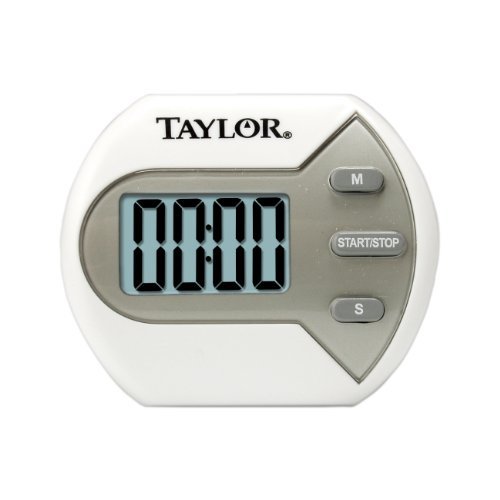
Сүрөт 1: Алдыңкы view of the Taylor Digital Timer, showing the display and control buttons.
4. Иштөө нускамалары
The Taylor Digital Timer features intuitive controls for setting and managing time.
4.1. Таймерди орнотуу
- Күйгүзүү: The timer is always ready for use. There is no separate power button.
- Убакытты коюу: Use the designated buttons (e.g., MIN, SEC) to set the desired countdown time. Pressing these buttons typically increases the time. Holding them down may accelerate the setting process.
- Clear Time: A "CLEAR" or "RESET" button is usually available to set the timer back to zero.
4.2. Таймерди баштоо жана токтотуу
- Артка саноону баштоо: After setting the desired time, press the "START/STOP" button to begin the countdown.
- Pause/Stop Countdown: Press the "START/STOP" button again to pause or stop the countdown. Pressing it again will resume the countdown from where it left off.
- Ойготкуч: When the countdown reaches zero, an audible alarm will sound. Press any button to silence the alarm.
4.3. Count-Up Function (if applicable)
Some digital timers also offer a count-up function. If your model includes this, typically, pressing the "START/STOP" button when the timer is at zero will initiate a count-up.
5. Техникалык тейлөө жана кам көрүү
Proper care will ensure the longevity and optimal performance of your digital timer.
- Тазалоо: Таймерди жумшак менен сүртүңүз, гamp кездеме. Абразивдүү тазалоочу каражаттарды колдонбоңуз же таймерди сууга салбаңыз.
- Сактагыч: Таймерди колдонбогондо салкын, кургак жерде сактаңыз.
- Экстремалдуу шарттарды болтурбоо: Do not expose the timer to extreme temperatures, direct sunlight for prolonged periods, or high humidity.
6. Кыйынчылыктарды
If you encounter issues with your Taylor Digital Timer, refer to the following common solutions:
| Көйгөй | Мүмкүн себеп | Чечим |
|---|---|---|
| Timer does not respond. | Internal malfunction or temporary glitch. | Press and hold the "CLEAR" or "RESET" button for a few seconds to attempt a reset. If the issue persists, contact customer support. |
| Дисплей күңүрт же бош. | Not applicable as this model does not require batteries. | Ensure the timer is not exposed to extreme cold, which can affect LCD performance. If the display remains blank, contact customer support. |
| Сигнализация чырылдабай жатат. | Volume setting too low or internal speaker issue. | Check if there is a volume control (if applicable to your model). Ensure the timer is not obstructed. If the alarm still does not sound, contact customer support. |
7. Техникалык шарттар
| Өзгөчөлүк | Деталь |
|---|---|
| Модел | Санариптик таймер |
| Продукциянын өлчөмдөрү | 6.25 x 4.5 x 6 дюйм |
| Элемент Салмагы | 0.01 унция |
| Power Source | Батарея талап кылынбайт |
| Материал | Пластик |
8. Кепилдик жана Кардарларды колдоо
For warranty information and customer support, please refer to the official Taylor website or contact their customer service department directly. Specific warranty terms may vary by region and retailer.
Сиз, адатта, колдоо маалыматын таба аласыз Taylor Brand Store or by searching for "Taylor customer support" online.
Ask a question about this manual
Ask about setup, troubleshooting, compatibility, parts, safety, or missing instructions. Manuals+ will review the question and use this page’s manual context to help answer it.