
USR-N510 Industrial Serial Ethernet Converter
Модел: USR-N510
Бренд: USR
Instruction Manual
1. Киришүү
The USR-N510 is an industrial-grade serial to Ethernet converter designed to enable transparent data transmission between serial devices (RS232, RS485, RS422) and an Ethernet network. It supports various working modes, including TCP Client, TCP Server, UDP, and HTTPD Client, facilitating seamless integration of serial equipment into IP-based networks. This device is equipped with high-level serial port protection and a hardware watchdog for reliable, continuous operation in industrial environments.
2. Негизги өзгөчөлүктөрү
- Serial Port Compatibility: Supports RS232, RS485, and RS422 interfaces.
- Ethernet туташуусу: 10/100Mbps auto-negotiation Ethernet port.
- Industrial Grade Protection: Features EMC protection, ESD, and EFT protection for robust performance.
- Hardware Watchdog: Integrated hardware watchdog circuit ensures continuous operation and automatic recovery from system failures.
- Modbus Gateway: Supports Modbus RTU to Modbus TCP conversion.
- Виртуалдык сериялык порт: Allows for virtual serial port mapping on a PC.
- Конфигурация: аркылуу конфигурацияланат web browser, setup software, or serial commands.
3. Пакеттин мазмуну

Figure 3.1: USR-N510 Package Contents
Пакетте бардык буюмдар бар экенин текшериңиз:
- USR-N510 Serial Ethernet Converter Unit
- Кубаттуу адаптер
- RS232 Сериялык кабели
- Terminal Block (for RS485/RS422 connection)
4. Түзмөк бүттүview

Figure 4.1: USR-N510 Front View
The USR-N510 features a robust industrial design. The front panel includes the serial port, indicator LEDs, and DIP switches for serial mode selection. The rear panel typically houses the Ethernet port and power input.
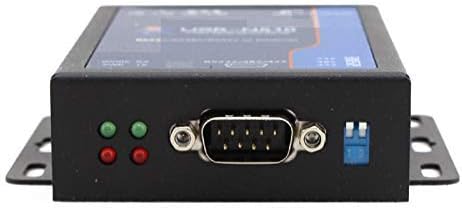
Figure 4.2: Serial Port and Indicators
4.1 Индикаторлордун светодиоддору
- PWR (кубат): Электр менен камсыздоонун абалын көрсөтөт.
- WORK (Working Status): Түзмөктүн иштөө абалын көрсөтөт.
- RX (Receive Data): Flashes when data is received on the serial port.
- TX (Transmit Data): Flashes when data is transmitted from the serial port.
4.2 Сериялык порт
The device features a DB9 male connector for RS232 and a terminal block for RS485/RS422 connections. The serial mode is selected using the DIP switches.
5. Орнотуу
5.1 Кубат туташтыруу
Connect the provided power adapter to the DC input port of the USR-N510. Ensure the power source matches the specified voltage range (DC 5-36V). The PWR LED should illuminate once power is supplied.
5.2 Тармактык туташуу
Connect an Ethernet cable from your network switch or router to the Ethernet port on the USR-N510. The Ethernet link/activity LEDs on the port should indicate a successful connection.
5.3 Serial Port Configuration and Connection
The USR-N510 supports RS232, RS485, and RS422. The serial mode is selected using the DIP switches located on the device. Refer to the diagram below for proper switch settings and wiring.

Figure 5.1: Serial Port Wiring and DIP Switch Settings
5.3.1 RS232 туташуусу
- DIP Switch Орнотуу: Ensure all DIP switches are in the 'down' position.
- Зымдар: Connect your RS232 device to the DB9 male connector. Standard pinouts apply (TXD, RXD, GND).
5.3.2 RS485 туташуусу
- DIP Switch Орнотуу: Ensure all DIP switches are in the 'up' position.
- Зымдар: Connect your RS485 device to the A+, B-, GND terminals on the terminal block.
5.3.3 RS422 туташуусу
- DIP Switch Орнотуу: Set the left DIP switch 'up' and the right DIP switch 'down'.
- Зымдар: Connect your RS422 device to the RX+, RX-, TX+, TX-, GND terminals on the terminal block.
5.4 Программанын баштапкы конфигурациясы
The USR-N510 can be configured via a web browser or dedicated setup software. Typically, the device obtains an IP address via DHCP by default. If DHCP is not available, it will use a default static IP address (refer to the product's specific documentation for the default IP).
- Connect your PC to the same network as the USR-N510.
- ачуу а web browser and enter the device's IP address.
- Log in using the default username and password (refer to the product's specific documentation).
- Configure serial port parameters (baud rate, data bits, stop bits, parity) and network parameters (working mode, remote IP/port) as required for your application.
6. Иштөө нускамалары
6.1 Basic Data Transmission
Once configured, the USR-N510 operates as a transparent data channel. Data sent to the serial port will be encapsulated and transmitted over Ethernet, and vice-versa. The specific behavior depends on the configured working mode (e.g., TCP Client, TCP Server, UDP).
6.2 Modbus RTU to TCP Gateway
In Modbus RTU to TCP mode, the converter acts as a gateway, translating Modbus RTU commands received on the serial port into Modbus TCP packets for the Ethernet network, and vice-versa. This allows Modbus TCP masters to communicate with Modbus RTU slave devices.
6.3 Watchdog Functionality

Figure 6.1: Watchdog and Core Processor
The USR-N510 incorporates a hardware watchdog circuit. This feature continuously monitors the device's operation. In the event of a system crash or unresponsiveness, the watchdog automatically triggers a reset, ensuring the device recovers and resumes normal operation without manual intervention. This is crucial for maintaining uptime in critical industrial applications.
7. Техникалык тейлөө
- Тазалоо: Түзмөктү таза жана чаңсыз кармаңыз. Тазалоо үчүн жумшак, кургак чүпүрөк колдонуңуз. Суюк тазалоочу каражаттарды колдонбоңуз.
- Программалык камсыздоонун жаңыртуулары: Мезгил-мезгили менен өндүрүүчүнүн текшерүү website for firmware updates. Firmware updates can provide new features, performance improvements, and bug fixes. Follow the provided instructions carefully when performing updates.
- Экологиялык шарттар: Ensure the device operates within its specified temperature and humidity ranges to prevent damage.
8. Кыйынчылыктарды
- Кубат жок: If the PWR LED is off, check the power adapter connection and the power source.
- Тармак шилтемеси жок: If the Ethernet link LED is off, check the Ethernet cable connection and the network switch/router status.
- No Serial Data: Verify serial port wiring, DIP switch settings for the correct mode (RS232/485/422), and serial parameters (baud rate, data bits, parity, stop bits) in the device configuration.
- Кирүү мүмкүн эмес Web Интерфейс: Ensure your PC is on the same subnet as the USR-N510. Check the device's IP address. Try resetting the device to factory defaults if the IP is unknown (refer to specific reset procedure in full manual).
- Үзгүлтүксүз туташуу: Check for electromagnetic interference, cable quality, and ensure proper grounding in industrial environments.
9. Техникалык шарттар
| Өзгөчөлүк | Нарк |
|---|---|
| Модель номери | USR-N510 |
| Serial Port Type | RS232, RS485, RS422 |
| Ethernet интерфейси | 10/100Mbps Auto-MDI/MDIX |
| Киргизүү көлөмүtage | DC 5-36V |
| Элемент Салмагы | 2.2 фунт (болжол менен 1 кг) |
| Пакеттин өлчөмдөрү | 8.27 x 6.3 x 1.97 дюйм |
| Иштөө температурасы | Industrial Grade (specific range not provided, refer to full datasheet) |
| Коргоо | EMC, ESD, EFT |
| Өндүрүүчү | USR |
| Дата биринчи жеткиликтүү | 9-декабрь, 2016-жыл |
10. Кепилдик жана колдоо
For warranty information, technical support, and detailed documentation, please refer to the official USR webсайтына кириңиз же жергиликтүү дистрибьюторуңузга кайрылыңыз. Кепилдик талаптары үчүн сатып алуу дүмүрчөгүңүздү сактап коюңуз.