
Introduction
This manual provides comprehensive instructions for the safe installation, operation, and maintenance of your Insignia Full Motion TV Wall Mount, model NS-HTVMM1702-C. This mount is designed to securely hold televisions with screen sizes ranging from 33 to 46 inches. Please read this manual thoroughly before installation and retain it for future reference.
Маанилүү коопсуздук маалыматы
Improper installation or use of this product can result in serious injury or damage. Always follow these safety guidelines:
- Read all instructions before assembly and installation. If you do not understand the instructions or have any doubts, contact a qualified installer.
- Монтаждоо бети монтаждын жана телевизордун биргелешкен салмагын коопсуз көтөрө аларын текшериңиз.
- Do not exceed the maximum weight capacity of the mount. Refer to the specifications section for details.
- Өндүрүүчү тарабынан берилген же көрсөтүлгөн жабдууларды гана колдонуңуз.
- Never install the mount into drywall alone. It must be secured to a solid wall stud or appropriate concrete/brick anchors.
- Орнотуу учурунда балдарды жана үй жаныбарларын алыс кармаңыз.
- Алар коопсуз бойдон калуу үчүн бардык байланыштарды мезгил-мезгили менен текшерип туруңуз.
Пакеттин мазмуну
Before beginning installation, ensure all parts are present and undamaged. While specific component names may vary, a typical package includes:
- Дубал плитасынын жыйындысы
- Сыналгы кронштейндери (2 даана)
- Аппараттык комплект (ар кандай бурамалар, шайбалар, аралыктар, якорьлор)
- Instruction Manual
If any parts are missing or damaged, do not proceed with installation. Contact customer support for assistance.
Орнотуу жана орнотуу
Follow these steps carefully for a secure installation. Professional installation is recommended if you are unsure about any part of the process.
Step 1: Prepare the Wall Mount
Unpack all components. If the wall plate and articulating arm are separate, assemble them according to the diagrams provided in the included quick setup guide. Ensure all pivot points move freely.
This video demonstrates the general assembly and installation process for a full-motion TV wall mount, including attaching components and preparing for wall mounting.
2-кадам: кашааларды сыналгыга бекитиңиз
Carefully place your television face down on a soft, clean surface. Attach the two vertical TV brackets to the back of your television using the appropriate screws and spacers from the hardware kit. Ensure the brackets are centered horizontally and vertically on the TV's VESA mounting holes. Do not overtighten screws.
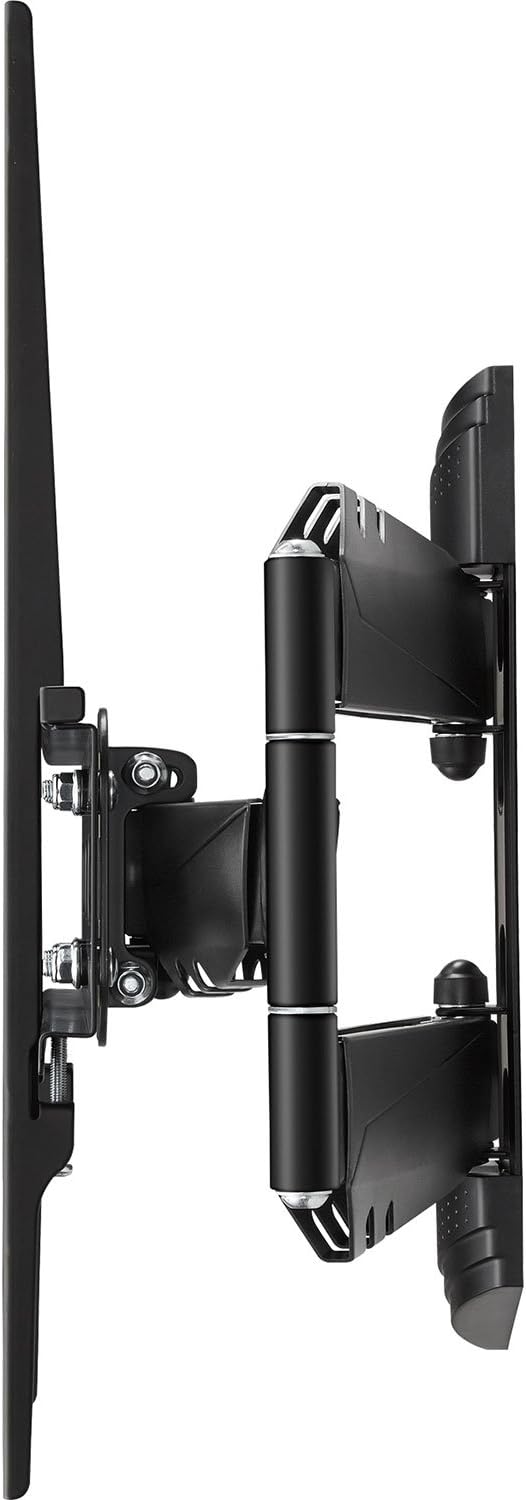
Бул сүрөт каптал профессионалды көрсөтөтfile of the Insignia full motion TV wall mount with the TV mounting brackets attached, illustrating the depth and articulation capability.
3-кадам: Дубал плитасын дубалга орнотуу
Determine the desired height and location for your TV. Use a stud finder to locate the center of a wooden wall stud. Mark the drilling locations for the wall plate. Drill pilot holes and securely fasten the wall plate to the wall using the provided lag bolts. For concrete or brick walls, use appropriate concrete anchors and drill bits (not always included). Use a level to ensure the wall plate is perfectly horizontal before tightening all fasteners.

Бул сүрөт алдыңкы жагын көрсөтөт view of the Insignia full motion TV wall mount, showing the wall plate and the articulating arm mechanism in a compact position.
4-кадам: Телевизорду дубалга илип коюңуз
With assistance, carefully lift the television (with the attached brackets) and hook the brackets onto the wall plate. Ensure the TV is securely seated. Engage any safety locking mechanisms on the brackets to prevent accidental dislodgement. Double-check all connections for security.

This image illustrates the Insignia full motion TV wall mount in an extended and angled position, demonstrating its articulating capabilities for flexible viewing.
Телевизорду дубалга орнотууну иштетүү
Your full-motion wall mount allows for flexible positioning of your television to achieve optimal viewing angles from various locations in a room.
- Эңкейүүнү тууралоо: To adjust the vertical tilt of your TV, locate the tilt adjustment knobs or bolts on the TV brackets. Loosen them slightly, adjust the screen to your desired upward or downward angle, and then re-tighten securely.
- Айланууну жөндөө: To swivel the TV horizontally, gently push or pull the side of the television to rotate it left or right. The articulating arm will move smoothly.
- Кеңейтүү жана артка тартуу: To extend or retract the TV from the wall, gently pull the television forward or push it back towards the wall. The articulating arm will extend or fold as needed.
Always handle the TV carefully and with two hands when making adjustments. Avoid sudden movements.
Техникалык тейлөө
Үзгүлтүксүз техникалык тейлөө телевизоруңуздун дубалга орнотулган жабдыгынын узак мөөнөттүү жана коопсуз иштешин камсыздайт.
- Тазалоо: Wipe the mount with a soft, dry cloth to remove dust. Avoid using abrasive cleaners, solvents, or harsh chemicals, as these can damage the finish.
- Мезгилдүү текшерүү: Every few months, visually inspect all mounting points, screws, and connections. Ensure all fasteners are tight and secure. Do not overtighten. Check for any signs of wear or damage to the mount components.
- Майлоо: The articulating joints are designed for smooth movement. If movement becomes stiff, a small amount of silicone-based lubricant can be applied to the pivot points, but this is rarely necessary.
Проблемаларды чечүү
Эгерде сиз телевизоруңузду дубалга орнотууда көйгөйлөргө туш болсоңуз, төмөнкү кеңири таралган көйгөйлөрдү жана чечимдерди караңыз:
- ТВ деңгээл эмес: Check the level of the wall plate and the TV brackets. Loosen the necessary fasteners, adjust, and re-tighten. Ensure the TV's VESA mounting holes are used correctly.
- Тоо бошоң же туруксуз сезилет: Immediately remove the TV from the mount. Re-check all wall mounting screws and TV bracket screws to ensure they are securely tightened. Verify that the wall structure is adequate and that the mount's weight capacity has not been exceeded.
- Difficulty adjusting TV position (tilt, swivel, extension): Check for any obstructions. Ensure that tilt adjustment knobs are not overtightened if applicable. If the articulating arm is stiff, inspect for any debris in the joints.
- Жабдуулар жетишпейт: Refer to the package contents list. If parts are missing, contact Insignia customer support. Do not substitute with unapproved hardware.
Продукт спецификациялары
| Өзгөчөлүк | Деталь |
|---|---|
| Бренд | Белгилер |
| Модель номери | NS-HTVMM1702-C |
| Монтаж түрү | Дубалга орнотуу |
| Кыймыл түрү | Артикуляция (толук кыймыл) |
| Материал | Металл |
| Түс | Кара |
| Minimum Supported Screen Size | 33 дюйм |
| Maximum Supported Screen Size | 46 дюйм |
| Шайкеш түзмөктөр | Телевидение |
| Почталардын өлчөмдөрү | 49.61 x 31.39 x 7.19 см |
| Элемент Салмагы | 4.3 кг |
| UPC | 600603202117 |
Кепилдик маалыматы жана Кардарларды колдоо
For specific warranty details, terms, and conditions, please refer to the warranty card included with your product or visit the official Insignia website. For technical assistance, troubleshooting not covered in this manual, or to inquire about replacement parts, please contact Insignia customer support.
Manufacturer Contact Information: Peachtree City, GA 30269, US.