
Introduction
This manual provides essential information for the safe and efficient use of your LP LP-E17 Battery Charger. Designed for compatibility with Canon LP-E17 batteries, this charger offers a reliable solution for powering your camera. Please read these instructions thoroughly before operating the device.

Image: The LP LP-E17 Battery Charger, a compact device designed for charging Canon LP-E17 camera batteries.
Продукт өзгөчөлүктөрү
- Стандарттык шайкештик: Designed to meet or exceed the performance of OEM Canon LC-E17 chargers. Compatible with Canon EOS R8, EOS R10, EOS R50, EOS R100, EOS RP, Rebel T6i, T6s, T7i, T8i, Rebel SL2, SL3, EOS M3, EOS M6, EOS M6 Mark II, EOS 77D, EOS 750D, EOS 760D, EOS 800D, KISS X8i Cameras. Note: Not compatible with Canon EOS Rebel T7, T6, T5, T3.
- Коопсуздукту коргоо: Equipped with overcharge, short circuit, high temperature, and surge protection. Certified with CE and RoHS standards.
- Бүткүл дүйнөлүк колдонуу: Supports AC100-240V input, making it suitable for international travel. Output is DC8.4V 600mA.
- Портативдик дизайн: Constructed from durable ABS material, lightweight and compact for easy transport in bags or pockets.

Image: A visual representation of the charger's compatibility with numerous Canon camera models, highlighting the LP-E17 battery type.

Image: The LP-E17 charger emphasizing its multiple safety features, including protection against various electrical issues.
Жайгашуу
- Unfold the AC Plug: Locate the foldable AC plug on the back of the charger. Gently pull it out until it locks into position.
- Батарея салыңыз: Align your Canon LP-E17 battery with the charging slot, ensuring the metal contacts on the battery match the pins in the charger. Gently push the battery into the slot until it clicks into place.
- Кубатка туташуу: Plug the charger directly into a standard AC wall outlet (100-240V).
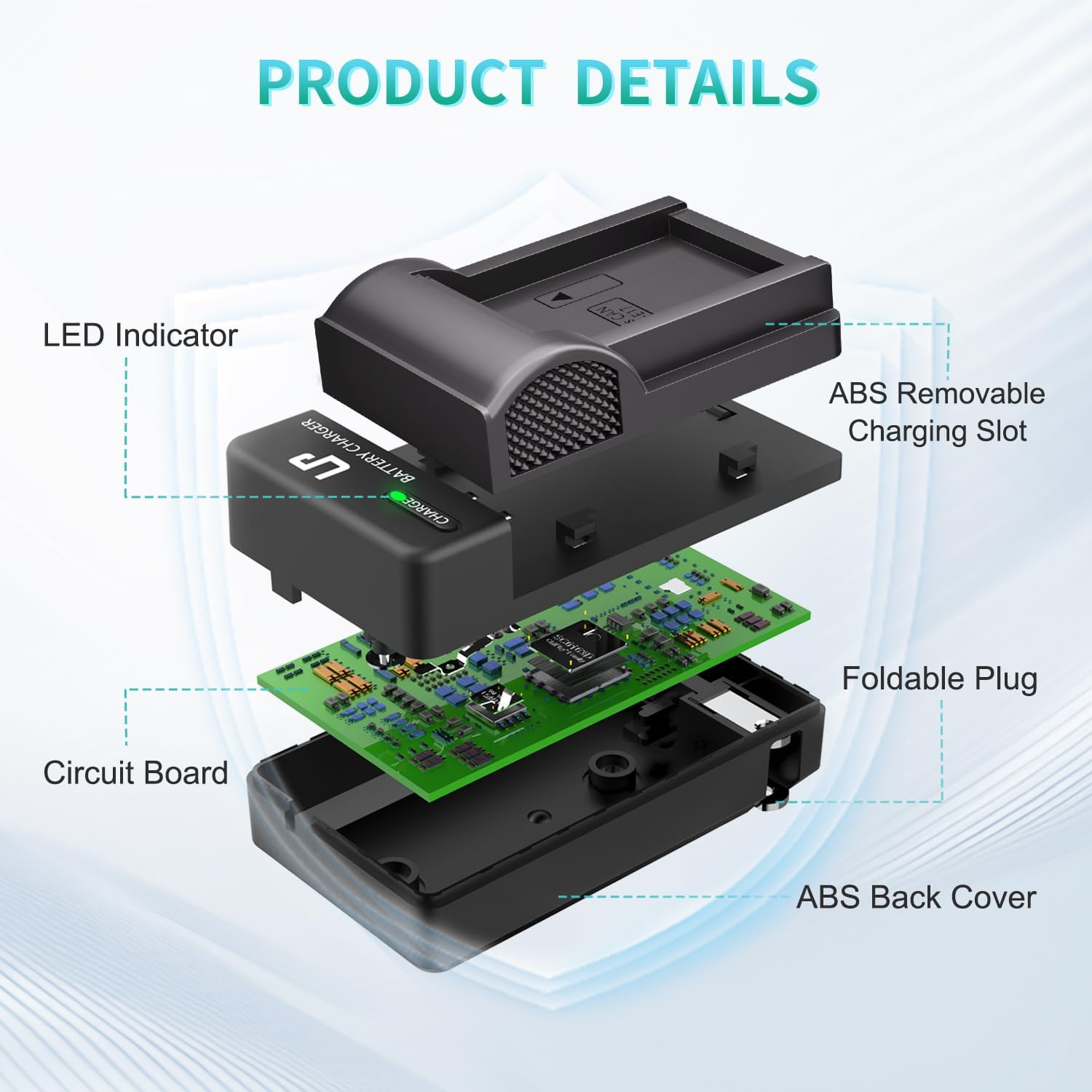
Image: An exploded diagram illustrating the internal components and external features of the LP-E17 charger, including the foldable plug.

Image: A user demonstrating the insertion of an LP-E17 battery into the charger, which is connected to a power source.
Иштөө нускамалары
- Заряддоо көрсөткүчү: Once connected to power with a battery inserted, the LED indicator on the charger will illuminate red, signifying that the battery is currently charging.
- Толук заряддын көрсөткүчү: When the battery is fully charged, the LED indicator will change from red to green.
- Батареяны алып салуу: Once the LED turns green, the battery is fully charged. Disconnect the charger from the power outlet and gently remove the battery from the charging slot.

Image: Close-up of the charger's LED indicator, clearly showing the red light for charging status and the green light for a fully charged battery.
Техникалык тейлөө
- Заряддоочу түзүлүштү чаңдан жана калдыктардан таза жана таза кармаңыз. Тазалоо үчүн жумшак, кургак чүпүрөктү колдонуңуз.
- Заряддоочу түзүлүштү өтө жогорку температурага, нымдуулукка же түз күн нуруна дуушар кылбаңыз.
- Do not attempt to disassemble or modify the charger. This can void the warranty and pose safety risks.
- Заряддоо түзүлүштү колдонбогондо салкын, кургак жерде сактаңыз.
Проблемаларды чечүү
| Көйгөй | Мүмкүн себеп | Чечим |
|---|---|---|
| LED does not light up when plugged in. | No power from outlet; battery not inserted correctly; faulty charger. | Check the power outlet with another device. Ensure the battery is fully seated in the charging slot. If the issue persists, contact customer support. |
| Батарея заряддалбайт же жай заряддалат. | Battery is damaged or at end of life; charger contacts are dirty; incorrect battery type. | Ensure the battery is an LP-E17 type. Clean the battery and charger contacts with a dry cloth. Try charging a different LP-E17 battery. If the problem continues, the battery may need replacement or contact support. |
| Charger becomes excessively hot. | Normal operation (some warmth is expected); poor ventilation; internal fault. | Ensure the charger is in a well-ventilated area. If the heat is extreme or accompanied by smoke/smell, immediately unplug the charger and contact customer support. |
Техникалык шарттар
| Өзгөчөлүк | Деталь |
|---|---|
| Бренд | LP |
| Модель номери | LP-LP-E17-C (4331903134) |
| Киргизүү көлөмүtage | AC 100-240V |
| Output Voltage | DC 8.4V |
| Output Current | 600мА (0.6 Amps) |
| Элемент Салмагы | 0.06 килограмм |
| Шайкештик | Canon LP-E17 batteries for various Canon EOS and Rebel series cameras. |
| Коопсуздук сертификаттары | CE, RoHS |
| Туташтыргыч түрү | Foldable AC Plug (Type A) |

Image: The physical dimensions of the LP-E17 charger, illustrating its compact size.
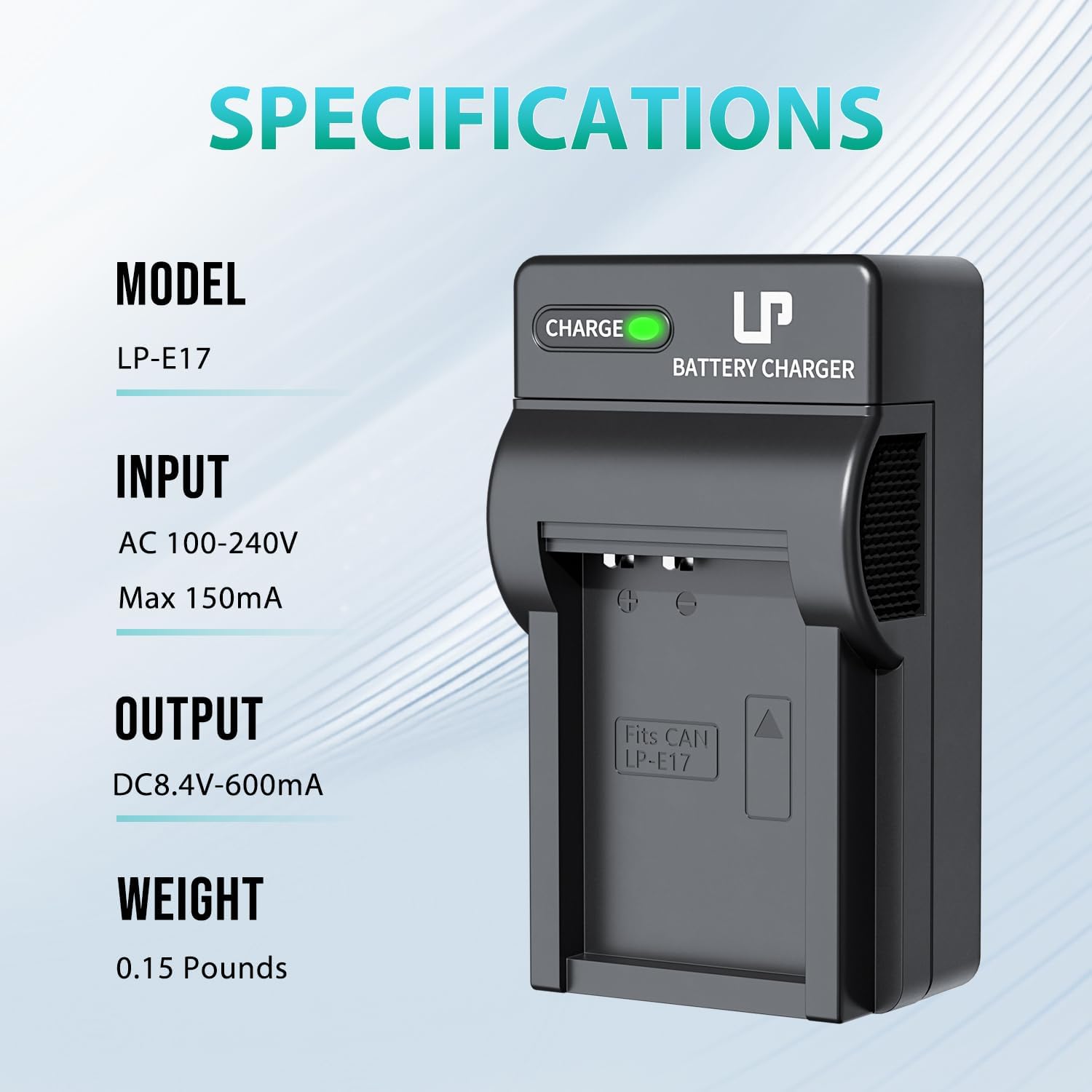
Image: A visual summary of the charger's technical specifications, including model, input/output power, and weight.
Кепилдик жана колдоо
LP offers a 30 күндүк кайтаруу саясаты жана а 1 жылдык сатуудан кийинки тейлөө for this product. We are committed to providing lifetime service and a quick, friendly response within 24 hours on working days for any inquiries or support needs.
For assistance, please contact LP customer support through the retailer's platform or visit the official LP webбайланыш маалыматы үчүн сайт.