
1. Киришүү
This manual provides essential information for the safe and effective operation, maintenance, and troubleshooting of your BLACK+DECKER KC3610 3.6V Cordless Screwdriver. Please read these instructions carefully before using the tool and retain them for future reference.
2. Коопсуздук нускамалары
Өрт, электр шок жана жеке жаракат алуу коркунучун азайтуу үчүн ар дайым негизги коопсуздук чараларын сактаңыз.
- Жумушчу жерди таза жана жакшы жарыктандырыңыз. Башаламан же караңгы жерлер кырсыкка чакырат.
- Жарылуучу чөйрөдө, мисалы, күйүүчү суюктуктар, газдар же чаң бар жерде электр шаймандарын иштетпеңиз. Электр шаймандары чаңды же түтүндү тутандыруучу учкундарды жаратат.
- Электр шайманын иштетип жатканда балдарды жана жанында тургандарды алыс кармаңыз. Алаксытуулар сизди башкара албай калышы мүмкүн.
- Кокусунан баштоодон алыс болуңуз. Батарея пакетине туташтыруудан, аспапты көтөрүүдөн же алып жүрүүдөн мурун өчүргүч өчүк абалда экенин текшериңиз.
- аша чаап алба. Ар дайым туура бутту жана тең салмактуулукту сактаңыз. Бул күтүлбөгөн кырдаалдарда электр шайманын жакшыраак башкарууга мүмкүндүк берет.
- Туура кийин. Кең кийимдерди же зер буюмдарды кийбеңиз. Чачыңызды жана кийимиңизди кыймылдуу бөлүктөрдөн алыс кармаңыз. Бош кийимдер, зер буюмдар же узун чачтар кыймылдуу бөлүктөргө кармалышы мүмкүн.
- Коопсуздук жабдууларын колдонуңуз. Дайыма коргоочу көздү тагыныңыз. Чаң маскасы, тайгаланбаган коопсуздук бут кийими, шляпа же угууну коргоо тиешелүү шарттарда колдонулушу керек.
- Кандайдыр бир тууралоолорду жасоодон, аксессуарларды алмаштыруудан же электр шаймандарын сактоодон мурда батареянын пакетин электр аспаптан ажыратыңыз.
- Бош турган электр шаймандарын балдар жетпеген жерде сактаңыз жана электр шайманын же бул нускаманы билбеген адамдарга электр шайманын иштетүүгө жол бербеңиз.
3. Пакеттин мазмуну
Төмөндө тизмеленген нерселердин баары пакетиңизде бар экенин текшериңиз:
- 1 x BLACK+DECKER KC3610 Cordless Screwdriver
- 1 х Wall кубаттагыч
- 1 x Magnetic Bit Holder
- 10 x Screwdriver Bits (various sizes and types)
- 1 x Instruction Manual

Figure 3.1: Complete package contents including the screwdriver, charger, and bit set.

Figure 3.2: Visual representation of the included components.
4. Продукт бүтүп калдыview
Familiarize yourself with the various parts of your BLACK+DECKER KC3610 Cordless Screwdriver.
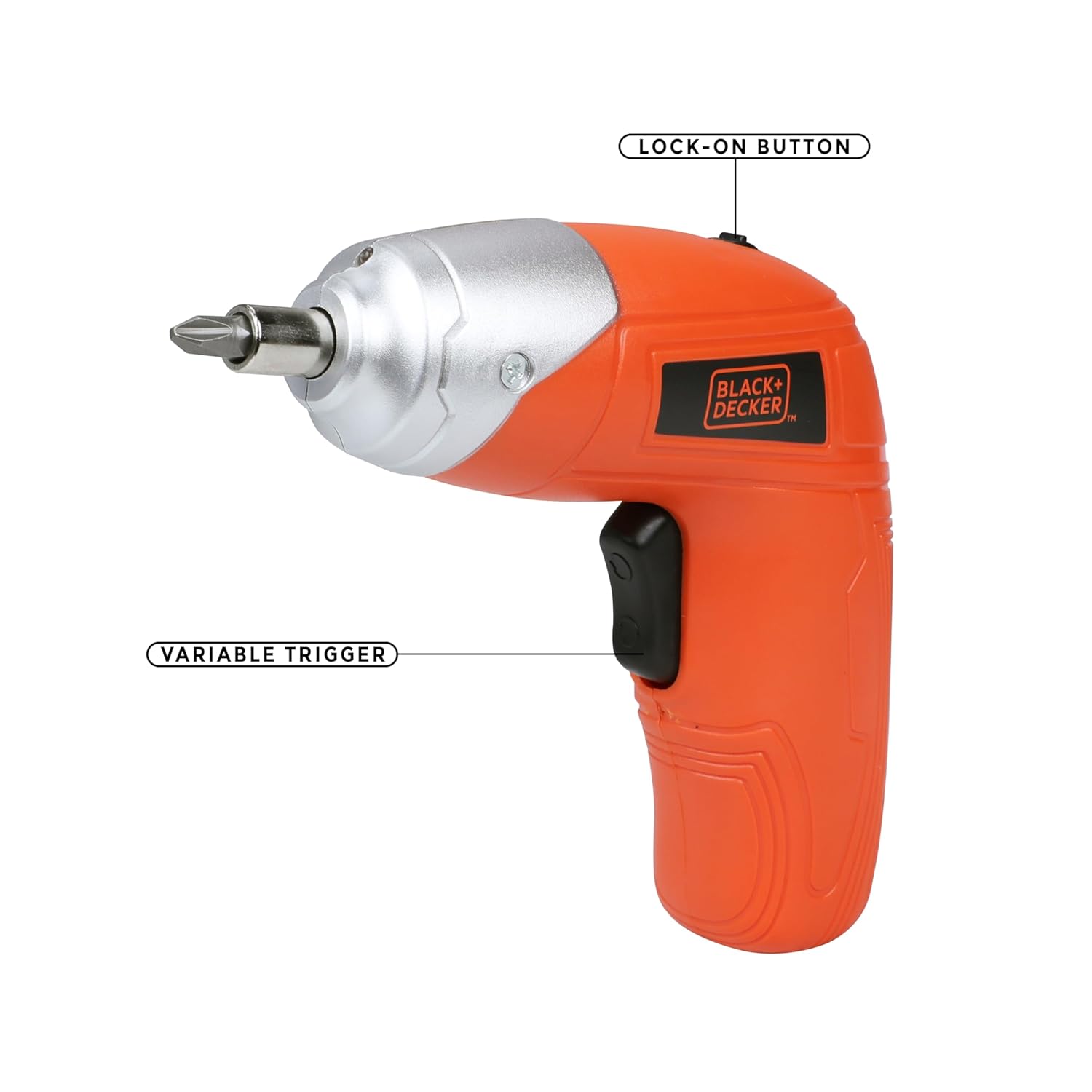
Figure 4.1: Key operational parts: Lock-on Button (top) and Variable Trigger (handle).

Сүрөт 4.2: Алдыңкы view highlighting the Tool Holder (1) and LED Light (2).

4.3-сүрөт: Каптал view indicating LED Switch (3), Charging Indicator (4), Charging Port (5), and Main Switch (6).
5. Орнотуу
5.1 Батареяны заряддоо
- Connect the wall charger to the charging port (5) on the screwdriver.
- Заряддагычты стандарттуу электр розеткасына сайыңыз.
- The charging indicator (4) will illuminate to show that the battery is charging.
- Allow approximately 2 hours for a full charge. The indicator may change or turn off once fully charged (refer to specific product behavior if different).
Эскертүү: The screwdriver uses a Lithium-Ion battery. It is recommended to fully charge the battery before first use.
5.2 Бурагычтын биттерин салуу жана алуу
- Ensure the screwdriver is switched off.
- Insert the desired screwdriver bit into the tool holder (1) until it is securely seated. For smaller bits, use the magnetic bit holder provided.
- To remove a bit, simply pull it straight out from the tool holder.

Figure 5.1: Proper insertion of a screwdriver bit into the tool holder.
6. Иштөө нускамалары
6.1 Күйгүзүү/өчүрүү жана багытты башкаруу
- To operate the screwdriver, slide the main switch (6) to the desired direction (forward for tightening, reverse for loosening).
- Press the variable trigger to start the screwdriver. Release the trigger to stop.
- For continuous use, press the variable trigger and then engage the lock-on button (Figure 4.1). To disengage, press the trigger again.
6.2 LED жумушчу чырактарын колдонуу
- The integrated LED worklight (2) illuminates the work area for improved visibility.
- To activate the LED light independently, use the LED switch (3). The light may also activate automatically when the trigger is pressed.
6.3 Моментти тууралоо
The BLACK+DECKER KC3610 features adjustable torque, allowing you to match the fastening power to the task and material, preventing overtightening or stripping screws.
- Locate the torque adjustment mechanism (refer to product diagram if available, typically a collar near the chuck).
- Rotate the collar to select the desired torque setting. Lower settings are for smaller screws and softer materials, while higher settings are for larger screws and harder materials.
Эскертүү: Some user experiences indicate that torque adjustment may not be present or as effective as expected. Always test on a scrap piece of material first to determine the appropriate setting for your application.
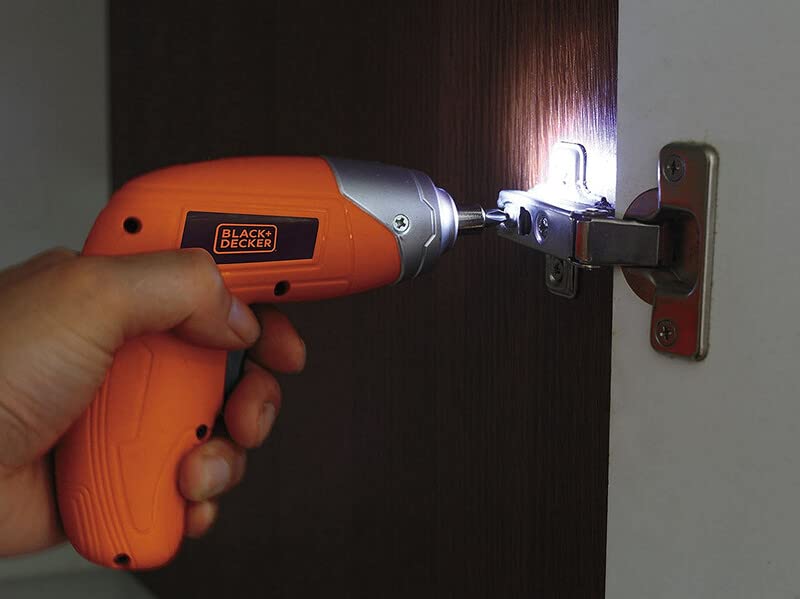
Figure 6.1: Screwdriver in operation, demonstrating the LED worklight.

Figure 6.2: Screwdriver being used for a typical fastening task.
7. Техникалык тейлөө
Үзгүлтүксүз тейлөө оптималдуу иштешин камсыз кылат жана куралыңыздын иштөө мөөнөтүн узартат.
- Тазалоо: Ашыкча ысып кетпеши үчүн, шаймандын желдетүүчү тешиктерин таза кармаңыз. Жумшак,amp cloth to clean the housing. Do not use harsh chemicals or abrasive cleaners.
- Сактагыч: Store the screwdriver and accessories in a dry, secure place out of reach of children. Ensure the battery is partially charged before long-term storage.
- Батареяга кам көрүү: Do not store the battery in discharged condition. Recharge it periodically if not in use for extended periods.
8. Кыйынчылыктарды
Жалпы маселелер жана аларды чечүү үчүн төмөнкү таблицага кайрылыңыз.
| Көйгөй | Мүмкүн себеп | Чечим |
|---|---|---|
| Бурагыч күйбөйт. | Батарея заряды түгөнгөн. Которгуч OFF абалында. | Батареяны заряддаңыз. Ensure the main switch is set to forward or reverse. |
| Low power or slow operation. | Батарея аз. Task is too demanding for the tool. | Батареяны кайра заряддаңыз. This screwdriver is designed for light-duty fastening tasks, not heavy drilling or driving large screws into dense materials. |
| Screws are stripping or overtightening. | Incorrect torque setting. Bit is worn or incorrect size. | Айландыруу моментин төмөнкү мааниге коюңуз. Use the correct size and type of bit for the screw. Replace worn bits. |
| Баскыч же которгучтун бузулушу. | Ички компоненттин бузулушу. | Contact customer support for assistance or warranty service. Do not attempt to repair yourself. |
9. Техникалык шарттар
Technical specifications for the BLACK+DECKER KC3610 Cordless Screwdriver:
| Өзгөчөлүк | Спецификация |
|---|---|
| Модель номери | KC3610 |
| Тtage | 3.6 вольт |
| Жүктөө ылдамдыгы жок | 200 RPM |
| Power Source | Зымсыз |
| Батарея түрү | Литий ион |
| Батарея сыйымдуулугу | 1500 мАч |
| Заряддоо убактысы | Болжол менен 2 саат |
| Элемент Салмагы | 450 грамм |
| Продукциянын өлчөмдөрү | 13.5L x 5.5W x 13H Сантиметр |
| Материал | Пластик |
| LED Worklight | Ооба |
| Кубат көрсөткүчү | Ооба |
| Torque Adjustment | Ооба |
Эскертүү: Техникалык мүнөздөмөлөр продуктуну жакшыртуу үчүн эскертүүсүз өзгөртүлүшү мүмкүн.

Figure 9.1: ашыкview негизги продукт мүнөздөмөлөрү жөнүндө.
10. Кепилдик жана Кардарларды колдоо
BLACK+DECKER provides a 1 жылдык кепилдик on this product from the date of purchase, covering manufacturing defects.
For any warranty-related issues, product feedback, or technical assistance, please contact our customer care team:
- Телефон: 1860-425-1111 (Monday to Friday, 10 AM to 5 PM, except government holidays)
- Электрондук почта: SBD-CUSTOMERCOMMUNICATIONS@SBDINC.COM
- WhatsApp: +91 96060 55835
You can also find information on authorized service centers by contacting customer care.

Figure 10.1: BLACK+DECKER Total Care contact details.