
Introduction
Welcome to the user manual for your Fuvision 16GB 1080P HD Spy Pen Camera Video Recorder. This manual provides detailed instructions on how to set up, operate, and maintain your device. Please read it carefully to ensure proper usage and to maximize the product's functionality.
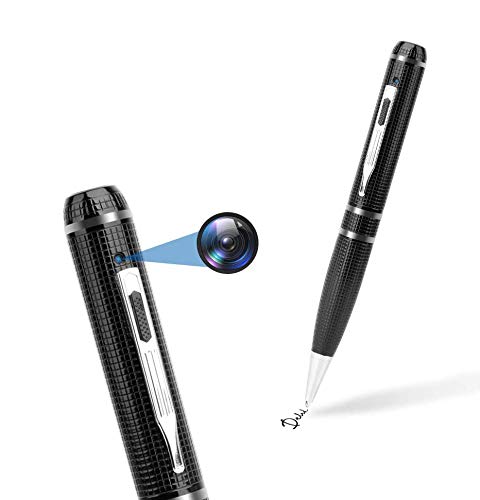
An image showing the Fuvision 16GB 1080P HD Spy Pen Camera, highlighting its discreet design as a functional writing pen.

A person holding the Fuvision Spy Pen Camera, illustrating how its design allows it to be discreetly used as a regular pen.
Пакеттин мазмуну
Сиздин пакетиңизде төмөнкү нерселердин бардыгы камтылганын текшериңиз:
- Fuvision 16GB 1080P HD Spy Pen Camera
- USB Data/Charging Cable
- 3 x Pen Refills
- Колдонуучунун Колдонмосу (бул документ)
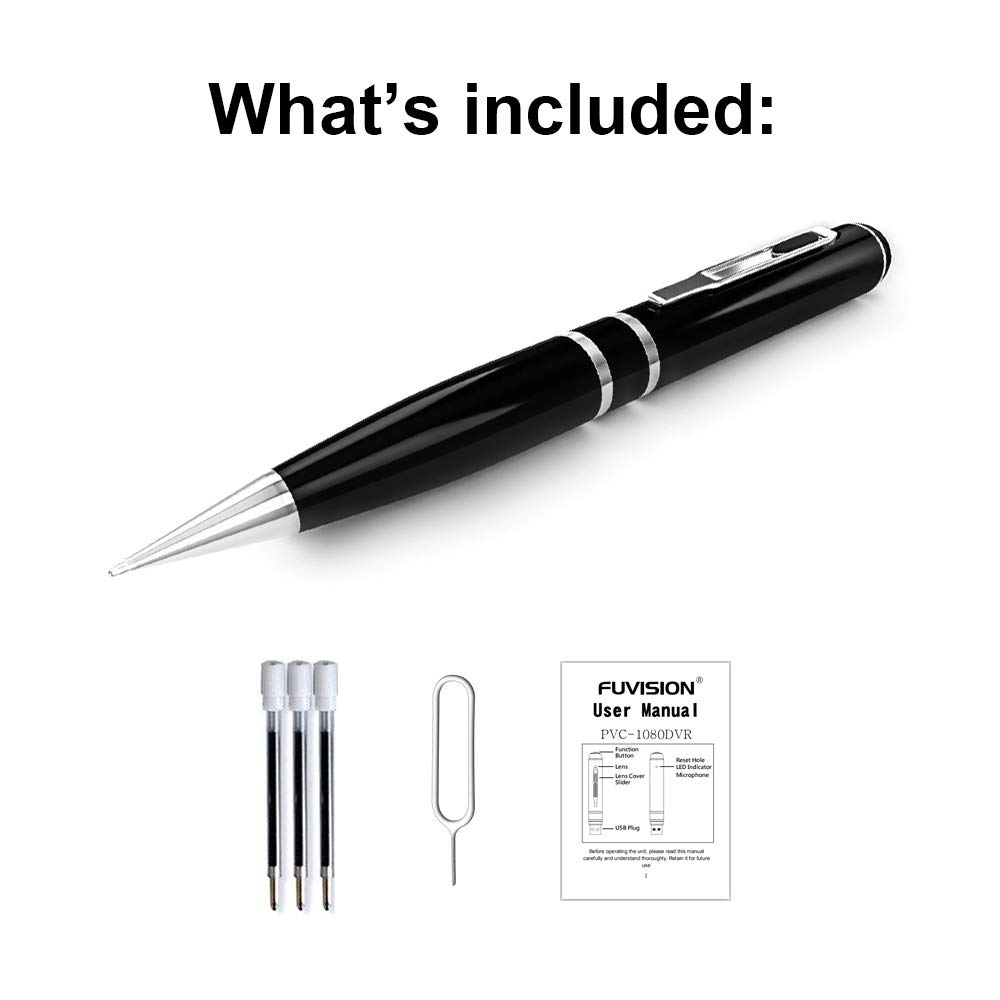
An image displaying all items included in the package: the Fuvision Spy Pen Camera, three ink refills, a USB data/charging cable, and a printed user manual.
Продукт бүттүview жана компоненттер
Familiarize yourself with the various parts of your Fuvision Spy Pen Camera:

A detailed diagram of the Fuvision Spy Pen Camera, pointing out key components such as the Reset Hole, LED Indicator, USB Plug, Function Button, Lens Cover Slider, and the Camera Lens.

Another diagram illustrating the Fuvision Spy Pen Camera's features, including the ON/OFF button, USB port, HD camera location, and the functional ball-point pen tip.
- Функция баскычы: Used for powering on/off, starting/stopping recording, and switching modes.
- Камера линзасы: The hidden lens for video and photo capture.
- LED көрсөткүчү: Provides status feedback (power, recording, photo mode).
- USB сайгыч: Located at the top, used for charging and data transfer.
- Тешикти баштапкы абалга келтирүү: For resetting the device if it becomes unresponsive.
- Ball-Point Pen: Fully functional writing pen.
Жайгашуу
1. Аппаратты заряддоо
Before first use, fully charge the pen camera. Connect the USB plug of the pen to a computer's USB port or a 5V DC USB wall adapter using the provided USB cable. The charging time is approximately 4 hours. The LED indicator will show charging status (specific LED behavior for charging is not detailed, assume it turns off or changes color when fully charged).
2. Баштапкы күйгүзүү
After charging, the device is ready for use. The pen has a built-in 16GB memory, so no external memory card installation is required.
Иштөө нускамалары
1. Күйгүзүү жана өчүрүү
- Күйгүзүү үчүн: Press and hold the Function Button on the top for a few seconds until the LED lights up. It will flash purple a few times, then turn off. This indicates the device has started recording. The LED is off during recording to maintain discretion.
- Өчүрүү үчүн: Press and hold the Function Button for a few seconds until the LED flashes purple a few times, then turns off completely.
2. Video Recording Mode
- Жаздырууну баштоо: When the device is powered on, it automatically begins recording video. The LED will flash purple a few times and then turn off, indicating active recording.
- Жаздырууну токтотуу: Press the Function Button once quickly. The recording will stop, and a red LED will turn on, indicating the pen is in STANDBY mode.
- Цикл жаздыруу: The device supports loop recording, which means it will automatically overwrite the oldest fileэс толгондо с.
3. Сүрөт режими
- Switching to Photo Mode: From STANDBY mode (red LED on), double-click the Function Button. The red LED will change to blue, indicating the device is now in Photo Mode.
- Сүрөткө тартуу: In Photo Mode (blue LED on), press the Function Button once. The purple light will blink a few times to confirm a photo has been taken.
- Exiting Photo Mode: Double-click the Function Button again. The device will return to STANDBY mode (red LED on).
4. Компьютерге туташуу
To transfer recorded videos and photos, connect the pen camera to your computer using the provided USB cable. The device will appear as a removable disk drive. It is compatible with Windows XP/2003/Windows7/8/10 and Apple Mac OS X - 10.7 operating systems.
Техникалык тейлөө
1. Жалпы кам көрүү
- Аппаратты жерге түшүрүүдөн же катуу таасирлерден сактаныңыз.
- Аппаратты суудан, нымдан жана экстремалдык температурадан алыс кармаңыз.
- Store the pen in a cool, dry place when not in use.
2. Тазалоо
Use a soft, dry cloth to clean the exterior of the pen. Do not use liquid cleaners or solvents, as they may damage the device.
Проблемаларды чечүү
Жалпы маселелер жана чечимдер:
- Түзмөк күйбөй жатат: Ensure the battery is fully charged. Connect to a power source and charge for 4 hours.
- Жаздыруу башталбай жатат: Check if the device is powered on correctly (LED flashes purple then turns off). Ensure the battery has sufficient charge.
- Компьютерге туташуу мүмкүн эмес: Try a different USB port or a different computer. Ensure the USB cable is securely connected.
- Түзмөк жооп бербей жатат: Locate the Reset Hole (refer to Product Overview) and gently press it with a thin object (like a paperclip) to reset the device.
Техникалык шарттар
Detailed technical specifications for the Fuvision 16GB 1080P HD Spy Pen Camera:

Сүрөт шоуcasing the clear video quality produced by the Fuvision Spy Pen Camera, indicating its 1080P Full HD resolution with still shot functionality.
| Video Resolution | 1080P (1920x1080) @ 30 кадр/сек |
| Сүрөттүн резолюциясы | JPG 4032x3024 |
| пиксел | 2.0 Mega Pixel CMOS |
| Ички эс тутум | 16 ГБ |
| Батареянын иштөө мөөнөтү | Approximately 120 minutes continuous recording |
| Жазуу режимдери | Continuous record, Loop Recording |
| Video Format | AVI |
| USB интерфейси | 2.0 |
| Заряддоо Voltage | DC-5V (500mA) |
| Заряддоо убактысы | Болжол менен 4 саат |
| View Бурч | 65° |
| Операциялык системанын шайкештиги | Windows XP/2003/Windows7/8/10, Apple Mac OS X - 10.7 and above |
| Өлчөмдөр | 155 × 14.5 × 14.5 мм (6.1 x 0.57 x 0.57 дюйм) |
| Элемент Салмагы | 100 г (0.22 фунт) |
| Power Source | Батарея менен иштейт (1 литий-иондук батарейка камтылган) |
| Сунушталган Колдонуулар | Motion Detection (feature mentioned in product details, but not detailed in operation) |
Маанилүү коопсуздук маалыматы
- Аппаратты ажыратууга же өзгөртүүгө аракет кылбаңыз.
- Балдар жетпеген жерде сактаңыз.
- Батареяны жергиликтүү эрежелерге ылайык жок кылыңыз.
- Кубаттоо жана маалыматтарды өткөрүү үчүн берилген USB кабелин гана колдонуңуз.