
Introduction
Сатып алганыңыз үчүн рахматasing the Ezonetronics 1DIN Car Stereo, Model RM-CW9601. This unit features a 7-inch retractable touchscreen, Bluetooth connectivity, FM radio, and multimedia playback capabilities. This manual provides essential information for installation, operation, and maintenance to ensure optimal performance and user satisfaction. Please read this manual thoroughly before using the product.
Коопсуздук маалыматы
- Агрегатты айдоодон алаксыта тургандай иштетпеңиз. Ар дайым жол коопсуздугун биринчи орунга коюу.
- Ensure proper installation by a qualified professional to prevent damage to the unit or vehicle.
- Түзмөктү өтө жогорку температурага, күндүн түз тийген нуруна же нымдуулукка узак убакытка дуушар кылбаңыз.
- Do not attempt to disassemble or modify the unit. This may void the warranty and pose safety risks.
- Үндүн көлөмүн тышкы трафиктин үндөрүн угууга мүмкүндүк берген деңгээлде кармаңыз.
Пакеттин мазмуну
Пакетте бардык буюмдар бар экенин текшериңиз:
- Ezonetronics 1DIN Car Stereo Unit (RM-CW9601)
- Кубат жана динамик зымдары
- Алыстан башкаруу
- Колдонуучунун Колдонмосу (бул документ)
- Орнотуу аксессуарлары (кронштейндер, бурамалар)
- Кошумча: Арткыview Camera (if included in your specific package)
Продукт бүттүview
The Ezonetronics RM-CW9601 features a single DIN chassis with a motorized retractable 7-inch touchscreen display. The front panel includes essential controls and ports for easy access.

1-сүрөт: Фронт view of the Ezonetronics RM-CW9601 car stereo, illustrating the 7-inch screen in both retracted and extended positions, along with front panel controls and ports.
Алдыңкы панелдин башкаруу элементтери жана порттору:
- Кубат / режим баскычы: Press to turn on/off, short press to change mode.
- Үн баскычы: Үндү тууралоо үчүн буруңуз. Үнсүз/чыгаруу үчүн басыңыз.
- USB порт: USB дисктерден медиа ойнотуу үчүн.
- SD карта уячасы: For media playback from SD cards.
- AUX киргизүү: тышкы аудио түзмөктөр үчүн 3.5 мм уячасы.
- Калыбына келтирүү баскычы: Small button to reset the unit (requires a pointed object).
- Screen Retract/Extend Button: Controls the motorized screen movement.
Жайгашуу
1. Орнотуу
The RM-CW9601 is designed for a standard 1DIN car stereo opening. Professional installation is highly recommended. Ensure the vehicle's battery is disconnected before starting installation.
- Унааңыздын учурдагы стереосун башкаруу панелинен алып салыңыз.
- Connect the wiring harness to the vehicle's wiring.
- Secure the unit into the dashboard using the provided mounting brackets and screws.
- Унаанын аккумуляторун кайра туташтырып, түзмөктү сынап көрүңүз.
2. Зымдар схемасы (Жалпы)
Refer to the detailed wiring diagram included with your product packaging for specific connections. Below are common connections:
- Сары зым: Туруктуу 12V (батарея)
- Кызыл зым: 12V которуштурулган (кошумча/тутандыруу)
- Кара зым: Жер
- Кызгылт сары зым: Illumination (Optional)
- Көк жип: Күч антеннасы / Ampкөтөргүчтү алыстан күйгүзүү
- Динамиктердин зымдары: Connect to vehicle speakers (e.g., White/White-Black for Front Left, Grey/Grey-Black for Front Right, Green/Green-Black for Rear Left, Purple/Purple-Black for Rear Right).
- Арткы камеранын киргизүүсү: Connect to the rearview camera video output and reverse trigger wire.
- Руль дөңгөлөгүн башкаруу киргизүү: Connect to vehicle's steering wheel control wires (if applicable).

2-сүрөт: Illustration of USB connection points, relevant for media input and smartphone integration.
Иштөө нускамалары
1. Негизги операция
- Күйгүзүү/өчүрүү: Алдыңкы панелдеги же алыстан башкаруу пультундагы кубат баскычын басыңыз.
- Үндү тууралоо: Rotate the volume knob or use the remote control.
- Режим тандоо: Short press the power/mode button to cycle through available modes (Radio, USB, SD, Bluetooth, AUX, CarPlay/Android Auto).
- Экранды башкаруу: Use the dedicated button to retract or extend the 7-inch display.
2. Bluetooth функциясы
The unit supports Bluetooth for hands-free calling and wireless audio streaming.
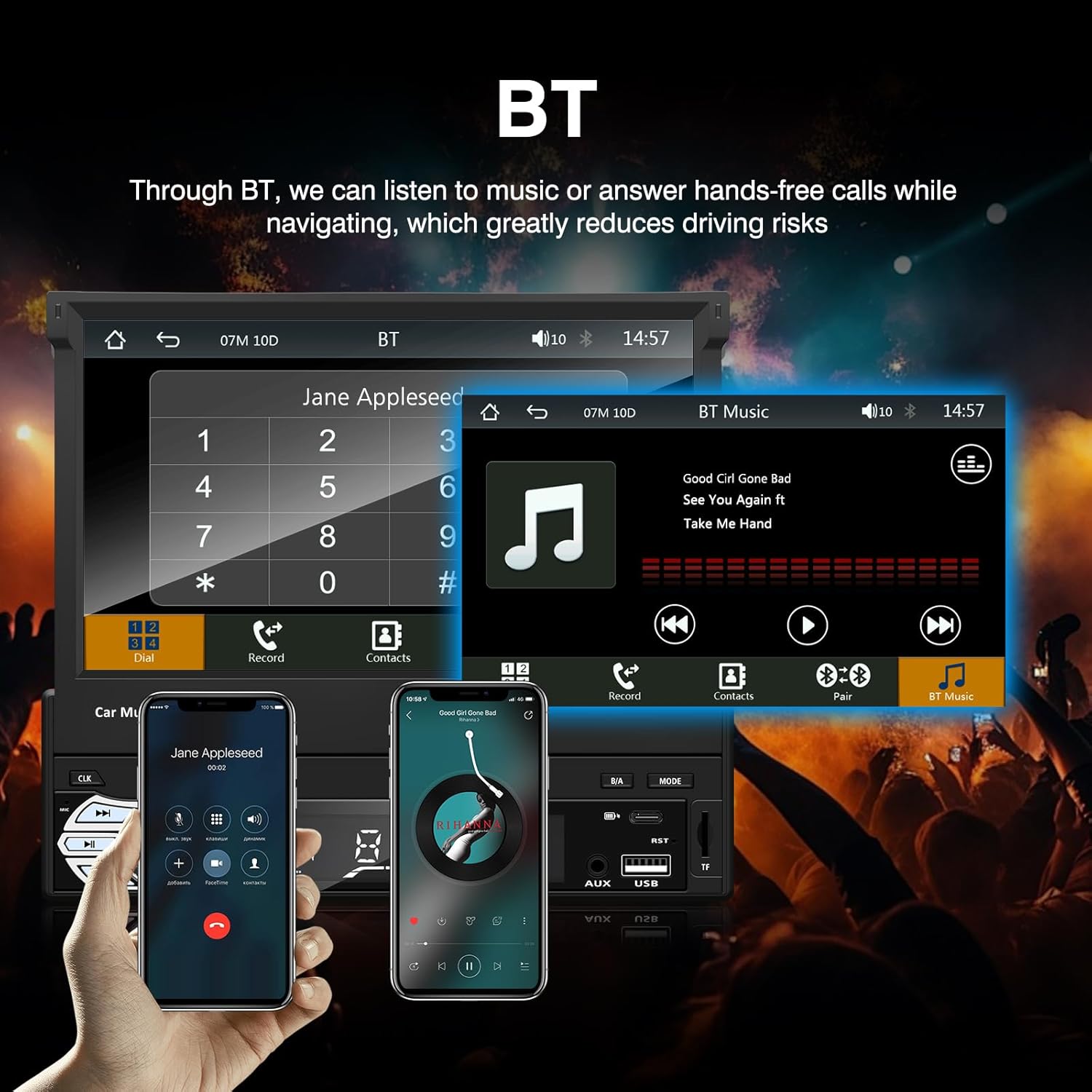
3-сүрөт: Bluetooth interface for hands-free calls and music streaming, showing a dial pad and music controls.
- Жупташтыруу: Мобилдик түзмөгүңүздө Bluetooth'ду иштетиңиз. Издөө available devices and select "Ezonetronics" or similar. Enter PIN "0000" if prompted.
- Hands Free Чалуу: Once paired, you can make and receive calls directly through the car stereo. Use the touchscreen or remote to dial, answer, or end calls.
- Аудио агымы (A2DP): Play music from your paired device wirelessly. Control playback (play/pause, skip) from the car stereo or your device.
3. USB/SD медиа ойнотуу
Insert a USB drive or SD card into the respective slot. The unit will automatically switch to USB/SD mode and begin playing compatible media files.

4-сүрөт: Icons indicating support for Bluetooth, Auxiliary input, TF (SD) Card, and USB connections for media playback.
- Supported formats include RM, RMVB, ASF, MKV, DIVX, MPEG4, AVI, VOB for video, and MP3/MP4 for audio.
- Папкалар аркылуу чабыттоо жана files using the touchscreen interface.
4. FM радиосу
Access the FM radio mode to listen to local broadcasts.

5-сүрөт: FM Radio interface with frequency display and equalizer settings for audio customization.
- Авто сканерлөө: Automatically search and save strong stations.
- Кол менен жөндөө: Fine-tune frequencies using the touchscreen.
- Алдын ала орнотуулар: Save your favorite stations for quick access (up to 18 preset stations).
5. Apple CarPlay / Android Auto
Connect your compatible smartphone via USB to access Apple CarPlay or Android Auto features directly on the stereo's display.

6-сүрөт: Wired Apple CarPlay interface, displaying phone applications like navigation, music, and messages on the car stereo screen.

7-сүрөт: Wired Android Auto interface, displaying Android applications like Google Maps, Spotify, and phone calls on the car stereo screen.
- Ensure your phone has CarPlay or Android Auto enabled.
- Use a high-quality USB cable for a stable connection.
- Access navigation, music, messages, and other compatible apps safely while driving.
6. Mirror Link
Mirror Link allows you to display your smartphone's screen content directly onto the car stereo's display via a USB data cable.

8-сүрөт: Mirror Link function demonstrating a smartphone screen being projected onto the car stereo display.
- Connect your smartphone to the USB port using a data cable.
- Follow the on-screen prompts on both the stereo and your phone to establish the connection.
- Note: Functionality may vary depending on your smartphone model and operating system.
7. Арткыview Камера киргизүү
Арткы болгондоview camera is connected and the vehicle is shifted into reverse, the stereo automatically displays the camera feed.

9-сүрөт: Reversing display showing the view from a rearview camera with parking assistance lines, providing an intuitive aid for parking.
- артын камсыз кылууview camera is properly installed and connected to the dedicated input.
- Дисплей автоматтык түрдө камерага которулат view when the reverse gear is engaged.
8. Руль башкаруу
The unit supports connection to your vehicle's existing steering wheel controls for convenient operation. Refer to your vehicle's manual and the stereo's wiring diagram for proper connection and configuration.
Техникалык тейлөө
- Экранды тазалоо: Сенсордук экранды акырын сүртүү үчүн жумшак, мамыксыз чүпүрөктү колдонуңуз. Абразивдүү тазалоочу каражаттарды же эриткичтерди колдонбоңуз.
- Жалпы тазалоо: Түзмөктүн сыртын кургак, жумшак чүпүрөк менен сүртүңүз.
- Суюктуктардан алыс болуңуз: Суюктуктарды түз эле аппараттын үстүнө чачпаңыз.
- Температура: Avoid prolonged exposure to extreme heat or cold, which can affect the unit's lifespan.
Проблемаларды чечүү
| Көйгөй | Мүмкүн себеп | Чечим |
|---|---|---|
| Түзмөк күйбөйт. | туура эмес зымдар; күйгөн сактагыч; Унаанын аккумулятору маселеси. | Check power connections (Yellow, Red, Black wires). Inspect vehicle fuses. Ensure battery is charged. |
| Үн жок. | Үнү өтө төмөн; Үнсүз режим иштетилген; Динамиктин зымдары туура эмес туташтырылган. | Үндү катуулатыңыз. Үнсүз режим иштетилгенин текшериңиз. Динамиктердин туташуусун текшериңиз. |
| Bluetooth туташпай жатат. | Bluetooth not enabled on phone; Incorrect pairing process. | Телефондун Bluetooth'у күйүк жана табыла тургандыгын текшериңиз. Кайрадан жупташтырып көрүңүз. |
| USB/SD media not playing. | Колдоого алынбайт file format; Corrupted media; Drive/card not inserted correctly. | Текшерүү file formats. Try a different USB drive/SD card. Ensure proper insertion. |
| Арткыview камера көрүнбөйт. | Камера туташкан эмес; Тескери триггер зымы туташкан эмес. | Камера видео киргизүүсүн жана тескери триггер зымынын туташуусун текшериңиз. |
If problems persist, consult a qualified technician or contact customer support.
Техникалык шарттар
- Бренд: EZoneTronics
- Модель номери: RM-CW9601
- Түсү: Кара
- Экран: 7-inch Capacitive Touchscreen, Retractable
- Байланыш технологиясы: Bluetooth, USB, SD, AUX, RCA
- Bluetooth: Integrated Bluetooth 2.0 with A2DP/Hands-free
- Шайкеш түзмөктөр: Смартфон
- Аудио чыгаруу режими: Стерео
- Video Encoding Support: RM, RMVB, ASF, MKV, DIVX, MPEG4, AVI, VOB
- USB/SD колдоо: Up to 32GB max.
- Өзгөчөлүктөр: Touchscreen, Steering Wheel Control Support, Rear Camera Input, Apple CarPlay, Android Auto, Mirror Link
- Өндүрүүчү: Rhythm Electronics Limited
Кепилдик жана колдоо
This product comes with a limited manufacturer's warranty.
- Негизги блоктун кепилдиги: 12 months for defective items (excluding damaged or misused items after receipt).
- Аксессуарлар Кепилдик: 3 months for accessories.
For warranty claims or technical support, please contact your retailer or the manufacturer directly. Keep your purchase receipt as proof of purchase.