
Introduction
The Anderic RR3UNV is a versatile 3-device universal remote control designed to simplify the management of your entertainment systems. This remote can control up to three different devices, including TVs, DVD players, VCRs, cable boxes, satellite receivers, and audio systems. It features a learning function for expanded compatibility and glow-in-the-dark buttons for ease of use in low-light conditions. This manual provides detailed instructions for setup, operation, and maintenance of your RR3UNV remote control.
Жайгашуу
1. Батареяны орнотуу
The Anderic RR3UNV remote requires two (2) AA batteries for operation. Ensure correct polarity when inserting the batteries.
- Пульттун арт жагында жайгашкан батарея бөлүкчөсүнүн капкагын ачыңыз.
- Insert two new AA batteries, matching the (+) and (-) terminals as indicated inside the compartment.
- Батарея уясынын капкагын бекем жабыңыз.

Сүрөт: Арткы view of the Anderic RR3UNV remote control, showing the battery compartment cover at the bottom. The back is black with a textured grip area.
2. Пультту программалоо
The RR3UNV can be programmed using direct code entry or the learning function. Refer to the included code booklet for a list of compatible device codes.
2.1. Direct Code Entry
- Программалагыңыз келген түзмөктү күйгүзүңүз (мисалы, телевизор, DVD ойноткуч).
- Керектүү түзмөк баскычын басып, кармап туруңуз (TV, DVD, же АУДИО) for approximately 5 seconds until the device button lights up and stays lit.
- Enter the 3-digit code for your device brand from the code booklet.
- If the code is valid, the device button light will blink twice and then turn off.
- Басуу менен пультту текшериңиз КҮЧ button. If the device turns off, the programming was successful. If not, repeat the process with the next code listed for your brand.
2.2. Окутуу функциясы
The learning function allows the RR3UNV to learn commands directly from your original remote control.
- Place the RR3UNV and your original remote control head-to-head on a flat surface, approximately 1-2 inches apart.
- Керектүү түзмөк баскычын басып, кармап туруңуз (TV, DVD, же АУДИО) on the RR3UNV for approximately 5 seconds until the device button lights up and stays lit.
- Press and release the button on the RR3UNV that you want to program (e.g., КҮЧ). The device button light will start blinking slowly.
- Press and hold the corresponding button on your original remote control (e.g., КҮЧ).
- The device button light on the RR3UNV will blink rapidly three times and then stay lit, indicating successful learning.
- Repeat steps 3-5 for all other buttons you wish to program.
- To exit learning mode, press the device button again. The light will turn off.
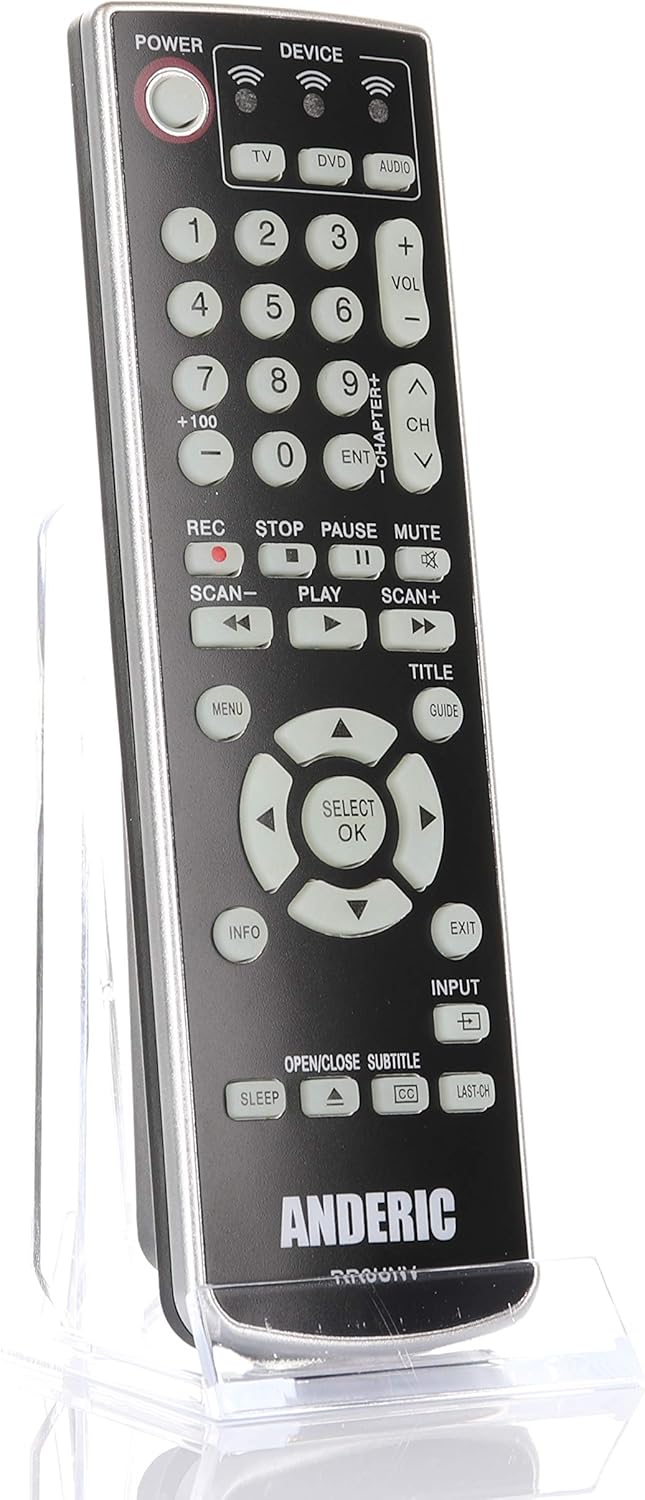
Сүрөт: алдыңкы view of the Anderic RR3UNV remote control. It is black with silver trim, featuring glow-in-the-dark buttons for power, device selection, number pad, volume, channel, playback, menu, and navigation controls.
Пультту иштетүү
Once programmed, the Anderic RR3UNV remote functions like your original remote. Select the desired device mode before sending commands.
- Түзмөк тандоо: басыңыз TV, DVD, же АУДИО button to select the device you want to control. The selected device button will light up briefly.
- Күч: басыңыз КҮЧ Тандалган аспапты күйгүзүү же өчүрүү үчүн баскыч.
- Үндү көзөмөлдөө: колдонуу VOL+ жана VOL- үнүн тууралоо үчүн баскычтар.
- Каналды башкаруу: колдонуу CH+ жана CH- каналдарды өзгөртүү үчүн баскычтар.
- Үнсүз: басыңыз БАСУУ аудиону басуу үчүн баскыч.
- Сандык такта: Канал номерлерин же башка сандык киргизүүлөрдү түз киргизүү үчүн сан баскычтарын (0-9) колдонуңуз.
- Ойнотуу башкаруулары: сыяктуу баскычтар ОЙНОО, ТЫНЫГУУ, ТОКТОТ, REC, SCAN-, жана SCAN+ control media playback functions.
- Навигация: The directional arrow buttons and SELECT/OK button are used for menu navigation.
- Меню/Жол көрсөткүч/Маалымат/Чыгуу: These buttons provide access to device-specific menus, program guides, information displays, and exit functions.
- Киргизүү: The INPUT button cycles through available input sources on your TV.
- Уйку: The УЙКУ button may activate a sleep timer function on compatible devices.
- CC/Subtitles: The CC/SUBTITLE button toggles closed captions or subtitles.
Техникалык тейлөө
- Батареяны алмаштыруу: Replace batteries when the remote's performance degrades or if the device indicator light does not illuminate. Always replace both AA batteries at the same time with new ones.
- Тазалоо: Clean the remote control with a soft, dry cloth. Do not use liquid cleaners or abrasive materials, as they may damage the remote's surface or internal components.
- Сактагыч: Store the remote in a dry place away from direct sunlight and extreme temperatures. If storing for an extended period, remove the batteries to prevent leakage.
Проблемаларды чечүү
| Көйгөй | Мүмкүн себеп | Чечим |
|---|---|---|
| Пульт таптакыр иштебейт. | Өлүк же туура эмес салынган батарейкалар. | Туура полярдуулукту камсыз кылуу менен батарейкаларды жаңы AA батарейкалары менен алмаштырыңыз. |
| Айрым функцияларды алыстан башкаруу менен иштетсе болот, башкаларын иштетпейт. | Incorrect device code or incomplete learning. | Try a different code for your device brand or re-program specific buttons using the learning function. |
| Device does not respond to remote commands. | Remote not aimed correctly; obstruction; device not selected. | Ensure the remote is aimed directly at the device's IR sensor. Remove any obstructions. Press the correct device button (TV, DVD, AUDIO) before sending commands. |
| Үйрөнүү функциясы иштебей калды. | Original remote batteries low; remotes too far apart; ambient light interference. | Ensure original remote has fresh batteries. Place remotes 1-2 inches apart. Try learning in a dimly lit room. |
Техникалык шарттар
- Бренд: Андерик
- Модель аты: RR3UNV
- Модель номери: RR3UNV
- Колдоого алынган түзмөктөрдүн максималдуу саны: 3
- Байланыш технологиясы: Инфракызыл (IR)
- Батарея түрү: 2 x AA батарейкалар (киргизилген эмес)
- Максималдуу диапазон: Болжол менен 25 фут (7.6 метр)
- Button Quantity: 41
- Өзгөчөлүктөр: Universal compatibility, Learning function, Glow-in-the-dark buttons
- Шайкеш түзмөктөр: TV, DVD, VCR, Cable, Satellite, Audio, DVD/VCR Combos, TV/DVD/VCR Combos
Кепилдик маалымат
Anderic products typically come with a limited warranty covering manufacturing defects. For specific warranty details, including duration and terms, please refer to the documentation included with your purchase or visit the official Anderic webсайт. Кепилдик дооматтар үчүн сатып алганыңыздын далилин сактаңыз.
Кардарларды колдоо
For technical assistance, programming help, or general inquiries regarding your Anderic RR3UNV remote control, please contact Anderic customer support:
- Webсайт: www.anderic.com
- Телефон: 1-855-573-6683
Please have your model number (RR3UNV) and a description of your issue ready when contacting support.