
SHARP LC-40U45
SHARP AQUOS LC-40U45 40-inch 4K HDR LCD TV User Manual
Model: LC-40U45 | Brand: SHARP
1. Киришүү
This manual provides essential information for the safe and efficient operation of your SHARP AQUOS LC-40U45 40-inch 4K HDR LCD TV. Please read these instructions thoroughly before using the product and retain them for future reference.
The LC-40U45 features a 4K low-reflection panel to minimize glare, 120-speed backlight technology for smooth motion, and the AQUOS 4K-Master Engine PRO II for high-definition image processing. Experience enhanced audio with the bass-reflex speaker box, Sound by ONKYO collaboration, and Eilex PRISM technology. The TV also includes a swivel stand for flexible viewбурчтар.
2. Коопсуздук маалыматы
Өрт, электр шок жана жаракат алуу коркунучун азайтуу үчүн бул телевизорду колдонууда ар дайым негизги коопсуздук чараларын сактаңыз.
- Телевизорду жамгырга же нымга тийгизбеңиз.
- Желдетүүчү тешиктерди жаппаңыз.
- Электр шнурунун туура жерге туташтырылышын камсыз кылыңыз.
- Чагылган бороондо же көпкө чейин пайдаланылбай турганда сыналгыны розеткадан ажыратыңыз.
- Майда бөлүктөрүн жана батареяларды балдар жетпеген жерде сактаңыз.
3. Кутуда эмне бар
Төмөнкү нерселердин баары телевизоруңуз менен кошо берилгенин текшериңиз:
- SHARP AQUOS LC-40U45 4K HDR LCD TV
- Алыстан башкаруу (2 AAA батарейкасы менен)
- Электр кабели
- Үстөл үстүндөгү стенд (эгер бар болсо)
- AV Terminal Conversion Cable
- Колдонуучунун Колдонмосу (бул документ)
4. Орнотуу
4.1 Physical Placement and Dimensions
Ensure the TV is placed on a stable surface or mounted securely. The dimensions of the TV with the stand are approximately 90.1 cm (width) x 27.1 cm (depth) x 55.8 cm (height). The weight is approximately 20.5 kg.

Figure 4.1: TV dimensions (Width: 90.1cm, Height: 55.8cm, Depth: 27.1cm) and recommended viewing distance of approximately 150cm.
4.2 Перифериялык түзүлүштөрдү туташтыруу
Your TV offers various connection ports on the rear panel for external devices.

Figure 4.2: Rear panel connections including HDMI inputs, USB ports, headphone jack, AV input, LAN port, and antenna inputs.
- HDMI кириштери (x4): Connect Blu-ray players, game consoles, or other HDMI-compatible devices. Input 1 supports HDR.
- USB порттору (x2): Connect USB storage devices for media playback or external HDD for recording.
- PC Input (x1): Компьютерди туташтырыңыз.
- LAN Port (10BASE-T/100BASE-TX): Зымдуу интернет байланышы үчүн.
- Headphone Jack (3.5mm stereo mini-jack): Жеке угуу үчүн.
- AV киргизүү: Use the provided AV terminal conversion cable for older devices.
- Антенна киргизүүлөр: Connect terrestrial digital and BS/CS digital antennas.
- B-CAS Card Slot: Insert the B-CAS card to decrypt digital broadcasts.
4.3 Тармактык туташуу
The TV supports both wired and wireless (Wi-Fi) network connections. Built-in Wi-Fi allows for easy connection to your home network.
4.4 Swivel Stand
The TV features a swivel stand that allows you to adjust the screen angle left and right by 30 degrees. This provides flexibility for optimal viewing from various positions in the room and makes accessing rear ports easier for cleaning or connecting devices.

Figure 4.3: The swivel stand allows for 30-degree left/right adjustment, simplifying cleaning and access to rear connections.
5. Сыналгыңызды иштетүү
5.1 Алыстан башкаруу функциялары
Use the provided remote control to navigate menus, change channels, adjust volume, and access smart TV features. The remote includes dedicated buttons for popular streaming services.
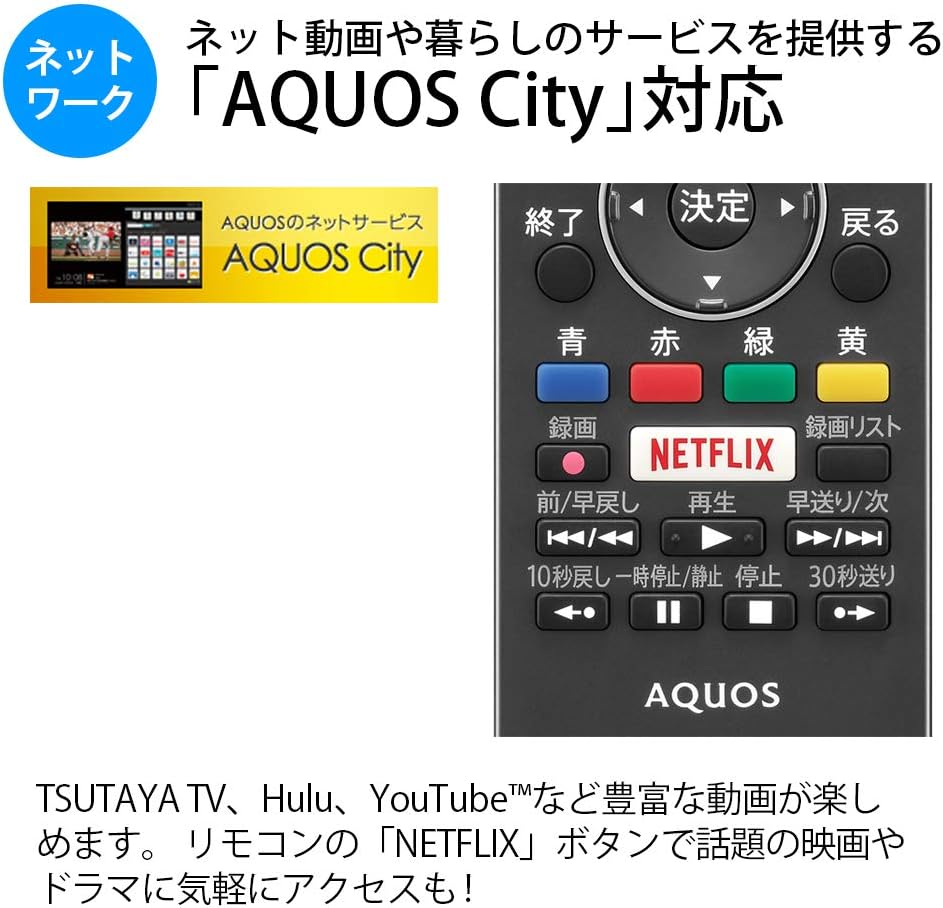
Figure 5.1: Remote control with a dedicated Netflix button and a view of the AQUOS City interface.
5.2 Smart TV Features (AQUOS City)
Your AQUOS TV supports "AQUOS City," providing access to various internet video services and lifestyle applications. Enjoy streaming content from platforms like NETFLIX, YouTube, Hulu, and TSUTAYA TV. Simply press the dedicated "NETFLIX" button on your remote for quick access.
5.3 4K Image Processing
The AQUOS 4K-Master Engine PRO II is a high-definition image processing circuit specifically designed for 4K LCD panels. It reduces noise and enhances contrast for a more immersive 4K viewтажрыйбасы.

Figure 5.2: The AQUOS 4K-Master Engine PRO II enhances 4K images by reducing noise and improving contrast.
5.4 Аудио өзгөчөлүктөрү
The TV is equipped with a bass-reflex type speaker box, developed in collaboration with ONKYO, to deliver high-quality sound with enhanced high-frequency pressure and rich bass. Eilex PRISM technology expands the listening position and creates a sense of audio depth.

Figure 5.3: Illustration of the bass-reflex speaker box, designed for superior sound quality.
5.5 Low-Reflection Panel
The 4K low-reflection panel minimizes reflections from room lighting and external light sources, ensuring clear and comfortable viewжаркыраган чөйрөдө да жаркырайт.

Figure 5.4: Visual comparison demonstrating how the low-reflection panel reduces glare compared to a conventional LCD panel.
5.6 Video Mirroring (Fire TV)
You can mirror your smartphone screen to the TV using Fire TV mirroring. This allows you to display photos, videos, or smartphone apps on the large TV screen. To use this feature, connect a Fire TV device to one of the TV's HDMI ports and ensure both devices are on the same Wi-Fi network. Refer to your Fire TV device's manual for specific mirroring instructions.
6. Техникалык тейлөө
Сыналгыңыздын узак иштөөсүн жана оптималдуу иштешин камсыз кылуу үчүн төмөнкү тейлөө көрсөтмөлөрүн аткарыңыз:
- Экранды тазалоо: Экранды жумшак, түксүз чүпүрөк менен акырын сүртүңүз. өжөр белгилери үчүн, бир аз гampчүпүрөккө суу же атайын экран тазалоочу каражат. Суюктукту экранга түз чачпаңыз.
- Кабинетти тазалоо: Телевизордун шкафын сүртүү үчүн жумшак, кургак чүпүрөктү колдонуңуз. Абразивдүү тазалагычтарды же эриткичтерди колдонуудан алыс болуңуз.
- Вентиляция: Ашыкча ысып кетүүнүн алдын алуу үчүн сыналгыдагы желдетүү тешиктери жабылбагандыгын текшериңиз.
- Электр кабели: Regularly check the power cord for any damage. If damaged, contact qualified service personnel.
7. Кыйынчылыктарды
Телевизоруңузда көйгөйлөргө туш болсоңуз, төмөнкү жалпы көйгөйлөрдү жана аларды чечүү жолдорун караңыз:
| Көйгөй | Мүмкүн болгон себеп / Чечим |
|---|---|
| Күч жок | Кубат шнуру телевизорго жана розеткага бекем сайылганын текшериңиз. Пульттагы же телевизордогу кубат баскычын басыңыз. |
| Сүрөт жок, бирок үн бар | Туура киргизүү булагы тандалганын текшериңиз. Тышкы түзмөктөргө кабелдик байланыштарды текшериңиз. |
| Үн жок, бирок сүрөт бар | Check volume level and mute status. Ensure audio cables are correctly connected. |
| Пульт иштебей жатат | Батареяларды алмаштырыңыз. Пульт менен сыналгынын IR сенсорунун ортосунда эч кандай тоскоолдуктар жок экенин текшериңиз. |
| Wi-Fi'га туташпай жатат | Check your Wi-Fi router and network settings. Ensure the TV is within range of the router. |
8. Техникалык шарттар
| Өзгөчөлүк | Спецификация |
|---|---|
| Screen Size | 40 дюйм |
| Дисплей технологиясы | LCD |
| Резолюция | 3840 x 2160 (4K) |
| HDR колдоо | HDR compatible (HDMI Input 1) |
| Жаңыртуу ылдамдыгы | 120 Hz (120 Speed backlight technology) |
| Түнерлер | Terrestrial Digital x3, BS/CS Digital x3 |
| Аудио чыгаруу | 20 Вт (10 Вт + 10 Вт) |
| Спикердин өзгөчөлүктөрү | Bass-reflex type, Sound by ONKYO, Eilex PRISM |
| HDMI порттору | 4 |
| USB порттору | 2 (USB-HDD recording compatible) |
| PC киргизүү | 1 |
| Network Connectivity | Wi-Fi built-in, LAN port |
| Зымсыз түрү | Bluetooth, Wi-Fi, Miracast |
| Энергияны керектөө | Approx. 106W (Annual: 96Kwh/year) |
| Өлчөмдөрү (W x D x H) | 90.1 x 27.1 x 55.8 см (стенд менен) |
| Салмагы | 20.5 кг |
| VESA тоо стандарты | 600 x 400 мм |
| Recommended Network Services | NETFLIX, YouTube, Hikari TV 4K, Hulu, TSUTAYA TV |
9. Кепилдик жана колдоо
Кепилдик жөнүндө маалымат алуу үчүн, өнүмүңүз менен кошо берилген кепилдик картасын караңыз же расмий SHARP дүкөнүнө баш багыңыз website. For technical support, troubleshooting assistance, or service requests, please contact SHARP customer service. Contact details can be found on the official SHARP webсайтында же продукт документациясында.
Ask a question about this manual
Ask about setup, troubleshooting, compatibility, parts, safety, or missing instructions. Manuals+ will review the question and use this page’s manual context to help answer it.