
Introduction
Thank you for choosing the Symphonized NXT 2.0 Portable Bluetooth Speaker. This manual provides essential information for setting up, operating, and maintaining your speaker to ensure optimal performance and longevity. Please read this manual thoroughly before using the product.
Кутуда эмне бар
- Symphonized NXT 2.0 Portable Bluetooth Speaker
- USB заряддоо кабели
- User Manual
Продукт бүттүview
The Symphonized NXT 2.0 speaker features a durable ABS plastic construction with elegant wood accents, providing both robust protection and a natural aesthetic. It is designed for portability and delivers a well-balanced, powerful sound experience.

Фронт view of the Symphonized NXT 2.0 Portable Bluetooth Speaker, showcasing its dual speaker grilles and wood-grain finish.
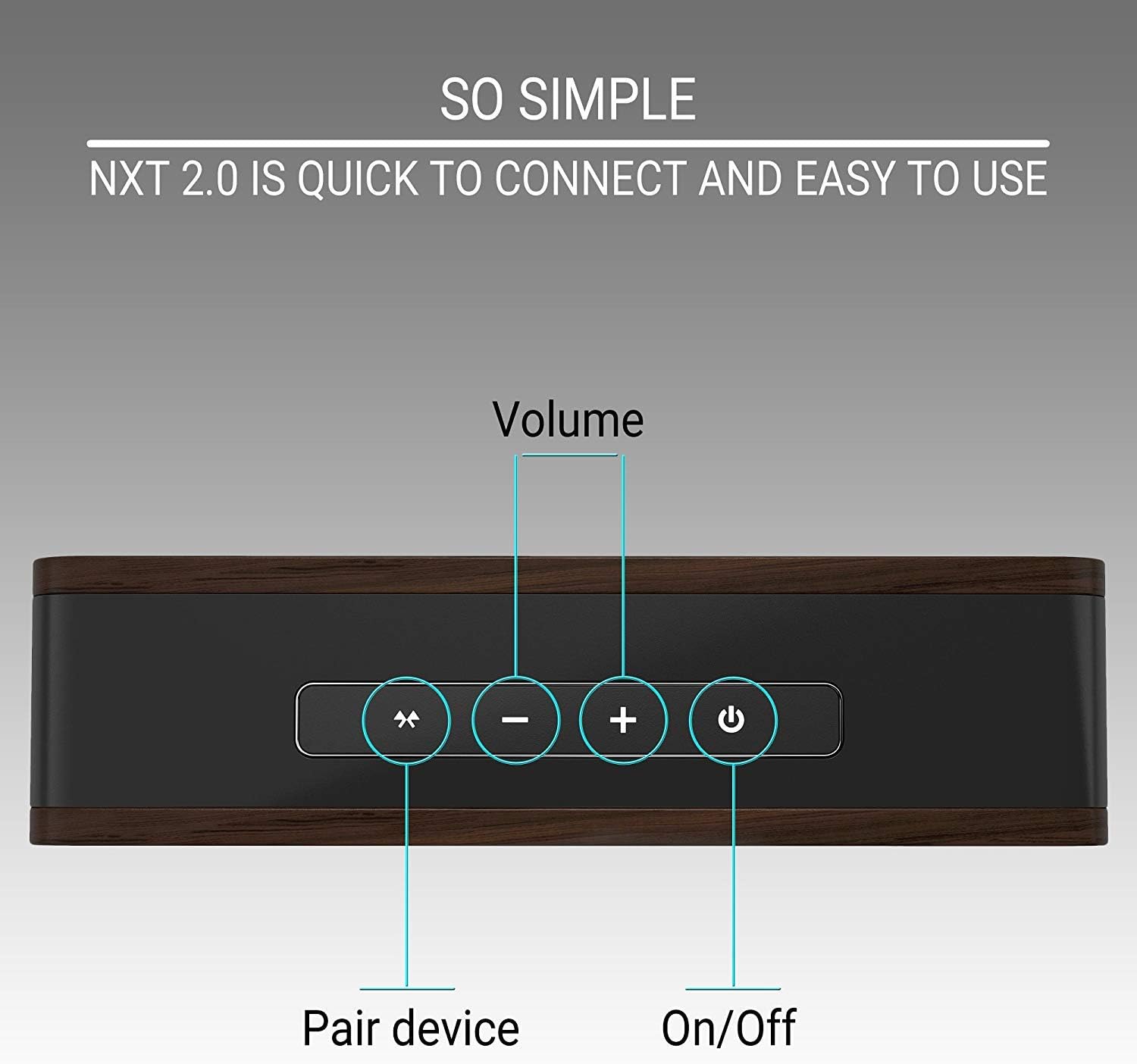
Top panel of the speaker showing the control buttons: Pair Device, Volume Down, Volume Up, and Power On/Off.
Жайгашуу
Спикерди заряддоо
- Connect the micro USB end of the charging cable to the charging port on the speaker.
- Заряддоо кабелинин USB-A учун туура келген USB кубат адаптерине (кошумча эмес) же компьютердин USB портуна туташтырыңыз.
- Заряддоо индикаторунун жарыгы күйөт. Толук кубаттоо, адатта, болжол менен 6 саатты талап кылат.
- Толук заряддалгандан кийин, индикатор жарыгы моделге жараша түсүн өзгөртүшү же өчүшү мүмкүн. Заряддоочу кабелди сууруп салыңыз.
A fully charged speaker provides up to 6 hours of playtime.
Bluetooth Жупташтыруу
- Динамик толугу менен кубатталганын текшериңиз.
- Press and hold the Power On/Off button on the speaker until you hear an audible prompt or see an indicator light flashing, indicating it's in pairing mode.
- Түзмөгүңүздө (смартфон, планшет, ноутбук) Bluetooth иштетиңиз жана жеткиликтүү түзмөктөрдү издеңиз.
- Select "Symphonized NXT 2.0" from the list of available devices.
- Once connected, you will hear a confirmation sound, and the indicator light will typically stop flashing and remain solid.
The speaker has a Bluetooth working distance of approximately 10 meters (32 feet).
Зымдуу туташуу (AUX киргизүү)
For devices without Bluetooth capability, or if you prefer a wired connection:
- Connect one end of a 3.5mm auxiliary cable (not included) to the AUX input port on the speaker.
- Connect the other end of the 3.5mm auxiliary cable to the audio output jack of your device.
- The speaker will automatically switch to AUX mode, or you may need to select it manually if there is a mode button.
Иштөө нускамалары
Күйгүзүү/өчүрүү
- To power on: Press and hold the Power On/Off button until the indicator light illuminates.
- To power off: Press and hold the Power On/Off button until the indicator light turns off.
Үндү көзөмөлдөө
- To increase volume: Press the '+' button.
- To decrease volume: Press the '-' button.
Bluetooth Device Pairing Button
- To initiate pairing mode or reconnect to a previously paired device, press the 'Pair Device' button.
Техникалык тейлөө
Тазалоо
- Динамикти жумшак, кургак чүпүрөк менен сүртүңүз.
- Абразивдүү тазалоочу каражаттарды, эриткичтерди же күчтүү химиялык заттарды колдонбоңуз, анткени алар жасалгасына же ички компоненттерине зыян келтириши мүмкүн.
Сактагыч
- Динамикти түз күн нурунан жана өтө температурадан алыс салкын, кургак жерде сактаңыз.
- Эгер батарейканы узак убакытка сактап жатсаңыз, анын иштөө мөөнөтүн сактоо үчүн анын жарым-жартылай заряддалганын (болжол менен 50%) текшериңиз.
Проблемаларды чечүү
| Көйгөй | Мүмкүн себеп | Чечим |
|---|---|---|
| Динамик күйбөйт | Батарея аз | Динамикти толук заряддаңыз. |
| Bluetooth аркылуу жупташтыруу мүмкүн эмес | Speaker not in pairing mode; Device Bluetooth off; Out of range | Ensure speaker is in pairing mode. Turn on Bluetooth on your device. Move device closer to speaker (within 10m/32ft). |
| Үн жок же үнү төмөн | Volume too low on speaker or device; Incorrect input mode | Increase volume on both speaker and connected device. Ensure correct input mode (Bluetooth/AUX) is selected. |
| Жогорку үн деңгээлинде үндүн бурмаланышы | Көлөмү өтө бийик | Reduce the volume on the speaker or your connected device. |
Техникалык шарттар
| Өзгөчөлүк | Деталь |
|---|---|
| Бренд | Симфонизацияланган |
| Модель аты | NXT 2.0 |
| Динамиктин максималдуу чыгаруу күчү | 25 Ватт |
| Frequency Response | 80 Гц - 20 кГц |
| Байланыш технологиясы | Көмөкчү, Bluetooth, USB |
| Аудио чыгаруу режими | Стерео |
| Коргоочу материал | ABS пластик |
| Динамик түрү | Сыртта |
| Кошумча функциялар | Portable |
| Түс | Кара |
| Суу өткөрбөйт | ЖАЛГАН |
| Башкаруу ыкмасы | баскыч |
| Батареянын орточо иштөө мөөнөтү | 6 саат |
| Аудио каналдардын саны | 2.0 |
| Зымсыз технология | Bluetooth |
| Connectivity Protocol | Bluetooth |
| Батареяны заряддоо убактысы | 6 саат |
| Элемент Салмагы | 0.68 килограмм |
| Шайкеш түзмөктөр | Смартфон, Планшет, Ноутбук, Телевизор |
| Power Source | Батарея менен иштейт |
Кепилдик маалымат
The Symphonized NXT 2.0 Portable Bluetooth Speaker comes with a Limited Warranty. For specific details regarding warranty coverage, duration, and claims process, please refer to the warranty card included with your product or contact Symphonized customer support.
Колдоо
If you encounter any issues not covered in the troubleshooting section or require further assistance, please contact Symphonized customer support. Contact information can typically be found on the product packaging, the official Symphonized webсайт, же сатып алуу документтери.