
1. Коопсуздук маалыматы
The Gyrocopters 8FINITI All Terrain Hoverboard is designed for personal transportation and recreation. Adherence to safety guidelines is crucial for preventing accidents and ensuring a safe riding experience. This product is UL2272 Certified, indicating compliance with electrical safety standards.
Жалпы коопсуздук чаралары:
- Always wear appropriate safety gear, including a helmet, knee pads, and elbow pads, when operating the hoverboard.
- Ховербордду алкоголдун же баңгизаттын таасири астында иштетпеңиз.
- Ensure the hoverboard is fully charged and in good working condition before each use.
- Бардык жергиликтүү жол мыйзамдарын жана эрежелерин сактаңыз.
- Avoid riding in heavy traffic, on uneven surfaces, or near obstacles.
- The maximum weight capacity is 264 lbs (119.75 kg), and the minimum weight is 35 lbs. Do not exceed these limits.
- The 'No Fall Technology' assists with balance but does not eliminate the risk of falling. Always maintain awareness and control.
- Avoid sudden turns or rapid acceleration/deceleration, especially at higher speeds.
2. Пакеттин мазмуну
Upon opening your Gyrocopters 8FINITI All Terrain Hoverboard package, please verify that all the following items are included:
- Gyrocopters 8FINITI All Terrain Hoverboard
- Кубат адаптери/заряддагыч
- Колдонуучунун Колдонмосу (бул документ)

Image: The Gyrocopters 8FINITI Hoverboard shown with its power adapter and various certification logos (RoHS, FC, CE).
3. Орнотуу
3.1 Алгачкы заряддоо
Before first use, fully charge your hoverboard. Connect the power adapter to the charging port on the hoverboard and then plug it into a standard electrical outlet. The charging indicator light on the hoverboard will change (e.g., from red to green) when charging is complete. Charging typically takes a few hours.
3.2 Калибрлөө
If the hoverboard does not balance correctly or exhibits unusual behavior, a recalibration may be necessary:
- Ховерборддун өчүрүлгөнүн текшериңиз.
- Ховербордду тегиз, тегиз жерге коюңуз.
- Press and hold the power button until the indicator lights begin to flash or a specific sound is heard (refer to the manufacturer's specific recalibration sequence if available, or contact support).
- Release the power button and power off the device.
- Power on the hoverboard again. It should now be recalibrated.
3.3 Bluetooth жупташтыруу
The 8FINITI hoverboard features an integrated speaker. To connect your device:
- Ховерборд күйгүзүлгөнүн текшериңиз.
- Activate Bluetooth on your smartphone or compatible device.
- Издөө available Bluetooth devices. The hoverboard should appear as '8FINITI' or a similar identifier.
- Select the hoverboard to pair. A confirmation sound may indicate a successful connection.
4. Иштөө нускамалары
4.1 Күйгүзүү/өчүрүү
To power on the hoverboard, press the power button located on the device. To power off, press and hold the power button until the lights turn off.
4.2 Ат минүүнүн негиздери
The 8FINITI hoverboard utilizes 'No Fall Technology' with enhanced gyro sensors to assist with balance. When stepping on, place one foot on a footpad, then quickly and smoothly place the second foot on the other footpad. Lean slightly forward to move forward, and lean backward to slow down or move in reverse. To turn, apply more pressure to the footpad on the side opposite the desired turning direction.

Сүрөт: Жогорку view of the Gyrocopters 8FINITI Hoverboard, highlighting the textured footpads and central battery/status indicators.
4.3 Speed and Terrain
The hoverboard can reach speeds of approximately 10 km/h. The rugged all-terrain wheels are designed for various surfaces, including puddles, sand, ceramic, uphill inclines, and grass. However, always exercise caution and reduce speed when riding on challenging terrain.
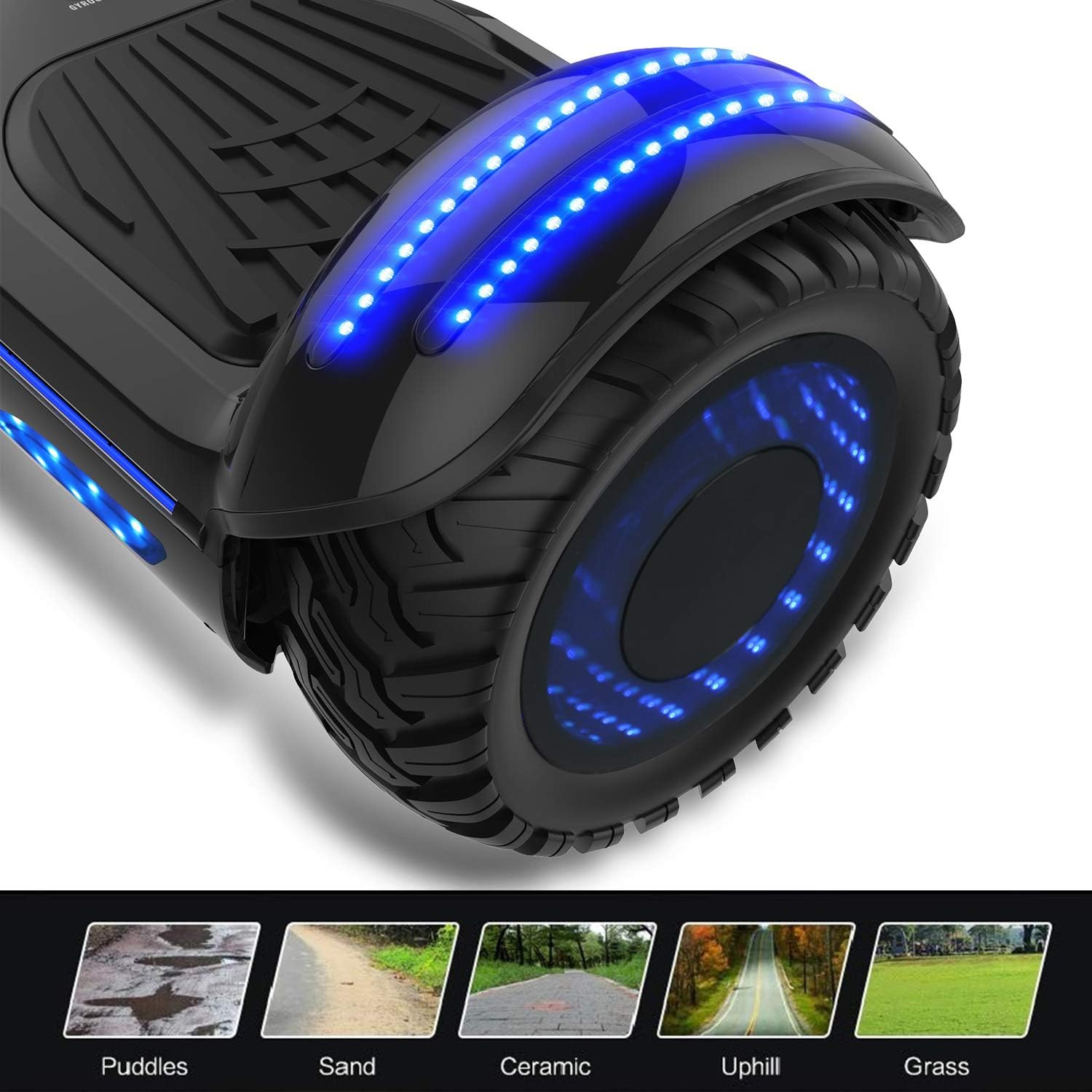
Image: A close-up of the hoverboard's wheel with blue LED lights, illustrating its suitability for various terrains such as puddles, sand, ceramic, uphill, and grass.
4.4 Mirror LED Wheels and Lights
The 8FINITI features Mirror LED wheels and additional LED lights for visibility and aesthetic appeal. These lights activate automatically when the hoverboard is in use.
5. Техникалык тейлөө
5.1 Тазалоо
Ховербордду жарнама менен сүртүңүзamp cloth to remove dirt and dust. Do not use harsh chemicals or abrasive cleaners. Ensure the charging port and other openings are dry before charging or operating.
5.2 Сактоо
Store the hoverboard in a cool, dry place away from direct sunlight and extreme temperatures. If storing for an extended period, ensure the battery is partially charged (around 50%) and recharge it every few months to maintain battery health.
5.3 Батареяга кам көрүү
The hoverboard uses a Lithium Ion battery. Avoid completely draining the battery regularly. Always use the provided charger. Do not attempt to open or replace the battery pack yourself.
5.4 Сууга туруктуулук
The 8FINITI hoverboard is built to IPX4 standard specifications, meaning it is resistant to splashing water from any direction. It is not waterproof and should not be submerged in water or ridden in heavy rain.
6. Кыйынчылыктарды
If you encounter issues with your Gyrocopters 8FINITI hoverboard, please refer to the following common solutions:
- Hoverboard Beeping Continuously: This often indicates an imbalance or error. Power off the hoverboard, place it on a flat surface, and perform a recalibration as described in Section 3.2.
- Hoverboard Not Turning On: Ensure the battery is charged. If fully charged and still not turning on, contact customer support.
- Bluetooth туташпай жатат: Ensure the hoverboard is powered on and Bluetooth is enabled on your device. Try restarting both devices.
- Uneven Riding/Difficulty Balancing: Perform a recalibration (Section 3.2).
For further assistance, please contact Gyrocopters customer support at sales@gyrocopters.ca. Many issues can be resolved with a simple reset or guidance from support.
7. Техникалык шарттар
| Модель аты | 8FINITI (EL-ES09F-E) |
| Бренд | ГИРОКОПТЕР |
| ASIN | B06XCNL6M4 |
| Өндүрүүчүнүн маалымдамасы | EL-ES09F |
| Түс | Кара боз |
| Максималдуу салмак боюнча сунуш | 119.75 кг (264 фунт) |
| Минималдуу салмак боюнча сунуш | 35 фунт |
| Frame Material | Металл |
| Ылдамдык | Up to 10 Miles per Hour (approx. 16 km/h) |
| Тормоз стили | Regenerative braking, Foot brake |
| Батареялар | 1 литий-иондук батарейка (кошулган) |
| Суу каршылык | IPX4 стандарты |
| Почталардын өлчөмдөрү | 69 x 24.5 x 23.5 см |
| Салмагы | 9.1 кг |
8. Кепилдик жана колдоо
For any product-related issues or warranty inquiries, please contact Gyrocopters directly. Most issues can be resolved through their customer support.
Байланыш маалыматы:
Электрондук почта: sales@gyrocopters.ca
Place of Business: Mississauga, Ontario L4W1E4, CA
Кепилдик дооматтары үчүн сатып алганыңыздын далилин сактап коюңуз.