
1. Продукт бүтүп калдыview
The GeoVision GV-EFD4700-0F is an indoor, fixed, mini-sized network camera designed for day and night surveillance. It features an automatic IR-cut filter and integrated IR LEDs to ensure clear imaging in various lighting conditions. This model offers an entry-level surveillance solution with essential features and high image quality.
Негизги өзгөчөлүктөр төмөнкүлөрдү камтыйт:
- 1/3" progressive scan super low lux CMOS sensor for minimal illumination at 0.02 lux.
- Dual streams supporting H.265, H.264, and MJPEG codecs.
- Video resolutions up to 20 fps at 2592 x 1520, 25 fps at 2560 x 1440, and 30 fps at 2048 x 1520.
- Intelligent IR with a distance of up to 15 meters (50 ft).
- Wide Dynamic Range Pro (WDR Pro) for clear images in high-contrast scenes.
- 3D noise reduction for improved image clarity.
- Built-in microphone for audio monitoring.
- 2-axis mechanism (pan / tilt) for flexible positioning.
- Power options: DC 12V or Power over Ethernet (PoE IEEE 802.3af).
2. Пакеттин мазмуну
Пакетти ачкандан кийин бардык буюмдар бар экенин жана жакшы абалда экендигин текшериңиз:
- GeoVision GV-EFD4700-0F Mini Fixed IP Dome Camera
- Бургулоочу комплект
- Орнотуу шаблону
- Тез баштоо боюнча колдонмо / Нускама (бул документ)
3. Коопсуздук маалыматы
Read these instructions carefully before installation and operation. Keep this manual for future reference.
- Кубат булагы: Use only the specified power adapter (DC 12V) or a compliant PoE (IEEE 802.3af) switch. Incorrect voltage аппаратты бузушу мүмкүн.
- Орнотуу: Ensure the camera is securely mounted to prevent it from falling. Installation should be performed by qualified personnel if necessary.
- Курчап турган чөйрө: This camera is designed for indoor use. Do not expose it to water, moisture, or extreme temperatures.
- Тазалоо: Тазалоодон мурун электр кубатынан ажыратыңыз. Жумшак, кургак чүпүрөктү колдонуңуз. Суюк же аэрозольдук тазалагычтарды колдонбоңуз.
- Тейлөө: Бул продуктту өзүңүз тейлөөгө аракет кылбаңыз. Бардык тейлөөнү квалификациялуу тейлөө кызматкерлерине тапшырыңыз.
4. Орнотуу жана орнотуу
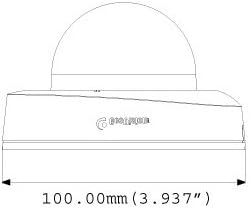
4.1 Физикалык өлчөмдөр
Understand the camera's dimensions for proper placement and mounting.

4.2 Монтаждоо параметрлери
The GV-EFD4700-0F supports both ceiling and wall-surface mounting.


4.3 Орнотуу кадамдары
- Жайгашкан жерди тандоо: Choose a suitable indoor location for optimal surveillance coverage.
- Бетти даярдоо: Use the provided installation template to mark drilling points on the ceiling or wall.
- Бургулоо тешиктери: Drill pilot holes according to the template. Insert wall anchors if necessary.
- Коопсуз камера: Attach the camera base to the mounting surface using the supplied screws.
- Кабелдерди туташтыруу: Connect the Ethernet cable for network and PoE, or a DC 12V power adapter and a separate Ethernet cable.
- Бурчту тууралоо: Loosen the adjustment screws to pan and tilt the camera lens to the desired viewбурчту бекитиңиз. Жөндөлгөндөн кийин бурамаларды бекемдеңиз.
4.4 Баштапкы конфигурация
After physical installation and power connection, access the camera's web interface for initial setup:
- Тармак туташуусу: Ensure the camera is connected to your network. It will typically obtain an IP address via DHCP.
- Камераны табуу: Use GeoVision's IP Device Utility software or a network scanner to find the camera's IP address.
- Мүмкүнчүлүк Web Интерфейс: ачуу а web браузерге өтүп, камеранын IP дарегин киргизиңиз.
- Кирүү: Enter the default username and password (refer to the Quick Start Guide or GeoVision documentation for default credentials). Change these immediately for security.
- Негизги Орнотуулар: Configure network settings, date/time, video resolution, and recording preferences.
5. Камераны иштетүү
5.1 Live View жана Жаздыруу
Once configured, you can access the live video feed through the web interface or compatible NVR/VMS software. The camera supports continuous recording, scheduled recording, and event-triggered recording (e.g., motion detection).
- H.265 Кысуу: Utilizes H.265 video codec for efficient storage and reduced network bandwidth while maintaining high image quality.
- WDR Pro: Wide Dynamic Range Pro enhances image visibility in scenes with both very bright and very dark areas.
- IR функциясы: The built-in IR LEDs automatically activate in low-light conditions, providing clear black and white images up to 15 meters.
5.2 Кыймылды аныктоо жана эскертүүлөр
Configure motion detection zones and sensitivity within the camera's web interface. The camera can be set to trigger recordings, send email alerts, or notify your VMS upon detecting motion.
5.3 Аудио мониторинг
The integrated microphone allows for audio monitoring of the surveillance area. Audio settings can be adjusted via the web интерфейс.
6. Техникалык тейлөө
6.1 Тазалоо
Regularly clean the camera lens and housing to ensure optimal image quality. Use a soft, lint-free cloth. For stubborn dirt, a slightly damp жумшак жуучу каражаты бар кездемени, андан кийин кургак чүпүрөктү колдонсо болот. Абразивдүү тазалагычтардан же эриткичтерден качыңыз.
6.2 Микропрограмма жаңыртуулары
Periodically check the GeoVision website for firmware updates. Firmware updates can provide new features, performance improvements, and security enhancements. Follow the instructions provided with the firmware update package carefully to avoid damaging the device.
7. Кыйынчылыктарды
If you encounter issues with your GV-EFD4700-0F camera, refer to the following common problems and solutions:
- Кубат жок:
- Check if the power adapter is securely connected and providing 12V DC.
- If using PoE, ensure the Ethernet cable is connected to a PoE-enabled switch or injector and that the switch port is active.
- Видео түрмөгү жок:
- Verify network connectivity. Ping the camera's IP address.
- Ensure the camera's IP address, subnet mask, and gateway settings are correct.
- Check if the video stream settings (e.g., resolution, frame rate) are compatible with your viewing software or NVR.
- Restart the camera by disconnecting and reconnecting power.
- Сүрөттүн сапаты начар:
- Камера линзасын тазалаңыз.
- Камеранын талаасындагы тоскоолдуктарды текшериңиз view.
- Adjust WDR Pro settings in the web interface for high-contrast scenes.
- Ensure sufficient lighting for optimal color images; IR will provide black and white in low light.
- Кирүү мүмкүн эмес Web Интерфейс:
- Confirm the camera's IP address is correct.
- Компьютериңиз камера менен бир тармак сегментинде экенин текшериңиз.
- Башкасын байкап көрүңүз web браузер.
- Компьютериңиздеги кандайдыр бир брандмауэр программасын убактылуу өчүрүңүз.
If problems persist, contact GeoVision technical support.
8. Техникалык шарттар
| Өзгөчөлүк | Деталь |
|---|---|
| Модель аты | GV-EFD4700-0F |
| Сүрөт сенсору | 1/3" progressive scan super low lux CMOS |
| Натыйжалуу дагы эле чечим | 4 депутат |
| Минималдуу жарыктандыруу | 0.02 люкс |
| Видеону кысуу | H.265, H.264, MJPEG |
| Макс. Кадр жыштыгы | 30 fps at 2048 x 1520 |
| IR Дистанция | 15 м (50 фут) чейин |
| Объектив | 2.8 мм (бекитилген) |
| Динамикалык диапазон | WDR Pro |
| Noise Reduction | 3D ызы-чууну азайтуу |
| Аудио | Камтылган микрофон |
| Pan/Tilt Mechanism | 2-ок |
| Power Input | DC 12V / PoE (IEEE 802.3af) |
| Байланыш технологиясы | Wired (Ethernet), Wi-Fi (for certain functions/protocols) |
| Ички/тышкы колдонуу | Indoor |
| Өлчөмдөрү (пункт) | 3.9 x 3.9 x 2.4 дюйм (100 x 100 x 60.8 мм) |
| Салмагы (пункт) | 5.28 унция |
| Түс | Ак |
| Өндүрүүчү | USA Vision Systems |
9. Кепилдик маалыматы
GeoVision products typically come with a limited manufacturer's warranty. Specific warranty terms, conditions, and duration may vary by region and retailer. Please refer to the warranty card included with your purchase or visit the official GeoVision webтолук кепилдик маалымат жана каттоо жол-жоболору үчүн сайт. Кепилдик дооматтар үчүн сатып алганыңыздын далилин сактаңыз.
10. Колдоо
Техникалык жардам, продукт боюнча суроолор же андан ары колдоо алуу үчүн төмөнкү ресурстарды колдонуңуз:
- GeoVision Official Webсайт: Visit www.geovision.com.tw for product documentation, FAQs, software downloads, and support contact information.
- Техникалык колдоо: Contact GeoVision's technical support team through their website or the contact details provided in your product's packaging.
- Онлайн ресурстар: Explore online forums and communities for user-generated tips and solutions.