
1. Киришүү
The Focal Shape 50 is a versatile monitoring loudspeaker designed for professional audio environments. It offers extended low-frequency response and precise control, making it suitable for rooms up to 130 sq ft (12 sq m). This manual provides essential information for the proper setup, operation, and maintenance of your Shape 50 studio monitor.

1.1-сүрөт: алдыңкы жагы view of the Focal Shape 50 Studio Monitor, showcasing its dark walnut finish and speaker components.
2. Пакеттин мазмуну
Before proceeding with installation, please verify that all components are present in the packaging:
- Focal Shape 50 Studio Monitor (1 unit)
- Электр кабели
- Колдонуучунун Колдонмосу (бул документ)
3. Орнотуу
3.1 Орнотуу
The Shape 50 monitor is designed to be placed near a wall due to its port-less design. For optimal listening, position the monitor at a distance of approximately 30 inches (80 cm) from your listening position. Ensure the monitors are placed symmetrically in your room to achieve a balanced stereo image.
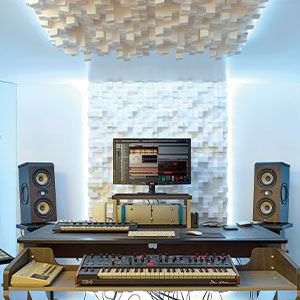
3.1-сүрөт: Мисample of a studio setup with two Focal Shape 50 monitors positioned for optimal sound monitoring.
3.2 Байланыштар
Connect your audio source to the Shape 50 monitor using an RCA cable. Ensure all connections are secure before powering on the unit.
- Аудио киргизүү: Use the RCA input for connecting your audio interface or mixer.
- Күч: Connect the provided power cord to the monitor's power inlet and then to a suitable electrical outlet.

Figure 3.2: Rear panel of the Focal Shape 50, showing the RCA input, power connection, and various adjustment controls.
3.3 Монтаждоо
The Shape 50 includes threads for ceiling and wall mount fastening. Mounting accessories are not supplied and must be purchased separately. Consult a professional for proper installation of wall or ceiling mounts.
4. Иштөө нускамалары
4.1 Күйгүзүү/өчүрүү
To power on the monitor, ensure all audio connections are made, then connect the power cord and flip the power switch located on the rear panel. To power off, reverse this process.
4.2 Орнотууларды тууралоо
The Shape 50 features numerous settings on its rear panel for optimal integration into various acoustic environments and for accurate control of sound reproduction. These include adjustments for high-frequency, mid-frequency, and low-frequency response, allowing you to tailor the sound to your specific room and preferences.
4.3 Flexible Listening Position
The monitor's low directivity tweeter design allows for a flexible listening position, providing consistent sound quality even when slightly off-axis from the monitor.
5. Техникалык тейлөө
To ensure the longevity and optimal performance of your Focal Shape 50 monitors, follow these maintenance guidelines:
- Тазалоо: Use a soft, dry cloth to clean the exterior surfaces of the monitor. Avoid abrasive cleaners or solvents.
- Вентиляция: Ensure adequate airflow around the monitor to prevent overheating. Do not block the ventilation openings.
- Курчап турган чөйрө: Мониторду туруктуу чөйрөдө, өтө жогорку температурадан, нымдуулуктан жана түз күн нурунан алыс иштетиңиз.
6. Кыйынчылыктарды
If you encounter issues with your Focal Shape 50 monitor, refer to the following common troubleshooting steps:
- Үн жок:
- Check if the monitor is powered on and the power cord is securely connected.
- Verify that the audio source is active and connected correctly to the monitor's input.
- Ensure the volume levels on both the monitor and the audio source are appropriately set.
- Бурмаланган үн:
- Reduce the input level from your audio source to prevent clipping.
- Бардык кабелдердин бузулгандыгын же бош туташууларды текшериңиз.
- Ensure the monitor's rear panel settings are not causing excessive boosting of certain frequencies.
- Ызы-чуу же ызы-чуу:
- Ensure all audio cables are properly shielded.
- Try connecting the monitor to a different power outlet, preferably on a different circuit.
- Тоскоолдук жаратышы мүмкүн болгон жакын жердеги электрондук түзмөктөрдү текшериңиз.
If the issue persists after attempting these steps, please contact Focal customer support.
7. Техникалык шарттар
| Өзгөчөлүк | Спецификация |
|---|---|
| Бренд | Фокустук |
| Модель аты | Форма 50 |
| Модель номери | 3544059801524DW001 |
| Динамик түрү | Монитор |
| Динамиктин максималдуу чыгаруу күчү | 1000 Ватт |
| Frequency Response | 35000 Гц |
| Байланыш технологиясы | RCA |
| Аудио чыгаруу режими | Стерео, айлана |
| Монтаж түрү | Wall Mount (accessories not supplied) |
| Коргоочу материал | Жаңгак |
| Сабвуфердин диаметри | 5 дюйм |
| Вуфердин диаметри | 5 дюйм |
| Түс | Кара жаңгак |
| Элементтин өлчөмдөрү (D x W x Y) | 9.5"D x 12.3"W x 7.5"H |
| Элемент Салмагы | 14.33 фунт |
| Power Source | Электр зымдары |
| Аудио каналдардын саны | 2.0 |
| Шайкеш түзмөктөр | Смартфон, Планшет, MP3-плеер, Иш такта, Телевизор, Проектор, Ноутбук |
8. Кепилдик маалыматы
The Focal Shape 50 Studio Monitor is covered by a 2 жылдык өндүрүүчүнүн кепилдиги сатып алынган күндөн тартып. Бул кепилдик кадимки колдонуудагы материалдардагы жана жасалгалоодогу кемчиликтерди камтыйт. Ал туура эмес колдонуудан, кырсыктардан, уруксатсыз өзгөртүүлөрдөн же туура эмес орнотуудан келип чыккан зыянды камтыбайт.
Please retain your proof of purchase for warranty claims. For detailed warranty terms and conditions, refer to the official Focal webсайтка же кардарларды колдоо менен байланышыңыз.
9. Колдоо
For technical assistance, troubleshooting beyond this manual, or warranty inquiries, please contact Focal customer support through their official webсайт же продукт документациясында берилген байланыш маалыматы.
Онлайн ресурстар: Расмий Focal сайтына кириңиз webпродуктуну каттоо, көп берилүүчү суроолор жана кошумча колдоо материалдары үчүн сайт.