
1. Киришүү
The COUGAR GX-S 750W is an 80-PLUS Gold certified power supply unit (PSU) designed for reliable and efficient power delivery to your personal computer. Its compact design ensures compatibility with various PC cases, while advanced features like fan curve tuning and DC-DC power conversion technology contribute to stable voltage outputs and reduced noise levels. This manual provides essential information for the safe installation, operation, and maintenance of your GX-S 750W PSU.
2. Коопсуздук маалыматы
Please read and understand all safety instructions before installing or operating the power supply unit. Failure to comply with these instructions may result in electric shock, fire, or damage to the product and connected components.
- Always disconnect the AC power cord from the wall outlet before installing, removing, or cleaning the PSU.
- PSUну ачпаңыз casinг. Жогорку томtage components inside pose a risk of electric shock, even when the unit is unplugged.
- Ensure the PSU is properly grounded.
- This product is intended for indoor use only. Do not expose the PSU to water, moisture, or high humidity.
- PSUну жакшы желдетилген жерге, жылуулук булактарынан жана тике күн нурунан алыс орнотуңуз.
- Кубат менен камсыздалган кабелдерди гана колдонуңуз.
- Do not force connectors. Ensure correct orientation before plugging in cables.
3. Пакеттин мазмуну
Пакетте бардык буюмдар бар экенин текшериңиз:
- COUGAR GX-S 750W кубат берүүчү блогу
- AC Power Cord
- Modular and Fixed Cables (24-pin ATX, 4+4-pin CPU, 6+2-pin PCIe, SATA, Molex)
- Монтаждоо бурамалар
- User Manual
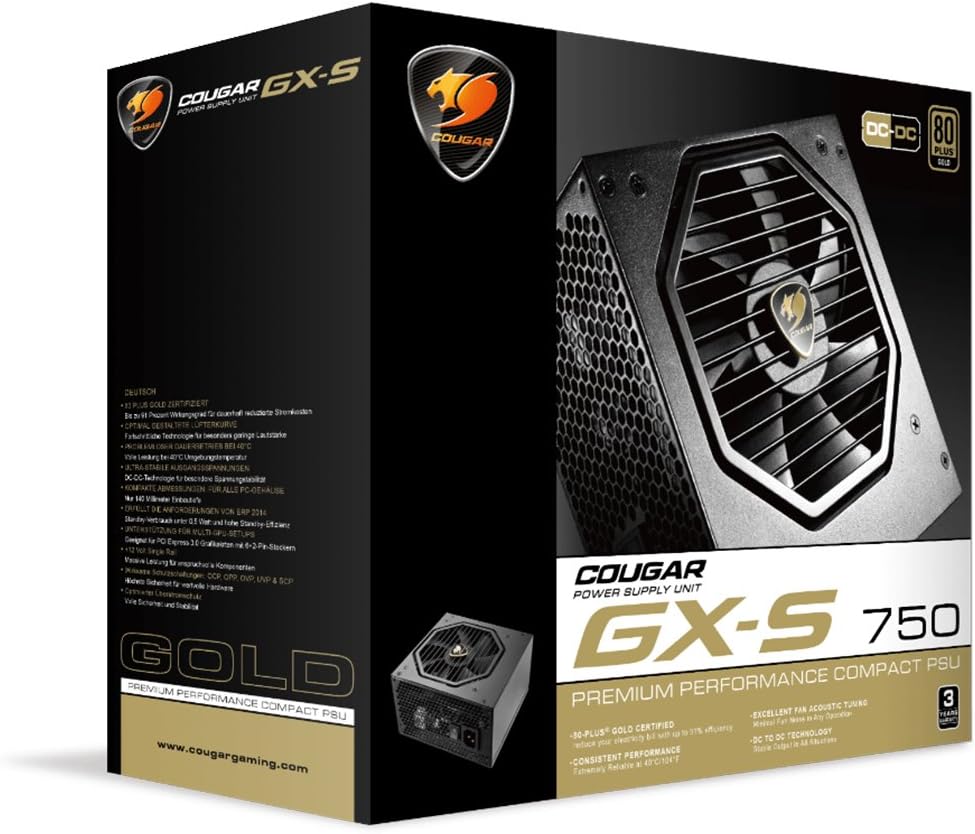
Image 3.1: COUGAR GX-S 750W Power Supply packaging. The image shows the retail box for the COUGAR GX-S 750W PSU, highlighting its 80 PLUS Gold certification and compact design.
4. Орнотуу жана орнотуу
Follow these steps to install your COUGAR GX-S 750W Power Supply:
- Даярдоо: Компьютериңиз толугу менен өчүрүлгөнүн жана розеткадан ажыратылганын текшериңиз. PSU монтаждоо аймагына кирүү үчүн компьютериңиздин корпусун ачыңыз.
- PSU орнотуу: Carefully place the GX-S 750W PSU into the designated PSU bay in your PC case. Align the screw holes on the PSU with those on the case. Secure the PSU using the provided mounting screws. Ensure the PSU fan is oriented correctly for optimal airflow (typically facing downwards if there's a vent, or upwards if not).
- Connecting Motherboard Power: Connect the 24-pin ATX power cable from the PSU to the corresponding 24-pin connector on your motherboard. Ensure it clicks securely into place.
- CPU кубаттуулугун туташтыруу: Connect the 4+4-pin EPS (CPU) power cable to the CPU power connector on your motherboard. This is usually located near the CPU socket. If your motherboard requires an 8-pin connector, combine the two 4-pin halves.
- Connecting PCIe Power (Graphics Cards): If you have a dedicated graphics card, connect the 6+2-pin PCIe power cables from the PSU to your graphics card(s). Some high-end graphics cards may require multiple PCIe power connectors.
- Connecting SATA/Molex Power: Connect SATA power cables to your storage drives (HDDs, SSDs) and optical drives. Use Molex connectors for any other peripherals that require them (e.g., case fans, fan controllers).
- Кабелдик башкаруу: Route all cables neatly to improve airflow and aesthetics within your PC case. Use cable ties or straps if necessary.
- Акыркы текшерүү: Double-check all connections to ensure they are secure and correctly seated. Close your PC case.
- Күйгүзүү: AC кубат шнурун PSUга, андан кийин розеткага туташтырыңыз. PSU артындагы кубат которгучун 'ON' абалына которуңуз. Эми компьютериңизди күйгүзсөңүз болот.

Image 4.1: COUGAR GX-S 750W Power Supply. This image displays the top-down view of the COUGAR GX-S 750W PSU, showing the fan grille, power input, and power switch, along with various cable connections.

Image 4.2: COUGAR GX-S 750W Power Supply side view. This image shows a side view of the COUGAR GX-S 750W PSU, illustrating the compact form factor and the exit point for fixed cables.
5. Иштөө нускамалары
The COUGAR GX-S 750W PSU is designed for continuous operation within its specified limits. Once installed, its operation is largely automatic, managing power delivery to your system components.
- Натыйжалуулугу: The 80-PLUS Gold certification ensures high power efficiency (up to 91%), reducing electricity consumption and heat generation.
- Муздатуу: The PSU features an optimized fan curve tuning designed to minimize noise levels while maintaining effective cooling for internal components. The fan will adjust its speed based on the PSU's temperature and load.
- Туруктуу күч: DC-DC power conversion technology provides stable and reliable voltage outputs to all connected components, crucial for system stability and longevity.
- Экологиялык шарттар: The PSU is designed to operate reliably even at ambient temperatures up to 40°C (104°F). Ensure adequate ventilation around your PC to prevent overheating.
6. Техникалык тейлөө
Proper maintenance helps ensure the longevity and optimal performance of your COUGAR GX-S 750W PSU.
- Чаңды тазалоо: Periodically clean the exterior of the PSU and its fan grille to prevent dust buildup, which can impede airflow and reduce cooling efficiency. Use compressed air or a soft brush. Always disconnect the PSU from power before cleaning.
- Суюктуктардан алыс болуңуз: Never spray cleaning liquids directly onto the PSU. Use a slightly damp cloth for external cleaning only.
- Кабелдик байланыштар: Occasionally check that all power cables are securely connected to the PSU and your components. Loose connections can lead to instability or damage.
7. Кыйынчылыктарды
If you encounter issues with your COUGAR GX-S 750W PSU, refer to the following troubleshooting steps:
- Система күйбөй жатат:
- AC кубат шнурунун PSUга да, розеткага да бекем сайылганын текшериңиз.
- Кубат булагынын арткы жагындагы кубат которгучу "ON" абалында экенин текшериңиз.
- Verify that the 24-pin ATX and 4+4-pin CPU power cables are correctly connected to the motherboard.
- Дубалдагы розеткада кубат бар экенин ырастоо үчүн башка аспап менен сынап көрүңүз.
- System Powers On but Shuts Down Immediately:
- This could indicate a short circuit or an overloaded component. Disconnect all non-essential components (e.g., extra drives, graphics card) and try powering on. Reconnect one by one to identify the problematic component.
- Ensure all components are compatible with the PSU's wattage.
- Ашыкча желдеткич ызы-чуу:
- Check for dust buildup on the fan grille and clean if necessary (after disconnecting power).
- Ensure the PSU is securely mounted and not vibrating against the case.
- High fan speed can be normal under heavy system load. Monitor system temperatures.
- Системанын туруксуздугу/бузуулар:
- Ensure all power connectors are firmly seated.
- Verify that your system's power requirements do not exceed the PSU's 750W capacity.
- This could also be related to other components (RAM, CPU, GPU). Test components individually if possible.
If these steps do not resolve the issue, please contact COUGAR customer support for further assistance.
8. Техникалык шарттар
| Өзгөчөлүк | Спецификация |
|---|---|
| Бренд | Cougar |
| Модель номери | GXS750 |
| Чыгуу Wattage | 750 Ватт |
| 80 PLUS сертификаты | Алтын |
| Муздатуу ыкмасы | Аба |
| Элементтин өлчөмдөрү (L x W x Y) | 5.9 x 3.4 x 5.5 дюйм (150 x 86 x 140 мм) |
| Элемент Салмагы | 88.15 унция (болжол менен 2.5 кг) |
| Шайкеш түзмөктөр | Персоналдык компьютер |
| Туташтыргыч түрү | PCI Express |
| UPC | 871520007974 |
9. Кепилдик жана колдоо
The COUGAR GX-S 750W Power Supply Unit comes with a 5 жылдык кепилдик сатып алынган күндөн тартып, нормалдуу пайдаланууда материалдардын жана жасалгалоонун кемчиликтерин жабуу.
For technical support, warranty claims, or further inquiries, please visit the official COUGAR webсайтка же кардарларды тейлөө бөлүмүнө кайрылыңыз. Кепилдикти текшерүү үчүн сатып алганыңыздын далилин сактаңыз.
COUGAR расмий өкүлү Webсайт: www.cougargaming.com