
Introduction
This manual provides essential information for the safe and efficient use of your SANSUI SCM39-B11 39V High-Vision LCD TV. Please read these instructions thoroughly before operating the television and retain them for future reference. This television features a reliable Japanese design, incorporating a main board developed by Toshiba Visual Solutions Corporation, with evaluation and production management handled by a specialized team in Echizen City, Fukui Prefecture.
The SCM39-B11 model is a 2017 release, designed for terrestrial digital broadcasting, and supports external HDD recording via USB connection.
Коопсуздук маалыматы
Өрт, электр шок жана жаракат алуу коркунучун азайтуу үчүн бул телевизорду колдонууда ар дайым негизги коопсуздук чараларын сактаңыз.
- Телевизорду жамгырга же нымдуулукка дуушар кылбаңыз.
- Do not block ventilation openings. Ensure adequate space around the television for proper airflow.
- Телевизорду туруксуз арабага, стендге, штативге, кронштейнге же столго койбоңуз.
- Чагылган бороондо же узак убакыт бою пайдаланылбай турганда телевизорду розеткадан ажыратыңыз.
- Бардык тейлөөлөрдү квалификациялуу тейлөө кызматкерлерине тапшырыңыз.
Пакеттин мазмуну
Пакетте бардык буюмдар бар экенин текшериңиз:
- SANSUI SCM39-B11 39V LCD TV
- Алыстан башкаруу
- Батареялар (алыстан башкаруу үчүн)
- MiniB-CAS Card
- B-CAS Card Cover (with screws)
- Тирөөч (бурамалар менен)
- Көрсөтмө (бул документ)
- Кепилдик картасы
Орнотуу колдонмосу
1. Стенд орнотуу
Carefully place the television screen-down on a soft, flat surface. Attach the included stand to the bottom of the television using the provided screws. Ensure the stand is securely fastened before placing the television upright.

Сүрөт: алдыңкы view of the SANSUI SCM39-B11 TV with its stand, showing the display and the two silver-colored feet.
2. Туташтыруучу кабельдер
Refer to the back panel of the television for connection ports.

Сүрөт: Арткы view of the SANSUI SCM39-B11 TV, displaying the back panel with various input ports including HDMI, USB, and antenna connections.
- Антенна туташуу: Connect your terrestrial digital antenna cable to the ANTENNA IN port.
- HDMI түзмөктөрү: Connect DVD players, Blu-ray players, game consoles, or other HDMI-compatible devices to the HDMI 1 or HDMI 2 ports. This model has 2 HDMI ports.
- USB External HDD: For recording, connect a compatible external USB Hard Disk Drive (HDD) to the USB port.
- Күч: Connect the power cord to the AC inlet on the television and then to a wall outlet.
3. Баштапкы орнотуу
After connecting all cables and powering on the TV, the initial setup wizard will guide you through the process. This typically includes:
- Тил тандоо.
- Region selection.
- Automatic channel scan for terrestrial digital broadcasts. Ensure your antenna is properly connected for this step.
Иштөө нускамалары
Негизги операциялар
- Күйгүзүү/өчүрүү: басыңыз КҮЧ алыстан башкаруудагы баскыч.
- Канал тандоо: колдонуу CH +/- buttons or the number buttons on the remote.
- Үндү тууралоо: колдонуу VOL +/- баскычтар.
- Киргизүү булагы: басыңыз INPUT button to cycle through connected devices (TV, HDMI 1, HDMI 2, etc.).
Recording with External HDD
This TV supports recording terrestrial digital broadcasts to an external USB HDD. Ensure your HDD is connected to the USB port.
- Жаздырууларды пландаштыруу: Use the Electronic Program Guide (EPG) to select programs for recording. The EPG supports a 1-week display.
- Automatic Chapter Marking: The TV can detect commercials during recording and automatically set chapter marks, allowing for easier navigation during playback.
Ойнотуу функциялары
When playing back recorded content from an external HDD, the following functions are available:
- Кайталап ойнотуу: Replay a section or the entire program.
- Chase Playback: Watch a program from the beginning while it is still being recorded.
- 1.5x Speed Playback: Watch recorded content at an accelerated speed.
Сүрөт жана үн жакшыртуу
- Blue Light Guard: Activate this function via the remote control to reduce blue light emission by up to approximately 50%, which may help reduce eye strain.
- Picture Enhancer: This feature automatically adjusts the super-resolution processing level according to the input content, ensuring optimal image display at all times.
- Japanese Paper Speakers: The integrated speakers utilize Japanese paper for clear sound reproduction across high to low frequencies.
Кошумча функциялар
- Screen Freeze Function: Pause the live broadcast or current display.
- HDMI Connected Device Linkage: Control compatible HDMI-connected devices using the TV remote.
- Bi-directional Data Communication: Supports two-way data communication.
Техникалык тейлөө
Телевизор тазалоо
- Экран: Экранды жумшак, кургак, түксүз чүпүрөк менен акырын сүртүңүз. өжөр белгилери үчүн, жеңил гampen the cloth with water or a specialized screen cleaner (ensure it is safe for LCD screens) and wipe carefully. Do not spray liquid directly onto the screen.
- Дене: Wipe the television body with a soft, dry cloth. Avoid using abrasive cleaners, waxes, or solvents as they can damage the finish.
Remote Control Care
- Replace batteries when the remote control's response becomes slow or inconsistent.
- Эски жана жаңы батарейкаларды же ар кандай типтеги батареяларды аралаштырбаңыз.
- Keep the remote control away from moisture and direct sunlight.
Проблемаларды чечүү
Эгерде телевизоруңузда көйгөйлөргө туш болсоңуз, колдоо кызматына кайрылуудан мурун төмөнкү кеңири таралган көйгөйлөрдү жана чечимдерди карап чыгыңыз.
| Көйгөй | Мүмкүн болгон себеп / Чечим |
|---|---|
| Күч жок | Ensure the power cord is securely plugged into both the TV and the wall outlet. Check if the outlet is functioning. |
| No picture / No signal | Verify antenna connection. Check the input source selection (e.g., HDMI 1, HDMI 2, TV). Perform a channel scan if necessary. |
| Үн жок | Check volume level and mute status. Ensure external audio devices are properly connected if used. |
| Пульт иштебей жатат | Батареяларды текшерип, алмаштырыңыз. Пульт менен сыналгынын IR сенсорунун ортосунда эч кандай тоскоолдуктар жок экенин текшериңиз. |
| External HDD recording issues | Ensure the USB HDD is properly connected and formatted for the TV. Some HDDs may have compatibility issues. Try a different USB port or HDD if available. |
| HDMI device not recognized | Ensure the HDMI cable is securely connected. Try a different HDMI port or cable. Power cycle both the TV and the HDMI device. |
Продукт спецификациялары

Image: A table detailing the specifications of the SANSUI SCM39-B11 TV, including screen size, resolution, tuner type, recording capabilities, connectivity, and power consumption.
| Өзгөчөлүк | Спецификация |
|---|---|
| Модель аты | SCM39-B11 |
| Screen Size | 39V-type (39 inches) |
| Дисплей технологиясы | LCD |
| Резолюция | High-Vision (HD 1366 x 768) |
| Түнерлер | Terrestrial Digital x1, BS Digital: None, CS Digital: None |
| External HDD Recording | Supported via USB |
| HDMI порттору | 2 система |
| USB порттору | 1 системасы |
| Дубалга орнотууга ылайыктуу | VESA 200мм x 200мм |
| Продукт Салмагы | 6.1 кг |
| Өлчөмдөрү (W x Y x D) | Approx. 88.8 cm x 57.5 cm x 21.0 cm (with stand) |
| Энергияны керектөө | 61 Вт |
| Чыгарылган жылы | 2017 |

Сүрөт: алдыңкы view of the SANSUI SCM39-B11 TV with overlaid measurements for width (88.8cm), height (57.5cm), and weight (6.1kg).

Сүрөт: каптал view of the SANSUI SCM39-B11 TV, illustrating the depth of the television body (9.9cm) and the total depth including the stand (21cm).
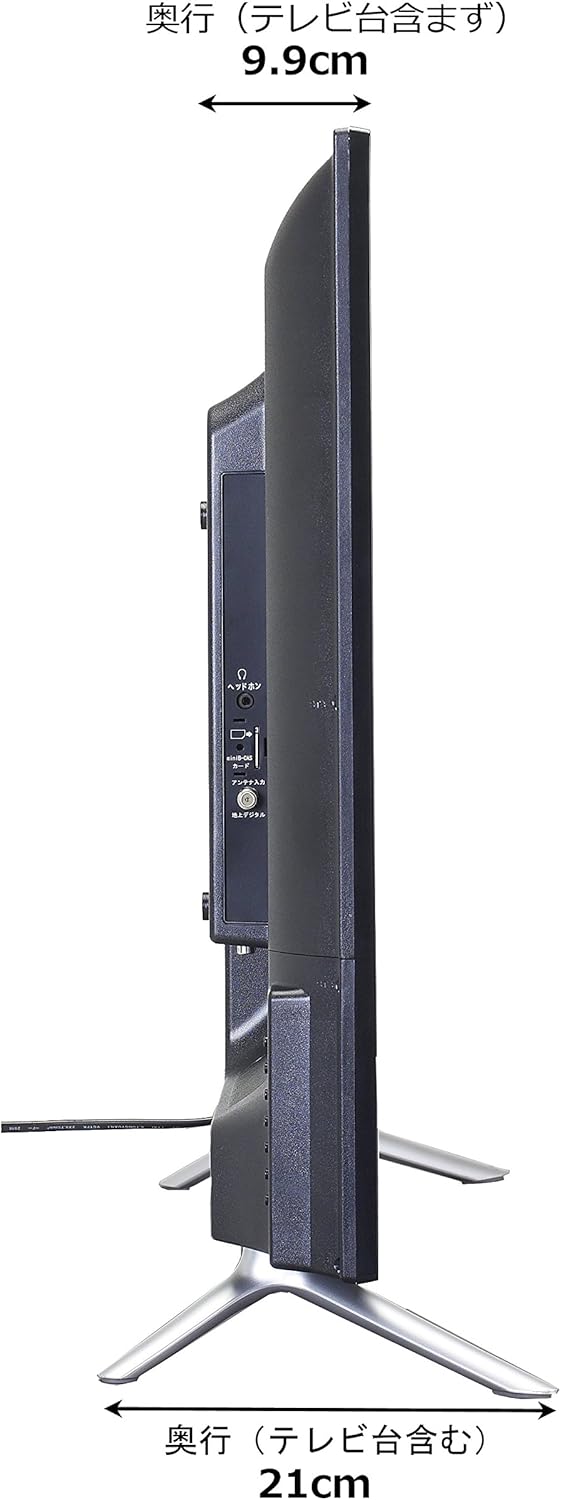
Image: Diagram showing the SANSUI SCM39-B11 TV on a stand next to a human figure (approx. 160cm tall) for visual scale, with TV dimensions indicated.
Кепилдик жана колдоо
Your SANSUI SCM39-B11 television comes with a warranty. Please refer to the included warranty card for details regarding coverage period and terms. Keep your purchase receipt as proof of purchase.
For technical support, service, or inquiries not covered in this manual, please contact SANSUI customer service. Contact information can typically be found on the warranty card or the official SANSUI webсайт.