
1. Киришүү
The Duronic DMUSB5X1 is a desk-mounted monitor arm designed to optimize your workspace. It features a gas spring mechanism for smooth, effortless adjustments, allowing you to position your monitor for optimal viewing comfort. This model also integrates a USB hub and audio ports for convenient connectivity directly at your desk.
This manual provides detailed instructions for the safe and efficient installation, operation, and maintenance of your Duronic DMUSB5X1 monitor arm.
2. Коопсуздук нускамалары
- Монтаждоо жана колдонуудан мурун бардык нускамаларды кунт коюп окуп чыгыңыз.
- Ensure your desk surface is strong enough to support the monitor arm and attached monitor(s).
- Ар бир кол үчүн 8 кг (17.6 фунт) салмактан ашпаңыз.
- Ensure all screws and connections are securely tightened before use. Periodically check for tightness.
- Балдарды жана үй жаныбарларын чогултуу аянтынан алыс кармаңыз.
- Use only the provided hardware. If any parts are missing or damaged, contact Duronic customer support.
- Adjust the gas spring tension carefully to match your monitor's weight. Improper tension can cause the monitor to drop or spring up unexpectedly.
3. Пакеттин мазмуну
Монтаждоону баштоодон мурун бардык компоненттердин бар экендигин текшериңиз:
- Monitor Arm Assembly (Gas Spring Arm, Pole)
- Desk Clamp База
- VESA монтаждоо плитасы
- USB and Audio Extension Cables
- Mounting Hardware (various screws, washers, spacers)
- Allen Keys for assembly and adjustment
4. Орнотуу жана орнотуу
Follow these steps to install your Duronic DMUSB5X1 monitor arm:
- Desk Clamp: Үстөлдү жайгаштыруу clamp base on your desk edge. Ensure the desk clamp is securely fastened to a stable surface. The clamp can accommodate desk thicknesses up to 68mm. Tighten the clamp бекем бураңыз.

4.1-сүрөт: Үстөл клamp орнотуу.
- Assemble Arm to Pole: Insert the monitor arm onto the pole of the desk clamp. Secure it with the provided screws and Allen key.
- Монитор үчүн VESA пластинкасын тиркөө: Carefully place your monitor face down on a soft, clean surface. Attach the VESA mounting plate to the back of your monitor using the appropriate screws and spacers (if needed). The arm supports VESA 75x75mm and 100x100mm patterns.
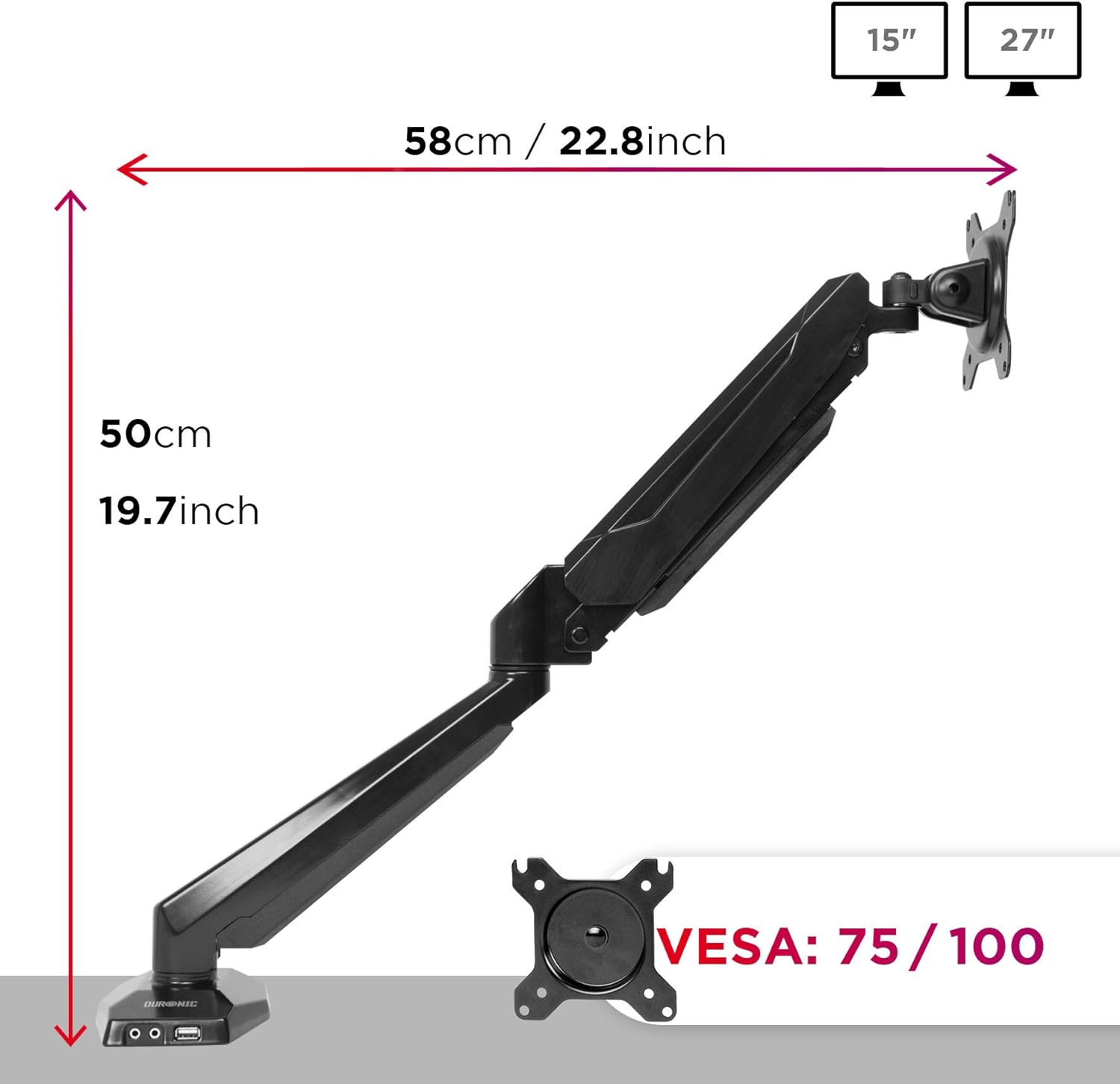
Figure 4.2: VESA plate and arm dimensions.
- Мониторду куралга орнотуу: Slide the monitor (with VESA plate attached) onto the arm's VESA head. Secure it with the locking mechanism or screws as per the specific design.
- Connect USB and Audio Cables: Connect the integrated USB and audio extension cables from the monitor arm base to the corresponding ports on your computer. This enables the convenient USB and audio ports on the arm's base.

Figure 4.3: Integrated USB and audio ports.
- Газ пружиналык чыңалууну жөнгө салуу: The gas spring comes pre-tensioned. You may need to adjust it to match your monitor's weight. Use the provided Allen key to turn the adjustment screw on the arm. Turn clockwise to increase tension for heavier monitors, and counter-clockwise to decrease tension for lighter monitors. Adjust until the monitor stays in position when moved.
5. Иштөө жана тууралоо
The Duronic DMUSB5X1 offers a wide range of adjustments for optimal viewing:
- Бийиктигин тууралоо: The gas spring arm allows for smooth vertical movement. Gently push or pull the monitor to the desired height.
- Россия: The VESA head allows tilting the monitor -90° (downwards) to +85° (upwards) to reduce glare and improve viewбурчтар.
- Айлануучу: The arm can swivel 180° left or right at the pole and at the arm joints, allowing you to share your screen or adjust its position.
- Айлануу: The VESA plate allows for 360° rotation, enabling you to switch between landscape and portrait orientations.
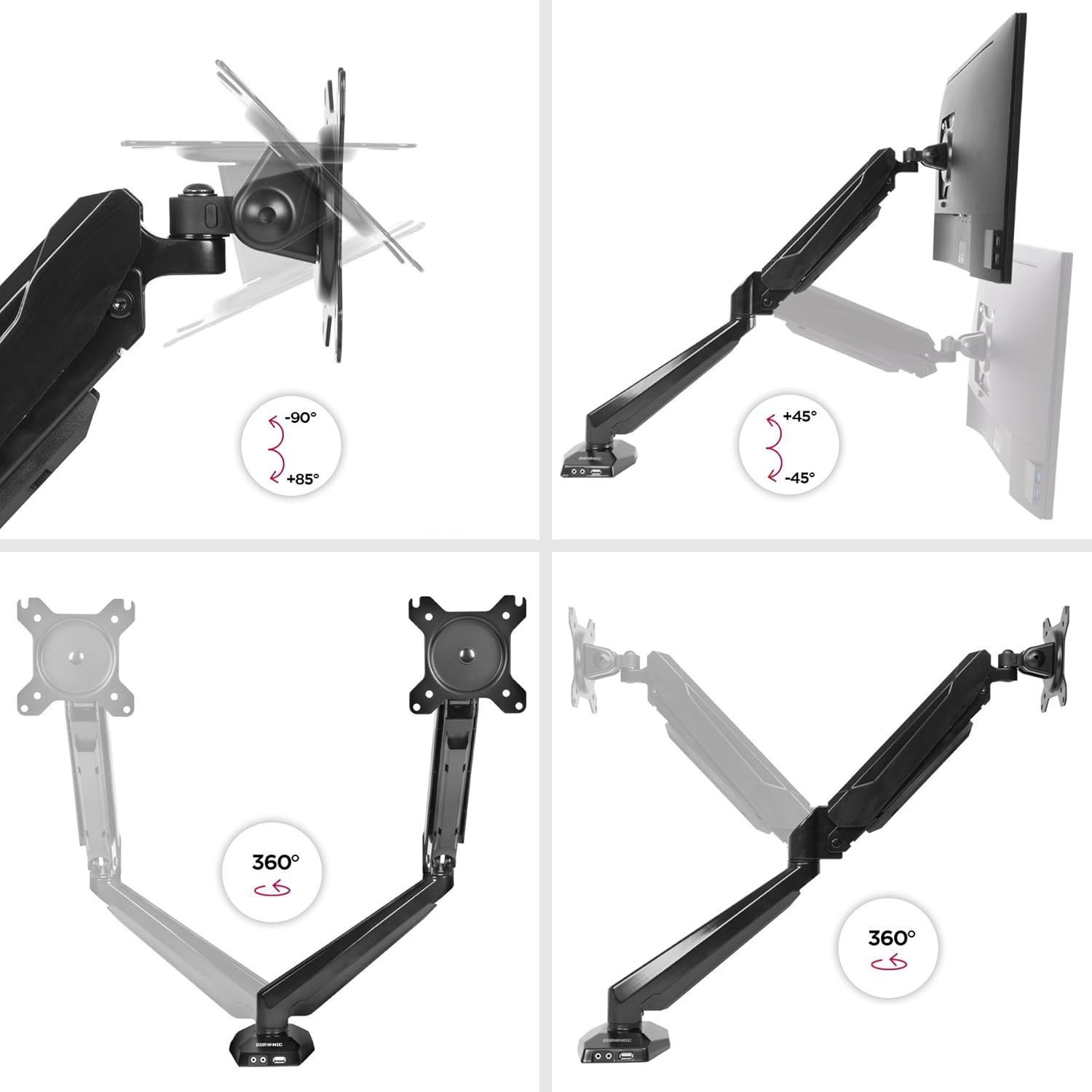
Figure 5.1: Monitor arm adjustment ranges.
- Integrated USB and Audio Ports: Use the two USB 2.0 ports for connecting peripherals like keyboards, mice, or USB drives. The headphone and microphone jacks provide convenient access for audio devices.
6. Техникалык тейлөө
- Тазалоо: Монитордун колун жумшак менен сүртүңүз, damp кездеме. Финишке зыян келтирүүчү абразивдүү тазалагычтардан же эриткичтерден качыңыз.
- Мезгилдүү текшерүүлөр: Бардык бурамалар менен байланыштарды дайыма текшерип туруңуз, алар бекем жана коопсуз бойдон калууда. Керек болсо кайра тартыңыз.
- Газ булагы жөндөө: If your monitor's weight changes, or if the arm no longer holds its position correctly, re-adjust the gas spring tension as described in the setup section.
7. Кыйынчылыктарды
| Көйгөй | Мүмкүн себеп | Чечим |
|---|---|---|
| Monitor does not stay in desired position (sags or springs up). | Incorrect gas spring tension. | Adjust the gas spring tension using the provided Allen key. Turn clockwise for heavier monitors, counter-clockwise for lighter monitors. |
| Monitor cannot be attached to the VESA plate. | Monitor VESA pattern is not compatible (not 75x75mm or 100x100mm). | Verify your monitor's VESA compatibility. An adapter may be required for non-standard patterns. |
| USB or audio ports on the arm base are not working. | Extension cables are not properly connected to the computer. | Ensure the USB and audio extension cables from the monitor arm base are securely plugged into the corresponding ports on your computer. |
| Arm feels loose or unstable. | Үстөл clamp is not tightened sufficiently or desk surface is unstable. | Үстөлдү кайра бекемдөө clamp. Ensure the desk surface is stable and within the recommended thickness. |
8. Техникалык шарттар
- Модел: DMUSB5X1
- Бренд: Duronic
- Материал: Алюминий
- Монитордун өлчөмүнүн шайкештиги: 15-27 дюйм (38-68 см)
- Салмак сыйымдуулугу: Up to 8 kg (17.6 lbs) per arm
- VESA шайкештиги: 75x75мм, 100x100мм
- Түзөтүүлөр:
- Кыйшык: -90 ° дан +85 ° чейин
- Айлануу: 180°
- Айлануу: 360°
- Desk Clamp Калыңдыгы: 68 мм чейин
- Integrated Ports: 2 x USB 2.0, 1 x Headphone Jack, 1 x Microphone Jack
9. Кепилдик жана колдоо
Кепилдик маалыматы: For detailed warranty terms and conditions, please refer to the manufacturer's official webсайтка же продуктунун таңгагында камтылган кепилдик картасы.
Кардарларды колдоо: If you encounter any issues or have questions regarding your Duronic DMUSB5X1 monitor arm, please visit the official Duronic website for support resources, FAQs, and contact information for their customer service team.