
Borofone BC19
Borofone BC19 Hero Single Wireless Earbud User Manual
Model: BC19 | Brand: Borofone
Introduction
This manual provides detailed instructions for the safe and efficient use of your Borofone BC19 Hero Single Wireless Earbud. Please read this manual thoroughly before using the product to ensure proper operation and to prevent damage.
Коопсуздук маалыматы
- Аппаратты экстремалдык температурага, нымдуулукка же суюктукка тийгизбеңиз.
- Аппаратты түшүрүүдөн же катуу таасирлерден сактаныңыз.
- Do not attempt to disassemble, repair, or modify the device yourself. This may void the warranty and cause damage.
- Аппаратты балдардан жана үй жаныбарларынан алыс кармаңыз.
- Көрсөтүлгөн кубаттоо көлөмүн гана колдонуңузtage (5V DC) to charge the device.
- Продукцияны жергиликтүү эрежелерге ылайык таштаңыз.
Пакеттин мазмуну
Сураныч, пакетте төмөнкү нерселерди текшериңиз:
- Borofone BC19 Single Wireless Earbud
- Заряддоо кутусу
- USB заряддоо кабели
- User Manual
Продукт бүттүview
Familiarize yourself with the components of your Borofone BC19 earbud and charging case.

Figure 1: The Borofone BC19 single wireless earbud securely placed within its white charging case, with the lid open, revealing the earbud and the charging cradle.
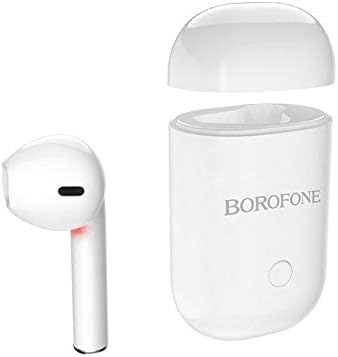
Figure 2: The white Borofone BC19 earbud is shown detached from its charging case, which has its lid open. This illustrates the compact design of both components.

Figure 3: The Borofone BC19 charging case is encased in a light grey protective silicone cover, featuring a power button icon and a small lanyard attached for portability.

Figure 4: A close-up of the bottom of the Borofone BC19 charging case, displaying the USB charging port and regulatory markings including "Model: BC19".
Техникалык шарттар
| Бренд | Borofone |
| Модел | BC19 |
| Түс | Ак |
| Type | Зымсыз кулактык гарнитура |
| Байланыш технологиясы | Зымсыз (Bluetooth 5.0) |
| Форма фактору | In-Ear |
| Шайкеш түзмөктөр | Көптөгөн |
| Колдоого алынган Profiles | A2DP, AVRCP |
| Заряддоо Voltage | 5V DC |
| Наушник заряддоо убактысы | 50 мүнөт |
| Заряддоо корпусунун заряддоо убактысы | 1 саат |
| Кулакчындын батареянын кубаттуулугу | 35 мАч |
| Заряддоо корпусунун батареясынын сыйымдуулугу | 180 мАч |
| Сүйлөшүү/Музыка убактысы | 3 саат |
| Күтүү убактысы | 120 саат |
| Продукциянын өлчөмдөрү | 11.99 x 1.91 x 5 см |
| Продукт Салмагы | 18 грамм |
Жайгашуу
1. Баштапкы заряддоо
Before first use, fully charge the earbud and its charging case.
- Place the earbud into the charging case.
- Connect the USB charging cable to the charging port on the case (refer to Figure 4 for port location) and plug the other end into a 5V DC power source.
- Корпустагы индикатор кубаттоо абалын көрсөтөт.
- Charging time for the earbud is approximately 50 minutes, and for the charging case, it is about 1 hour.
2. Күйгүзүү/өчүрүү
- Күйгүзүү: The earbud will automatically power on when removed from the charging case. Alternatively, press and hold the multi-function button on the earbud for a few seconds until you hear a power-on prompt.
- Өчүрүү: Place the earbud back into the charging case to automatically power off. Alternatively, press and hold the multi-function button for a few seconds until you hear a power-off prompt.
Иштөө нускамалары
1. Bluetooth Жупташтыруу
To connect your Borofone BC19 earbud to your device:
- Ensure the earbud is charged and powered on.
- Смартфонуңузда же башка шайкеш түзмөктө Bluetooth'ду иштетиңиз.
- Издөө available Bluetooth devices. The earbud will appear as "BC19" or "Borofone BC19".
- Select "BC19" from the list to pair. Once paired, you will hear a confirmation sound.
- If pairing fails, turn off the earbud and your device's Bluetooth, then repeat the steps.
2. Музыканы ойнотуу
- Ойнотуу/тындыруу: Көп функциялуу баскычты бир жолу басуу.
- Кийинки трек: Көп функциялуу баскычты эки жолу басыңыз.
- Мурунку трек: Көп функциялуу баскычты үч жолу басыңыз.
3. Чалууларды башкаруу
- Чалууга жооп берүү/аяктоо: Кирүүчү же активдүү чалуу учурунда көп функциялуу баскычты бир жолу басыңыз.
- Чакырууну четке кагуу: Кирүүчү чалуу учурунда көп функциялуу баскычты 2 секунд басып туруңуз.
Техникалык тейлөө
- Clean the earbud and charging case regularly with a soft, dry cloth.
- Абразивдүү тазалагычтарды же эриткичтерди колдонбоңуз.
- Аппаратты колдонбогондо салкын, кургак жерде сактаңыз.
- Тике күн нурунун же экстремалдык температуранын узакка созулган таасиринен алыс болуңуз.
Проблемаларды чечүү
| Көйгөй | Мүмкүн себеп | Чечим |
|---|---|---|
| Earbud does not power on. | Батарея аз. | Charge the earbud and charging case fully. |
| Түзмөк менен жупташтыруу мүмкүн эмес. | Bluetooth is off on device; earbud not in pairing mode; interference. | Ensure Bluetooth is enabled on your device. Turn the earbud off and on again. Move closer to the device. Clear previous Bluetooth connections on your device. |
| Үн жок же аз үн. | Volume too low; earbud not properly connected; earbud dirty. | Adjust volume on your device. Re-pair the earbud. Clean the earbud's speaker mesh. |
| Заряддоо маселелери. | Cable or power source issue; dirty charging contacts. | Try a different USB cable or power adapter. Ensure charging contacts on the earbud and case are clean and free of debris. |
| Sound quality is poor or buzzing. | Interference; earbud too far from device; faulty unit. | Move closer to your device. Avoid environments with strong electromagnetic interference. If the issue persists, contact customer support. |
Кепилдик жана колдоо
Borofone products are manufactured to high quality standards. For warranty information or technical support, please refer to the warranty card included in your package or visit the official Borofone webсайт. Кепилдик дооматтары үчүн сатып алганыңыздын далилин сактап коюңуз.
Ask a question about this manual
Ask about setup, troubleshooting, compatibility, parts, safety, or missing instructions. Manuals+ will review the question and use this page’s manual context to help answer it.