
1. Киришүү
This manual provides essential instructions for the safe and efficient use of your Kechaoda K116 basic mobile phone. Please read this manual thoroughly before operating your device to ensure proper functionality and to understand its features.
2. Пакеттин мазмуну
Пакетти ачкандан кийин, төмөндө көрсөтүлгөн нерселердин бардыгы бар экенин жана жакшы абалда экендигин текшериңиз:
- Kechaoda K116 Handset
- USB кабели
If any item is missing or damaged, please contact your retailer immediately.
3. Түзмөк бүттүview
Familiarize yourself with the physical components of your Kechaoda K116 mobile phone.
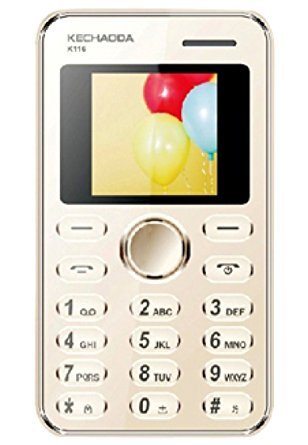
Сүрөт 3.1: Алдыңкы view of the Kechaoda K116, displaying the screen and numeric keypad.

3.2-сүрөт: Алдыңкы, каптал жана арткы views of the Kechaoda K116, highlighting its compact design and rear panel.
Негизги компоненттер:
- Дисплей экраны: 1.44-inch LED display for viewмаалымат алуу.
- Сандык баскычтоп: Номерлерди терүү жана текст киргизүү үчүн.
- Чабыттоо ачкычы: Central button for menu navigation.
- Чалуу/аяктоо баскычтары: For initiating and ending calls.
- Арткы камера: 0.3MP camera located on the back.
- Заряддоо порту: Located at the bottom for connecting the USB cable.
4. Орнотуу
4.1. SIM картаны орнотуу
- Телефон өчүк экенин текшериңиз.
- Телефондун арткы капкагын акырын чыгарып алыңыз.
- Remove the battery if it is already inserted.
- Locate the SIM card slot. Insert your SIM card with the gold contacts facing down and the cut corner aligned with the slot's orientation.
- SIM картаны ордуна чыкылдаганча акырын басыңыз.
4.2. Батареяны орнотуу
- After installing the SIM card, align the battery's gold contacts with the terminals in the battery compartment.
- Gently press the battery down until it is securely seated.
- Арткы капкакты кайра ордуна коюп, анын бекем орнотулганын текшериңиз.
4.3. Батареяны заряддоо
- Connect the small end of the USB cable to the charging port on your phone.
- USB кабелинин экинчи учун туура келген USB кубат адаптерине (кошумча эмес) же компьютердин USB портуна туташтырыңыз.
- Экрандагы батарейканын көрсөткүчү заряддоо абалын көрсөтөт.
- Батарея толук заряддалгандан кийин заряддагычты ажыратыңыз.
5. Иштөө нускамалары
5.1. Күйгүзүү / Өчүрүү
- Күйгүзүү үчүн: Press and hold the End/Power key (red button) until the screen lights up.
- Өчүрүү үчүн: Press and hold the End/Power key until the power off options appear, then select 'Power Off'.
5.2. Чалуу
- From the home screen, use the numeric keypad to enter the phone number.
- Чакырууну баштоо үчүн Чакыруу баскычын (жашыл баскыч) басыңыз.
- To end the call, press the End/Power key.
5.3. Чакырууну кабыл алуу
- When an incoming call rings, press the Call key (green button) to answer.
- Чакырууну четке кагуу үчүн Аяктоо/Күч баскычын басыңыз.
5.4. SMS жөнөтүү жана алуу
- SMS жөнөтүү үчүн: Navigate to 'Menu' > 'Messages' > 'Write Message'. Enter your text and the recipient's number, then send.
- SMS алуу үчүн: New messages will typically display a notification. Navigate to 'Menu' > 'Messages' > 'Inbox' to read.
6. Камераны колдонуу
The Kechaoda K116 features a 0.3MP rear camera for basic photography.
- Негизги менюдан "Камера" тандаңыз.
- Дисплей экранын колдонуп, объектиңизди кадрга алыңыз.
- Press the central navigation key or the designated camera button (if available) to capture the photo.
- Photos are saved to the phone's internal memory.
7. Техникалык тейлөө
- Тазалоо: Телефондун бетин тазалоо үчүн жумшак, кургак чүпүрөктү колдонуңуз. Суюк тазалоочу каражаттарды колдонбоңуз.
- Сактагыч: Телефонду түз күн нурунан жана экстремалдык температурадан алыс салкын, кургак жерде сактаңыз.
- Батареяга кам көрүү: Do not expose the battery to high temperatures or puncture it. Use only approved chargers.
- Суу таасири: This phone is not waterproof. Avoid contact with liquids.
8. Кыйынчылыктарды
If you encounter issues with your Kechaoda K116, refer to the following common problems and solutions:
- Телефон күйбөйт:
- Батарея туура салынганын жана заряддалганын текшериңиз.
- Press and hold the power key for several seconds.
- Тармак сигналы жок:
- SIM карта туура салынганын текшериңиз.
- Тармакты жакшыраак каптаган аймакка жылыңыз.
- Телефонду кайра күйгүзүңүз.
- Батарея кубатталбай жатат:
- Verify the USB cable and charger are securely connected.
- Электр розеткасынын иштешин текшериңиз.
- Try a different USB cable or charger if available.
- Чалууларды жасоо же кабыл алуу мүмкүн эмес:
- Тармак сигналынын күчүн текшериңиз.
- SIM картаңыз активдүү экенин жана балансыңызда/планыңызда жетиштүү сумма бар экенин текшериңиз.
- Verify that call barring or flight mode is not enabled.
9. Техникалык шарттар
| Өзгөчөлүк | Description |
|---|---|
| Модел | K116 |
| Дисплей | 1.44-inch LED, 128 x 160 pixels resolution |
| Камера | 0.3 МП арткы камера |
| Ички эс тутум | 32MB |
| SIM колдоо | Жалгыз SIM |
| Батарея | 800 мАч литий-ион |
| Байланыш | GSM (900/1800 MHz), Bluetooth |
| Форма фактору | Бар |
| Өлчөмдөр | 27.9 x 12.7 x 15.2 см |
| Салмагы | 150 г |
| Өндүрүүчү | Prema Sai Electronics |
10. Кепилдик жана колдоо
Your Kechaoda K116 mobile phone comes with a manufacturer's warranty:
- Аппарат Кепилдиги: Сатып алган күндөн тартып 1 жыл.
- Кутудагы аксессуарлардын кепилдиги: 6 months for accessories, including batteries, from the date of purchase.
Please retain your purchase receipt as proof of purchase for warranty claims. For technical support or warranty service, please contact your retailer or the manufacturer's authorized service center.


