
Introduction
Thank you for choosing the AVWOO IP67 Waterproof Bluetooth Speaker. This manual provides essential information for setting up, operating, and maintaining your speaker. Please read it carefully before use to ensure optimal performance and longevity of your device.

Image: The AVWOO A021 speaker, highlighting its IP67 waterproof rating.
Пакеттин мазмуну
Сураныч, төмөнкү нерселер үчүн кутучаны белгилеңиз:
- AVWOO IP67 Waterproof Bluetooth Speaker
- USB заряддоо кабели
- Аудио кабель (AUX)
- Camping Snap Hook (Carabiner)
- English User Manual

Image: All items included in the AVWOO speaker package.
Продукт бүттүview
Familiarize yourself with the speaker's controls and features:

Сүрөт: деталдуу view динамиктин башкаруу баскычтарынын жана алардын тиешелүү функцияларынын.
- LED Switch ON/OFF: Controls the speaker's LED lights.
- Күйгүзүү/өчүрүү: Динамикти күйгүзөт же өчүрөт.
- Next Track / Volume +: Кийинки трек үчүн кыска басыңыз, үнүн катуулатуу үчүн көпкө басыңыз.
- Previous Track / Volume -: Мурунку трек үчүн кыска басыңыз, үндү азайтуу үчүн көпкө басыңыз.
- Play/Pause / Answer Call: Музыка ойнотууну көзөмөлдөйт жана телефон чалууларын башкарат.
Спикерди заряддоо
Before first use, fully charge the speaker. A full charge typically takes 3-4 hours.
- Locate the charging port on the side of the speaker, usually protected by a waterproof flap.
- Open the flap and connect the small end of the USB charging cable to the speaker's charging port.
- USB кабелинин чоңураак учун USB кубат адаптерине (кошулмада жок) же компьютердин USB портуна туташтырыңыз.
- LED индикатору заряддоонун абалын көрсөтөт (мисалы, заряддоо үчүн кызыл, толук заряддалганда өчүк).
- Толук заряддалгандан кийин, кабелди сууруп, суу өткөрбөй турган капкактын бекем жабылганын текшериңиз, бул суу өткөрбөйт.
Жайгашуу
1. Күйгүзүү / Өчүрүү
- Күйгүзүү үчүн: басып, кармап туруңуз Күйгүзүү/ӨЧҮРҮҮ button until you hear an audible prompt and the LED lights activate.
- Өчүрүү үчүн: басып, кармап туруңуз Күйгүзүү/ӨЧҮРҮҮ динамик өчүп калганга чейин баскычты кайра басыңыз.
2. Bluetooth Жупташтыруу
Динамик биринчи жолу күйгүзүлгөндө же эч кандай түзмөк туташпаган болсо, жупташтыруу режимине автоматтык түрдө өтөт.
- Ensure the speaker is powered on and in pairing mode (LED lights may flash).
- Түзмөгүңүздө (смартфон, планшет, ноутбук) Bluetooth иштетиңиз жана жеткиликтүү түзмөктөрдү издеңиз.
- Select "AVWOO A021" (or similar name) from the list of devices.
- Once paired, the speaker will indicate a successful connection, and the LED lights may change pattern.
- The speaker will automatically reconnect to the last paired device when in range.

Image: The speaker demonstrating compatibility with various Bluetooth-enabled devices.
3. AUX туташуу
For devices without Bluetooth, use the included audio cable.
- Connect one end of the audio cable to the speaker's AUX-in port.
- Экинчи жагын аудио шайманыңыздын гарнитура уячасына туташтырыңыз.
- Динамик автоматтык түрдө AUX режимине өтөт.

Image: Instructions for connecting the speaker via AUX cable to a computer or laptop.
4. TF картасын ойнотуу
The speaker supports music playback directly from a TF (MicroSD) card.
- Insert a TF card (not included) into the designated slot on the speaker.
- Динамик картаны автоматтык түрдө аныктап, музыка ойной баштайт.
- Use the track control buttons to navigate through songs.

Image: How to insert a TF card into the speaker for direct music playback.
Иштөө нускамалары
1. Музыканы ойнотуу
- Ойнотуу/тындыруу: басыңыз Ойнотуу/Тыныгуу баскычын бир жолу.
- Кийинки трек: баскычын кыска басыңыз Кийинки трек / Көлөм + баскычы.
- Мурунку трек: баскычын кыска басыңыз Previous Track / Volume - баскычы.
- Көлөмү: көпкө басыңыз Кийинки трек / Көлөм + баскычы.
- Үнүн азайтуу: көпкө басыңыз Previous Track / Volume - баскычы.
2. Чалууларды башкаруу
When connected via Bluetooth, you can manage phone calls directly from the speaker.
- Чакырууга жооп берүү: басыңыз Чакырууга жооп бер баскычын бир жолу.
- Чакырууну аяктоо: басыңыз Чакырууга жооп бер Чалуу учурунда баскычты бир жолу басыңыз.
- Чакырууну четке кагуу: басып, кармап туруңуз Чакырууга жооп бер баскычы.

Image: The speaker's call answering function, useful for hands-free communication.
3. LED жарыгын башкаруу
The speaker features colorful LED lights.
- Жарыктарды күйгүзүү/өчүрүү: басыңыз LED Switch ON/OFF баскычы.
- Жарык режимин өзгөртүү: кайра-кайра басыңыз LED Switch ON/OFF button to cycle through available light modes (e.g., flashing, solid, off).
Video: A short demonstration of the AVWOO IP67 Waterproof Bluetooth Speaker's LED light features and waterproof capabilities.
Техникалык тейлөө
Proper care ensures the longevity of your AVWOO speaker.
- Тазалоо: Динамикти жумшак менен сүртүңүз, гamp кездеме. Катуу химиялык заттарды же абразивдүү тазалагычтарды колдонбоңуз.
- Суу каршылык: The speaker is IP67 rated, meaning it is protected from dust and can withstand immersion in water up to 1 meter for 30 minutes. Always ensure the charging port flap is securely closed before exposing the speaker to water.
- Сактагыч: Динамикти түз күн нурунан жана өтө температурадан алыс салкын, кургак жерде сактаңыз.
- Көчүрүү мүмкүнчүлүгү: Use the included camping snap hook to securely attach the speaker for outdoor activities.
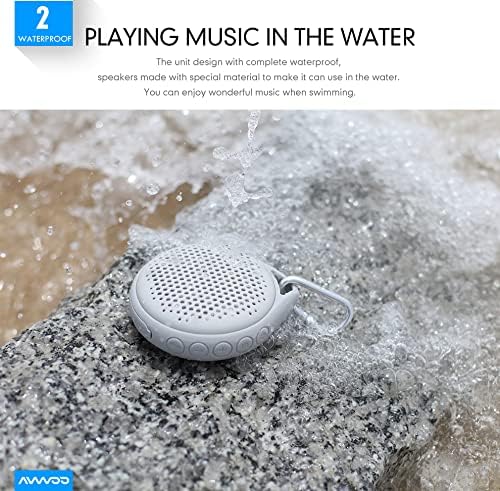
Image: The speaker being used near water, showcasing анын суу өткөрбөйт дизайны.

Image: The speaker hanging from a shower rail, ideal for bathroom use.

Image: The speaker attached to a backpack with its carabiner, emphasizing its portability for outdoor use.
Проблемаларды чечүү
| Көйгөй | Мүмкүн себеп | Чечим |
|---|---|---|
| Динамик күйбөйт. | Батарея аз. | Динамикти 3-4 саатка заряддаңыз. |
| Bluetooth түзмөгү менен жупташтыруу мүмкүн эмес. | Bluetooth is off on your device or speaker is not in pairing mode. | Ensure Bluetooth is enabled on your device and the speaker is in pairing mode. Move devices closer. |
| Үн жок же үнү төмөн. | Динамикте же туташкан түзмөктө үн өтө төмөн. | Динамиктин жана туташкан түзмөгүңүздүн үнүн жогорулатыңыз. |
| Үндүн бузулушу. | Volume too high or speaker is too far from the source. | Reduce volume. Ensure speaker is within Bluetooth range (up to 50 feet). |
| LED жарыктары иштебейт. | LED lights are turned off. | Press the LED Switch ON/OFF button to activate or change modes. |
Техникалык шарттар
| Өзгөчөлүк | Деталь |
|---|---|
| Модель аты | A021-BK |
| Динамик түрү | Сыртта |
| Өзгөчө өзгөчөлүк | Суу өткөрбөйт (IP67) |
| Байланыш технологиясы | Bluetooth 4.2, USB, AUX |
| Bluetooth диапазону | 50 фут (15.24 метр) чейин |
| Динамиктин максималдуу чыгаруу күчү | 5 Ватт |
| Батарея сыйымдуулугу | 1000mAh |
| Оюн убактысы | 12 саатка чейин |
| Башкаруу ыкмасы | Touch Buttons |
| Продукциянын өлчөмдөрү | 4 x 4 x 1.6 дюйм |
| Элемент Салмагы | 10.5 унция |
| Өндүрүүчү | SHENZHEN AVWOO TECHNOLOGY CO., LTD |
Кепилдик жана колдоо
This AVWOO speaker comes with a limited warranty. For specific warranty terms and conditions, please refer to the warranty card included in your package or contact AVWOO customer support.
For technical support, troubleshooting assistance, or any inquiries regarding your product, please visit the official AVWOO website or contact their customer service team through the contact information provided on the product packaging or their webсайт.
Коопсуздук маалыматы
- Динамикти бөлүктөргө бөлбөңүз, оңдобоңуз же өзгөртпөңүз. Бул бузулууга, электр тогуна урунууга же өрткө алып келиши мүмкүн.
- Keep the speaker away from extreme temperatures, direct sunlight, and heat sources.
- Do not expose the speaker to open flames.
- Ensure the charging port cover is securely closed when using the speaker near water to maintain its waterproof integrity.
- Берилген заряддоо кабелин же тастыкталган эквивалентти гана колдонуңуз.
- Балдар жетпеген жерде сактаңыз.