
Introduction
The Perixx PERIBOARD-313 is a wired, full-sized keyboard featuring an integrated touchpad and a 3-level LED backlight. Designed for convenience and efficiency, this keyboard combines typing and pointing functionalities into a single device, making it suitable for various computing environments. Its dimensions are approximately 456mm x 160mm x 30mm, with a touchpad measuring 57mm x 40mm.
This manual provides comprehensive instructions for the proper setup, operation, and maintenance of your PERIBOARD-313 keyboard to ensure optimal performance and longevity.
Пакеттин мазмуну
- 1 x Perixx PERIBOARD-313 Wired USB Backlit Keyboard with Touchpad
- Колдонуучунун Колдонмосу (бул документ)

Image: The Perixx PERIBOARD-313 keyboard, its USB cable, and the user manual shown next to the product packaging.
Системалык талаптар
- Иштетүү системасы: Windows 7, 8 же 10
- Connectivity: Available USB port
Жайгашуу
- Баскычтопту таңгактан чыгаруу: Carefully remove the PERIBOARD-313 from its packaging.
- Компьютерге туташуу: Баскычтоптун USB туташтыргычын компьютериңиздеги жеткиликтүү USB портуна сайыңыз.
- Драйверди орнотуу: The keyboard is plug-and-play. Your operating system will automatically detect and install the necessary drivers. No additional software installation is required.
- Функционалдуулугун текшерүү: Once connected, the keyboard and touchpad should be immediately functional. Test by typing and moving the cursor.
Иштөө нускамалары
Баскычтоптун жайгашуусу
The PERIBOARD-313 features a standard full-size US English QWERTY layout with 104 keys, including a dedicated numeric keypad and function keys.

Image: Detailed diagram illustrating the full QWERTY keyboard layout, including the numeric keypad and integrated touchpad.
Touchpad функциялары
The integrated touchpad provides precise cursor control and includes two buttons that function as left and right mouse clicks.
- Курсордун кыймылы: Slide your finger across the touchpad surface to move the cursor on the screen.
- Сол чыкылдатуу: Press the left button below the touchpad or tap once on the touchpad surface.
- Оң чыкылдатуу: Press the right button below the touchpad or tap with two fingers on the touchpad surface (if supported by OS settings).
- Жылдыруу: Use two fingers to scroll vertically on the touchpad (if supported by OS settings).
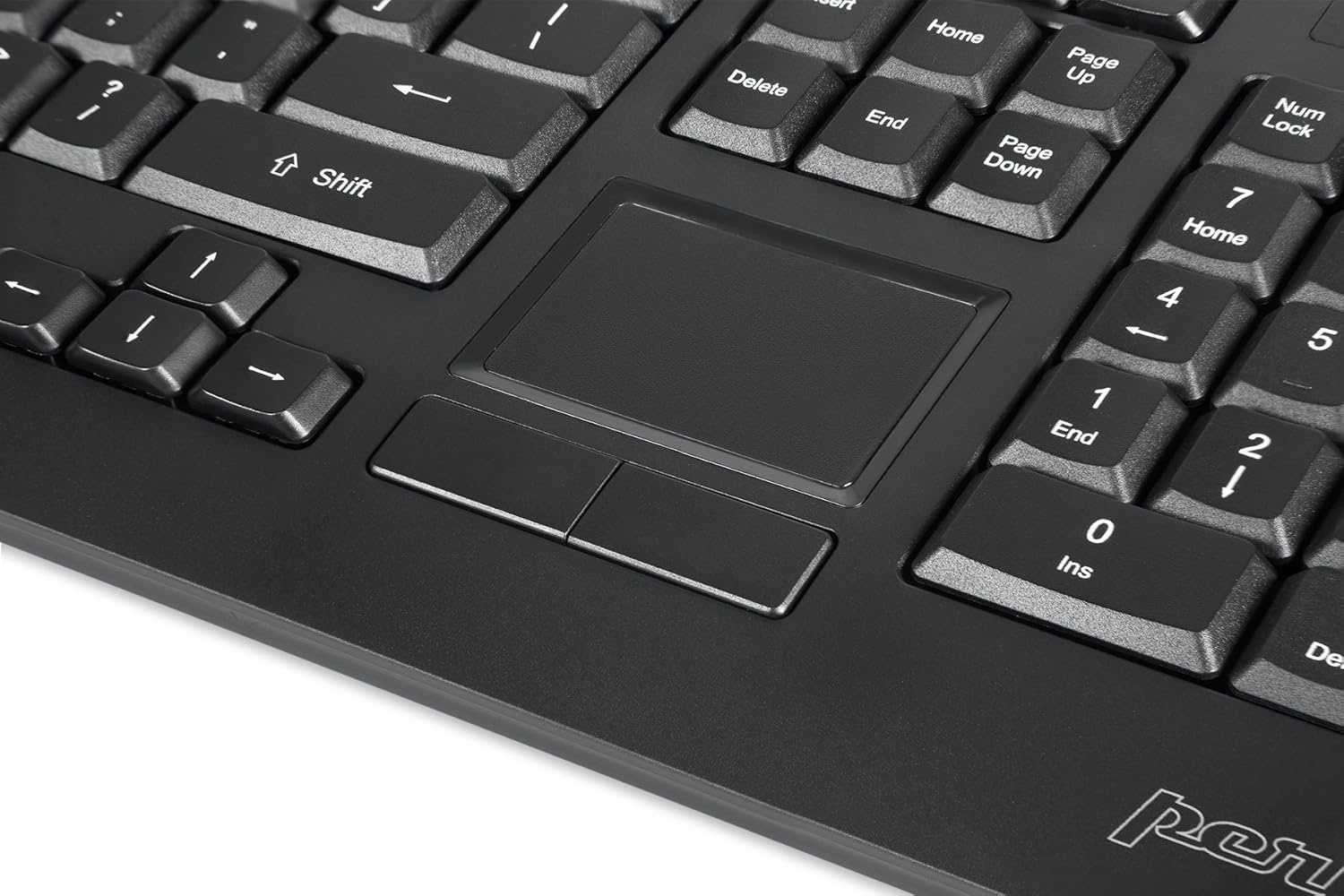
Image: A close-up of the integrated touchpad, highlighting its surface and the two dedicated click buttons.

Image: A user's hand interacting with the touchpad for cursor control.
Арткы жарыкты башкаруу
The keyboard features a white LED backlight with three adjustable brightness levels. Use the dedicated backlight control keys to adjust the illumination.
- Арткы жарыкты күйгүзүү/өчүрүү: басыңыз Fn + F12 баскыч айкалышы.
- Жарыктыкты жөндөө: Басыңыз Fn + F11 үч жарыктык деңгээли аркылуу айлануу үчүн.
Мультимедиа ачкычтары
The PERIBOARD-313 includes 10 multimedia function keys for quick access to media controls and internet features. These functions are activated by holding the Fn key and pressing the corresponding function key (F1-F10).
- Fn+F1: Медиа ойноткучту ачыңыз
- Fn+F2: Үндү төмөндөтүү
- Fn+F3: Үндү көтөрүү
- Fn+F4: Үнсүз
- Fn+F5: Мурунку трек
- Fn+F6: Кийинки трек
- Fn+F7: Ойнотуу/Тыныгуу
- Fn+F8: Токто
- Fn+F9: Open Web Браузер
- Fn+F10: Электрондук почта кардарын ачыңыз
Интегралдык USB Hub
The keyboard features two integrated USB 2.0 hubs, allowing you to connect additional USB devices directly to the keyboard for convenience.

Image: The side of the keyboard displaying the two built-in USB 2.0 ports for connecting peripherals.
Техникалык тейлөө
- Тазалоо: Disconnect the keyboard from your computer before cleaning. Use a soft, damp cloth to wipe the surface. For deeper cleaning between keys, use compressed air to remove dust and debris. Avoid using harsh chemicals or abrasive cleaners.
- Сактагыч: Клавиатураны кургак жерде, өтө жогорку температурадан жана түз күн нурунан алыс сактаңыз.
- Суюктук таасири: This keyboard is not water-resistant. Avoid spilling liquids on it. If liquid exposure occurs, immediately disconnect the keyboard and allow it to dry completely before reconnecting.
Проблемаларды чечүү
| Көйгөй | Мүмкүн себеп | Чечим |
|---|---|---|
| Баскычтоп жооп бербей жатат | Бош USB туташуу, туура эмес USB порт, драйвер маселеси. |
|
| Сенсордук такта иштебейт | Driver issue, touchpad disabled (unlikely for wired), physical damage. |
|
| Backlight not turning on/off or adjusting | Туура эмес баскыч айкалышы, программалык камсыздоонун карама-каршылыгы. |
|
| Мультимедиа баскычтары иштебейт | Туура эмес баскыч айкалышы, программалык камсыздоонун карама-каршылыгы. |
|
Техникалык шарттар
| Бренд | Perixx |
| Модель аты | PERIBOARD-313 US |
| Модель номери | 11445 |
| Байланыш технологиясы | USB-A (Зымдуу) |
| Keyboard Description | QWERTY, Full-sized, Backlit |
| Өзгөчө өзгөчөлүк | Backlit, Integrated Touchpad, USB Hubs |
| Түс | Кара |
| Баскычтоптун арткы жарык түсү | Single Color (White LED) |
| Материал | ABS пластик |
| Ачкычтардын саны | 104 |
| Которуу түрү | Мембрана |
| Сенсордук панелдин өлчөмдөрү | 57мм x 40мм (2.24" x 1.57") |
| Баскычтоптун өлчөмдөрү | 456 мм x 160 мм x 30 мм (17.95" x 6.30" x 1.18") |
| Элемент Салмагы | 1.85 фунт |
| Total USB 2.0 Ports | 2 (Integrated Hubs) |
Image: Technical drawing with key dimensions of the PERIBOARD-313 keyboard.
Кепилдик
The Perixx PERIBOARD-313 comes with a 1 жылдык Чектелген Кепилдик from the date of purchase. This warranty covers manufacturing defects and workmanship under normal use. It does not cover damage caused by misuse, accident, modification, or unauthorized repair. Please retain your proof of purchase for warranty claims.
Колдоо
For further assistance, technical support, or warranty inquiries, please visit the official Perixx webсайтка же кардарларды тейлөөгө кайрылыңыз. Көбүрөөк маалымат жана байланыш маалыматтарын даректен таба аласыз Amazon'догу Perixx бренд дүкөнү.