
Alarm.com ADC-V723x
Alarm.com ADC-V723 сырткы Wi-Fi камерасынын колдонуучу колдонмосу
Model: ADC-V723x
1. Продукт бүтүп калдыview
The Alarm.com ADC-V723 is a high-definition 1080p outdoor Wi-Fi camera designed to provide reliable surveillance for your property. Featuring High Dynamic Range (HDR) and powerful Video Analytics, it can detect and alert you to people, vehicles, and animals. Its robust design ensures performance in various lighting conditions and environments. This manual provides comprehensive instructions for installation, operation, and maintenance.
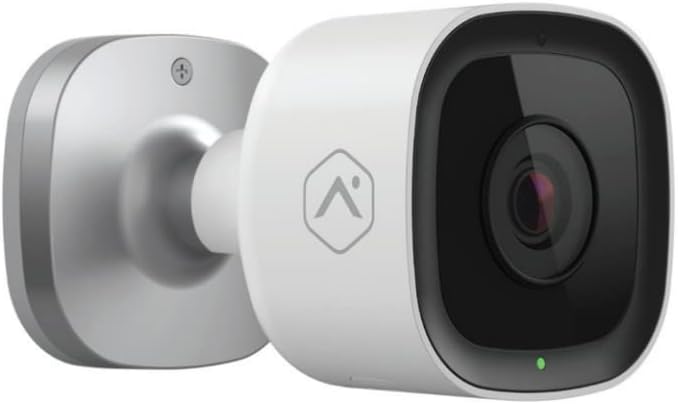
Сүрөт: алдыңкы view of the Alarm.com ADC-V723 Outdoor Wi-Fi Camera, showing its compact, bullet-style design and lens.
2. Коопсуздук маалыматы
- Ensure the camera is installed in a location that complies with local building codes and regulations.
- Камера менен кошо берилген кубат адаптерин гана колдонуңуз.
- Камераны анын иштөө диапазонунан тышкаркы экстремалдык температурага дуушар кылбаңыз.
- Камераны күчтүү электромагниттик кийлигишүү булактарынын жанына коюудан качыңыз.
- Тазалоодон же тейлөөдөн мурун электр энергиясын өчүрүңүз.
3. Пакеттин мазмуну
Пакетиңизде бардык буюмдар бар экенин текшериңиз:
- Alarm.com ADC-V723 Outdoor Wi-Fi Camera
- Монтаждоо плитасы
- Монтаждоо бурамдары жана дубал анкерлери
- Кубаттуу адаптер
- Орнотуу боюнча колдонмо (бул документ)
4. Орнотуу жана орнотуу
4.1 Жайгашкан жерди тандоо
Каалаган нерсени камсыз кылган ачык жерди тандаңыз viewing angle and is within range of your Wi-Fi network. The camera is designed for outdoor use and is IP67 rated for weather resistance. Consider areas with good lighting or where the camera's night vision capabilities can be maximized.
4.2 Камераны орнотуу
- Secure the mounting plate to the desired surface using the provided screws and wall anchors. Ensure the plate is level.
- Attach the camera to the mounting plate by aligning the camera with the plate and twisting until it locks securely.
- Adjust the camera's angle to achieve the optimal field of view.
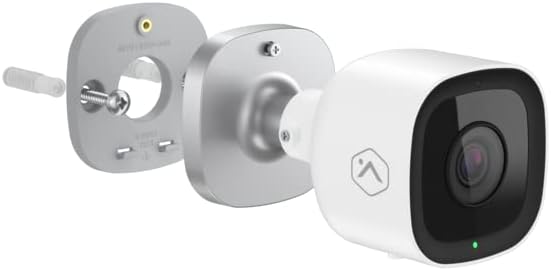
Сүрөт: жарылды view showing the Alarm.com ADC-V723 camera, its mounting plate, and a screw with wall anchor, illustrating the assembly process.
4.3 Powering On and Connecting to Wi-Fi
- Connect the power adapter to the camera and plug it into a suitable outdoor power outlet.
- Wait for the camera's LED indicator to show a specific status (refer to the LED status guide in Section 5.2).
- Download the Alarm.com mobile application from your device's app store.
- Follow the in-app instructions to add the ADC-V723 camera to your Alarm.com system and connect it to your Wi-Fi network. This typically involves scanning a QR code on the camera or entering its MAC address.
5. Камераны иштетүү
5.1 Live View жана Жаздыруу
Access live video feeds and recorded clips through the Alarm.com mobile app or web портал. Сиз жасай аласыз view реалдуу убакыт footage, initiate manual recordings, and review event-triggered clips.
5.2 LED абал көрсөткүчтөрү
The camera features an LED indicator that communicates its current status:
- Катуу жашыл: Connected to Wi-Fi and operating normally.
- Жаркылдаган жашыл: Attempting to connect to Wi-Fi.
- Катуу кызыл: Not connected to Wi-Fi or an error has occurred.
- Жаркылдаган кызыл: Firmware update in progress or factory reset.
5.3 Video Analytics and Alerts
The ADC-V723 supports advanced Video Analytics. Configure detection zones and rules within the Alarm.com app to receive specific alerts for people, vehicles, or animals entering designated areas. Alerts can be customized to send notifications to your mobile device.
5.4 Night Vision and HDR
The camera is equipped with infrared night vision, allowing clear video capture up to 40 feet in low-light conditions. High Dynamic Range (HDR) technology enhances video quality by balancing bright and dark areas, providing clearer images in challenging lighting environments.
6. Техникалык тейлөө
- Дайыма камеранын линзасын жумшак, гamp cloth to ensure clear image quality. Do not use harsh chemicals.
- Periodically check the mounting hardware to ensure the camera remains securely fastened.
- Ensure the power cable is free from damage and properly secured.
- Keep the camera's firmware updated through the Alarm.com app to ensure optimal performance and access to new features.
7. Кыйынчылыктарды
| Көйгөй | Мүмкүн себеп | Чечим |
|---|---|---|
| Камера күйбөй жатат | Электр кубаты жок, адаптер туура эмес, туташуу бош. | Check power outlet, ensure connections are secure, try a different outlet. |
| Wi-Fi'га туташпай жатат | Incorrect Wi-Fi password, camera too far from router, network interference. | Verify Wi-Fi password, move camera closer to router, reduce interference, restart router. |
| Видеонун сапаты начар | Кир линза, начар өткөрүү жөндөмдүүлүгү, начар жарык. | Clean lens, check internet speed, ensure adequate lighting or rely on night vision. |
| Кыймыл эскертүүлөрү жок | Incorrect Video Analytics settings, notifications disabled. | Review and adjust Video Analytics rules in the app, enable notifications for the camera. |
8. Техникалык шарттар
| Өзгөчөлүк | Деталь |
|---|---|
| Модель номери | ADC-V723x |
| Видео тартуунун резолюциясы | 1080p (1920x1080) |
| Байланыш | Wi-Fi |
| Power Source | Электр зымдары |
| Ички/тышкы колдонуу | Сыртта |
| Viewбурч | 167 градус |
| Түнкү көрүү диапазону | 40 Фут |
| Материал | Металл |
| Өлчөмдөрү (L x W x Y) | 2.5 x 2.5 x 4.5 дюйм |
| Элемент Салмагы | 1.32 фунт |
| Эл аралык коргоо рейтинги | IP67 |
| Өзгөчө өзгөчөлүк | Motion Sensor, HDR |
9. Кепилдик жана колдоо
For warranty information and technical support, please contact your Alarm.com service provider or visit the official Alarm.com webТүзмөктү өзүңүз оңдоого аракет кылбаңыз, анткени бул кепилдикти жокко чыгарышы мүмкүн.
For additional resources and FAQs, please refer to the Alarm.com support portal.
Ask a question about this manual
Ask about setup, troubleshooting, compatibility, parts, safety, or missing instructions. Manuals+ will review the question and use this page’s manual context to help answer it.