
Продукт бүттүview
The Seasonic FOCUS GX-650 is a 650W 80 PLUS Gold certified, full-modular ATX power supply. Engineered with advanced technology, this power supply delivers outstanding electrical performance in a compact design. It features a low-noise operation and utilizes premium Japanese capacitors for enhanced reliability and stability.

Сүрөт: алдыңкы view of the Seasonic FOCUS GX-650 power supply.
Негизги өзгөчөлүктөрү
- Компакт өлчөмү: 140 mm deep, offering a high power output to size ratio for versatile system integration.
- Full Modular Design: Allows users to connect only the necessary cables, reducing clutter and improving airflow within the system for better ventilation.
- 80 PLUS Алтын тастыкталган: Achieves 87% efficiency at 20% load, 90% efficiency at 50% load, and 87% efficiency at 100% load, ensuring energy savings and reduced heat generation.
- Гибриддик үнсүз желдеткичти башкаруу: Seasonic's patented three-phased thermal control system optimizes the balance between silence and cooling. This feature operates in three stages: Fanless Mode, Silent Mode, and Cooling Mode.
- Premium Japanese Capacitors: Ensures long-term stability and reliability.
- 10 жылдык кепилдик: Reflects a commitment to superior product quality and customer assurance.
Пакеттин мазмуну
Төмөндө саналып өткөн нерселердин баары сиздин продукт таңгагыңызда камтылганын текшериңиз:
- Seasonic FOCUS GX-650 Power Supply Unit
- Modular Cable Set (Mainboard, CPU, PCIe, SATA, Molex)
- AC Power Cord
- Cable Ties and Velcro Straps
- PSU Tester
- User Manual
- Carrying Bag for Cables

Image: All components included in the Seasonic FOCUS GX-650 power supply package.
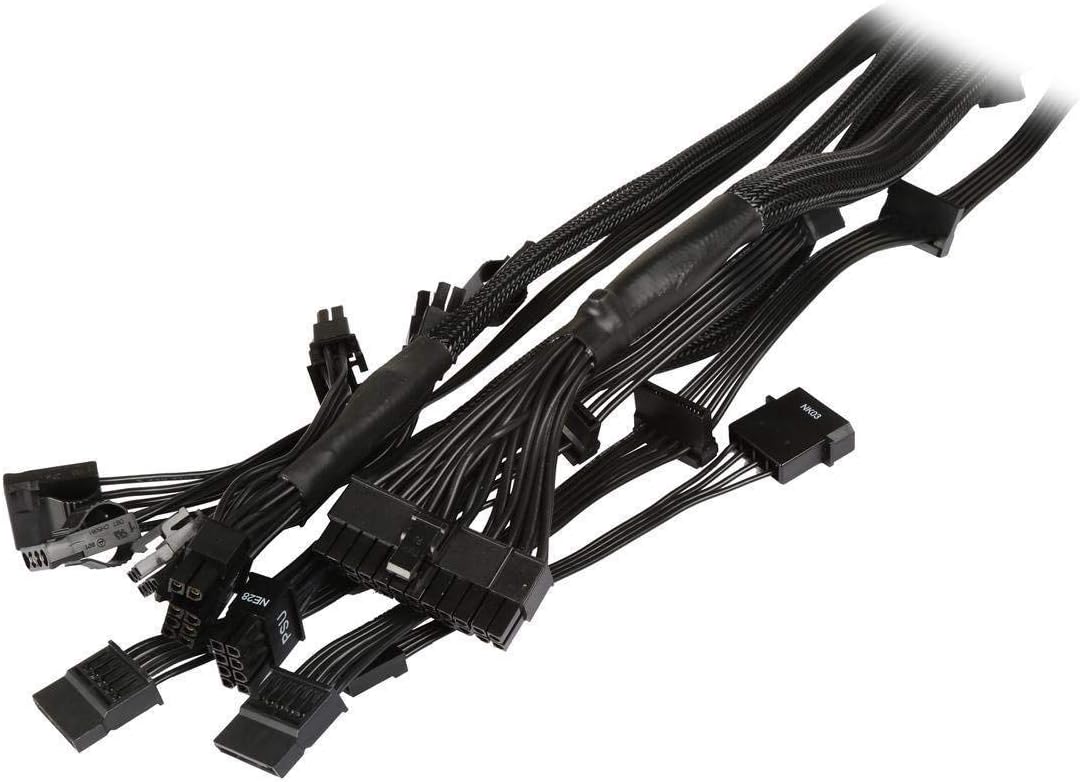
Сүрөт: Жакын план view of the modular cables provided with the Seasonic FOCUS GX-650.
Video: Official unboxing of the Seasonic FOCUS GX Power Supply, showing package contents and initial setup.
Video: Unboxing of the Seasonic FOCUS Plus Gold, demonstrating the included accessories and power supply unit.
Орнотуу жана орнотуу
Before installing your Seasonic FOCUS GX-650 power supply, ensure your computer system is powered off and disconnected from the main power outlet. Refer to your computer case and motherboard manuals for specific installation guidelines.
- Mount the power supply securely into the designated PSU bay in your computer case using the provided screws.
- Connect the necessary modular cables to the power supply unit. The connectors are clearly labeled for Mainboard (M/B), CPU, PCIe, SATA, and Molex.
- Connect the 24-pin mainboard cable to your motherboard.
- Connect the 4/8-pin CPU power cable(s) to your motherboard.
- Connect the 6/8-pin PCIe power cable(s) to your graphics card(s) as required.
- Connect SATA and Molex cables to your storage drives and other peripherals.
- Ensure all connections are firm and properly seated. Use the provided cable ties and Velcro straps for organized cable management.
- AC кубат шнурын кубат булагына, андан кийин розеткага туташтырыңыз.
- Toggle the power switch on the PSU to the 'ON' position.
Маанилүү коопсуздук эскертүүсү: This power supply is only compatible with cables provided by Seasonic. Using unapproved cables may result in malfunction and void the warranty.

Сүрөт: Арткы view of the Seasonic FOCUS GX-650 showing modular cable connection ports.
Иштөө нускамалары
The Seasonic FOCUS GX-650 is designed for reliable and efficient operation. Once installed, the power supply will automatically manage power delivery to your system components. The Hybrid Silent Fan Control feature allows for quiet operation under low to moderate loads, with the fan activating only when necessary to maintain optimal temperatures.
- Fanless Mode: Under low power loads, the fan may remain off for silent operation.
- Үнсүз режим: As load increases, the fan will spin at a low RPM to maintain quiet cooling.
- Муздатуу режими: Under high loads, the fan speed will increase to provide maximum cooling performance.
Ensure adequate ventilation around your computer case to facilitate proper airflow for the power supply and other components.

Сүрөт: Жогорку view of the Seasonic FOCUS GX-650, highlighting the cooling fan.
Техникалык тейлөө
The Seasonic FOCUS GX-650 power supply requires minimal maintenance. Regular cleaning can help ensure optimal performance and longevity.
- Чаңды тазалоо: Periodically clean dust from the power supply's fan grille and ventilation openings using compressed air. Ensure the system is powered off and unplugged before cleaning.
- Кабелдик башкаруу: Periodically check cable connections to ensure they remain secure and free from obstruction.
- Экологиялык шарттар: Operate the power supply in a clean, dry environment with stable temperatures to prevent damage.
Проблемаларды чечүү
If you encounter issues with your Seasonic FOCUS GX-650 power supply, consider the following basic troubleshooting steps:
- Кубат жок: AC кубат шнуру кубат булагына жана розеткага бекем туташтырылганын текшериңиз. Кубат булагындагы кубат которгучу "КҮЙҮК" абалында экенин текшериңиз. Розетканы башка түзмөк менен текшериңиз.
- Система жүктөлбөй жатат: Double-check all modular cable connections to the motherboard, CPU, and graphics card. Ensure they are fully seated.
- Intermittent Shutdowns: This could indicate an overloaded power supply or overheating. Verify your system's power requirements do not exceed the PSU's capacity. Ensure adequate airflow within the case.
- адаттан тыш үндөр: While the Hybrid Silent Fan Control minimizes noise, persistent or unusual noises (e.g., grinding, buzzing) may indicate a fan issue. If the noise is significant, contact customer support.
- Using the PSU Tester: The included PSU tester can help verify basic power supply functionality. Connect the 24-pin mainboard cable to the tester and power on the PSU. If the tester indicates a fault, the PSU may be defective.
For advanced troubleshooting or issues not resolved by these steps, please contact Seasonic customer support.

Сүрөт: Арткы view of the Seasonic FOCUS GX-650, showing the power input and hybrid mode switch.
Техникалык шарттар
| Спецификация | Нарк |
|---|---|
| Модель аты | FOCUS Plus 650 Gold |
| Бренд | Сезондук |
| Шайкеш түзмөктөр | Персоналдык компьютер |
| Туташтыргыч түрү | ATX |
| Чыгуу Wattage | 650 Ватт |
| Форма фактору | ATX12V |
| Муздатуу ыкмасы | Аба |
| Элементтин өлчөмдөрү (L x W x Y) | 7.28 x 12.44 x 4.69 дюйм |
| Элемент Салмагы | 1.5 килограмм |
| Энергия менен жабдуунун дизайны | Толук модулдук |
| Күйөрмандардын саны | 1 |
| Fan Size | 120 миллиметр |
| Максималдуу киргизүү көлөмүtage | 240 вольт (AC) |
| Минималдуу киргизүү көлөмүtage | 100 вольт (AC) |
| Модель номери | SSR-650FX |
| Кепилдиктин сүрөттөлүшү | 10 years manufacturer direct warranty |
Кепилдик жана колдоо
The Seasonic FOCUS GX-650 (SSR-650FX) is backed by a comprehensive 10-year manufacturer direct warranty. Бул кепилдик нормалдуу колдонуудагы материалдардагы жана жасалгадагы кемчиликтерди камтыйт.
For warranty claims, technical support, or any product-related inquiries, please visit the official Seasonic webсайтка же кардарларды тейлөө бөлүмүнө кайрылыңыз. Кепилдикти текшерүү үчүн сатып алганыңыздын далилин сактаңыз.