
Introduction
The Beurer HM55 Wireless Thermometer and Hygrometer is designed to monitor your indoor climate, providing real-time data on temperature and relative humidity. This device helps you maintain a comfortable and healthy environment within your home by displaying current conditions and allowing long-term monitoring via the Beurer FreshRoom app on your smartphone. This manual provides essential information for the safe and effective use of your HM55 device.
Негизги өзгөчөлүктөрү
- Monitors and displays current time, temperature, and relative humidity.
- Тез өтүүнү камсыз кылатview of indoor environment quality through a colored indicator.
- Bluetooth Smart connectivity for long-term monitoring with the free Beurer FreshRoom app.
- Allows monitoring of temperature and humidity trends over time with easy-to-read graphs in the app.
- Compact and elegant design for discreet placement.
- Multi-room display function enables management of multiple Beurer indoor humidity monitors via the app.
- App features include LED brightness control and time zone settings.
Коопсуздук маалыматы
Сураныч, аппаратты колдонуудан мурун бул коопсуздук нускамаларын кылдат окуп чыгыңыз. Бул колдонмону келечекте маалымат алуу үчүн сактаңыз.
Жалпы коопсуздук
- Аппаратты түз күндүн нуруна, экстремалдык температурага же жогорку нымдуулукка калтырбаңыз.
- Keep the device away from water and other liquids. Do not immerse it.
- Аппаратты өзүңүз ачпаңыз же оңдоого аракет кылбаңыз. Бардык тейлөөлөрдү квалификациялуу кызматкерлерге тапшырыңыз.
- Бул түзмөк оюнчук эмес. Аны балдар жетпеген жерде сактаңыз.
- Аппаратты ушул колдонмодо сүрөттөлгөн максатта гана колдонуңуз.
Батареянын коопсуздугу
- Батареяларды ар дайым туура полярдуулукта (+/-) салыңыз.
- Эски жана жаңы батарейкаларды же ар кандай типтеги батареяларды аралаштырбаңыз.
- Remove depleted batteries promptly to prevent leakage and damage.
- Эгер аппарат узак убакыт бою колдонулбаса, батарейкаларды алып салыңыз.
- Батареяларды жергиликтүү эрежелерге ылайык жок кылыңыз. Батареяларды отко таштабаңыз.
Пакеттин мазмуну
Carefully unpack your Beurer HM55 and check that all components are present and undamaged.
- 1 x Beurer HM55 Thermo-Hygrometer
- 2 x 1.5V AAA батареялары
- 1 х Инструкция (бул документ)
Түзмөк бүттүview
Familiarize yourself with the components of your Beurer HM55 device.
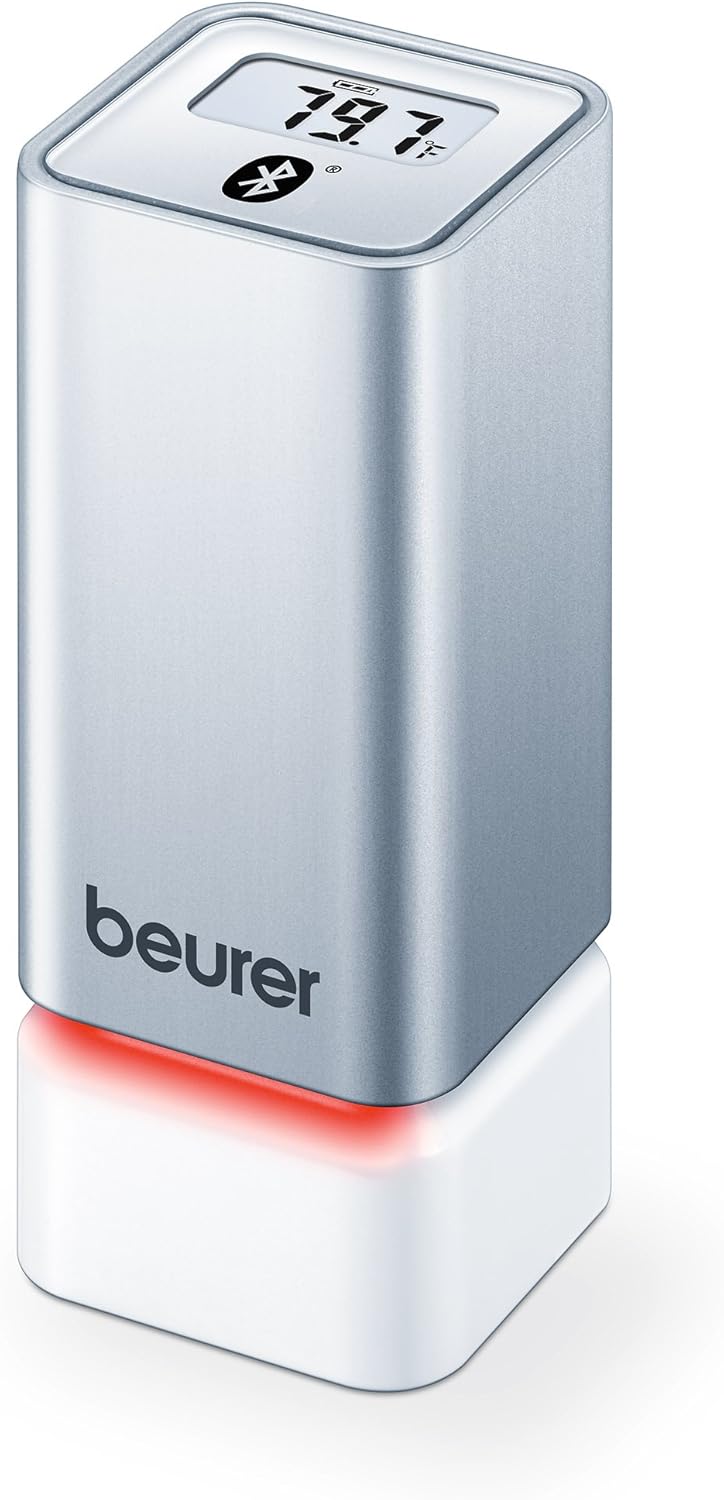
1-сүрөт: Фронт view of the Beurer HM55 device, showing the display and Beurer logo.

2-сүрөт: Close-up of the HM55 display, indicating temperature, humidity, and Bluetooth icon.

3-сүрөт: The compact size of the HM55 device, shown in comparison to a hand.
- Дисплей: Shows current temperature, relative humidity, and time.
- LED көрсөткүчү: Located at the base, changes color to indicate indoor climate quality.
- Батарея бөлүмү: Located on the underside of the device.
- Bluetooth белгиси: Indicates active Bluetooth connection.
Жайгашуу
1. Батареяларды салуу
- Locate the battery compartment on the bottom of the HM55 device.
- Батарея уясынын капкагын ачыңыз.
- Туура полярдуулукту (+/-) камсыз кылып, эки 1.5V AAA батарейканы салыңыз.
- Close the battery compartment cover securely. The device display should activate.
2. Downloading the Beurer FreshRoom App
The Beurer FreshRoom app is required to utilize the full functionality of your HM55 device, including long-term monitoring and multi-room management. The app is compatible with iOS (version 8.0 or higher) and Android (version 4.4 or higher with Bluetooth 4.0).
- For iOS devices, download the "Beurer FreshRoom" app from the Apple App Store.
- For Android devices, download the "Beurer FreshRoom" app from the Google Play Store.
- Alternatively, scan the QR code provided in the product packaging or visit the official Beurer webтүз шилтемелер үчүн сайт. Beurer Smartphone App Information

4-сүрөт: Example of the Beurer FreshRoom app interface on a smartphone.
3. Смартфонуңуз менен жупташуу
- Смартфонуңузда Bluetooth иштетилгенин текшериңиз.
- Open the Beurer FreshRoom app.
- Follow the on-screen instructions within the app to search for and connect to your HM55 device. The app will guide you through the pairing process.
- Once successfully paired, the Bluetooth symbol on the HM55 display will illuminate, and data will begin to synchronize with the app.
4. Алгачкы жайгаштыруу
Place the HM55 in the room you wish to monitor. For accurate readings, avoid placing it:
- Near heat sources (e.g., radiators, direct sunlight).
- Near air conditioning vents or open windows.
- In areas with high airflow or drafts.
- In direct contact with moisture.
Аппаратты иштетүү
Дисплейди түшүнүү
The HM55 display provides immediate readings:
- Температура: Displays in Celsius (°C) or Fahrenheit (°F). The unit can be changed via the app.
- Салыштырмалуу нымдуулук: Displays as a percentage (%).
- Убакыт: Displays the current time, synchronized via the app.
- Bluetooth сүрөтчөсү: Indicates an active connection to your smartphone.
Interpreting the Colored Climate Indicator
The LED light at the base of the HM55 provides a quick visual indication of your indoor climate:
- Жашыл: Optimal indoor climate.
- Кызыл: Poor indoor climate (e.g., too dry, too humid, or extreme temperature).
- The specific thresholds for these indicators can be customized within the Beurer FreshRoom app.

5-сүрөт: HM55 device showing a red LED indicator, signifying a poor indoor climate.

6-сүрөт: HM55 device showing a green LED indicator, signifying an optimal indoor climate.
Using the Beurer FreshRoom App
The app provides advanced features for monitoring and managing your indoor climate:
- Реалдуу убакыттагы маалыматтар: View current temperature and humidity readings from your device.
- Тарыхый дата: Access graphs and logs of temperature and humidity over various periods (e.g., hourlж, күн сайын, жума сайын, ай сайын).
- Эскертүүлөр: Set custom minimum and maximum thresholds for temperature and humidity. Receive notifications if readings fall outside these ranges.
- Орнотуулар: Adjust device settings such as temperature unit (°C/°F), LED brightness, and time zone.
Multi-Room Function
If you have multiple Beurer HM55 devices, the FreshRoom app allows you to monitor all of them from a single interface. Each device can be assigned to a specific room for easy identification and tracking.
- Add each additional HM55 device to the app following the pairing instructions.
- Assign a unique name or room designation to each device within the app settings.
- View and compare climate data from all connected rooms on a single dashboard.
Техникалык тейлөө
Тазалоо
- Аппаратты жумшак, кургак же бир аз сүртүңүз damp кездеме.
- Do not use abrasive cleaners, solvents, or harsh chemicals, as these can damage the surface or internal components.
- Аппараттын ичине суюктук кирбегенин текшериңиз.
Батареяны алмаштыруу
When the battery low indicator appears on the display or in the app, replace both AAA batteries following the instructions in the "Inserting Batteries" section.
Сактагыч
If the device will not be used for an extended period, remove the batteries and store the device in a cool, dry place, away from direct sunlight and extreme temperatures.
Проблемаларды чечүү
If you encounter issues with your Beurer HM55, refer to the following common problems and solutions:
| Көйгөй | Мүмкүн себеп | Чечим |
|---|---|---|
| Device display is blank. | Батареялар түгөнүп калган же туура эмес салынган. | Батареянын полярдуулугун текшериңиз же жаңы AAA батарейкалары менен алмаштырыңыз. |
| Колдонмо түзмөккө туташа албайт. | Bluetooth is off on smartphone; device is out of range; app issue. | Ensure Bluetooth is enabled. Move smartphone closer to the device. Restart the app or smartphone. Re-pair the device if necessary. |
| Readings appear inaccurate. | Device placement is suboptimal; environmental factors. | Relocate the device away from direct heat, cold, or drafts. Allow time for readings to stabilize after relocation. |
| LED indicator is always red. | Indoor climate is consistently outside optimal range; app settings. | Check temperature and humidity levels in the app. Adjust environmental conditions (e.g., use a humidifier/dehumidifier, adjust heating/cooling). Review and adjust alert thresholds in the app. |
Техникалык мүнөздөмөлөр
| Модел | HM55 |
| Бренд | Beurer |
| Электр камсыздоо | 2 x 1.5V AAA батарейкалары |
| Байланыш | Bluetooth Smart (Bluetooth 4.0) |
| Колдонмонун шайкештиги | iOS 8.0 же андан жогору, Android 4.4 же андан жогору |
| Монтаж түрү | Дубалга орнотуу |
| Түс | Silver |
| Камтылган компоненттер | Beurer Thermo-Hygrometer |
Кепилдик жана колдоо
Beurer provides a limited warranty for this product. For detailed warranty terms and conditions, please refer to the warranty card included with your product or visit the official Beurer webсайт.
For technical support, troubleshooting assistance, or to inquire about replacement parts, please contact Beurer customer service. Contact information can typically be found on the Beurer webсайтында же продуктунун таңгагында.
Онлайн ресурстар: For additional information and app support, visit Beurer Smartphone App Information.