
Introduction
This manual provides detailed instructions for the safe and proper installation and operation of your iMounTEK Tilting TV Wall Mount Bracket. Please read this manual thoroughly before installation and retain it for future reference. This mount is designed to securely hold LED, LCD, OLED, and Plasma flat screen TVs ranging from 37 to 70 inches and weighing up to 99 lbs.
Маанилүү коопсуздук маалыматы
ЭСКЕРТҮҮ: Бул көрсөтмөлөрдү окуп чыкпасаңыз жана аткарбасаңыз, олуттуу дене жаракаттарына, мүлккө зыян келтирилишине же кепилдиктин жокко чыгарылышына алып келиши мүмкүн. Эгерде сиз бул көрсөтмөлөрдү түшүнбөсөңүз же орнотуунун коопсуздугуна күмөн санасаңыз, квалификациялуу орнотуучуга кайрылыңыз.
- Бул продуктуну конструкциялык жактан бекем эмес дубалдарга орнотпоңуз.
- Орнотуучу бети орнотуунун жана телевизордун жалпы салмагын коопсуз көтөрө ала тургандыгын текшериңиз.
- Дубалга бекитилүүчү бекиткичтерди табуу үчүн ар дайым шпилька издегичти колдонуңуз.
- 99 lbs (45 кг) максималдуу салмак сыйымдуулугунан ашпаңыз.
- Бул продукт ички колдонуу үчүн гана арналган.
- Орнотуу учурунда балдарды жана үй жаныбарларын алыс кармаңыз.
- Use appropriate personal protective equipment during installation.
Пакеттин мазмуну
Verify that all components are present and undamaged before beginning installation. If any parts are missing or defective, contact iMounTEK customer service.

Image: All components included in the iMounTEK TV wall mount package. This includes the main wall plate, two vertical TV brackets, and multiple bags containing different sizes of screws, washers, spacers, and wall anchors for various TV models and wall types.
Камтылган жабдык:
- Дубал плитасынын жыйындысы
- TV кронштейн колдору (2)
- Various Lag Bolts and Anchors for wall mounting
- Assorted M4, M6, M8 TV Screws and Washers
- Spacers
- Hex ачкычы
Орнотуу & Орнотуу
Керектүү куралдар: Stud finder, drill, level, pencil, measuring tape, Phillips head screwdriver, socket wrench.
1-кадам: Дубал плитасын даярдоо
- Телевизоруңуз үчүн керектүү бийиктикти аныктаңыз.
- Use a stud finder to locate two adjacent wooden studs in your wall. Mark the center of each stud.
- Position the wall plate against the wall, aligning the mounting holes with the marked stud centers. Use a level to ensure it is perfectly horizontal.
- Дубал плитасынын тешиктери аркылуу бургулоочу чекиттерди белгилеңиз.
- Drill pilot holes into the wall studs. The size of the drill bit will depend on the lag bolts provided.
- Secure the wall plate to the wall using the lag bolts and washers. Tighten firmly but do not overtighten.

Image: The main wall plate component of the TV mount, featuring its articulating arms. This part attaches directly to the wall studs.
2-кадам: кашааларды сыналгыга бекитиңиз
- Экрандын бузулуп калышына жол бербөө үчүн, телевизоруңуздун бетин ылдый каратып жумшак, таза бетке этияттык менен коюңуз.
- Сыналгыңыздын артындагы VESA орнотуу тешиктерин аныктаңыз.
- Берилген аппараттык топтомдон телевизоруңуздун VESA үлгүсүнө туура келген тиешелүү бурамаларды, шайбаларды жана аралыктарды тандаңыз.
- Attach the two vertical TV bracket arms to the back of your TV. Ensure they are securely fastened and evenly spaced.

Image: The TV mount's wall plate and the two vertical TV brackets. The brackets are shown attached to the back of a TV, illustrating how the TV connects to the mount.
Step 3: Mount the TV to the Wall Plate
- Жардам менен сыналгыны тиркелген кашаалары менен этияттык менен көтөрүңүз.
- Align the hooks on the TV brackets with the corresponding slots on the wall plate.
- Кронштейндер дубалдагы пластинага бекем тийип турганын текшерип, телевизорду акырын ылдый түшүрүңүз.
- Once the TV is hanging, secure it in place using the safety screws or locking mechanisms on the bottom of the TV brackets.
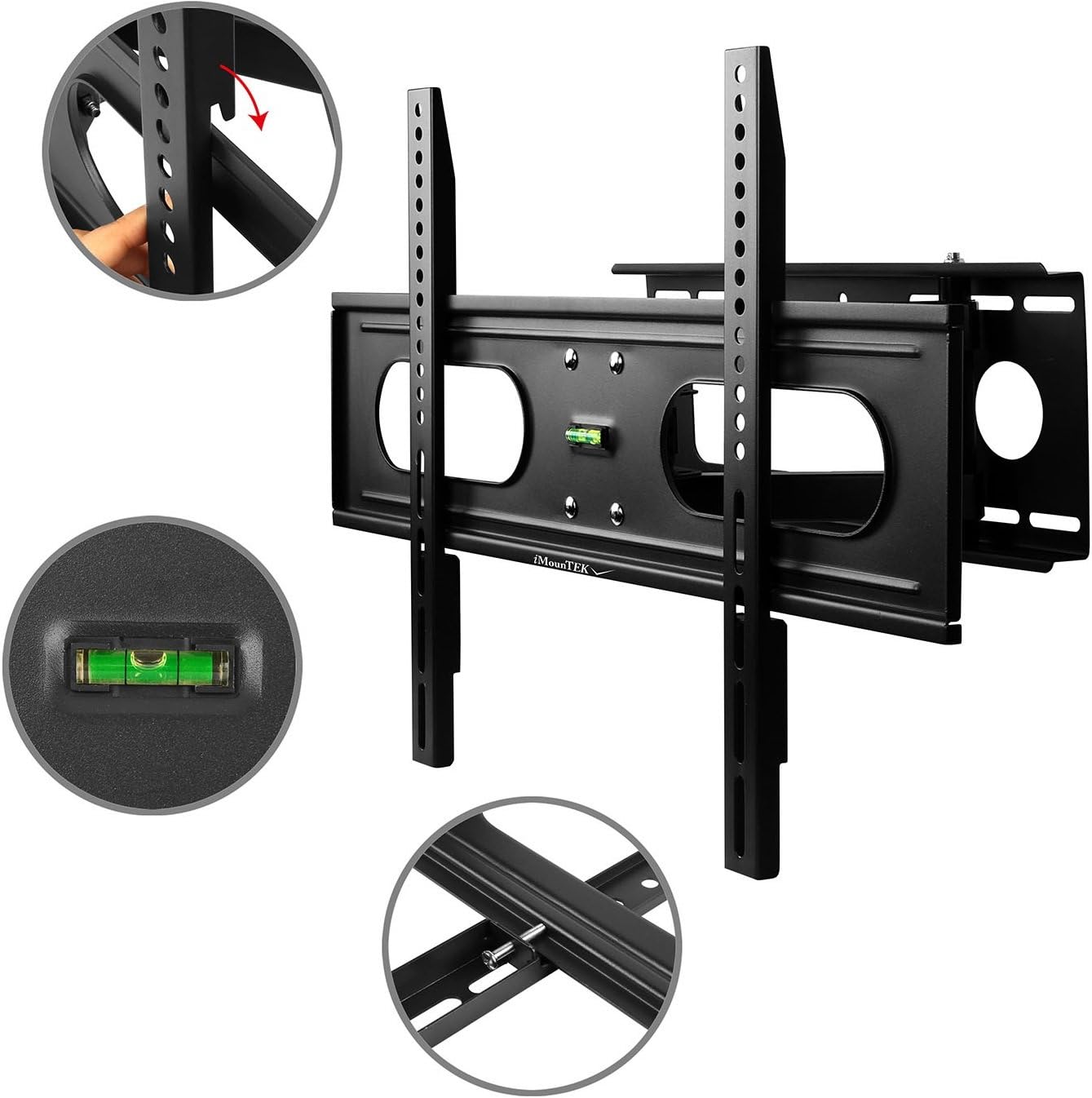
Image: A flat-screen TV securely mounted on the iMounTEK wall mount. The mount is extended from the wall, demonstrating its articulating capabilities, allowing the TV to be positioned for optimal viewing.
Иштөө нускамалары
This full-motion TV mount allows for flexible positioning of your television to achieve the best viewбурч.
- Кеңейтүү: Gently pull the TV away from the wall to extend the articulating arms. The mount extends up to 18 inches.
- Артка тартуу: Push the TV gently back towards the wall until it folds to a 3-inch depth.
- Айлануучу: Carefully pivot the TV left or right to adjust the horizontal viewing angle. The mount allows for 90° rotation for landscape or portrait viewing.
- Россия: Loosen the tilt adjustment knobs on the TV brackets, adjust the TV to the desired vertical angle (up to +/-20° forward), and then re-tighten the knobs to secure the position.
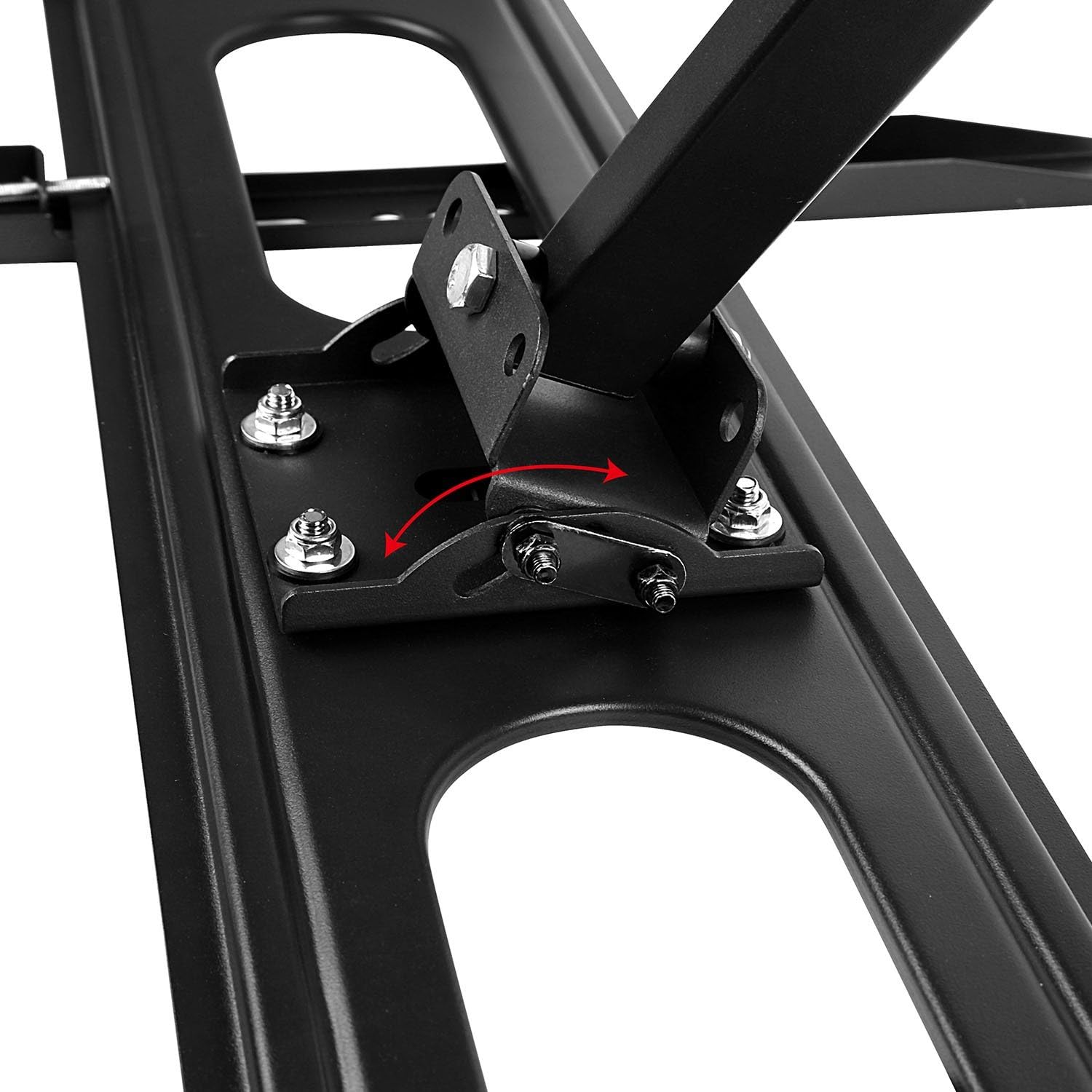
Сүрөт: деталдуу view of the tilting mechanism on the iMounTEK TV mount. An arrow illustrates the range of motion for tilting the TV up or down, highlighting the adjustable bolts that secure the tilt angle.
Техникалык тейлөө
Үзгүлтүксүз техникалык тейлөө сыналгы монтажыңыздын узак мөөнөттүү жана коопсуз иштешин камсыз кылат.
- Мезгилдүү текшерүү: Annually, check all screws and bolts to ensure they are securely tightened. Re-tighten if necessary.
- Тазалоо: Wipe the mount with a soft, dry cloth. Avoid using abrasive cleaners or solvents.
- Майлоо: Муунткуч муундар жылмакай кыймыл үчүн иштелип чыккан. Эгерде кыймыл катып калса, айланма чекиттерге бир аз өлчөмдө силикон негизиндеги майлоочу май сүйкөөгө болот.
Проблемаларды чечүү
If you encounter issues with your TV mount, refer to the following common problems and solutions.
- ТВ деңгээл эмес:
- Check the wall plate installation with a level. If the wall plate is not level, it may need to be re-installed.
- Some mounts have a post-installation leveling adjustment. Refer to the specific mechanism on your mount.
- Mount feels wobbly:
- Ensure all lag bolts securing the wall plate to the wall studs are fully tightened.
- Verify that the TV is correctly seated on the wall plate and secured with safety screws.
- Confirm that the wall studs are solid and capable of supporting the weight.
- Эңкейүүнү/бурулууну тууралоодогу кыйынчылык:
- For tilt, ensure the tilt adjustment knobs are sufficiently loosened before attempting to adjust, then re-tighten.
- For swivel/extension, ensure no cables are snagged or restricting movement.
- Жабдуулар жетишпейт:
- Review the "Package Contents" section. If parts are genuinely missing, contact iMounTEK customer support.
Продукт спецификациялары
| Өзгөчөлүк | Деталь |
|---|---|
| Бренд | iMounTEK |
| Модель номери | 4330178596 |
| Туура келген сыналгы өлчөмдөрү | 37-70" |
| Максималдуу Салмак сыйымдуулугу | 99 фунт (45 кг) |
| Монтаж түрү | Дубалга орнотуу |
| Кыймыл түрү | Айландыруу, айландыруу, буроо, эңкейтүү |
| Тит бурч | +/-20° forward |
| Дубалдан узартуу | 3" (кичирейтилген) 18" (узартылган) чейин |
| Материал | Эритме болот |
| Түс | Кара |
| Элемент Салмагы | 11.16 фунт (5.06 кг) |
| Продукциянын өлчөмдөрү | 27 x 7.48 x 3.03 дюйм |
| UPC | 616043300498 |
Кепилдик жана Кардарларды колдоо
For warranty information or technical assistance, please contact iMounTEK customer service. Keep your purchase receipt as proof of purchase.
Байланыш маалыматы: Refer to the contact details provided with your product packaging or visit the official iMounTEK webакыркы колдоо маалымат үчүн сайт.