
Introduction
The Mastervolt Battman Pro Digital Meter (Part #70405070) is an advanced battery monitor designed for 12V and 24V DC battery systems. It provides comprehensive and critical information about the status of your battery bank under all operating circumstances. This device features a large, splash-proof (IP65) display and a power bar, ensuring durability and readability in various environments. The Battman Pro is engineered to warn users when the battery bank is nearing empty, helping to prevent unexpected power loss and extend battery life.
Продукт бүттүview жана өзгөчөлүктөрү
The Battman Pro offers detailed insights into your battery's performance and health. Key features include:
- Комплекстүү мониторинг: Көрсөтөт томtage, учурдагы, amp-hours, time remaining, and battery capacity in percentage.
- Dual Battery Outlets: Monitors two battery banks – a service battery (fully monitored) and a starter battery (voltage гана).
- Splash-Proof Display: IP65 rated display ensures protection against water splashes, suitable for marine or outdoor applications.
- Эскертүү системасы: Alerts users when the battery bank is low, preventing deep discharge.
- Special Battery Status Events: Tracks and displays specific events related to battery health.
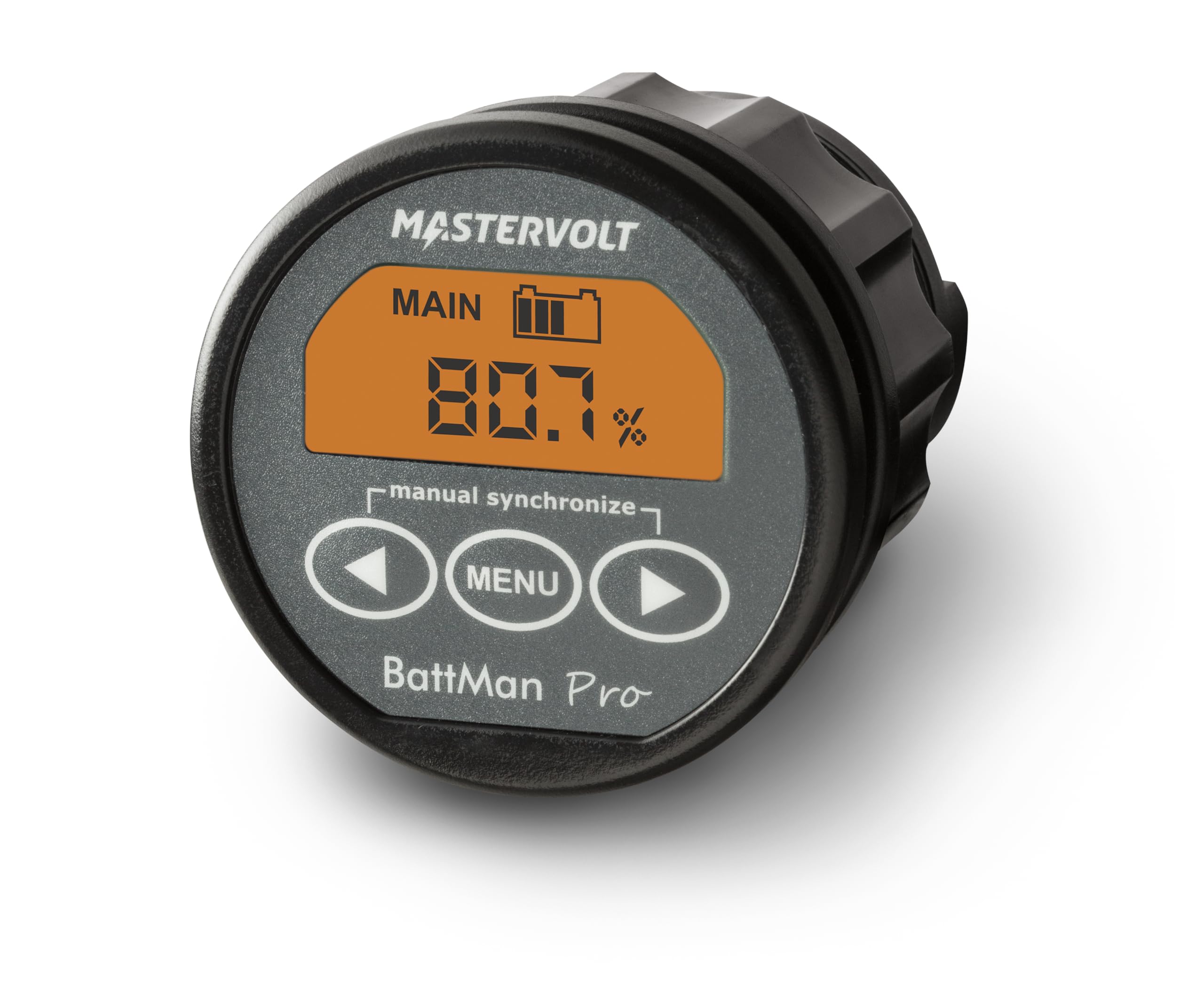
Сүрөт 1: Алдыңкы view of the Mastervolt Battman Pro Battery Monitor, showing the digital display with "MAIN" and "80.7%" charge, along with the "manual synchronize" text and control buttons (left arrow, MENU, right arrow).
Орнотуу жана орнотуу
Proper installation is crucial for accurate readings and safe operation. While specific wiring diagrams are typically provided in the full installation manual, the following general steps apply:
- Монтаждоо: Choose a suitable location for the Battman Pro display unit. Ensure it is easily accessible and visible, and that there is sufficient space behind for wiring connections. The unit is splash-proof (IP65), making it suitable for exposed locations.
- Кубат туташуу: Connect the Battman Pro to your 12V or 24V DC system. Ensure correct polarity.
- Shunt Installation: A current shunt (sold separately or included in a kit) must be installed in the negative line of your main service battery bank. All loads and charging sources for the service battery must pass through this shunt for accurate current measurement.
- Тtage Sense Wires: Connect томtage sense wires to both the service battery bank (for full monitoring) and the starter battery (for voltage monitoring only).
- Конфигурация: After physical installation, the unit may require initial configuration, such as setting battery capacity and type, through the on-screen menu. Refer to the detailed wiring diagram and configuration guide that accompanies the product for precise instructions.
Маанилүү: Always disconnect battery power before performing any wiring or installation work. If you are unsure about any step, consult a qualified marine or automotive electrician.
Иштөө нускамалары
The Battman Pro is designed for intuitive operation. The display provides real-time data, and the buttons allow for navigation and settings adjustments.
Маалыматты көрсөтүү:
- Тtage (V): Учурдагы томду көрсөтөтtage of the monitored battery bank.
- Учурдагы (A): Displays the current flowing into (charging) or out of (discharging) the battery bank.
- Amp-hours (Ah): Indicates the net amp-hours consumed or replenished.
- Калган убакыт: Estimates the time until the battery is empty, based on current draw and capacity.
- Battery Capacity (%): Shows the state of charge as a percentage of the total battery capacity.
- Special Battery Status Events: Provides alerts or information regarding specific battery conditions.
Баскыч функциялары:
The Battman Pro features three primary buttons below the display:
- Сол жебе (◀): Typically used to navigate backward through menus or decrease values.
- МЕНЮ: Used to access the main menu, confirm selections, or cycle through display screens.
- Оңго жебе (▶): Typically used to navigate forward through menus or increase values.
Manual Synchronize: The display includes a "manual synchronize" function. This is used to manually reset the battery monitor's state of charge to 100% when the battery is known to be fully charged. This ensures accuracy over time, as minor discrepancies can accumulate.
Техникалык тейлөө
The Mastervolt Battman Pro is designed for durability and requires minimal maintenance. However, regular checks can ensure its longevity and accurate performance:
- Тазалоо: Дисплейди мезгил-мезгили менен сүртүп туруңуз жанаasing жумшак менен, гamp cloth. Avoid abrasive cleaners or solvents that could damage the display or housing.
- Туташуу текшерүүлөрү: Annually inspect all wiring connections to the shunt and the monitor for corrosion or looseness. Ensure all terminals are clean and securely fastened. Loose connections can lead to inaccurate readings or system malfunctions.
- Программалык камсыздоо жаңыртуулары: Check the Mastervolt website periodically for any available firmware updates for your Battman Pro model. Updates can improve performance or add new features.
- Батареянын ден соолугу: While the monitor provides data, regularly inspect your battery bank for signs of damage, corrosion, or swelling. Ensure proper ventilation around batteries.
Проблемаларды чечүү
If you encounter issues with your Battman Pro, consider the following common troubleshooting steps:
- Дисплей/кубат жок:
- Check all power connections to the monitor.
- Verify the fuse in the power supply line (if applicable).
- Ensure the battery bank has sufficient voltage.
- Inaccurate Readings (Current/Ah/Capacity):
- Ensure the current shunt is correctly installed in the negative line of the service battery, and all loads/charges pass through it.
- Check for loose or corroded connections at the shunt and the monitor.
- Perform a "manual synchronize" after fully charging the battery to recalibrate the state of charge.
- Verify that the battery capacity setting in the monitor's menu matches your actual battery bank capacity.
- "Battery Empty" Warning Appears Prematurely:
- Check the battery capacity setting in the monitor's menu.
- Ensure the battery bank is indeed fully charged when performing a manual synchronize.
- Consider having your battery bank tested by a professional to confirm its actual health and capacity.
- Display Freezes or Behaves Erratically:
- Try power cycling the unit by temporarily disconnecting its power supply.
- Check for any signs of physical damage or water ingress (though the unit is IP65, extreme conditions can still cause issues).
If these steps do not resolve the issue, contact Mastervolt customer support or a certified technician for further assistance.
Техникалык шарттар
| Атрибут | Деталь |
|---|---|
| Бренд | Mastervolt |
| Модель номери | 70405070 |
| Продукт аты | Battman Pro Digital Meter |
| Тtage Шайкештик | 12V / 24V DC |
| Ampөчүрүү | 2 Amps (operating current) |
| Battery Outlets | 2 (Service: full monitoring; Starter: voltagд гана) |
| Дисплей түрү | Digital, Large |
| Кирүү коргоо (IP) рейтинги | IP65 (чачууга каршы) |
| Өлчөмдөрү (болжол менен) | 2.5" (Diameter) x 3.1" (Depth) |
| Элемент Салмагы | 1 фунт |
| Көзөмөлдөнгөн параметрлер | Тtage, Учурдагы, Amp-hours, Time Remaining, Battery Capacity (%), Special Battery Status Events |
Кепилдик жана колдоо
For specific warranty information regarding your Mastervolt Battman Pro Battery Monitor, please refer to the warranty card included with your product or visit the official Mastervolt webсайт. Кепилдиктин шарттары, адатта, сатып алынган күндөн тартып белгилүү бир мезгил ичинде өндүрүш кемчиликтерин камтыйт.
For technical support, troubleshooting assistance beyond this manual, or to inquire about spare parts and service, please contact Mastervolt customer service directly. Contact details can usually be found on their official webсайтында же продуктунун таңгагында.
Mastervolt Official Webсайт: www.mastervolt.com