
Introduction
This manual provides detailed instructions for the installation, operation, and maintenance of your Minolta MNCD53-S Car Dashboard Camera. Please read this manual thoroughly before using the device to ensure proper functionality and safety.
The Minolta MNCD53-S is designed to record your road trips in full 1080P HD resolution, featuring a 140-degree wide-angle lens, Wide Dynamic Range (WDR), G-Sensor for emergency recording, and loop recording capabilities. Review footage on the integrated 3.0-inch LCD screen.
Кутуда эмне бар
- Minolta MNCD53-S Car Dashboard Camera
- SD карта (8 ГБ камтылган)
- баштык
- USB кабели
- Көрсөтмө (бул документ)
- Кепилдик картасы
Коопсуздук маалыматы
- Do not operate the camera or adjust settings while driving. Always pull over to a safe location before making any adjustments.
- Ensure the camera is securely mounted and does not obstruct your view жолго же коопсуздук жаздыктарынын ачылышына тоскоол болот.
- Avoid exposing the camera to extreme temperatures, direct sunlight for prolonged periods, or excessive moisture.
- Use only the provided power cable and accessories to prevent damage to the device or vehicle.
- Keep the lens clean to ensure clear recordings.
- The internal battery is primarily for saving emergency files and maintaining settings. The camera requires continuous power from the vehicle's lighter socket for daily operation.
Продукт бүттүview
The Minolta MNCD53-S dash camera is designed for reliable in-car video recording. Below are its key features and a visual representation.
- Full HD 1080P Video Recording: Таза видеолорду тартатtage.
- 140° кең бурчтуу объектив: кенен камсыз кылат view жолдун.
- 3.0 дюймдук LCD экран: Жашоо үчүн view, ойнотуу жана менюну багыттоо.
- G-сенсор: Automatically detects sudden impacts or movements and locks the current video file кайра жазуунун алдын алуу үчүн.
- Цикл жаздыруу: Continuously records, overwriting the oldest unlocked fileэстутум картасы толгондо.
- Кыймылды аныктоо: Starts recording automatically when motion is detected in front of the camera (useful when parked).
- Кең динамикалык диапазон (WDR): Improves video quality in varying light conditions, such as bright sunlight and shadows.
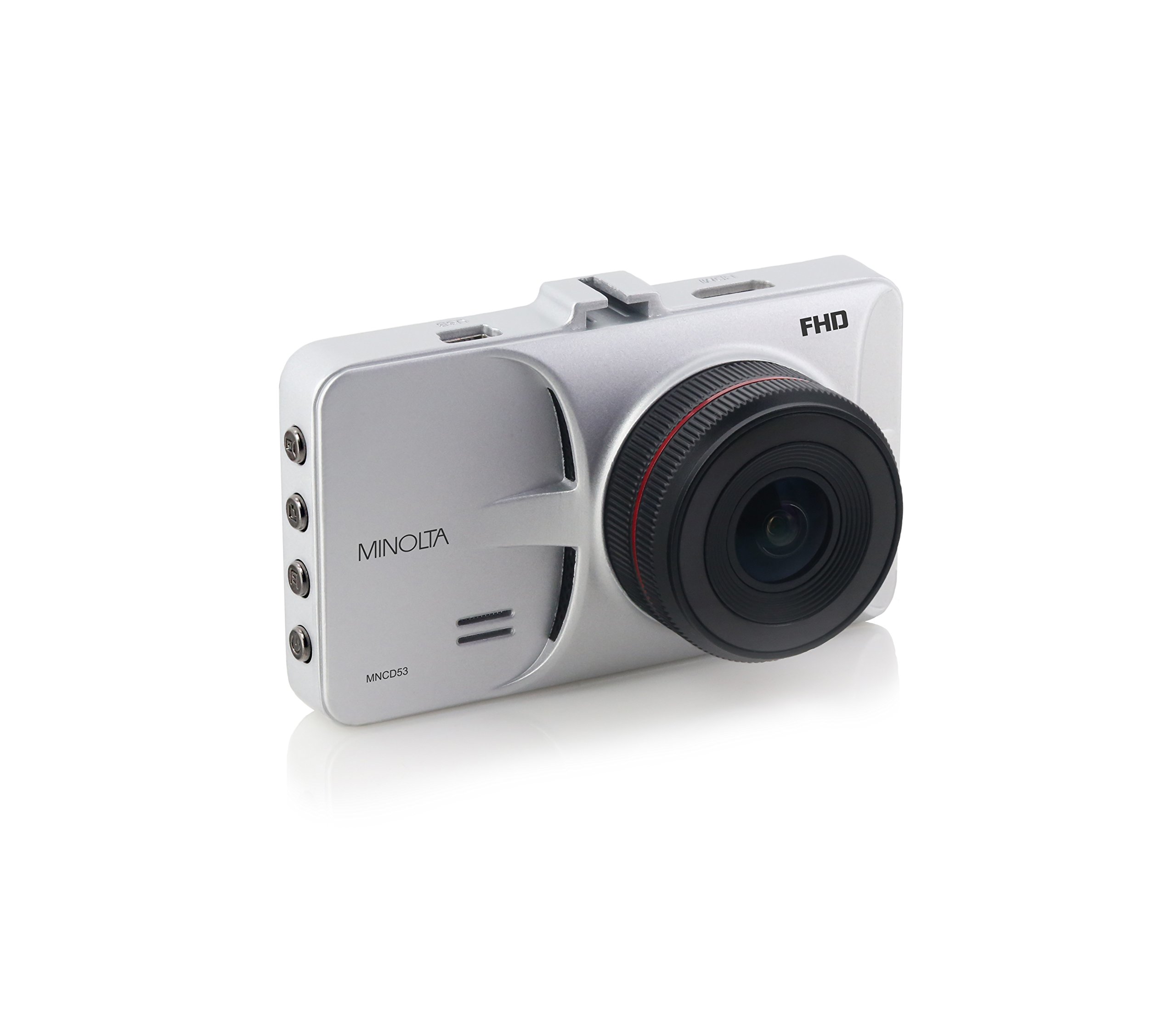
Сүрөт 1: Алдыңкы view of the Minolta MNCD53-S Car Dashboard Camera, showing the 3.0-inch LCD screen displaying a city night scene.
Жайгашуу
- SD картаны салыңыз: Locate the SD card slot on the camera. Gently insert the provided 8GB SD card (or another compatible Class 10 or higher microSD card, up to 32GB) until it clicks into place. Ensure the camera is off before inserting or removing the SD card.
- Камераны орнотуу:
- Соргуч чөйчөктү камерага бекитиңиз.
- Clean the desired area on your windshield. Ensure it does not obstruct your view or interfere with safety features.
- Press the suction cup firmly against the windshield and engage the locking mechanism to secure it.
- Adjust the camera angle to capture the road ahead.

Figure 2: The Minolta MNCD53-S Car Dashboard Camera mounted on a car windshield, showing the driver's perspective of the road.
- Кубат туташуу:
- Берилген USB кубат кабелин камеранын кубат киргизүү портуна туташтырыңыз.
- Plug the other end of the power cable into your vehicle's 12V lighter socket.
- The camera will typically power on automatically when the vehicle starts and power off when the vehicle is turned off.
- Баштапкы күйгүзүү: The camera should power on automatically when connected to power. If not, press and hold the power button.
- Дата менен убакытты коюу: Access the camera's menu settings to set the correct date and time. This is crucial for accurate timestamps on your recordings. Refer to the "Operating Instructions" section for general menu navigation.
Иштөө нускамалары
Familiarize yourself with the camera's buttons and menu system for optimal use.
Негизги жаздыруу
- When the camera is powered on, it typically begins recording automatically. A red indicator or icon on the screen usually signifies active recording.
- Recordings are saved in segments (e.g., 3 or 5 minutes) due to loop recording.
- To manually start/stop recording, press the designated record button (refer to your camera's physical buttons).
Меню Багыттоо
The camera features a menu system accessible via physical buttons. Common buttons include:
- Меню баскычы: Орнотуулар менюсуна кирет.
- Өйдө/ылдый баскычтары: Меню параметрлери боюнча чабыттоо.
- OK/Confirm Button: Selects an option or confirms a setting.
- Режим баскычы: Видео жаздыруу, сүрөт режими жана ойнотуу режимдеринин ортосунда которуштурат.
Key Settings to Adjust:
- Дата/Убакыт: Так убакытты көрсөтүү үчүн учурдагы датаны жана убакытты коюңузamps.
- Цикл жаздыруу: Adjust the duration of video segments (e.g., 1, 3, 5 minutes).
- G-сенсордун сезгичтиги: Adjust sensitivity for emergency recording. Higher sensitivity means it will trigger more easily.
- Кыймылды аныктоо: Enable or disable this feature. Use with caution when parked as it can drain the battery or fill the SD card quickly.
- WDR: Enable or disable Wide Dynamic Range for improved image quality in varied lighting.
Ойнотуу
- Switch to playback mode using the Mode button.
- Use the navigation buttons to browse through recorded video files.
- Press the OK/Confirm button to play a selected video.
- үчүн view files on a computer, remove the SD card and insert it into a card reader, or connect the camera directly to a computer via USB.
Сүрөт режими
- Switch to photo mode using the Mode button.
- Press the record/shutter button to capture still images.
Техникалык тейлөө
- Линзаны тазалоо: Камера линзасын акырын сүртүү үчүн жумшак, түксүз чүпүрөктү колдонуңуз. Абразивдүү материалдардан же катуу химиялык заттардан алыс болуңуз.
- Экранды тазалоо: Use a microfiber cloth to clean the LCD screen.
- SD Card башкаруу:
- Regularly format the SD card (e.g., once a month) within the camera's settings to ensure optimal performance and prevent data corruption.
- Камдык маанилүү footage to a computer before formatting.
- Replace the SD card if you notice frequent errors or degraded performance.
- Сактагыч: If storing the camera for an extended period, remove it from the windshield and store it in its pouch in a cool, dry place.
Проблемаларды чечүү
| Көйгөй | Мүмкүн себеп | Чечим |
|---|---|---|
| Камера күйбөйт. | No power from vehicle; faulty power cable; internal battery depleted. | Check vehicle's lighter socket and fuse. Ensure power cable is securely connected. Try a different power source or cable if available. The internal battery is for emergency files, not sustained operation. |
| Camera stops recording or does not record continuously. | SD card full; SD card error; G-Sensor triggered too often; motion detection enabled. | Format the SD card. Use a Class 10 or higher SD card. Adjust G-Sensor sensitivity. Disable motion detection if not needed while driving. |
| Video footage бүдөмүк же түшүнүксүз. | Protective film on lens; dirty lens; incorrect focus (unlikely for fixed focus); poor lighting. | Remove any protective film. Clean the lens with a soft cloth. Ensure WDR is enabled in challenging light conditions. |
| Date and time settings reset. | Ички батарея түгөндү. | Ensure the camera is consistently powered by the vehicle to allow the internal battery to maintain charge for settings. Re-enter date and time. |
| Сороо монтажы кармабайт. | Dirty windshield; cold temperatures; worn suction cup. | Clean the windshield and suction cup thoroughly. Warm the windshield slightly in cold weather. Replace the mount if it is damaged. |
Техникалык шарттар
| Өзгөчөлүк | Деталь |
|---|---|
| Модель аты | MNCD53-S |
| Видео тартуунун резолюциясы | 1080p толук HD |
| Чыныгы бурч View | 140 градус |
| Screen Size | 3 дюйм LCD |
| Өзгөчөлүктөр | Loop Recording, Motion Sensing, G-Sensor, Wide Dynamic Range (WDR) |
| Байланыш технологиясы | USB кабели |
| Шайкеш операциялык системалар | Windows 7 / 8 / 10, Mac OS 10.8 / 10.9 / 10.10 |
| Монтаж түрү | Соруу Тоосу |
| Flash эс тутум түрү | SD (supports up to 32GB, Class 10 recommended) |
| Батарея түрү | Lithium Ion (internal, for emergency files and settings) |
| Элемент Салмагы | 0.3 фунт |
| Өндүрүүчү | Минолта |
| UPC | 084438960143 |
Кепилдик жана колдоо
Кепилдик маалымат
The Minolta MNCD53-S Car Dashboard Camera comes with a 1 жылдык Чектелген Кепилдик сатып алынган күндөн тартып. Бул кепилдик кадимки колдонуудагы өндүрүштүк кемчиликтерди жана чеберчиликти камтыйт. Ал туура эмес колдонуудан, кырсыктардан, уруксатсыз өзгөртүүлөрдөн же табигый кырсыктардан келип чыккан зыянды камтыбайт.
Кепилдик дооматтары үчүн сатып алганыңыздын далилин сактап коюңуз.
Кардарларды колдоо
For technical assistance, troubleshooting not covered in this manual, or warranty inquiries, please contact Minolta customer support. Refer to the warranty card or the official Minolta webакыркы байланыш маалыматы үчүн сайт.
When contacting support, please have your product model number (MNCD53-S) and proof of purchase readily available.