
Introduction
Thank you for choosing the kwmobile Digital Wooden Look Alarm Clock. This manual provides detailed instructions for setting up, operating, and maintaining your new alarm clock. Please read this manual carefully to ensure proper use and to fully utilize all features of the device.
The kwmobile Digital Wooden Look Alarm Clock is designed to display time, temperature, and date with a stylish wood-look finish. It features multiple alarm settings, sound and touch activation for the display, and flexible power options.

1-сүрөт: kwmobile Digital Wooden Look Alarm Clock with included USB power cable. The clock displays the time and temperature with green LEDs.
Пакеттин мазмуну
- 1 x kwmobile Digital Wooden Look Alarm Clock
- 1 х USB кабелинин
Жайгашуу
Аппаратты кубаттандыруу
The alarm clock can be powered in two ways:
- USB кубаты (үзгүлтүксүз көрсөтүү үчүн сунушталат): Connect the included USB cable to the DC 5V port on the back of the clock and plug the other end into a USB power adapter (not included) or a powered USB port. When powered via USB, the display remains permanently on.
- Battery Power (for backup or power-saving mode): Insert 3 x AAA batteries (not included) into the battery compartment on the back of the clock. When operating on batteries, the clock automatically enters power-saving mode to conserve battery life. The display will turn off after approximately 30 seconds.
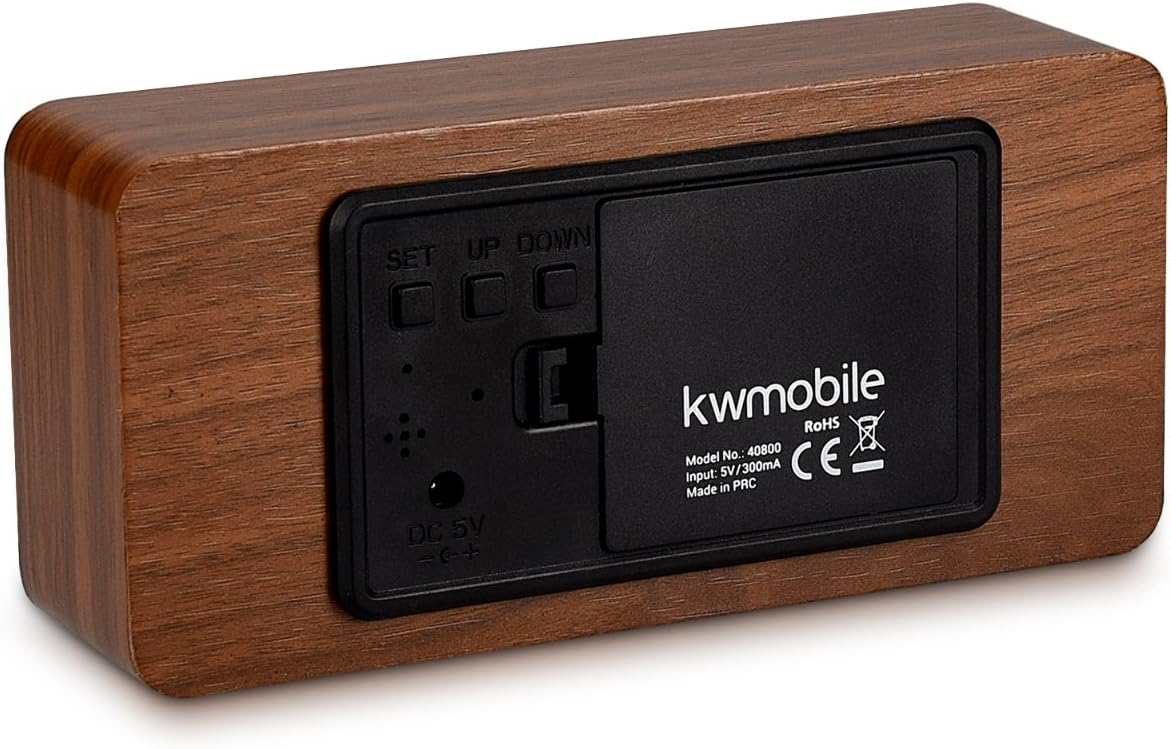
2-сүрөт: Арткы view of the alarm clock, showing the battery compartment, DC 5V input, and control buttons (SET, UP, DOWN).
Баштапкы күйгүзүү
Once powered, the clock will display the time. If using battery power, the display may turn off after a short period. You can activate the display by touching the clock or making a sound.
Иштөө нускамалары
The clock features three control buttons on the back: SET, UP, жана ылдый.
Убакыт жана дата орнотуу
- басып, кармап туруңуз SET button for 3 seconds to enter setting mode. The display will flash.
- колдонуу UP жана ылдый маанисин тууралоо үчүн баскычтар.
- Басыңыз SET briefly to confirm the current setting and move to the next parameter.
- The setting sequence is typically: Year → Month → Day → 12/24 Hour Format → Hour → Minute.
- Мүнөт койгондон кийин басыңыз SET again to exit time/date setting mode.
Setting Alarms (A1, A2, A3)
Саат үчкө чейин көз карандысыз ойготкучту (A1, A2, A3) колдойт.
- басыңыз SET баскычын дисплейде "A1" (же A2, A3) пайда болгонго чейин кайра-кайра басыңыз.
- басып, кармап туруңуз SET button for 3 seconds. The alarm hour will flash.
- Колдонуу UP жана ылдый ойготкуч саатын коюу үчүн, андан кийин басыңыз SET.
- Колдонуу UP жана ылдый to set the alarm minute, then press SET.
- You can then choose alarm activation settings:
- КҮЙҮК: Alarm is active every day.
- --: Alarm is inactive.
- E: Alarm is active only on weekdays (Monday-Friday).
- Басыңыз SET to confirm and exit alarm setting mode. Repeat for A2 and A3 if desired.
When an alarm sounds, it will typically last for one minute. To stop the alarm, press any button.
Температура дисплей
The clock displays temperature in either Celsius (°C) or Fahrenheit (°F).
- Кадимки дисплей режиминде басыңыз ылдый button to toggle between °C and °F.
Display Modes (dP-1, dP-2)
The clock offers two display modes:
- dP-1 (Fixed Display): The display cycles between time, date, and temperature.
- dP-2 (Time Only Display): The display shows only the time.
Дисплей режимдеринин ортосунда которулуу үчүн, баскычын басыңыз UP button in normal display mode.
Power Saving Mode (oNSd, --Sd)
This mode is primarily active when the clock is battery-powered. In power-saving mode, the display turns off after approximately 30 seconds to conserve energy.
- oNSd: Power-saving mode is ON. The display will turn off after 30 seconds of inactivity.
- --Sd: Power-saving mode is OFF. The display will remain on (only effective when USB powered).
To activate the display when in power-saving mode, you can either touch the top of the clock or make a sound (e.g., clap your hands).
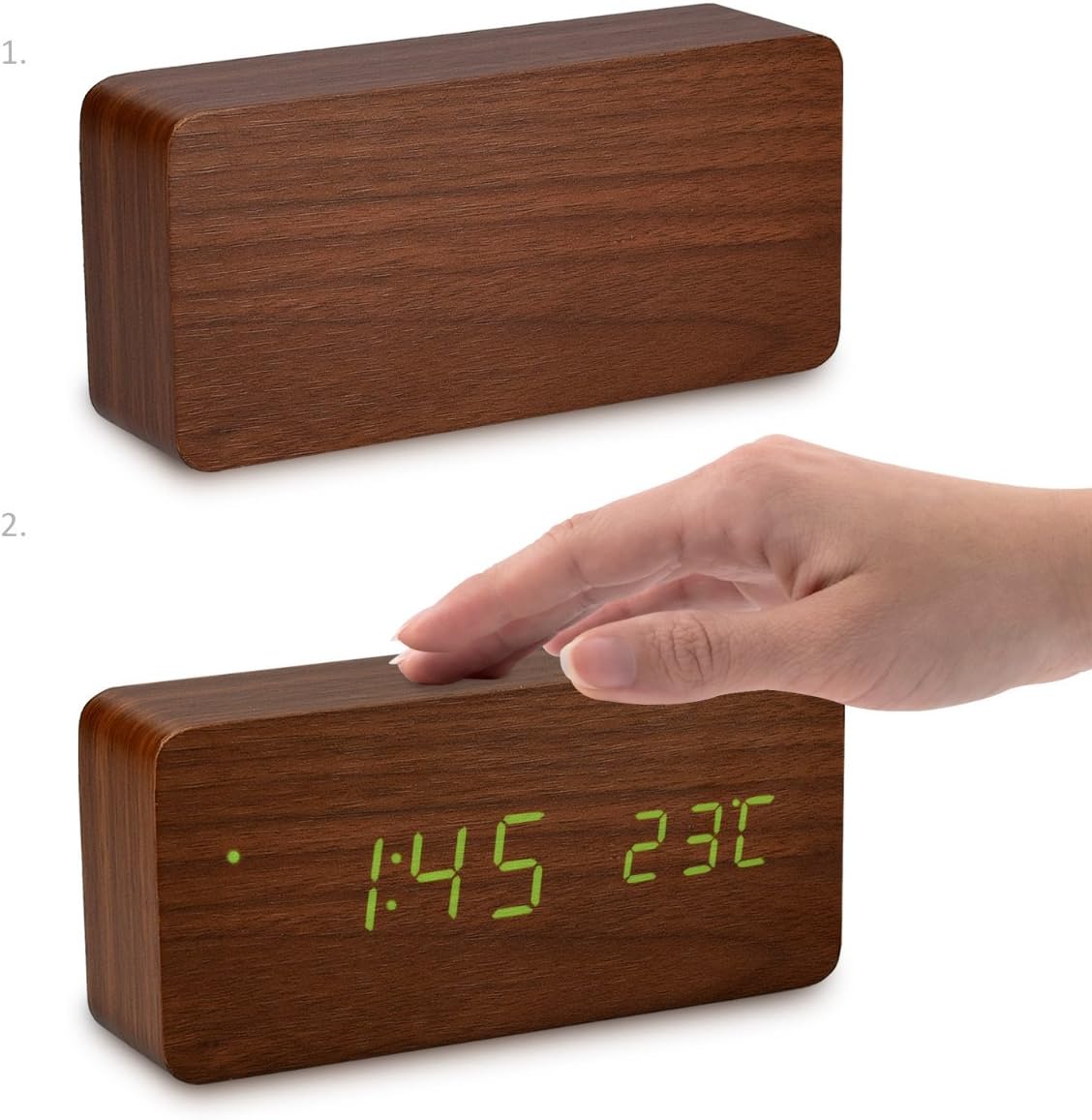
3-сүрөт: Activating the display by touching the top surface of the clock.

4-сүрөт: Activating the display through sound, such as clapping hands.
Техникалык тейлөө
Тазалоо
Саатты тазалоо үчүн, бетин жумшак, кургак чүпүрөк менен акырын сүртүңүз. Абразивдүү тазалоочу каражаттарды, эриткичтерди же химиялык чачыраткычтарды колдонбоңуз, анткени алар капталына же ички компоненттерине зыян келтириши мүмкүн.
Батареяны алмаштыруу
If using batteries, replace all three AAA batteries when the display becomes dim or the clock functions erratically. Ensure correct polarity when inserting new batteries.
Сактагыч
If storing the clock for an extended period, remove the batteries to prevent leakage and potential damage to the device.
Проблемаларды чечүү
- Display is off or dim:
- Check if the clock is in power-saving mode (oNSd). Touch the clock or make a sound to activate the display.
- If using batteries, they might be low. Replace with fresh AAA batteries.
- Ensure the USB cable is securely connected and the power source is active if using USB power.
- Clock not responding to buttons:
- Ensure the clock is properly powered.
- Try removing and re-inserting batteries or unplugging and re-plugging the USB cable to reset the device.
- Alarm does not sound or stops too quickly:
- Verify that the alarm is set to "ON" or "E" (for weekdays) in the alarm settings.
- Ойготкучтун убактысы туура коюлганын текшериңиз.
- The alarm typically sounds for one minute. Pressing any button will stop it.
- Температураны өлчөө туура эмес көрүнөт:
- Саатты жылуулук булактарынын жанына же күндүн түз тийген жерине койбоңуз, анткени бул температуранын көрсөткүчтөрүнө таасир этиши мүмкүн.
- Confirm the correct temperature unit (°C or °F) is selected.
Техникалык шарттар
| Бренд | kvmobile |
| Модель номери | 40800 |
| Материал | Жыгач |
| Түс | Brown (with Green LEDs) |
| Продукциянын өлчөмдөрү | 15 x 7 x 4.2 см |
| Салмагы | 254.01 г |
| Электр камсыздоо | DC 5V/300mA via USB cable, or 3x AAA batteries (backup/power-saving mode) |
| Дисплей түрү | Digital LED |
| Өзгөчөлүктөр | Alarm, Illuminated Display, Temperature Display, Calendar Display, Sound/Touch Activation, Power Saving Mode |
Кепилдик жана колдоо
kwmobile products are designed for reliability and performance. For warranty information or technical support, please refer to the official kwmobile webсайтка же түздөн-түз кардарларды тейлөөгө кайрылыңыз. Сатып алганыңыздын далили катары сатып алуу дүмүрчөгүңүздү сактаңыз.
Кошумча жардам алуу үчүн, сураныч, баш багыңыз kwmobile Store on Amazon.