
Radioddity Raddy RF23 AM FM Portable Pocket Radio MP3 Player User Manual
Модели: RF23
Introduction
This manual provides detailed instructions for the Radioddity Raddy RF23, a compact and versatile portable radio and MP3 player. It features AM/FM radio reception, MP3 playback from Micro TF cards and USB disks, and an integrated flashlight. Please read this manual thoroughly before using the device to ensure proper operation and longevity.
Пакеттин мазмуну
- 1 x Radioddity Raddy RF23 AM/FM Radio
- 1 x USB заряддоо кабели
- 1 x Rechargeable Lithium-Ion Battery (BL-5C type)
- 1 Билек боонун х
Продукт бүттүview
Familiarize yourself with the various parts and controls of your Raddy RF23 radio.

Сүрөт 1: Алдыңкы View of Raddy RF23 - Displays the speaker grille, digital display, and numeric keypad with function buttons.

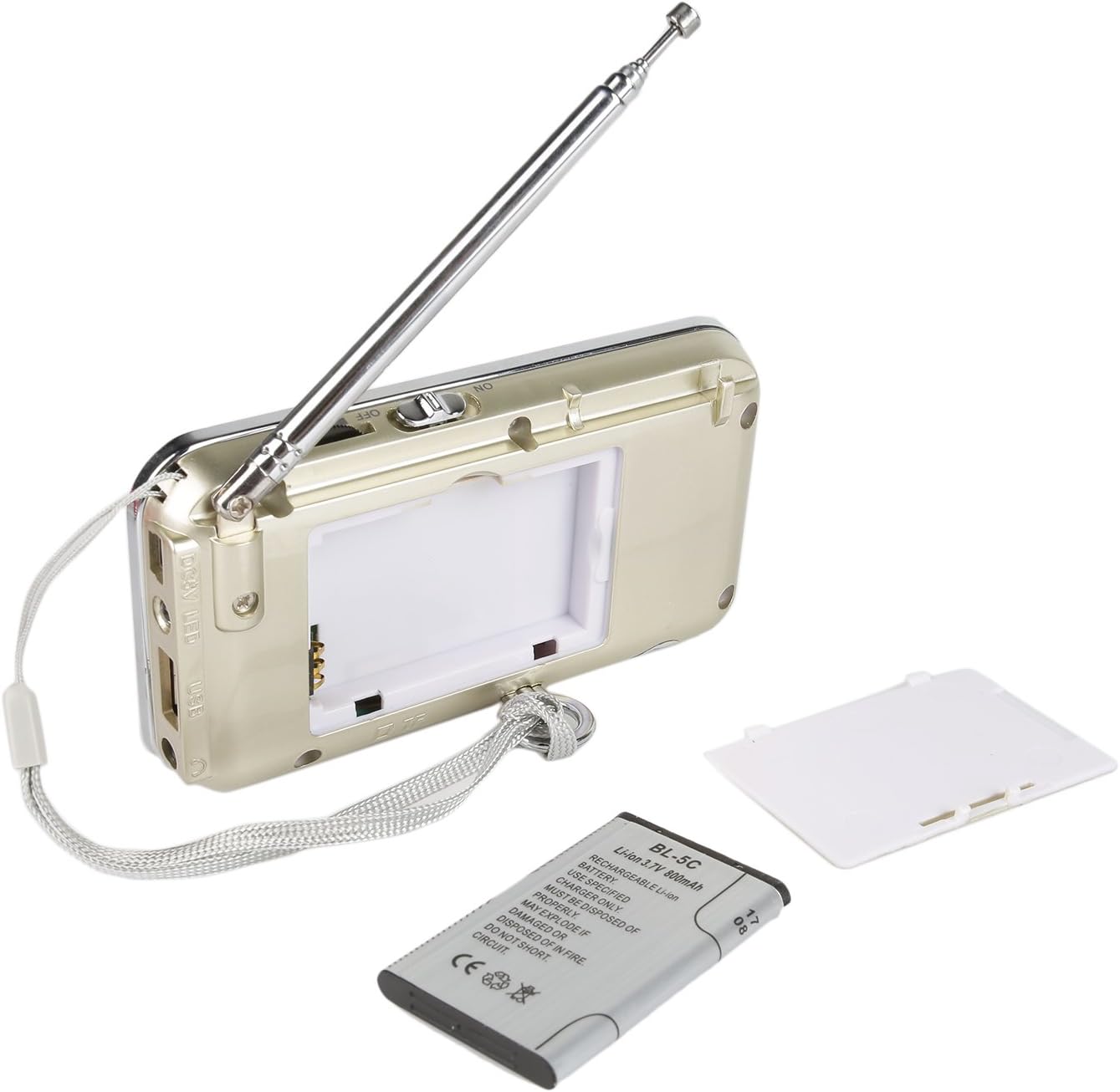
2-сүрөт: Артка View of Raddy RF23 - Shows the battery cover, USB port, DC 5V charging port, and the wrist strap with its stand attachment.
Башкаруу каражаттары жана порттор
- Кубат которгучу: Slide switch on the side to turn the device ON or OFF.
- Антенна: Радио кабыл алууну жакшыртуу үчүн узартылуучу телескопиялык антенна.
- Санариптик дисплей: Жыштык, режим жана трек жөнүндө маалыматты көрсөтөт.
- Баяндамачы: Аудио чыгаруу үчүн интеграцияланган динамик.
- Сандык баскычтоп (0-9): Used for direct frequency input or track selection.
- MODE баскычы: Switches between AM, FM, and MP3 playback modes.
- Play/Pause Button (▶⏸): Plays or pauses MP3 tracks.
- Previous/Rewind Button (◀◀): Skips to the previous track or rewinds during MP3 playback. In radio mode, short press for previous station, long press for auto-scan down.
- Next/Fast Forward Button (▶▶): Skips to the next track or fast forwards during MP3 playback. In radio mode, short press for next station, long press for auto-scan up.
- LED баскычы: Activates or deactivates the built-in flashlight.
- DC 5V киргизүү: Аппаратты кубаттоо үчүн микро USB порту.
- USB порт: For connecting a USB flash drive for MP3 playback.
- TF карта уячасы: For inserting a Micro TF (Micro SD) card for MP3 playback.
- Наушник уячасы (3.5 мм): Купуя угуу үчүн кулакчындарды туташтыруу үчүн.
Жайгашуу
1. Батареяны орнотуу
- Радионун артындагы батарея бөлүкчөсүнүн капкагын табыңыз.
- Капкакты жылдырыңыз.
- Insert the provided BL-5C Lithium-Ion battery, ensuring the contacts align correctly.
- Батарея уясынын капкагын бекем жабыңыз.

Сүрөт 3: Батареяны орнотуу - Open the battery compartment and insert the BL-5C battery.
2. Батареяны заряддоо
- Connect the small end of the included USB charging cable to the DC 5V input port on the side of the radio.
- USB кабелинин чоңураак учун USB кубат адаптерине (кошулмада жок) же компьютердин USB портуна туташтырыңыз.
- The charging indicator light will illuminate. The light typically turns off or changes color when charging is complete.
- Толук заряддоо болжол менен 2-3 саатты талап кылат.
4-сүрөт: USB заряддоо - Connect the radio to a USB power source using the provided cable.
3. Inserting a Micro TF Card or USB Disk (for MP3 Playback)
- Радио өчүрүлгөнүн текшериңиз.
- For a Micro TF card: Gently insert the card into the TF card slot until it clicks into place.
- For a USB disk: Insert the USB disk into the USB port.
- The radio will automatically detect the storage device when powered on and switched to MP3 mode.

5-сүрөт: TF картасын киргизүү - Insert a Micro TF card into the designated slot.
Иштөө нускамалары
1. Күйгүзүү/өчүрүү
Slide the power switch located on the side of the radio to the "ON" position to power on. Slide it to "OFF" to power off.
2. Режимди тандоо
басыңыз РЕЖИМ button repeatedly to cycle through the available modes: FM Radio, AM Radio, and MP3 Player (if a TF card or USB disk is inserted).
3. FM/AM радиосунун иштеши
- Радио режимин тандаңыз: басыңыз РЕЖИМ button until "FM" or "AM" appears on the display.
- Антеннаны узартуу: Оптималдуу кабыл алуу үчүн, телескопиялык антеннаны толугу менен сунуңуз.
- Автоматтык станцияны сканерлөө: көпкө басыңыз Мурунку (◀◀) or Кийинки (▶▶) button to automatically scan for and stop at the next available station.
- Кол менен жөндөө: Use the numeric keypad to directly enter a frequency (e.g., for 106.7 FM, press 1-0-6-7).
- Үндү тууралоо: Adjust the volume using the dedicated volume controls, typically located on the side of the device or integrated with other function buttons.
4. MP3 Playback Operation
- MP3 режимин тандаңыз: басыңыз РЕЖИМ button until "MP3" or a track number appears on the display.
- Ойнотуу/тындыруу: басыңыз Play/Pause (▶⏸) ойнотууну баштоо же тындыруу үчүн баскыч.
- Кийинки / Мурунку трек: басыңыз Кийинки (▶▶) кийинки трекке өтүү үчүн баскычты басыңыз. басыңыз Мурунку (◀◀) button to go to the beginning of the current track, or press it again to go to the previous track.
- Үндү тууралоо: Adjust the volume using the dedicated volume controls, typically located on the side of the device or integrated with other function buttons.
- Түз тректи тандоо: Use the numeric keypad to enter the track number directly.
5. Кол чырак функциясы
басыңыз LED button to turn the built-in flashlight ON. Press it again to turn the flashlight OFF.
Техникалык тейлөө
- Тазалоо: Wipe the radio with a soft, dry cloth. Do not use liquid cleaners or solvents.
- Сактагыч: Радиону көпкө чейин колдонбогон учурда, аны салкын, кургак жерде сактаңыз.
- Батареяга кам көрүү: If the radio will not be used for a long time, remove the battery to prevent leakage. Recharge the battery periodically to maintain its lifespan.
- Антеннага кам көрүү: Ийилип же сынбаш үчүн телескоптук антеннаны акырын кармаңыз.
Проблемаларды чечүү
| Көйгөй | Мүмкүн себеп | Чечим |
|---|---|---|
| Радио күйбөйт. | Батарея түгөндү же туура эмес орнотулган. | Charge the battery or ensure it is inserted with correct polarity. |
| Радио кабыл алуу начар. | Антенна узартылган эмес, сигнал алсыз же тоскоолдук бар. | Fully extend the antenna. Try repositioning the radio. Move away from electronic devices that may cause interference. |
| No sound from MP3 player. | Volume too low, incorrect mode, or no valid media. | Increase volume. Ensure MP3 mode is selected. Verify TF card/USB disk contains MP3 files and is inserted correctly. |
| Flashlight does not work. | Battery low or flashlight not activated. | Charge the battery. Press the LED button to turn on the flashlight. |
| Түзмөк күтүүсүздөн өчүп калат. | Батарея аз. | Батареяны толук заряддаңыз. |
Техникалык шарттар
- Бренд: Radioioddity
- Модел: RF23
- Продукциянын өлчөмдөрү: 4.61 x 0.79 x 2.5 дюйм
- Элемент Салмагы: 6.7 унция
- Кубат булагы: Батарея менен иштейт (1 литий-иондук батарейка талап кылынат)
- Батарея түрү: BL-5C (Rechargeable)
- Байланыш технологиясы: USB
- Тюнер технологиясы: AM, FM
- Колдоого алынган радио топтору: AM, FM
- Жыштык диапазону: FM (87.5-108 МГц), AM (520-1710 кГц)
- Өзгөчө өзгөчөлүгү: Built-In Flashlight, Portable
- Шайкеш түзмөктөр: Earphone, Micro TF Card, USB Disk
- Өндүрүүчү: Radioioddity
Кепилдик жана колдоо
For warranty information or technical support, please refer to the documentation provided with your purchase or visit the official Radioddity webсайт. Сатып алуу квитанциясын кепилдик дооматтары үчүн сатып алуунун далили катары сактаңыз.
Radioddity Official Webсайт: www.radioddity.com