
Маанилүү коопсуздук нускамалары
Бул продуктуну колдонуудан мурун бардык коопсуздук көрсөтмөлөрүн окуп чыгып, түшүнүп алыңыз. Бул көрсөтмөлөрдү келечекте колдонуу үчүн сактап коюңуз.
- Бул аппаратты сууга же нымга жакын колдонбоңуз.
- Кургак чүпүрөк менен гана тазалаңыз.
- Эч кандай желдетүүчү тешиктерди жаап албаңыз. Өндүрүүчүнүн көрсөтмөлөрүнө ылайык орнотуу.
- Радиаторлор, жылуулук регистрлери, мештер же башка аппараттар (анын ичинде) сыяктуу жылуулук булактарынын жанына орнотпоңуз ampкөтөргүчтөр) жылуулукту пайда кылуучу.
- Электр шнурунун басылып кетүүсүнөн же кысып калуудан сактаңыз, өзгөчө сайгычтарда, розеткаларда жана алар аппараттан чыга турган жеринде.
- Өндүрүүчү тарабынан көрсөтүлгөн тиркемелерди/аксессуарларды гана колдонуңуз.
- Бул аппаратты чагылгандуу бороондордо же узак убакыт бою колдонбогондо электр розеткасынан ажыратыңыз.
- Бардык тейлөөлөрдү квалификациялуу тейлөө кызматкерлерине тапшырыңыз. Аппарат кандайдыр бир зыянга учураганда, мисалы, кубат берүүчү шнур же сайгыч бузулганда, суюктук төгүлгөндө же аппараттын ичине нерселер түшкөндө, аппарат жамгырга же нымдуулукка дуушар болгондо, нормалдуу иштебей калганда тейлөө талап кылынат. , же түшүрүлгөн.
Продукт бүттүview
The AUNA Roadie KIDS Boombox is a versatile audio system featuring a top-loading CD player, Bluetooth connectivity, USB playback, AUX input, and AM/FM radio. It is designed for portable use with both AC power and battery options, and includes integrated LED lights.

Сүрөт 1: Алдыңкы view of the AUNA Roadie KIDS Boombox with active red LED lights.

2-сүрөт: Детальдуу фронт view showing the display, USB port, and control panel.
Башкаруу элементтери жана компоненттери
- CD бөлүмү: Top-loading tray for audio CDs.
- Дисплей: LED screen showing track number, mode, and radio frequency.
- Башкаруу баскычтары: Play/Pause, Stop, Skip Forward/Backward, Program, Album.
- Баяндамачылар: Integrated stereo speakers with LED illumination.
- USB порт: MP3/WMA ойнотуу үчүн fileUSB флешкасынан.
- AUX IN уячасы: тышкы аудио түзмөктөрдү туташтыруу үчүн 3.5 мм киргизүү.
- Гарнитура уячасы: Жеке угуу үчүн 3.5 мм чыгаруу.
- AM/FM Antenna: Extendable antenna for radio reception.
- Үн баскычы: Аудио чыгаруу деңгээлин тууралайт.
- Режим тандоочу которгуч: Toggles between CD, USB, Bluetooth, AUX, AM, and FM modes.
- Жарык өчүргүч: Turns the LED speaker lights on or off.
- AC IN Jack: AC кубат адаптерин туташтыруу үчүн.
- Батарея бөлүмү: Located on the bottom for C-type batteries.
- Ташуу туткасы: Жөнөкөй көчүрүү үчүн.
Жайгашуу
Электр камсыздоо
The AUNA Roadie KIDS Boombox can be powered by either the included AC power adapter or by batteries.
AC Power туташуусу
- Бумбокс өчүрүлгөнүн текшериңиз.
- Connect the small end of the AC power adapter to the AC IN jack on the back of the boombox.
- Plug the other end of the AC power adapter into a standard wall outlet (110-120V ~ / 50-60 Hz).

3-сүрөт: Арткы view with AC power input and antenna.
Батарея орнотуу
For portable use, the boombox requires 6 x C-type batteries (not included).
- Ensure the boombox is switched off and disconnected from AC power.
- Аппараттын астындагы батарея отсегин табыңыз.
- Батарея уясынын капкагын ачыңыз.
- Insert 6 C-type batteries, ensuring correct polarity (+/-) as indicated inside the compartment.
- Батарея уясынын капкагын бекем жабыңыз.
Иштөө нускамалары
Жалпы операция
- Күйгүзүү/өчүрүү: Use the main power switch located on the side of the unit.
- Үндү көзөмөлдөө: айлантыңыз VOLUME knob on the side of the unit to adjust the sound level.
- Режим тандоо: колдонуу РЕЖИМ selector switch on the side to choose between CD/USB/BT/AUX and AM/FM radio functions.

4-сүрөт: Каптал view showing Volume and Mode controls.
CD ойноткучтун иштеши
The boombox supports Audio CD, CD-R, CD-RW, and MP3-CDs.
- которуштуруу РЕЖИМ селектор үчүн CD.
- Gently press the 'OPEN' area on the CD compartment lid to open it.
- CDди этикеткасын өйдө каратып, шпинделге коюңуз.
- Close the CD compartment lid firmly until it clicks. The display will show 'CD' and then the total number of tracks.
- басыңыз ОЙНОО/ТЫНЫТТЫРУ ойнотууну баштоо үчүн
- Басыңыз ОЙНОО/ТЫНЫТТЫРУ again to pause, and press ТОКТОТ ойнотууну аяктоо үчүн.
- колдонуу АЛГА ӨТҮҢҮЗ (>> |) же АРТКА ӨТКӨРҮҮ (|<) тректер арасында багыттоо үчүн баскычтар.
- Программаланган ойнотуу: Токтотуу режиминде, басыңыз ПРОГРАММА button. The display will show '01'. Use АЛДЫГА/АРТКАГА ӨТКӨРҮҮ трек тандоо үчүн, андан кийин басыңыз ПРОГРАММА again to confirm. Repeat for up to 20 tracks (CD) or 99 tracks (MP3). Press ОЙНОО программаланган ойнотууну баштоо үчүн.
- Repeat Functions: Ойнотуу учурунда басыңыз КАЙТАЛОО button to cycle through repeat modes (e.g., repeat one track, repeat all tracks, repeat folder for MP3 CDs).
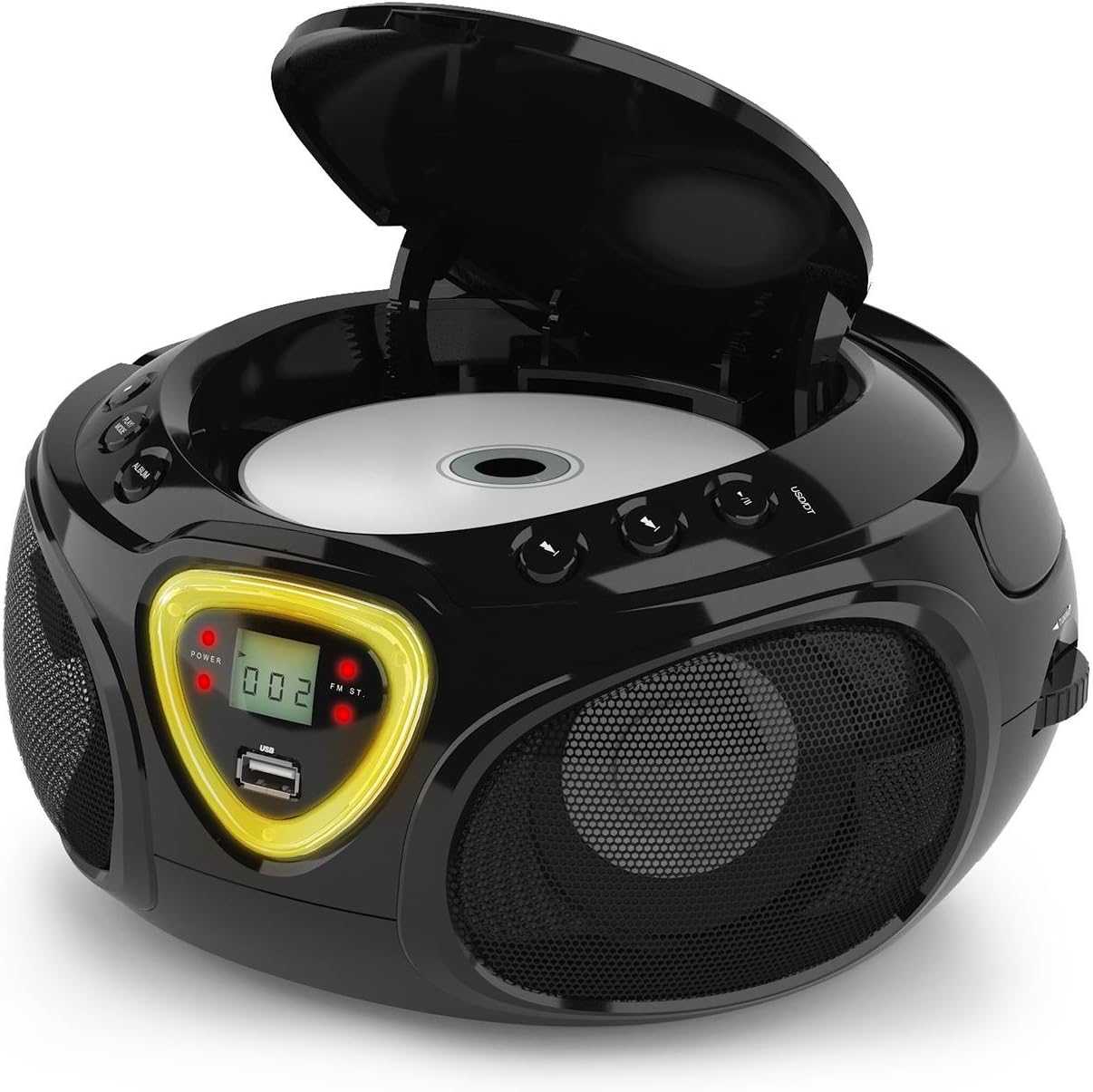
Figure 5: CD compartment open for disc insertion.
Bluetooth операциясы
- которуштуруу РЕЖИМ селектор үчүн BT (Bluetooth). The display will show 'BT' and flash, indicating pairing mode.
- Смартфонуңузда, планшетиңизде же башка Bluetooth иштетилген түзмөгүңүздө Bluetooth'ду иштетиңиз.
- Издөө available devices and select 'AUNA Roadie' from the list.
- Once successfully paired, the 'BT' indicator on the boombox display will stop flashing and remain solid.
- You can now play audio from your connected device through the boombox. Use the controls on your device or the boombox's Play/Pause and Skip buttons to manage playback.
USB ойнотуу
The boombox supports MP3 and WMA file formats from USB flash drives.
- USB флэш-дискти салыңыз USB port on the front of the boombox.
- которуштуруу РЕЖИМ селектор үчүн USB. The unit will automatically detect and begin playing compatible audio files.
- колдонуу ОЙНОО/ТЫНЫТТЫРУ, ТОКТОТ, жана АЛДЫГА/АРТКАГА ӨТКӨРҮҮ ойнотууну башкаруу үчүн баскычтар.
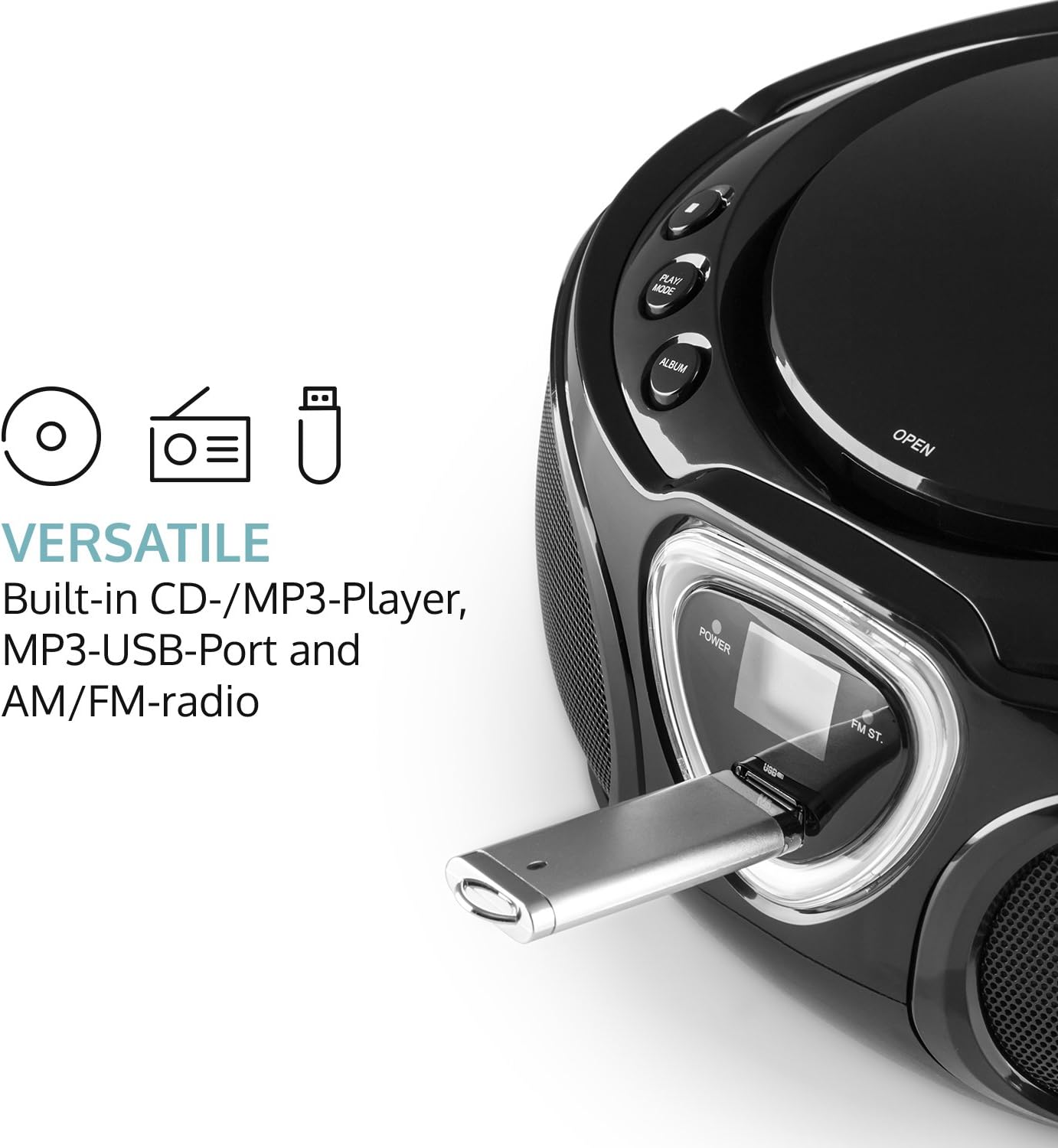
Figure 6: USB port with a flash drive inserted.
AUX киргизүү
- 3.5 мм аудио кабелдин бир учун (кошулмага кирбейт) туташтырыңыз AUX IN бумбокстогу уяча.
- Connect the other end of the audio cable to the headphone jack or audio output of your external audio device (e.g., MP3 player, smartphone).
- которуштуруу РЕЖИМ селектор үчүн AUX.
- Control playback and volume directly from your external audio device.
Радио операциясы (AM/FM)
- которуштуруу РЕЖИМ selector to either AM or FM.
- Extend the telescopic antenna for optimal FM reception. For AM, rotate the unit for best reception.
- айлантыңыз TUNING dial on the side of the unit to scan for radio stations.

7-сүрөт: Каптал view with Tuning dial and Light switch.
LED жарык функциясы
The boombox features multi-color LED lights that illuminate the speakers.
- колдонуу ЖАРЫК КҮЙГҮЗҮҮ/ӨЧҮРҮҮ switch on the side of the unit to turn the LED lights on or off.
- The lights will typically pulse and change color with the rhythm of the music when active.

Figure 8: Boombox with active LED lights.
Наушник колдонуу
For private listening, connect any standard 3.5mm headphones (not included) to the НАУШНИК jack. The main speakers will automatically mute when headphones are connected.
Техникалык тейлөө
Агрегатты тазалоо
- Wipe the exterior of the boombox with a soft, dry cloth.
- Абразивдүү тазалагычтарды, момдорду же эриткичтерди колдонбоңуз, анткени алар финишке зыян келтириши мүмкүн.
- For the CD lens, use a specialized CD lens cleaning kit if necessary. Avoid touching the lens directly.
Сактагыч
- Бумбоксту салкын, кургак жерде, күндүн түз тийген нурларынан жана өтө жогорку температурадан алыс сактаңыз.
- If storing for an extended period, remove the batteries to prevent leakage and damage to the unit.
Проблемаларды чечүү
If you encounter any issues with your AUNA Roadie KIDS Boombox, please refer to the following common problems and solutions:
| Көйгөй | Мүмкүн себеп | Чечим |
|---|---|---|
| Күч жок | AC adapter not connected, batteries depleted or incorrectly inserted. | Check AC adapter connection. Replace or correctly insert batteries. |
| Үн жок | Volume too low, incorrect mode selected, headphones connected. | Increase volume. Select correct mode (CD, BT, USB, AUX, AM/FM). Disconnect headphones if using speakers. |
| CD ойнобой жатат | CD inserted incorrectly, CD dirty/scratched, incompatible CD format. | Ensure CD is label-side up. Clean CD. Use compatible CD format. |
| Bluetooth туташпай жатат | Boombox not in BT mode, device too far, already paired to another device. | Switch to BT mode. Ensure device is within 10 meters. Disconnect from other devices. |
| Радио кабыл алуу начар | Antenna not extended/adjusted, weak signal. | Extend and adjust FM antenna. Rotate unit for AM. Try a different location. |
Техникалык шарттар
| Өзгөчөлүк | Деталь |
|---|---|
| Бренд | AUNA |
| Байланыш технологиясы | Көмөкчү, Bluetooth, USB |
| Түс | Кара |
| Динамик түрү | Стерео |
| Элементтин өлчөмдөрү (L x W x Y) | 7.9 x 9.5 x 5.2 дюйм |
| Power Source | AC (110-120V ~ / 50-60 Hz) or 6 x C-type batteries (9V DC) |
| Шайкеш түзмөктөр | Ноутбук, смартфон, планшет |
| Ватtage | 3 watts (2 x 1.5W speakers) |
| Аудио чыгаруу режими | Стерео |
| Колдоого алынган аудио форматтары | CD, MP3, WMA |
| Bluetooth версиясы | 2.1 + EDR (Profiles: A2DP, AVRCP) |
| Туура келген CD форматтары | Audio CD, CD-R, CD-RW, MP3-CDs |
| Programmable Playback | 20 tracks (CD), 99 tracks (MP3) |
| Элемент Салмагы | 3.4 фунт |
Кепилдик жана колдоо
This product comes with a manufacturer's warranty. For detailed warranty information, please refer to the documentation included with your purchase or visit the official AUNA website. If you require technical assistance, troubleshooting beyond this manual, or have questions regarding your product, please contact AUNA customer support.