
1. Киришүү
Thank you for choosing the WINGONEER LP-168 Plus Bluetooth 2.1 Channel Audio Power Amplifier. This device is designed to provide a high-quality audio experience with versatile connectivity options. Please read this manual carefully before use to ensure proper operation and to maximize the performance of your ampөмүрлүү.
Негизги өзгөчөлүктөрү:
- High-quality integrated Bluetooth module for wireless audio streaming.
- 2.1 Channel output: 2 x 45W RMS for main speakers and 1 x 68W for subwoofer.
- Supports USB playback for MP3 files.
- RCA audio input for connecting external devices like DVD/CD/VCD/TV/PC.
- Electronic volume control with dedicated Bass and Treble adjustments.
- Bright LED display for mode and track information.
- Includes a compact IR remote control for convenient operation.
2. Коопсуздук маалыматы
To prevent fire, electric shock, and other hazards, please observe the following safety precautions:
- Бул шайманды жамгырга же нымга тийгизбеңиз.
- ачпагыла ampкөтөргүч casinг. Бардык тейлөөлөрдү квалификациялуу кызматкерлерге тапшырыңыз.
- Кубат адаптерин камсыз кылыңызtage сиздин жергиликтүү электр камсыздооңузга дал келет.
- сактаңыз amplifier away from direct sunlight, heat sources, and excessive dust.
- Ашыкча ысып кетүүнүн алдын алуу үчүн аппараттын айланасында жетиштүү желдетүүнү камсыз кылыңыз.
- Чагылган түшкөн учурда же көпкө чейин колдонулбаган учурда кубат адаптерин сууруп коюңуз.
3. Пакеттин мазмуну
Сураныч, пакетте төмөнкү нерселерди текшериңиз:
- 1 x WINGONEER LP-168 Plus Audio Power Ampөмүрлүү
- 1 x Power Adapter (AC 100-240V to DC 19V-24V)
- 1 x Signal Cable (RCA to 3.5mm or similar)
- 1 х IR алыстан башкаруу
- 1 x WINGONEER USB LED Light

Image: Contents of the WINGONEER LP-168 Plus package, showing the amplifier, remote, power supply, and manual.

Image: The included WINGONEER USB LED Light.
4. Продукт бүтүп калдыview
Алдыңкы панели:
- MODE баскычы: Switches between input sources (Bluetooth, USB, RCA).
- PREV/NEXT баскычтары: For USB playback, navigates tracks.
- ОЙНОО/ТЫНДЫРУУ баскычы: For USB playback, controls playback.
- USB порт: USB флэш-дисктерди туташтыруу үчүн.
- IR алуучу: Алыстан башкаруу сигналдары үчүн.
- VOLUME баскычы: Adjusts overall volume.
- TREBLE баскычы: Жогорку жыштыктагы үндү тууралайт.
- BASS баскычы: Төмөн жыштыктагы үндү тууралайт.
- LED дисплей: Учурдагы режимди, трек маалыматын ж.б. көрсөтөт.
Арткы Panel:
- АУДОНУ КИРГИЗҮҮ (RCA сол/оң): Тышкы аудио булактарын туташтырыңыз.
- +R OUT - / +L OUT -: Speaker terminals for right and left main speakers.
- + SUB SPEAKER -: Subwoofer output terminals.
- АНТ: Bluetooth antenna connector.
- POWER INPUT (DC 19V-24V): Берилген кубат адаптерин туташтырыңыз.
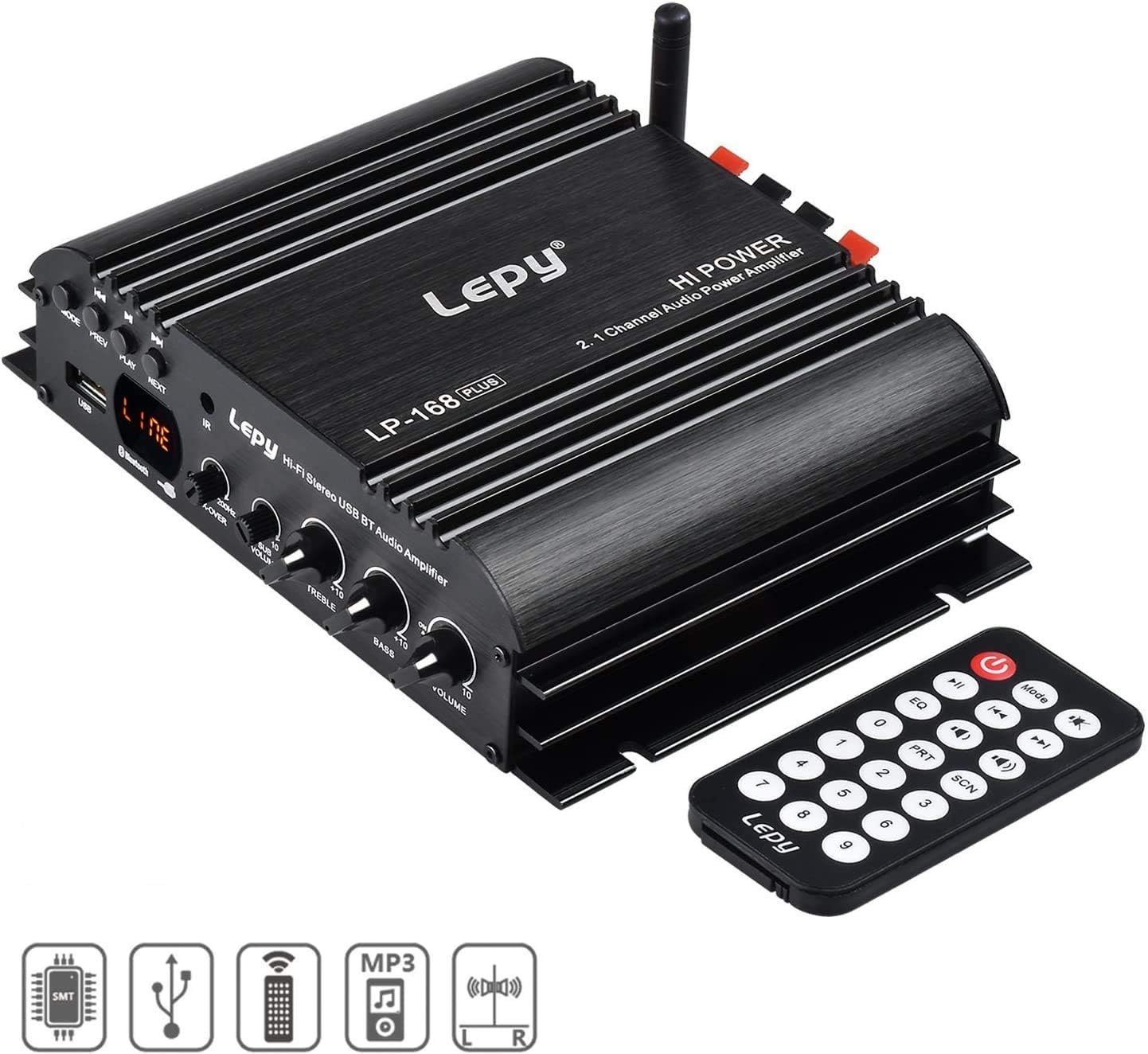
Image: Front panel of the LP-168 Plus ampалыстан башкаруу менен көтөргүч.

Image: Rear panel connections of the LP-168 Plus ampөмүрлүү.
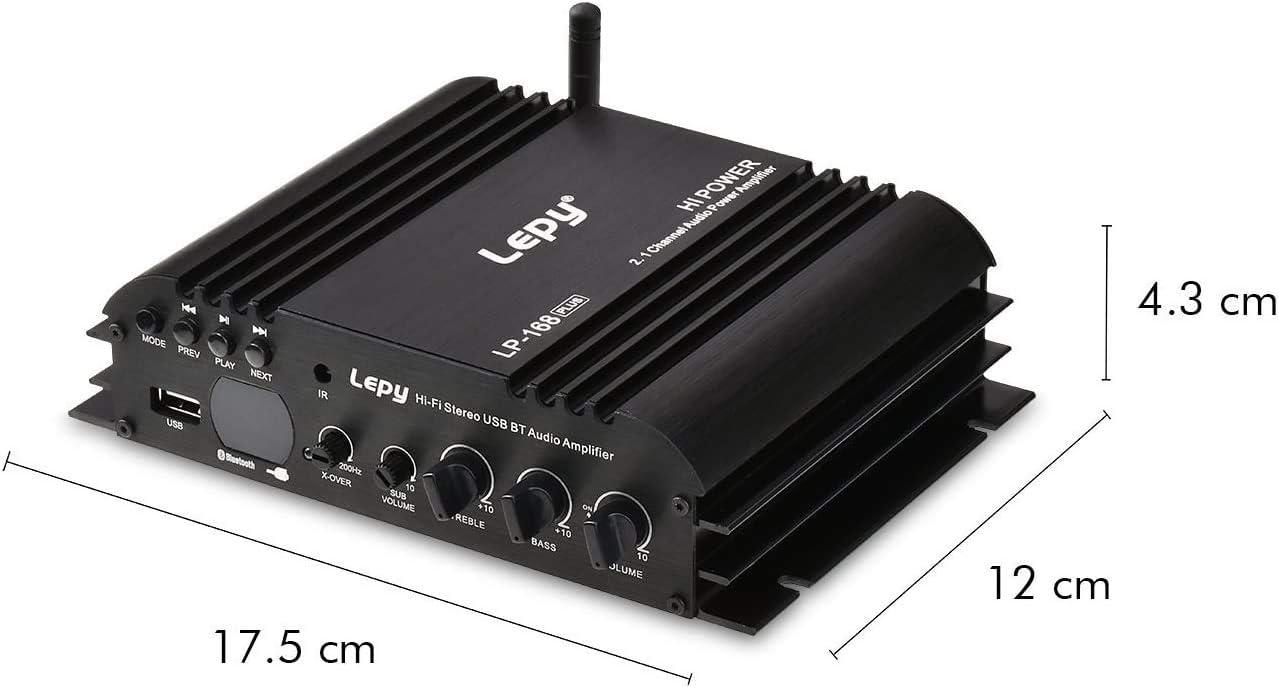
Image: Dimensions of the LP-168 Plus ampөмүрлүү.
5. Орнотуу
Follow these steps to set up your WINGONEER LP-168 Plus ampөмүр берүүчү:
- Динамиктерди туташтыруу: Connect your passive main speakers to the +R OUT - жана +L OUT - terminals. Ensure correct polarity (+ to + and - to -). For the subwoofer, connect it to the + SUB SPEAKER - терминалдар. The ampкөтөргүч 4-8 Ом динамиктерди колдойт.
- Connect Audio Source (RCA): If using an external device (e.g., DVD, CD player, PC), connect its audio output to the AUDIO INPUT (RCA L/R) боюнча ampкөтөргүчтүн арткы панелин RCA кабели менен бекитиңиз.
- Connect Bluetooth Antenna: Screw the provided Bluetooth antenna into the ANT арткы панелдеги туташтыргыч.
- Туташуу кубаты: Plug the DC output of the provided power adapter into the POWER INPUT (DC 19V-24V) боюнча amplifier. Then, plug the AC input of the power adapter into a wall outlet (AC 100-240V, 50/60Hz).

Image: Connection diagram for the LP-168 Plus ampөмүрлүү.
6. Иштөө нускамалары
Күйгүзүү/өчүрүү:
кошулгандан кийин, amplifier will power on automatically. There is no dedicated power button on the unit; power is controlled by connecting/disconnecting the power adapter or using the remote control's power button.
Киргизүү булагын тандоо:
басыңыз РЕЖИМ button on the front panel or the remote control to cycle through available input sources: Bluetooth, USB, and RCA (Audio Input).
Volume, Bass, and Treble Control:
- айлантыңыз VOLUME knob on the front panel or use the volume buttons on the remote control to adjust the overall sound level.
- айлантыңыз БАС knob to increase or decrease low-frequency sounds.
- айлантыңыз ҮЧЧҮ knob to increase or decrease high-frequency sounds.
Bluetooth операциясы:
- которуштуруу ampколдонуп, Bluetooth режимине көтөргүчтү РЕЖИМ button. The LED display will indicate "BT".
- Bluetooth иштетилген түзмөгүңүздө (смартфон, планшет, компьютер) жеткиликтүү Bluetooth түзмөктөрүн издеңиз.
- Select "LP-168 Plus" from the list to pair. Once paired, the amplifier will emit a confirmation sound.
- You can now play audio from your device wirelessly through the ampөмүрлүү.
USB ойнотуу:
- MP3 аудиосу бар USB флэш-дискти салыңыз fileс ичине USB порту алдыңкы панелинде.
- которуштуруу amplifier to USB mode using the РЕЖИМ button. The LED display will show track information.
- колдонуу ОЙНОО/ТЫНЫТТЫРУ, ПРЕВ, жана КИЙИНКИ ойнотууну башкаруу үчүн алдыңкы панелдеги же пульттагы баскычтар.
Алыстан башкаруу функциялары:
The included IR remote control allows you to conveniently manage the amplifier from a distance. Functions include power on/off, mode selection, volume control, track navigation (USB), EQ presets, and more.
7. Техникалык тейлөө
- Тазалоо: Тазалоо үчүн жумшак, кургак чүпүрөктү колдонуңуз amplifier's exterior. Do not use liquid cleaners or solvents.
- Сактагыч: When not in use for extended periods, disconnect the power adapter and store the amplifier in a cool, dry place.
- Вентиляция: Ensure that the ventilation fins on the amplifier are not blocked to prevent overheating.
8. Кыйынчылыктарды
| Көйгөй | Мүмкүн себеп | Чечим |
|---|---|---|
| Үн чыгышы жок. |
|
|
| Bluetooth туташпай жатат. |
|
|
| USB ойнотуу иштебей жатат. |
|
|
| Пульт иштебей жатат. |
|
|
9. Техникалык шарттар
| Модел | LP-168 Plus |
| Чыгуу күчү | 2 x 45W RMS (Main Channels), 1 x 68W (Subwoofer) |
| Динамик импедансы | 4-8 Ом |
| Жалпы гармоникалык бурмалоо (THD) | <0.1% |
| Сигнал-ызы-чуу катышы (SNR) | >80 дБ |
| Frequency Response | 20Гц-20кГц |
| Киргизүү импедансы | 47K |
| Киргизүү көлөмүtage | DC 19V-24V |
| AC Input (Power Adapter) | 100-240V 50/60Hz |
| Өлчөмдөрү (L x W x Y) | 17.6 x 15.5 x 4.3 см |
| Таза Салмак | 495г |
| Түс | Кара |
10. Кепилдик жана колдоо
This WINGONEER product comes with a standard manufacturer's warranty. Please refer to the warranty card included in your package for specific terms and conditions. For technical support, troubleshooting assistance, or warranty claims, please contact your retailer or the WINGONEER customer service department.
Сураныч, кепилдик максаттары үчүн сатып алганыңыздын далилин сактап коюңуз.