
Introduction
This manual provides essential instructions for the safe and efficient use of your Lepro Industrial LED Desk Lamp. Бул ар тараптуу лamp features an adjustable arm and a sturdy clamp, making it suitable for various environments such as study desks, office workstations, or bedside tables. It is designed to accommodate an E27 bulb (not included), allowing you to choose the light source that best fits your needs.
Сураныч, орнотуудан жана иштетүүдөн мурун бул колдонмону кылдат окуп чыгыңыз жана аны келечекте маалымат үчүн сактап коюңуз.

Image: The Lepro Industrial LED Desk Lamp providing illumination on a modern desk setup.
Коопсуздук нускамалары
- л колдонуудан мурун бардык көрсөтмөлөрдү кунт коюп окуп чыгыңызamp.
- Ensure the power supply is disconnected before installing, cleaning, or replacing the bulb.
- Э27 негизги лампаларды гана колдонуңузtage of 40W.
- l колдонбоңузamp бузулган электр шнуры же сайгычы менен.
- Бул продукт имараттын ичинде гана колдонууга арналган. Сууга же жогорку нымдуулукка дуушар кылбаңыз.
- l сактаңызamp күйүүчү материалдардан алыс.
- l-ди ажыратууга же оңдоого аракет кылбаңызamp өзүң. Тейлөө үчүн квалификациялуу кызматкерлерге кайрылыңыз.
Пакеттин мазмуну
Сураныч, пакетте төмөнкү нерселерди текшериңиз:
- Lepro Industrial LED Desk Lamp (main unit with clamp)
- User Manual
Note: The E27 bulb is not included and must be purchased separately.
Орнотуу жана орнотуу
Follow these steps to assemble and install your desk lamp:
- Cl тиркеңизamp: Клди бекем бекитиңизamp to a desk or shelf edge. The clamp can accommodate surfaces up to 5.4 cm thick. Tighten the screw until the clamp is firmly in place, ensuring stability for both vertical and horizontal mounting.
- Л чогултууamp башчысы: l орнотууamp cover onto the upper part of the main unit. Twist the cover in the direction indicated (usually clockwise) to tighten it securely.
- Колду киргизүү: кылдаттык менен киргизиңиз lamp arm into the designated joint on the clamp base. Ensure it clicks or locks into place for stable positioning.
- Лампаны орнотуу: l камсыз кылууamp is unplugged from the power outlet. Screw an E27 base bulb (not included) into the lamp розетка. Өтө катуу тартпаңыз.
- Кубатка туташуу: lampэлектр шнурун тиешелүү электр розеткасына сайыңыз.

Image: The bidirectional clamp allows for both vertical and horizontal mounting on surfaces up to 5.4 cm thick.

Сүрөт: The lamp requires an E27 bulb, which is not included. Various E27 bulb types can be used.
Иштөө нускамалары
Күйгүзүү/өчүрүү: Locate the rocker switch on the power cord. Press the switch to turn the lamp күйгүзүү же өчүрүү.
Жарык бурчту тууралоо: лamp features a highly flexible and adjustable arm with multiple joints. You can rotate the lamp head up to 300 degrees and adjust the arm at various angles (e.g., 120 degrees at the main joints, 360 degrees at the base clamp) to direct light precisely where needed. The spring-balanced arm ensures the lamp stays in your desired position.
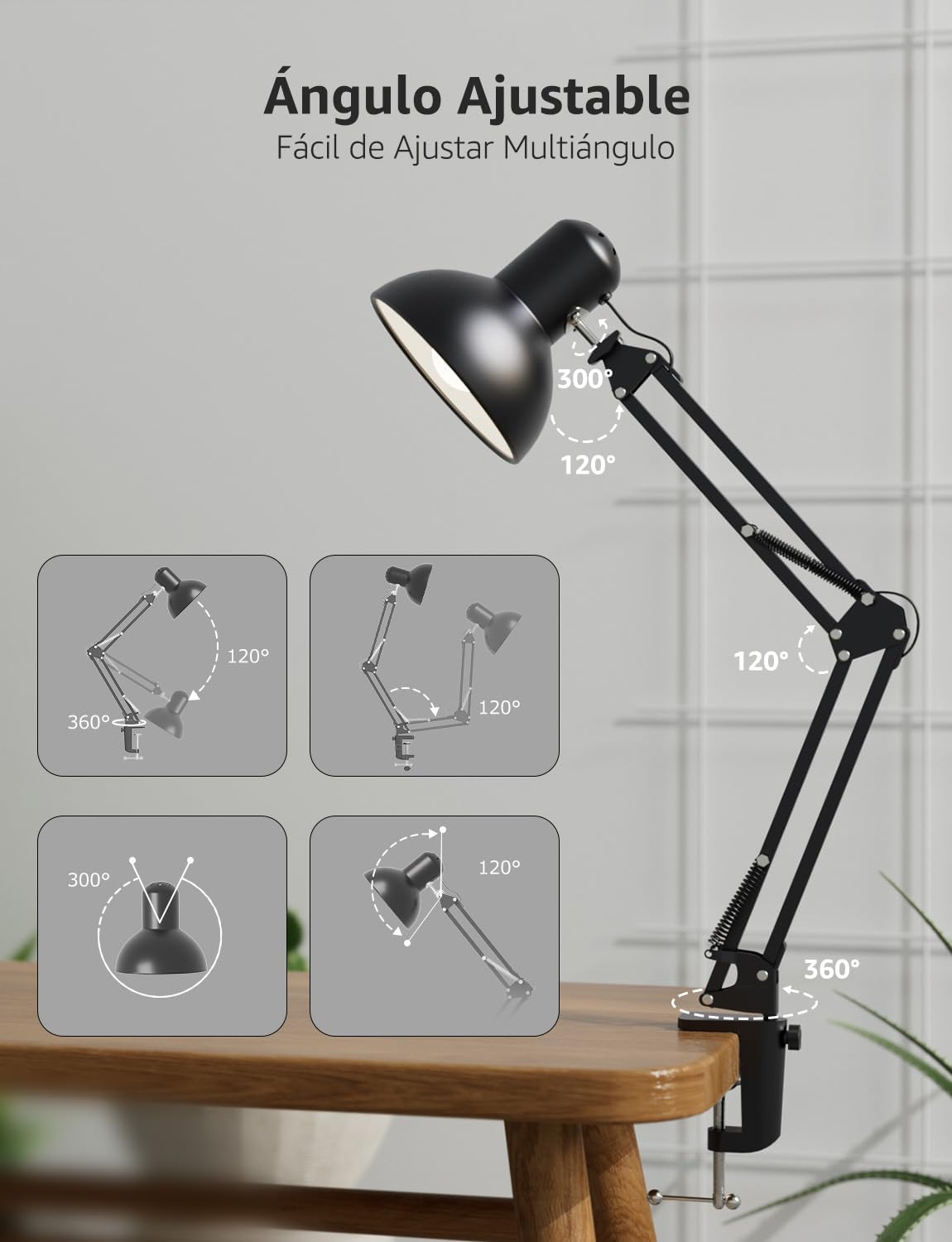
Сүрөт: The lamp's flexible arm and head allow for multi-angle adjustment to optimize lighting.
Техникалык тейлөө
Тазалоо: л тазалоо үчүнamp, ensure it is unplugged and cool. Wipe the surfaces with a soft, dry cloth. Do not use abrasive cleaners, solvents, or liquids, as these may damage the finish or electrical components.
Лампаны алмаштыруу: Before replacing the bulb, ensure the lamp is unplugged and the old bulb has cooled down completely. Carefully unscrew the old E27 bulb and screw in a new E27 bulb (maximum 40W). Ensure the new bulb is securely seated before plugging the lamp кайра кирди.
Проблемаларды чечүү
- Lamp күйгүзбөйт:
- Электр шнурунун розеткага бекем сайылганын текшериңиз.
- Ensure the rocker switch on the cord is in the 'ON' position.
- Verify that the E27 bulb is correctly installed and not faulty. Try testing with a known working bulb.
- Башка аспапка туташтыруу менен электр розеткасын текшериңиз.
- Жарык жаркырап турат:
- Лампанын бекем сайылганын текшериңиз.
- The bulb may be faulty or incompatible. Replace it with a new E27 bulb.
- Check for loose connections in the power cord or outlet.
- Lamp туруксуз:
- cl камсыз кылууamp is tightened securely to the desk or surface.
- Verify that the surface thickness is within the maximum 5.4 cm limit for the clamp.
- lamp arm is properly inserted into the clamp биргелешкен.
Техникалык шарттар
| Өзгөчөлүк | Спецификация |
|---|---|
| Модель номери | 3100027-DW-EU |
| Өлчөмдөрү (L x W x Y) | 38 x 15 x 27 см |
| Салмагы | 900 г |
| Лампанын базасы | E27 |
| Макс Ватtage | 40 Ватт |
| Power Source | Электр зымдары |
| Материал | Металл |
| Которуу түрү | Рокер которуу |
| Тtage | 240 вольт |
| Макс Клamp Калыңдыгы | 5.4 см |
| Электр кабелинин узундугу | Болжол менен 1.6 метр |

Image: Product dimensions and key features like E27 bulb base and power cord length.
Кепилдик жана колдоо
Кепилдик: This Lepro Industrial LED Desk Lamp comes with a 1-year warranty for replacement parts in the EU, covering manufacturing defects from the date of purchase. This warranty does not cover damage caused by misuse, accidents, unauthorized modifications, or normal wear and tear.
Кардарларды колдоо: For technical assistance, troubleshooting, or warranty claims, please contact Lepro customer support through the retailer where the product was purchased or visit the official Lepro website for contact information. Please have your model number (3100027-DW-EU) and proof of purchase ready when contacting support.