
1. Киришүү
Welcome to the user manual for your Sades S-16 Gunblade Gaming Mouse. This high-performance wired gaming mouse is designed to provide precision, comfort, and customization for an enhanced gaming experience. Please read this manual carefully to ensure proper setup and operation of your device.
2. Пакеттин мазмуну
Пакетиңизде бардык буюмдар бар экенин текшериңиз:
- Sades S-16 Gunblade Gaming Mouse
- Instruction Manual
- Драйвер CD
3. Продукциянын өзгөчөлүктөрү
- Avago Optical Sensor: Provides accurate and reliable tracking for precise control.
- Жөнгө салынуучу DPI деңгээли: Cycle through 4 preset DPI settings to match your gaming style and preference.
- 7 Башкаруу баскычтары: Includes programmable buttons for enhanced functionality.
- Ыңгайлаштырылган LED жарыктандыруу: Features 8 customizable LED color options for personalized aesthetics.
- Эргономикалык дизайн: Shaped for comfortable use during extended gaming sessions.
- Туруктуу курулуш: Узак жашоо үчүн сапаттуу материалдар менен курулган.
4. Орнотуу
4.1 Чычканды туташтыруу
To connect your Sades S-16 Gunblade Gaming Mouse:
- Компьютериңизден жеткиликтүү USB портун табыңыз.
- Plug the USB connector of the mouse firmly into the USB port.
- Your computer should automatically detect the mouse.
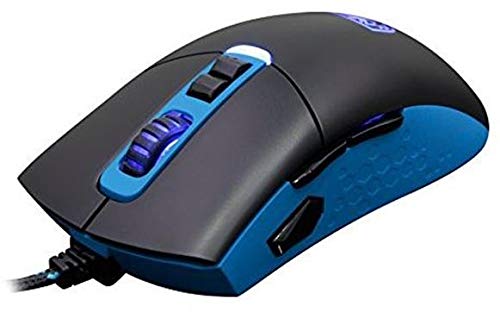
Figure 1: Sades S-16 Gunblade Gaming Mouse connected to a computer.
4.2 Драйверди орнотуу
For full customization and advanced features, driver installation is recommended:
- Insert the provided Driver CD into your computer's optical drive.
- Follow the on-screen instructions to install the Sades S-16 software.
- If you do not have an optical drive, or for the latest version, visit the official Sades website to download the drivers.
Эскертүү: Some users may experience compatibility issues with the included software on newer operating systems. The mouse functions as a standard plug-and-play device without the software, but customization of buttons and LEDs requires the software. The mouse features an in-built memory module to save configurations.
5. Иштөө нускамалары
5.1 Баскыч функциялары
The Sades S-16 Gunblade Gaming Mouse features 7 control buttons:
- Сол чыкылдатуу баскычы: Негизги аракет.
- Оң баскычты чыкылдатуу: Кошумча аракет/контексттик меню.
- Жылдыруу дөңгөлөгү: Scrolls content up/down. Also functions as a clickable middle button.
- DPI Up Button: DPI сезгичтигин жогорулатат.
- DPI Down Button: DPI сезгичтигин төмөндөтөт.
- Алдыга карай баскыч: Алга карай жылдырат web браузерлер же тиркемелер.
- Арткы беттеги баскыч: Артка карай багыт алат web браузерлер же тиркемелер.
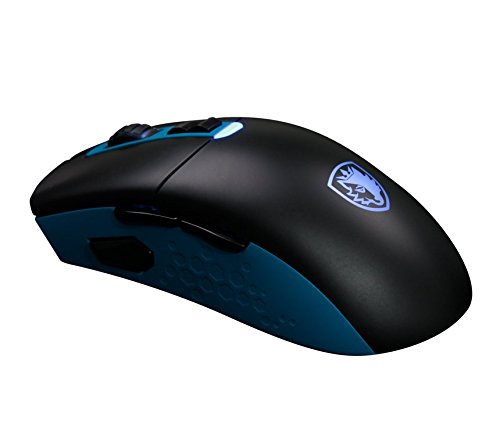
2-сүрөт: Каптал view illustrating the forward and backward thumb buttons.
5.2 DPI жөндөө
Use the dedicated DPI Up and DPI Down buttons, typically located below the scroll wheel, to cycle through the 4 available DPI sensitivity levels. The mouse's LED lighting may change to indicate the currently selected DPI setting.
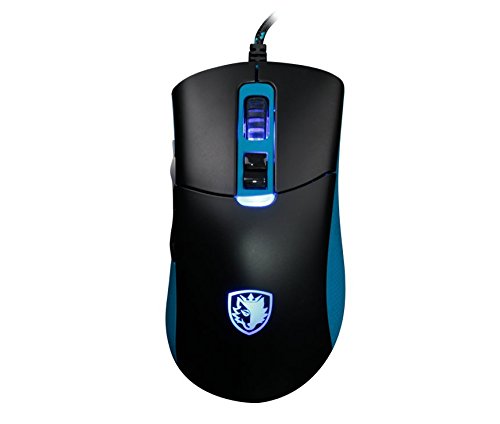
3-сүрөт: Жогорку view highlighting the scroll wheel and DPI adjustment buttons.
5.3 LED Customization
If the Sades S-16 software is installed, you can customize the LED lighting effects and choose from 8 different colors. Refer to the software's interface for detailed instructions on personalization.
5.4 Эргономика жана кармоо
The Sades S-16 is designed with an ergonomic shape. It is a relatively large mouse, which may be particularly comfortable for users with larger hands or those who prefer a fingertip grip style.
6. Техникалык тейлөө
6.1 Тазалоо
- Use a soft, dry, lint-free cloth to clean the surface of the mouse.
- For the optical sensor, gently clean with a cotton swab lightly dampened with isopropyl alcohol. Ensure no liquid enters the mouse.
- Катуу химиялык заттарды же абразивдик материалдарды колдонуудан алыс болуңуз, анткени алар чычкандын бетине зыян келтириши мүмкүн.
6.2 Сактоо жана кабелдерди тейлөө
- Store the mouse in a clean, dry environment away from extreme temperatures when not in use.
- Avoid sharp bends, kinks, or excessive pulling on the USB cable to prevent internal wire damage.
7. Кыйынчылыктарды
7.1 Чычкан жооп бербейт
- USB кабели компьютериңиздеги иштеген USB портуна бекем сайылганын текшериңиз.
- Чычканды башка USB портуна туташтырууга аракет кылыңыз.
- Компьютериңизди өчүрүп күйгүзүңүз.
7.2 Jerky Movement or Inaccurate Tracking
- Check the underside of the mouse for any plastic protectors on the mouse skates and remove them if present.
- Чычкандын астыңкы жагындагы оптикалык сенсордун таза жана чаңсыз же таштандысыз экенин текшериңиз.
- Use the mouse on a clean, uniform surface or a high-quality mouse mat.
7.3 Программалык камсыздоодогу көйгөйлөр
- Verify that you have installed the correct drivers for your operating system.
- If experiencing issues on newer Windows versions, try running the software in compatibility mode.
- Check the official Sades website for updated software or firmware.
7.4 Scroll Wheel Issues
- If the scroll wheel feels loose or unresponsive, inspect it for any obstructions or debris that might be affecting its movement.
8. Техникалык шарттар
| Бренд | Sades |
| Модел | S-16 |
| Байланыш | Зымдуу (USB) |
| Сенсор түрү | Optical (Avago Sensor) |
| DPI деңгээли | 4 жөнгө салынуучу деңгээл |
| Buttons | 7 Башкаруу баскычтары |
| LED жарыктандыруу | Customizable (8 colors) |
| Операциялык системанын шайкештиги | Linux, Windows 7, Windows XP (жана андан кийинки версиялары) |
| Аппараттык платформа | Ноутбук, персоналдык компьютер |
9. Кепилдик жана колдоо
The Sades S-16 Gunblade Gaming Mouse comes with a standard manufacturer's warranty. Please refer to the warranty card included in your product packaging for detailed terms and conditions, or visit the official Sades webкөбүрөөк маалымат алуу үчүн сайт.
For technical support, troubleshooting assistance, or any other inquiries, please contact Sades customer service through their official webсайт же атайын колдоо каналдары.