
Cooler Master MFY-P4DC-153PC-R1
Cooler Master MasterFan Pro 140 AP RGB Kit Instruction Manual
Model: MFY-P4DC-153PC-R1
1. Киришүү
This manual provides detailed instructions for the installation, operation, and maintenance of your Cooler Master MasterFan Pro 140 AP RGB Kit. This kit is designed to enhance your desktop PC's cooling performance and aesthetic with customizable RGB lighting. Please read this manual thoroughly before installation to ensure proper setup and functionality.

Image 1.1: An illuminated Cooler Master MasterFan Pro 140 AP RGB fan, showcasing its lighting capabilities.
2. Пакеттин мазмуну
Verify that all items listed below are present in your package. If any items are missing or damaged, please contact your retailer or Cooler Master support.
- 3x MasterFan Pro 140 AP RGB Fans
- 1x MasterAccessory RGB Fan Controller
- Монтаждоо бурамалар
- Туташуу кабелдери
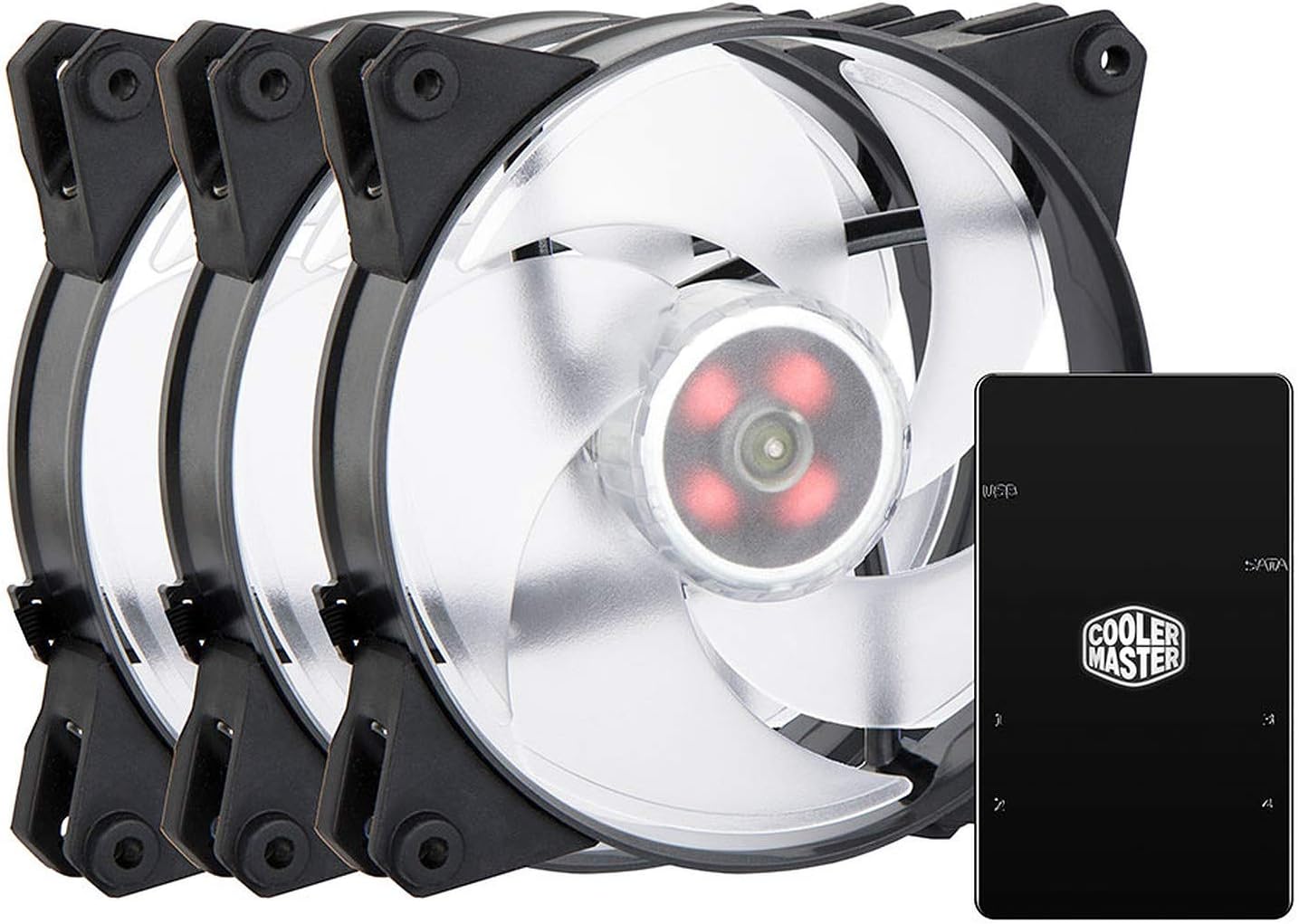
Image 2.1: The complete MasterFan Pro 140 AP RGB Kit, including three fans and the RGB controller.
3. Орнотуу жана орнотуу
Follow these steps to properly install your MasterFan Pro 140 AP RGB Kit into your desktop system.
3.1 Желдеткичти орнотуу
- Identify the desired mounting locations for the 140mm fans within your PC case.
- Secure each fan to the case using the provided mounting screws. Ensure the fan's airflow direction is appropriate for your cooling configuration (intake or exhaust).
3.2 RGB Controller Connection
- Connect the 4-pin RGB cable from each MasterFan Pro 140 AP fan to an available RGB port on the MasterAccessory RGB Fan Controller. The controller typically has multiple ports (e.g., 1, 2, 3).
- Connect the 4-pin PWM fan cable from each MasterFan Pro 140 AP fan to an available 4-pin fan header on your motherboard or a fan hub.
3.3 Power and Motherboard Connection
- Connect the SATA power connector from your PC's power supply unit (PSU) to the MasterAccessory RGB Fan Controller. This provides power to the controller and the connected RGB fans.
- Connect the included USB cable from the MasterAccessory RGB Fan Controller to an available internal USB 2.0 header on your motherboard. This allows software control of the RGB lighting.
- Alternatively, if your motherboard has a compatible 4-pin RGB header, you may connect the controller directly to the motherboard's RGB header for motherboard software control (consult your motherboard manual for compatibility).

Image 3.1: Multiple MasterFan Pro 140 AP RGB fans connected to the RGB controller, demonstrating a typical setup.
4. Operating the RGB Lighting and Fans
Once installed, the RGB lighting and fan speeds can be controlled through various methods.
4.1 Программалык камсыздоону башкаруу
- Cooler Master MasterPlus+ Software: Download and install the Cooler Master MasterPlus+ software from the official Cooler Master website. This software allows for comprehensive control over RGB lighting effects, colors, and fan speeds when the controller is connected via USB.
- Motherboard RGB программалык камсыздоо: If the controller is connected to a compatible motherboard RGB header, you may use your motherboard's proprietary RGB software (e.g., ASUS Aura Sync, MSI Mystic Light, Gigabyte RGB Fusion) to synchronize and control the fan lighting.
4.2 Кол менен башкаруу (эгер бар болсо)
Some Cooler Master RGB controllers may feature physical buttons for basic RGB mode and color cycling. Refer to the specific controller's documentation for details on manual control options. The MasterFan Pro 140 AP RGB Kit primarily relies on software control for full customization.
5. Техникалык тейлөө
Үзгүлтүксүз техникалык тейлөө күйөрмандарыңыздын оптималдуу иштешин жана узак мөөнөттүү иштешин камсыз кылат.
- Тазалоо: Periodically clean the fan blades and housing to remove dust buildup. Use compressed air or a soft, dry cloth. Ensure the PC is powered off and unplugged before cleaning.
- Текшерүү: Кабелдердин бекем туташууларын жана эскирүү белгилерин текшериңиз.
6. Кыйынчылыктарды
If you encounter issues with your MasterFan Pro 140 AP RGB Kit, refer to the following common solutions.
- Айланбаган күйөрмандар:
- Ensure the 4-pin PWM fan cables are securely connected to the motherboard fan headers or fan hub.
- Verify that the SATA power connector is firmly attached to the RGB controller and the PSU.
- Check BIOS settings to ensure fan headers are enabled and configured correctly.
- RGB жарыктандыруу иштебейт:
- Confirm that the 4-pin RGB cables from the fans are correctly plugged into the RGB controller.
- Verify the RGB controller's SATA power connection.
- Ensure the USB 2.0 header connection to the motherboard is secure for software control.
- If using motherboard RGB software, ensure the controller is connected to a compatible motherboard RGB header and the software is up to date.
- Try restarting the Cooler Master MasterPlus+ software or your PC.
- Туура эмес түстөр/эффекттер:
- Ensure you are using the correct software (Cooler Master MasterPlus+ or motherboard RGB software) and that it is updated to the latest version.
- Check for conflicting RGB software running simultaneously.
7. Техникалык шарттар
| Өзгөчөлүк | Спецификация |
|---|---|
| Модель номери | MFY-P4DC-153PC-R1 |
| Бренд | Cooler Master |
| Fan Size | 140мм |
| Тtage | 12 вольт |
| Ватtage | 3.84 ватт |
| Муздатуу ыкмасы | Аба |
| Шайкеш түзмөктөр | Иш такта |
| Ызы-чуу деңгээли | 20 децибел |
| Материал | Поликарбонат |
| Буюмдун салмагы (комплект) | 662 грамм |
| Элемент түрү | Case Fan Kit |
8. Кепилдик жана колдоо
Cooler Master products come with a limited warranty. For detailed warranty information, terms, and conditions, please visit the official Cooler Master webсайтка кайрылыңыз же продуктуңузга кошулган кепилдик картасын караңыз.
For technical support, troubleshooting assistance, or to inquire about replacement parts, please contact Cooler Master customer service through their official webсайт: www.coolermaster.com/support/.
Ask a question about this manual
Ask about setup, troubleshooting, compatibility, parts, safety, or missing instructions. Manuals+ will review the question and use this page’s manual context to help answer it.