RASTAR Ferrari La Ferrari RC Car Instruction Manual
Модел: AC-50100
Бренд: RASTAR
Introduction
This manual provides detailed instructions for the RASTAR Ferrari La Ferrari RC Car, Model AC-50100. Please read this manual thoroughly before operating the vehicle to ensure proper use and longevity of the product. This 1/14 scale replica offers an authentic driving experience with meticulous attention to detail.
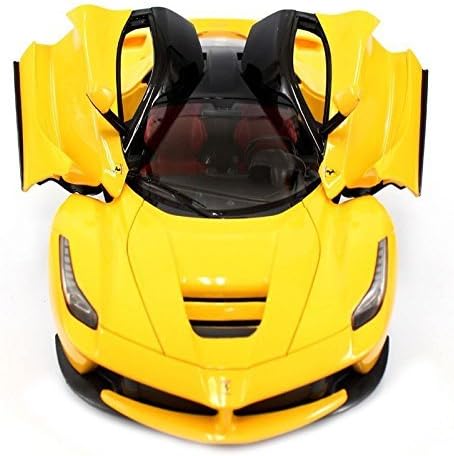
Image: The RASTAR Ferrari La Ferrari RC Car in yellow, showcasing анын деталдык дизайны.
1. Орнотуу
1.1 кутудан чыгаруу
Бардык компоненттерди таңгактан кылдаттык менен алып салыңыз. "Кутуда эмне бар" бөлүмүндө тизмеленген бардык нерселердин бар экенин текшериңиз.
Ferrari La Ferrari RC Car (Model AC-50100)
Алыстан башкаруу
Кайра заряддалуучу батарея (7.4V)
USB заряддоо кабели
Кичинекей бурагыч
Сүрөт: жогорудан төмөнгө view of the RASTAR Ferrari La Ferrari RC Car, highlighting its sleek design.
1.2 Battery Installation (RC Car)
RC унаасынын астыңкы бетиндеги батарея бөлүмүн табыңыз.
Use the provided screwdriver to open the battery compartment cover.
Connect the rechargeable 7.4V battery to the car's battery connector.
Carefully place the battery inside the compartment and secure the cover with the screwdriver.
Ensure the car's power switch (located near the battery compartment) is in the "OFF" position before installation.
Image: The bottom of the RC car, indicating the battery compartment and power switch.
1.3 Батареяны орнотуу (Алыстан башкаруу)
Пульттун артындагы батарея отсегин табыңыз.
Батарея уясынын капкагын ачыңыз.
Бөлүмгө 4 AA батарейкасын (кошулмага кирбейт) салып, туура полярдуулукту (+/-) камсыз кылыңыз.
Батарея уясынын капкагын жабыңыз.
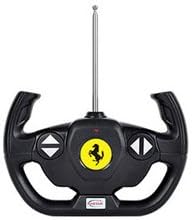
Image: The remote control unit, featuring a steering wheel design.
1.4 Remote Control Wheel Assembly
The steering wheel for the remote control may need to be attached. Simply align the wheel with the designated slot on the side of the remote control and push it firmly into place until it clicks securely.
2. Иштөө нускамалары
2.1 Power On and Syncing
Ensure both the RC car and the remote control have fresh or fully charged batteries installed.
Turn on the RC car using the switch on its underside.
Алыстан башкаруу пультун анын кубат баскычын колдонуп күйгүзүңүз.
The car and remote should automatically sync. If not, turn both off and on again.
2.2 Негизги башкаруу каражаттары
Алга/артка: Use the trigger on the remote control. Pull the trigger towards you for forward motion, and push it away from you for reverse. The remote offers variable speed control.
Башкаруу: Rotate the steering wheel on the side of the remote control left or right to steer the car in the desired direction.
The RC car has a control range of up to 30 meters, allowing for ample space during operation.
2.3 Продукт бүттүview and Features (Video)
Видео: Продукциянын деталдуу сүрөттөмөсүview of the Ferrari RC car, highlighting its features and design.
Video: Demonstration of the Ferrari remote control car in red, showcasinанын кыймылы жана өзгөчөлүктөрү.
Video: A 1/14 Licensed Le Mans Series Remote Control Car, demonstrating similar operational characteristics.
3. Техникалык тейлөө
3.1 Батареяны заряддоо
To charge the RC car's rechargeable battery:
Кайра заряддалуучу батареяны берилген USB кубаттоо кабелине туташтырыңыз.
Plug the USB cable into a compatible USB power source (e.g., computer, USB wall adapter).
The charging indicator on the USB cable will show the charging status (e.g., red light for charging, green light for fully charged).
A full charge typically takes approximately 2 hours. Do not leave batteries unattended while charging.
Always disconnect the battery from the charger once fully charged.
3.2 Тазалоо
To maintain the appearance and functionality of your RC car:
Wipe the car's body with a soft, dry cloth to remove dust and dirt.
Катуу химиялык заттарды же абразивдүү тазалоочу каражаттарды колдонуудан алыс болуңуз, анткени алар териге зыян келтириши мүмкүн.
Keep the car and remote control away from water and moisture.
4. Кыйынчылыктарды
4.1 Car Not Responding to Remote Control
Унаа жана пульт экөө тең күйүк экенин текшериңиз.
Ensure batteries in both devices are fully charged and correctly installed.
Turn both devices off and then on again to re-establish the connection.
Иштөө диапазонунда (30 метрге чейин) экениңизди текшериңиз.
Avoid operating multiple RC cars with the same frequency in close proximity, as this can cause interference.
4.2 Car Moving Slowly or Not at All
The rechargeable battery in the car may be low. Recharge it fully.
Check the AA batteries in the remote control and replace them if necessary.
Ensure the car is being operated on a smooth, flat surface for optimal performance.
5. Техникалык шарттар
Өзгөчөлүк
Деталь
Продукциянын өлчөмдөрү
17 x 9 x 7.5 дюйм
Элемент Салмагы
2 фунт
Модель номери
AC-50100
Өндүрүүчүнүн сунуш кылган курагы
12 жаш жана андан жогору
Унаа батареясы
7.4V Rechargeable Battery (included)
Алыстан башкаруунун батареялары
4 AA батарейкалар (киргизилген эмес)
Масштаб
1:14
6. Кепилдик жана колдоо
Кепилдик маалыматы же техникалык колдоо үчүн өндүрүүчүнүн расмий өкүлүнө кайрылыңыз webсайтка же түздөн-түз кардарларды тейлөөгө кайрылыңыз. Сатып алганыңыздын далили катары сатып алуу дүмүрчөгүңүздү сактаңыз.
Ask a question about this manual
Ask about setup, troubleshooting, compatibility, parts, safety, or missing instructions. Manuals+ will review the question and use this page’s manual context to help answer it.