
1. Киришүү
This manual provides essential information for the safe and efficient operation of your Lenco L-30BK Belt Drive Turntable. Please read these instructions thoroughly before using the device and retain them for future reference. The Lenco L-30BK is designed for playing vinyl records at 33 and 45 RPM, featuring a built-in preamplifier and USB connectivity for digitizing your vinyl collection.
2. Коопсуздук маалыматы
- Кубат булагы: электр менен жабдууну камсыз кылуу voltage matches the requirements specified on the unit. Use only the provided power adapter.
- Суу жана ным: Аппаратты жамгырга, нымга же тамчылатуучу/чачыраган суюктуктарга тийгизбеңиз. Ваза сыяктуу суюктуктар толтурулган нерселерди аппараттын үстүнө койбоңуз.
- Вентиляция: Адекваттуу вентиляцияны камсыз кылыңыз. Вентиляция тешиктерин жаап албаңыз.
- Жылуулук: Аппаратты радиаторлор, жылуулук регистрлери, мештер же башка аппараттар (анын ичинде) сыяктуу жылуулук булактарынан алыс кармаңыз. ampкөтөргүчтөр) жылуулукту пайда кылуучу.
- Тазалоо: Тазалоодон мурун түзмөктү розеткадан сууруп алыңыз. Жумшак, кургак чүпүрөктү колдонуңуз. Суюк же аэрозоль тазалоочу каражаттарды колдонбоңуз.
- Тейлөө: Бул продуктту өзүңүз тейлөөгө аракет кылбаңыз. Бардык тейлөөнү квалификациялуу тейлөө кызматкерлерине тапшырыңыз.
- Жайгашкан жери: Титирөөнүн алдын алуу жана туура ойнотууну камсыз кылуу үчүн айланма табакты туруктуу, тегиз жерге коюңуз.
3. Пакеттин мазмуну
Please check that all items listed below are included in the package:
- Lenco L-30BK Turntable Unit
- Чаң капкагы
- Платтер
- Drive Belt
- Slipmat
- AC кубат адаптери
- USB кабели
- RCA аудио кабели
- Instruction Manual
- Pick-up Needle (pre-installed on cartridge)
4. Продукт бүтүп калдыview
Familiarize yourself with the components of your Lenco L-30BK turntable.

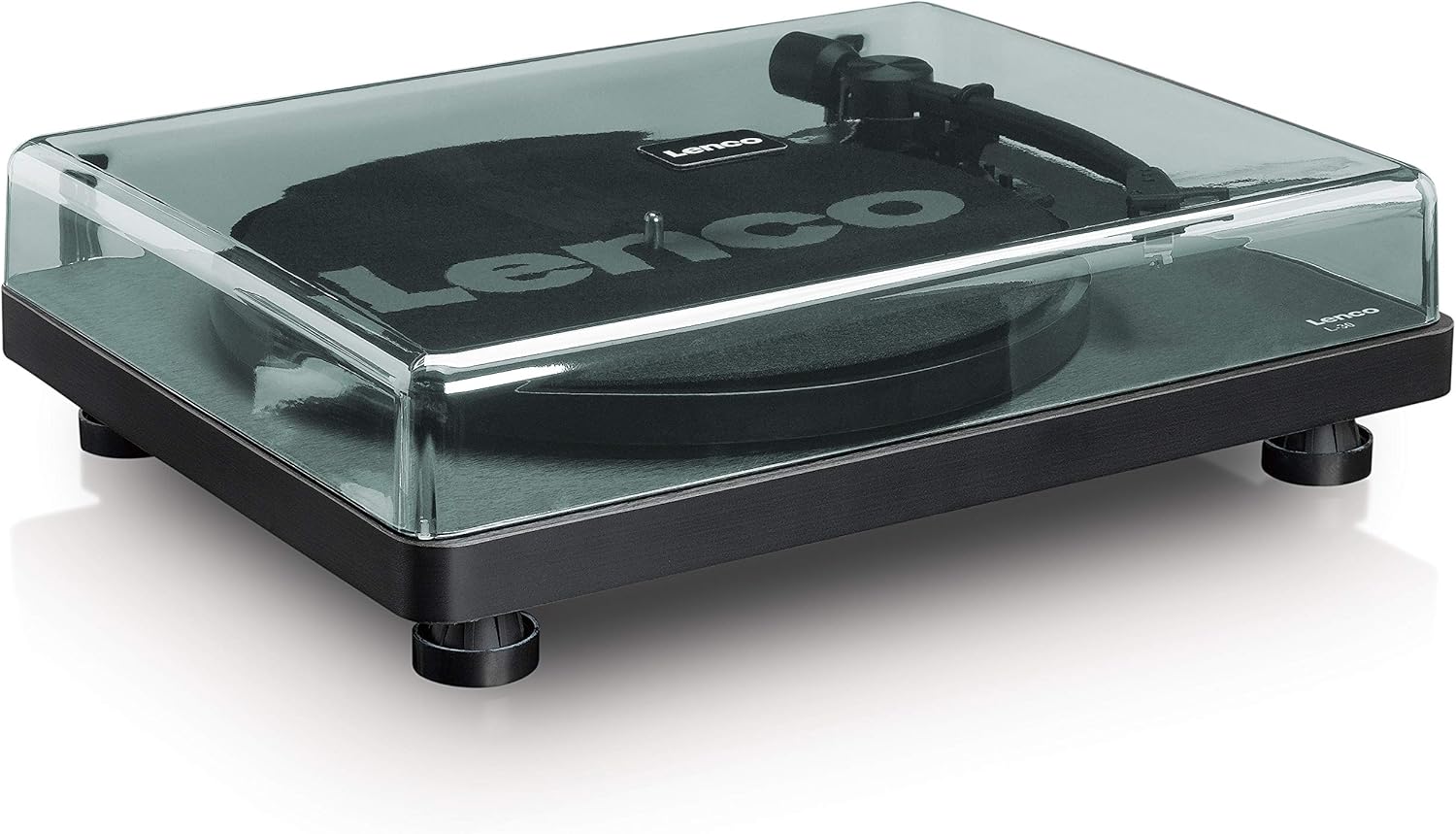
4.1-сүрөт: Фронт view of the Lenco L-30BK Turntable with the dust cover open, revealing the main components including the platter, tonearm, and control buttons.

4.2-сүрөт: Rear panel connections of the Lenco L-30BK, including RCA audio outputs (L/R), USB port, DC12V power input, and the main power switch.
Негизги компоненттер:
- Табак: The circular platform where records are placed.
- Тонарм: Пластинанын оюктарын окуган картриджди жана стилусту кармайт.
- Картридж жана стилус: Converts physical vibrations into electrical signals. The L-30BK features a Movable Magnet Sensor (MMC) with an individually replaceable stylus.
- Ылдамдык тандагыч: Switch to select between 33 and 45 RPM playback speeds.
- Автоматтык түрдө өчүрүү: Жаздыруунун аягында пластинанын айлануусун автоматтык түрдө токтотот.
- Чаң капкагы: Колдонулбаган учурда айланма табакчаны чаңдан коргойт.
- RCA Audio Outputs (L/R): Тышкы туташуу үчүн ampкөтөргүч же активдүү спикерлер.
- USB порт: For connecting to a computer to digitize vinyl records.
- DC12V кубат киргизүү: Кубат адаптерин туташтыруу үчүн.
5. Орнотуу
5.1 Пакеттен чыгаруу жана жайгаштыруу
- Айлануучу табакты анын таңгагынан этияттык менен алып салыңыз.
- Place the unit on a stable, level surface, away from direct sunlight, heat sources, and excessive dust or vibrations.
- Чаң капкагын анын илмектерин айланма табактын арткы жагындагы уячалар менен тегиздеп орнотуңуз.

5.1-сүрөт: The Lenco L-30BK Turntable with its protective dust cover closed, ready for placement.
5.2 Пластинаны жана курду орнотуу
- Place the platter onto the turntable spindle.
- Locate the drive belt, typically found underneath the platter or separately packaged.
- Carefully stretch the drive belt around the motor pulley and the inner rim of the platter. Ensure the belt is not twisted.
- Place the slipmat on top of the platter.
5.3 Аудио туташуу
The L-30BK has a built-in preamplifier, allowing direct connection to most audio systems.
- Connect the RCA audio cable (red for right channel, white for left channel) from the AUDIO OUT jacks on the rear of the turntable to the LINE IN or AUX IN jacks on your ampкөтөргүч же активдүү спикерлер.
5.4 Кубат туташтыруу
- Connect the DC12V power adapter to the DC12V POWER input on the rear of the turntable.
- Кубат адаптерин ылайыктуу розеткага сайыңыз.
5.5 USB Connection (for Digitization)
- To digitize your vinyl records, connect the USB cable from the USB port on the rear of the turntable to an available USB port on your computer (PC or Mac).
6. Иштөө нускамалары
6.1 Күйгүзүү/өчүрүү
- Flip the ON/OFF switch on the rear panel to the 'ON' position to power on the turntable.
- Flip the switch to 'OFF' when not in use.
6.2 Пластинканы ойнотуу
- Пластинканы тарелкага коюп, анын ортосуна туураланганын текшериңиз.
- Select the appropriate speed (33 or 45 RPM) using the speed selector switch. For 45 RPM singles, place the included adapter on the spindle if needed.
- Кью рычагын колдонуп, тонер рычагын көтөрүңүз.
- Кол менен колду жазууну каалаган баштапкы оюктун үстүнө жайгаштырыңыз.
- Gently lower the tonearm using the cueing lever. The stylus will descend onto the record, and playback will begin.
- At the end of the record, the auto shut-off function will stop the platter rotation. Lift the tonearm and return it to its rest.

6.1-сүрөт: Proper technique for lowering the tonearm onto a record for playback.
6.2-сүрөт: Деталдаштырылган view of the Movable Magnet Sensor (MMC) cartridge and stylus assembly.
6.3 USB аркылуу жазууларды санариптештирүү
The L-30BK allows you to convert your vinyl records into digital audio fileкомпьютер колдонуу.
- Берилген USB кабелин колдонуп, бурулуучу табакты компьютериңизге туташтырыңыз.
- Download and install audio recording software such as Audacity (available online for free) on your computer.
- Open the recording software and select the USB Audio Device as the input source.
- Start recording in the software, then begin playing your record on the turntable as described in section 6.2.
- Once the record finishes, stop the recording in the software and save your digitized audio file.
7. Техникалык тейлөө
7.1 Айланма табакчаны тазалоо
- Тазалоодон мурун айланма табактын үстүнкү бөлүгүн ар дайым электр розеткасынан сууруп алыңыз.
- Use a soft, dry, lint-free cloth to wipe the cabinet and dust cover.
- Абразивдүү тазалагычтарды, момдорду же эриткичтерди колдонбоңуз, анткени алар финишке зыян келтириши мүмкүн.
7.2 Stylus Care and Replacement
- The stylus is a delicate component. Avoid touching it with your fingers.
- Clean the stylus regularly using a soft brush, gently brushing from back to front.
- The stylus should be replaced after approximately 300-500 hours of playback, or if you notice a degradation in sound quality.
- To replace the stylus, carefully pull the old stylus assembly forward and down from the cartridge. Insert the new stylus assembly by pushing it upwards and backwards into the cartridge until it clicks into place.
8. Кыйынчылыктарды
If you encounter problems with your turntable, refer to the following common issues and solutions:
| Көйгөй | Мүмкүн себеп | Чечим |
|---|---|---|
| Күч жок | Power adapter not connected; Power switch off; Wall outlet faulty. | Ensure power adapter is securely connected; Turn power switch to 'ON'; Test wall outlet with another device. |
| Үн жок же үнү төмөн | RCA cables not connected correctly; Amplifier/speakers off or volume low; Input selected incorrectly on ampөмүрлүү. | Check RCA cable connections; Turn on amplifier/speakers and adjust volume; Select correct input source on your audio system. |
| Бурмаланган үн | Dirty stylus; Damaged stylus; Dirty record; Turntable not on a stable surface. | Clean the stylus; Replace the stylus if damaged; Clean the record; Ensure turntable is on a stable, level surface. |
| Жаздырууну өткөрүп жиберүү | Dirty or scratched record; Stylus worn or damaged; Turntable not level; External vibrations. | Clean the record; Replace the stylus; Ensure turntable is level; Place turntable away from sources of vibration. |
| USB жаздыруу көйгөйлөрү | USB cable not connected; Incorrect input selected in software; Software not installed. | Check USB cable connection; Select 'USB Audio Device' as input in recording software; Install Audacity or similar software. |
9. Техникалык шарттар
| Модель аты | L-30BK |
| Бренд | Lenco |
| Drive Type | Belt Drive |
| Ылдамдыктар | 33 1/3, 45 RPM |
| Preampөмүрлүү | Камтылган |
| Картридждин түрү | Movable Magnet Sensor (MMC) |
| Байланыш | USB, RCA Audio Out |
| Автоматтык өчүрүү | Ооба |
| Табактын диаметри | 300 мм |
| Материал | Wood (Enclosure) |
| Түс | Кара |
| Элемент Салмагы | 3.28 килограмм |
| Өлчөмдөрү (L x W x Y) | 41L x 32W x 12H сантиметр |
| Ызы-чуунун катышы | 60 дБ |
| Тtage | 240 вольт |
| Power Source | Электр зымдары |
10. Кепилдик жана колдоо
Lenco products are manufactured to high quality standards. In the event of a defect, your product is covered by the terms of the warranty in your country of purchase. For detailed warranty information, please refer to the warranty card included with your product or visit the official Lenco website. For technical support or service inquiries, please contact Lenco customer service through their official channels.