
1. Киришүү
The FRITZ!DECT 301 is an intelligent radiator controller designed for integration into your FRITZ!Box home network. It enables automatic and precise control of room temperature, contributing to energy efficiency and comfort. This manual provides essential information for the installation, operation, and maintenance of your FRITZ!DECT 301 thermostat.
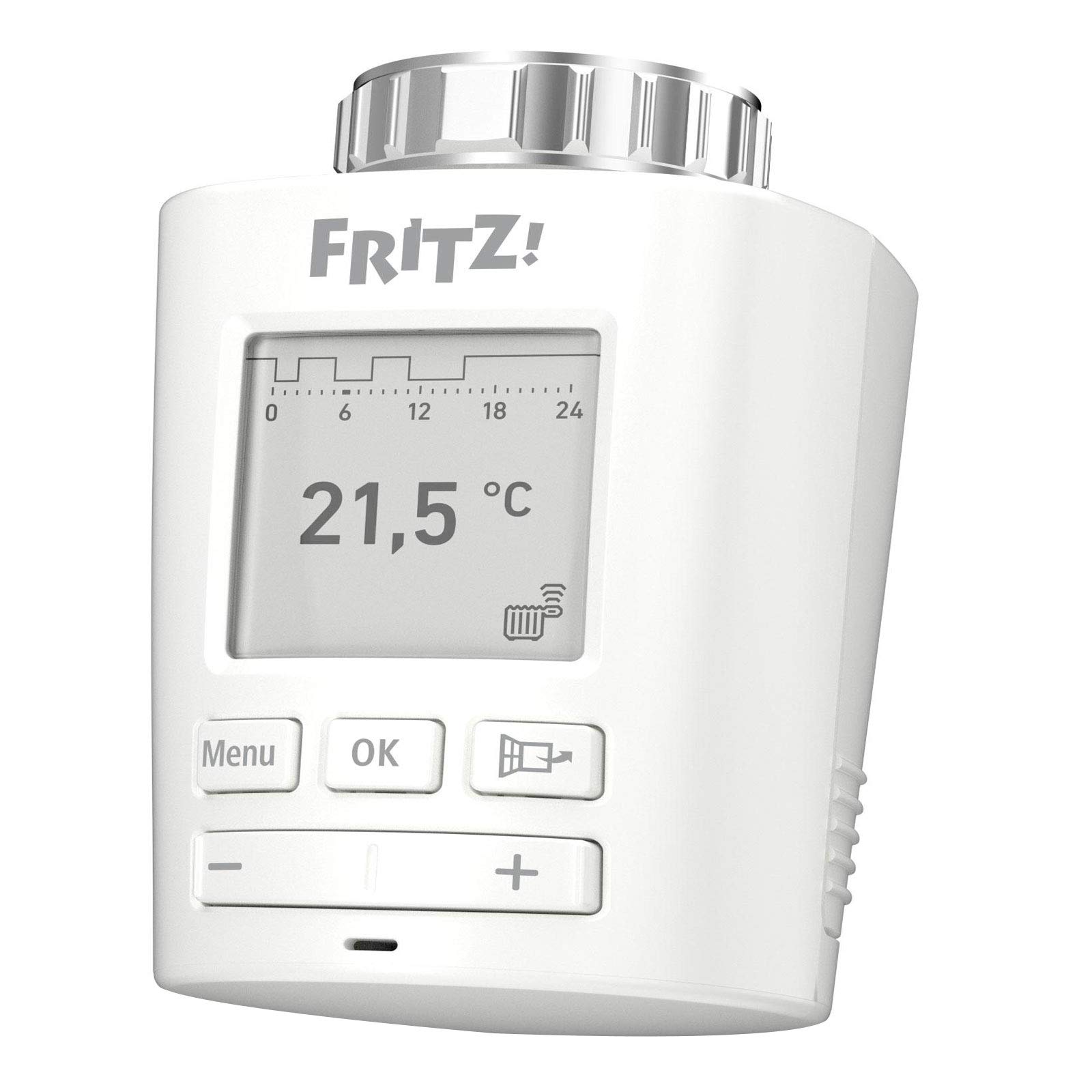
Сүрөт 1.1: Алдыңкы view of the FRITZ!DECT 301 Thermostat, showing the e-paper display and control buttons.
2. Коопсуздук маалыматы
- Орнотуудан жана колдонуудан мурун бардык нускамаларды кылдат окуп чыгыңыз.
- Аппаратты нымдуулукка, экстремалдык температурага же түз күндүн нуруна калтырбаңыз.
- Көрсөтүлгөн батарея түрүн гана колдонуңуз (2 AA батарея). Батареяларды сайганда туура полярдуулукту камсыз кылыңыз.
- Keep batteries out of reach of children. Do not dispose of batteries in fire.
- Аппаратты ачпаңыз casinг. Оңдоо иштери квалификациялуу кызматкерлер тарабынан гана жүргүзүлүшү керек.
- Бул аппарат имараттын ичинде гана колдонууга арналган.
3. Пакеттин мазмуну
Пакетте бардык буюмдар бар экенин текшериңиз:
- FRITZ!DECT 301 Thermostat
- 2 x AA батарейкалар
- Орнотуу боюнча нускамалар (бул колдонмо)
- Adaptor for Danfoss RA valves
4. Орнотуу
4.1. Батареяны орнотуу
- Remove the battery compartment cover on the back of the FRITZ!DECT 301.
- Туура полярдуулукту (+/-) камсыз кылып, эки АА батарейканы салыңыз.
- Replace the battery compartment cover. The device display should activate.
4.2. Mounting on Radiator Valve
The FRITZ!DECT 301 is designed for easy installation on all standard radiator valves with a connection thread. An adaptor for Danfoss RA valves is included if needed.
- Remove your existing thermostat head from the radiator valve.
- If necessary, attach the appropriate adaptor to the radiator valve.
- Screw the FRITZ!DECT 301 onto the radiator valve or adaptor until it is securely fastened. Do not overtighten.
4.3. Pairing with FRITZ!Box
The FRITZ!DECT 301 requires a FRITZ!Box with a DECT base and FRITZ!OS version 6.83 or higher for operation.
- Ensure your FRITZ!Box is powered on and its DECT function is active.
- On the FRITZ!DECT 301, press and hold the "Menu" button until the pairing symbol appears on the display.
- Within 2 minutes, press the "DECT" button on your FRITZ!Box.
- The FRITZ!DECT 301 will connect to the FRITZ!Box. A successful connection will be indicated on the thermostat's display.
- Further configuration, such as naming the thermostat and setting up heating profiles, can be done via the FRITZ!Box user interface (accessible via PC, notebook, smartphone, or tablet).
5. Термостатты иштетүү
5.1. Негизги башкаруу элементтери
The FRITZ!DECT 301 features an e-paper display and several buttons for local control:
- Меню баскычы: Accesses settings and functions.
- OK баскычы: Тандоолорду ырастайт.
- Plus (+) баскычы: Increases temperature or navigates up in menus.
- Минус (-) баскычы: Decreases temperature or navigates down in menus.
5.2. Температураны орнотуу
You can adjust the desired room temperature directly on the device using the Plus (+) and Minus (-) buttons. The current set temperature will be shown on the e-paper display.
5.3. Heating Profiles and Comfort Functions
The FRITZ!DECT 301 offers advanced features configurable through the FRITZ!Box user interface:
- Individual Heating Profiles: Program specific heating schedules for different times of day and days of the week.
- E-Paper Display: Energy-efficient display showing current temperature and status.
- Терезени ачууну аныктоо: Automatically reduces heating when a window is opened to save energy.
- Group Circuit: Control multiple FRITZ!DECT thermostats simultaneously.
- Ачкыч кулпусу: Prevents unauthorized changes to settings on the device.
- Limescale Protection Function: Periodically opens and closes the valve to prevent limescale buildup.
- Automatic Frost Protection: Ensures the room temperature does not drop below a critical level to prevent pipes from freezing.
5.4. Алыстан башкаруу
Control your FRITZ!DECT 301 from anywhere using the FRITZ!App or the FRITZ!Box user interface via the internet. This allows for convenient temperature adjustments and profile management even when you are away from home.
6. Техникалык тейлөө
6.1. Батареяны алмаштыруу
When the battery level is low, an indicator will appear on the e-paper display. Replace the batteries promptly to ensure continuous operation.
- Батарея уясынын капкагын алып салыңыз.
- Эски АА батарейкаларын алып салыңыз.
- Туура полярдуулукту сактап, эки жаңы AA батарейкасын салыңыз.
- Батарея бөлүгүнүн капкагын ордуна коюңуз.
6.2. Тазалоо
Clean the device with a soft, dry cloth. Do not use abrasive cleaners or solvents, as these can damage the casing же дисплей.
7. Кыйынчылыктарды
- Түзмөк жооп бербей жатат: Check if batteries are correctly inserted and charged. Replace if necessary.
- Cannot connect to FRITZ!Box: Ensure the FRITZ!Box DECT function is active and the thermostat is within range. Repeat the pairing process (Section 4.3). Update your FRITZ!Box OS to the latest version.
- Температуранын туура эмес көрсөткүчтөрү: Ensure the thermostat is not obstructed or exposed to direct heat sources (e.g., sunlight, other appliances) that could affect its internal sensor.
- Радиатор күтүлгөндөй жылытпайт/муздатпайт: Verify that the thermostat is correctly mounted on the valve and that the valve itself is functioning properly. Check the set heating profile in the FRITZ!Box interface.
- Дисплей бош: Check batteries. If new batteries do not resolve the issue, contact support.
8. Техникалык шарттар
| Модель номери | 20002822 |
| Бренд | FRITZ! |
| Өндүрүүчү | AVM |
| Түс | Ак |
| Power Source | Battery Powered (2 x AA batteries, included) |
| Тtage | 230 вольт (Note: This likely refers to the system voltage the FRITZ!Box operates on, not the thermostat itself) |
| Ватtage | 3600 (Likely refers to maximum controlled load, not thermostat consumption) |
| Дисплей стили | E-paper |
| Өзгөчөлүктөр | Programmable, Window Open Detection, Limescale Protection, Frost Protection, Key Lock |
| Байланыш технологиясы | DECT ULE (via FRITZ!Box) |
| Controller Type | Application, Programmable, Smart/Remote |
| Продукциянын өлчөмдөрү (L x W x Y) | 8.7 x 5.3 x 5.2 см |
| Элемент Салмагы | 143 грамм |
| Камтылган компоненттер | FRITZ!DECT 301, 2 x AA batteries, installation instructions, adaptor for Danfoss RA |

Image 8.1: FRITZ!DECT 301 Thermostat showing its dimensions (8.7cm length, 5.3cm width, 5.2cm height).
9. Кепилдик жана колдоо
For warranty information, please refer to the documentation provided with your purchase or visit the official FRITZ! website. If you encounter any issues not covered in this manual or require further assistance, please contact FRITZ! customer support.
Өндүрүүчү: AVM
Webсайт: www.avm.de/en/