
1. Киришүү
This manual provides comprehensive instructions for the installation, operation, and maintenance of your AUTO-VOX Dash Cam Hardwire Kit (LVP-Micro). This kit is designed to provide a continuous power supply to your micro USB dash camera, enabling features like 24-hour parking surveillance and neat wire routing by connecting directly to your vehicle's fuse box.
2. Продукт бүтүп калдыview
The AUTO-VOX Hardwire Kit ensures your dash camera receives constant power directly from your vehicle's battery, bypassing the cigarette lighter socket. This allows for uninterrupted recording, especially for parking mode functions, and keeps your vehicle's interior tidy by concealing wires. The kit includes a low voltage protection feature to prevent excessive draining of your car battery.
Негизги өзгөчөлүктөрү:
- Үзгүлтүксүз электр менен камсыздоо: Provides 24-hour power for parking surveillance modes.
- Neat Wire Routing: Connects directly to the fuse box, eliminating visible cables from the cigarette lighter.
- Low Voltage Коргоо: Automatically cuts off power to the dash cam if the vehicle battery voltage drops below 11.6V, safeguarding your car battery.
- Кеңири шайкештик: Designed for micro USB port dash cameras and other compatible devices.
3. Орнотуу жана орнотуу
Proper installation is crucial for the functionality and safety of your hardwire kit. It is recommended to consult a professional if you are unsure about any steps.
3.1 Шайкештикти текшерүү
Ensure your dash camera or device uses a Микро USB порту. This kit is not compatible with Mini USB or other USB types.

Image: Visual comparison of Mini USB (incompatible) and Micro USB (compatible) connectors. Confirm your device uses a Micro USB port.
3.2 Components of the Hardwire Kit

Image: The hardwire kit components, showing the Micro USB output, the 'Car DVR Exclusive Power Box' (voltage converter), and the fuse tap with ground wire.
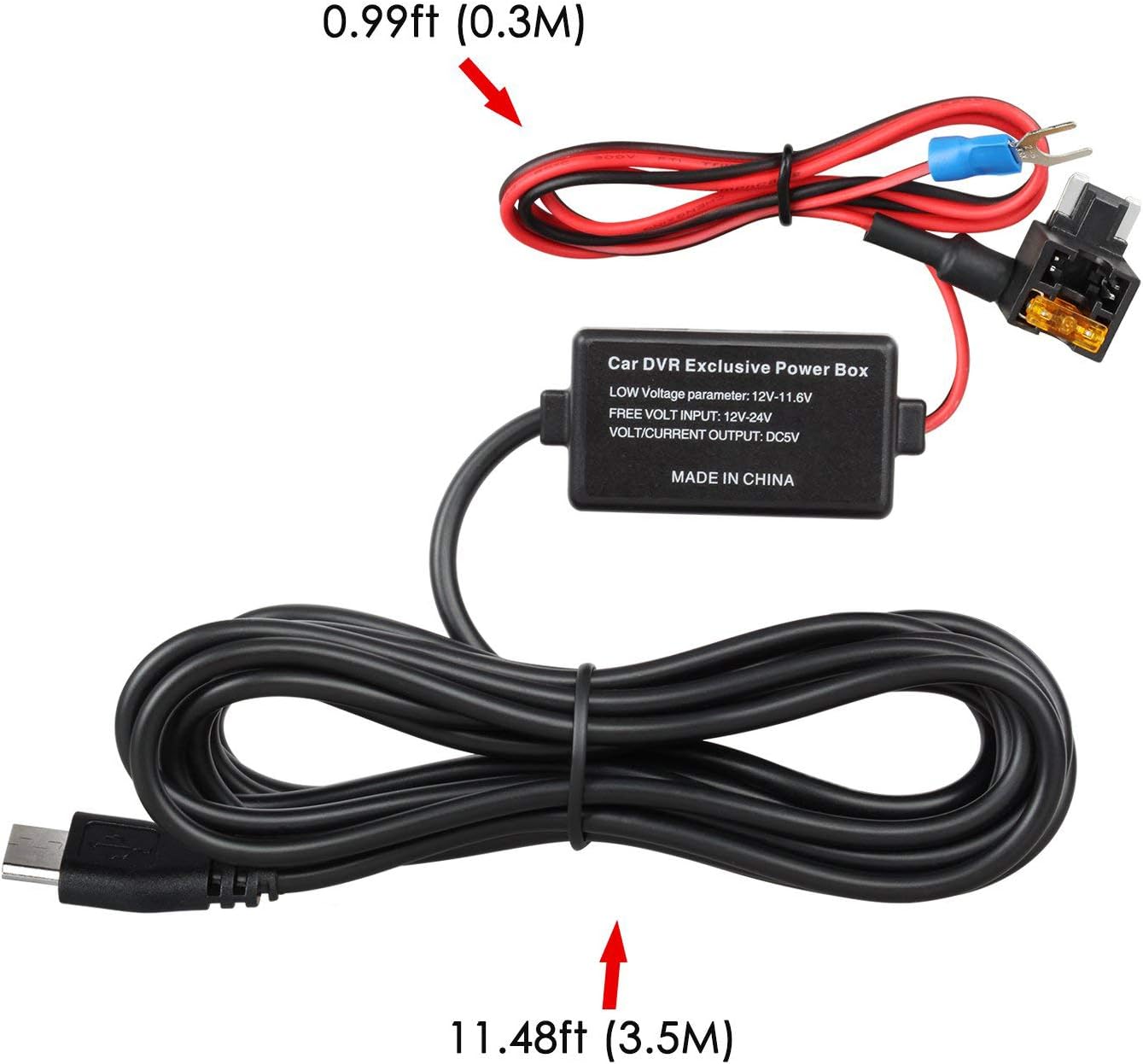
Image: The complete hardwire kit cable, illustrating the Micro USB connector, the power box, and the fuse tap with its ground terminal. The total length is approximately 12.47 feet (3.8 meters).
3.3 Орнотуу кадамдары
- Унааңыздын сактандыргыч кутучасын табыңыз: Refer to your vehicle's owner's manual to find the fuse box location, typically under the dashboard, in the glove compartment, or under the hood.
- Identify a Suitable Fuse Slot: You will need to identify a fuse slot that provides constant power (always on, even when the ignition is off) for parking mode functionality. You may also need an accessory fuse (power only when ignition is on) depending on your dash cam's requirements. Use a circuit tester to confirm constant power.
- Determine Fuse Type: The AUTO-VOX Hardwire Kit comes with a MINI type fuse adapter. Verify that your vehicle uses MINI fuses. If your vehicle uses a different fuse type (e.g., ATM, Micro2, ATO), you will need to acquire the correct fuse tap adapter separately.
- Install the Fuse Tap:
- Carefully remove the existing fuse from the chosen constant power slot.
- Insert the removed fuse into the lower slot of the fuse tap.
- Insert a new fuse (e.g., 5A for the dash cam) into the upper slot of the fuse tap.
- Plug the fuse tap into the empty fuse slot in your vehicle's fuse box. Ensure the fuse tap is oriented correctly (the 'LOAD' side should be towards the device, and the 'DRAW' side towards the power source).
- Жерге туташтыруу зымын туташтырыңыз: Locate a metal bolt or screw on the vehicle's chassis near the fuse box. Loosen the bolt, slide the U-shaped terminal of the hardwire kit's black ground wire under it, and tighten the bolt securely. Ensure a good metal-to-metal connection.
- Кабель маршруту: Carefully route the long Micro USB cable from the fuse box to your dash camera's mounting location. Tuck the cable neatly along the vehicle's trim, headliner, or A-pillar to conceal it.
- Dash Camга туташуу: Plug the Micro USB connector into your dash camera's power input port.
- Байланышты текшерүү: Turn on your vehicle's ignition and check if the dash cam powers on. Then, turn off the ignition and remove the key. The dash cam should remain powered on (if configured for parking mode) or enter parking mode, indicating a successful constant power connection.
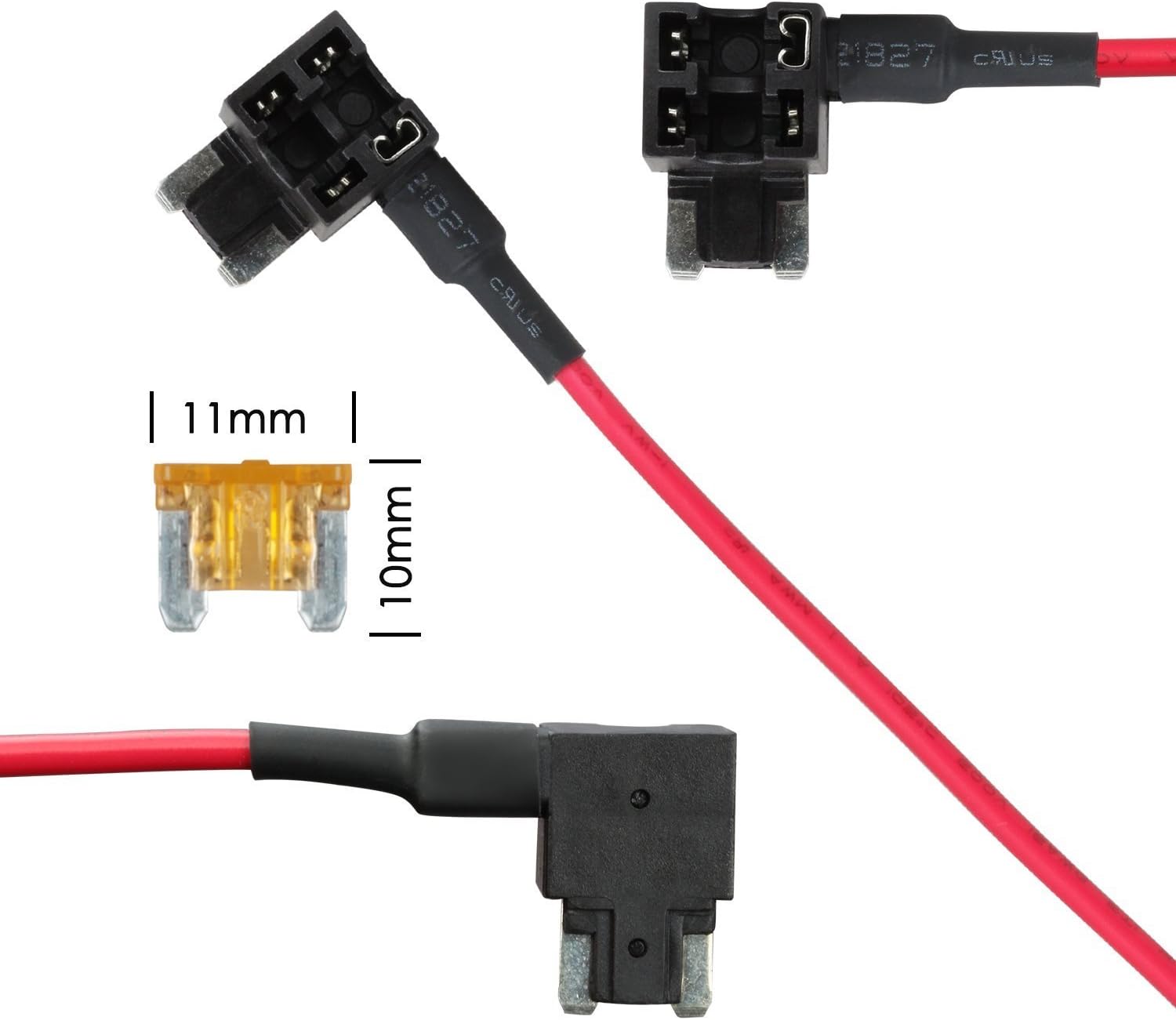
Сүрөт: деталдуу view of the included MINI type fuse adapter, showing its dimensions (11mm width, 10mm height for the fuse blade section).
4. Иштөө нускамалары
Once installed, the AUTO-VOX Hardwire Kit operates automatically to provide power to your dash camera.
4.1 Parking Mode Functionality
With the hardwire kit, your micro USB dash camera can utilize its parking mode feature, providing 24-hour surveillance. The kit ensures continuous power even when your vehicle's ignition is off.

Image: A car being monitored, symbolizing the 24-hour power supply for parking mode surveillance provided by the hardwire kit.
4.2 Low Voltage Коргоо
The integrated low voltage protection circuit monitors your vehicle's battery voltagд. Эгерде томtage drops to 11.6V (or lower, depending on specific vehicle conditions), the hardwire kit will automatically cut off power to the dash camera. This prevents your car battery from draining completely, ensuring you can start your vehicle.

Image: A visual representation of the low voltage protection feature, showing a car battery at a low charge level and a car, indicating that the system will automatically turn off power to the dash cam when the battery reaches 11.4V (or 11.6V as per specifications) to prevent full discharge.
5. Техникалык тейлөө
The AUTO-VOX Hardwire Kit requires minimal maintenance.
- Үзгүлтүксүз текшерүүлөр: Periodically inspect the visible parts of the cable and connections for any signs of wear, damage, or loose connections.
- Сактандыргычтын бүтүндүгү: If your dash cam stops receiving power, check the fuse in the fuse tap. Replace it with a fuse of the same amperage if it is blown.
- Тазалык: Keep the area around the fuse box and cable free from excessive dust or debris.
6. Кыйынчылыктарды
If you encounter issues with your hardwire kit, refer to the following troubleshooting guide:
| Көйгөй | Мүмкүн себеп | Чечим |
|---|---|---|
| Dash cam does not power on after installation. |
|
|
| Dash cam turns off when vehicle ignition is off, despite hardwire kit. |
|
|
| Car battery drains quickly. |
|
|
| Fuse tap does not fit into the fuse box slot. | Incorrect fuse type for the vehicle. | The kit includes a MINI type fuse adapter. If your vehicle uses a different fuse type (e.g., ATM, Micro2, ATO), you will need to purchase the correct fuse tap adapter separately. |
7. Техникалык шарттар
| Өзгөчөлүк | Спецификация |
|---|---|
| Киргизүү көлөмүtage | DC 12-24V |
| Output Voltage/Current | DC 5V / 1.5A |
| Low Voltage Protection Cut-off | 11.6V |
| Кабелдин узундугу | Болжол менен 3.8 метр (12.47 фут) |
| Туташтыргыч түрү | Микро USB |
| Included Fuse Adapter Type | MINI type |
| Элемент моделинин номери | LVP-Micro |
| Элемент Салмагы | 3.03 унция |
| Пакеттин өлчөмдөрү | 4.96 x 2.6 x 1.61 дюйм |
8. Кепилдик жана колдоо
For warranty information or technical support, please contact AUTO-VOX customer service. You can find contact details and additional resources by visiting the official AUTO-VOX store or webсайт.