
1. Киришүү
The Seasonic FOCUS 550 Gold SSR-550FM is a 550W 80 PLUS Gold certified semi-modular power supply designed for reliable and efficient power delivery to personal computer systems. It features a compact 140 mm deep design, a quiet 120 mm Fluid Dynamic Bearing (FDB) fan with S2FC fan control, and a 7-year warranty. This manual provides essential information for the safe and proper installation, operation, and maintenance of your power supply unit.
2. Продукциянын өзгөчөлүктөрү
- Компакт өлчөмү: 140 mm deep for high power output to size ratio.
- Semi-Modular Cabling: Provides essential connections while allowing flexibility for peripheral cables.
- 80 PLUS Алтын тастыкталган: Achieves 87% efficiency at 20% load, 90% at 50% load, and 87% at 100% load.
- 120 mm Fluid Dynamic Bearing Fan: Regulated by Seasonic S2FC fan control for optimized fan speed and quiet operation.
- 7 жылдык кепилдик: Demonstrates commitment to superior quality and reliability.
3. Пакеттин мазмуну
Төмөндө саналып өткөн нерселердин баары сиздин продукт таңгагыңызда камтылганын текшериңиз:
- Seasonic FOCUS 550 Gold SSR-550FM Power Supply Unit
- AC Power Cord
- Modular Cables (SATA, Molex, PCIe)
- Монтаждоо бурамалар
- Cable Ties (Velcro and Zip Ties)
- PSU Tester
- User Manual and Quick Installation Guide
- Кабель баштыгы

Сүрөт: бүттүview of the Seasonic FOCUS 550 Gold SSR-550FM power supply and its complete package contents, including the PSU, modular cables, power cord, mounting screws, cable ties, PSU tester, user manual, and cable bag.
Video: An official unboxing video for the Seasonic FOCUS GM Power Supply, demonstrating the contents and initial presentation of the product.
4. Коопсуздук маалыматы
- Always disconnect the AC power cord from the wall outlet before installing, servicing, or cleaning the power supply.
- Электр жабдыгын ачпаңыз casinг. Жогорку томtages ичинде бар жана блокту ачуу кепилдикти жокко чыгарат.
- Ашыкча ысып кетүүнүн алдын алуу үчүн электр менен камсыздоо жакшы желдетилген жерге орнотулганын текшериңиз.
- Use only the cables provided with your Seasonic power supply. Using incompatible cables may cause damage to the PSU or connected components.
- This power supply is designed for use in personal computer systems only. Do not use it for any other purpose.
- Электр камсыздоосун суудан, нымдуулуктан жана өтө жогорку температуралардан алыс кармаңыз.
5. Орнотуу жана орнотуу
Follow these steps for proper installation of your Seasonic FOCUS 550 Gold power supply:
- Системаңызды даярдаңыз: Ensure your computer is powered off and the AC power cord is disconnected from the wall outlet. Open your computer case to access the PSU mounting area.
- PSU орнотуу: Carefully slide the power supply into the designated bay in your computer case. Secure it with the provided mounting screws. Ensure the fan is facing the correct direction for optimal airflow (typically facing down if there's a bottom vent, or up if drawing air from inside the case).
- Негизги кабелдерди туташтыруу: Connect the 24-pin ATX motherboard power cable and the 4+4-pin EPS/CPU power cable to your motherboard. These cables are permanently attached to the semi-modular unit.
- Модулдук кабелдерди туташтыруу: Identify the necessary modular cables for your components (e.g., PCIe for graphics cards, SATA for storage drives, Molex for older peripherals). Plug these cables into the corresponding ports on the power supply and then connect them to your components. Ensure all connections are firm and secure.
- Кабелдик башкаруу: Route cables neatly to improve airflow and aesthetics within your case. Use the included cable ties to secure them.
- Акыркы байланыштар: Компьютериңиздин корпусун жабыңыз. AC кубат шнурун кубат булагына, андан кийин жерге туташтырылган розеткага туташтырыңыз.
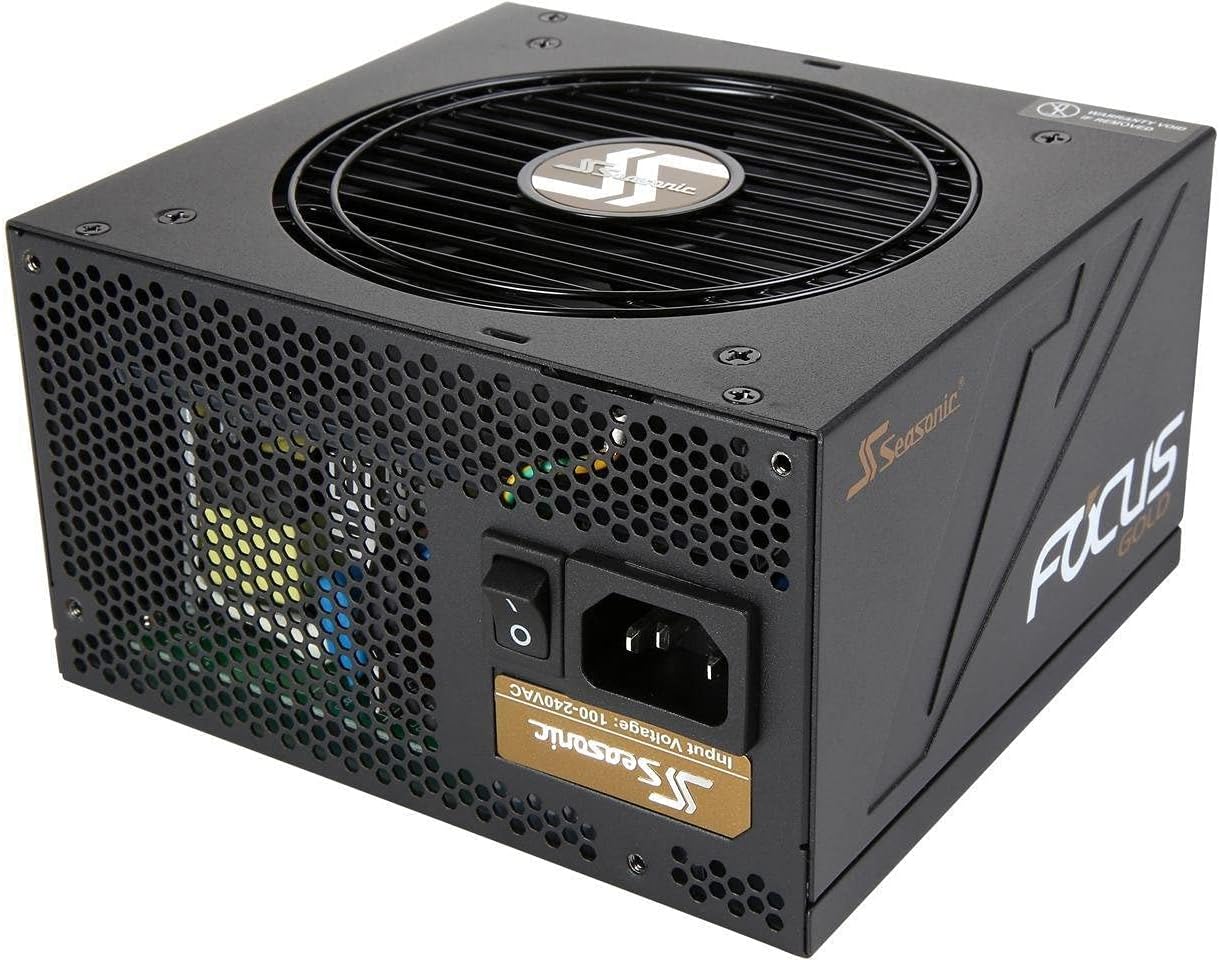
Сүрөт: бурчтуу view of the Seasonic FOCUS 550 Gold SSR-550FM power supply, showcasing its compact design and semi-modular cable connections.
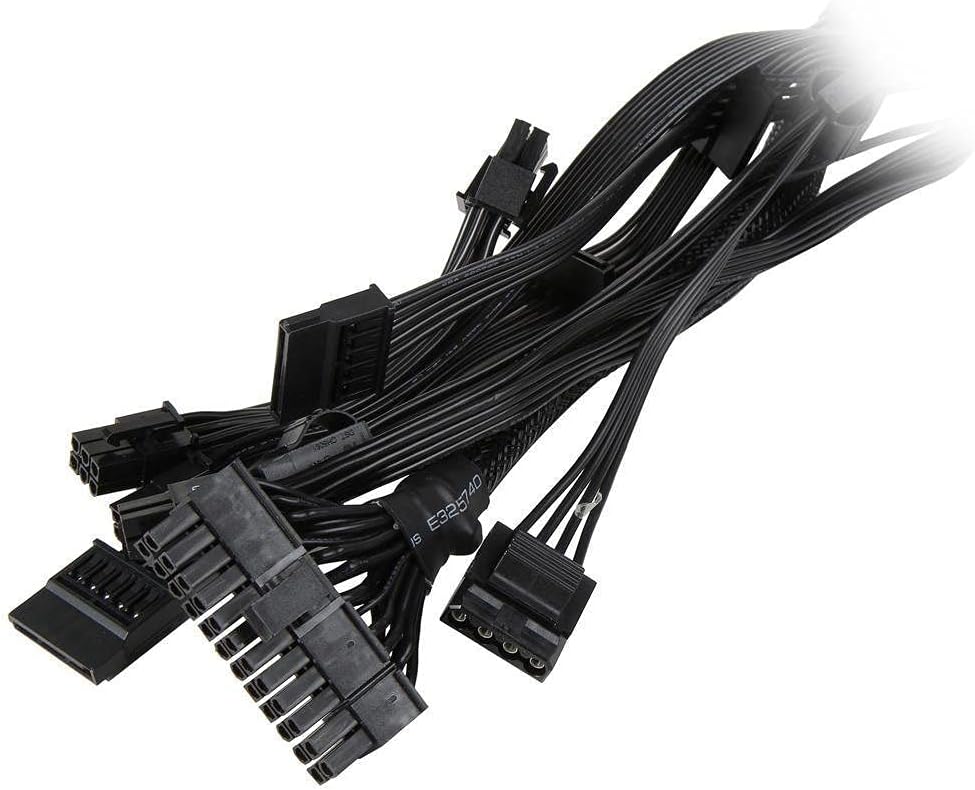
Image: A selection of modular cables included with the Seasonic FOCUS 550 Gold SSR-550FM power supply, ready for connection to various PC components.
6. Иштөө нускамалары
Ийгиликтүү орнотуудан кийин, сиз системаңызды күйгүзө аласыз:
- Кубат которгучу: Кубат булагынын арткы жагындагы кубат которгучу "ON" (I) абалында экенин текшериңиз.
- Системанын күчү: Press the power button on your computer case. The system should boot normally.
- Күйөрман операциясы: The 120 mm FDB fan operates under Seasonic's S2FC fan control, which means it will adjust its speed based on the power supply's temperature and load. The fan may not spin at low loads to maintain silent operation.

Image: The rear panel of the Seasonic FOCUS 550 Gold SSR-550FM power supply, showing the AC power inlet and the main power switch.

Сүрөт: жогорудан ылдыйга view of the Seasonic FOCUS 550 Gold SSR-550FM power supply, highlighting the 120 mm Fluid Dynamic Bearing fan with the Seasonic logo.
7. Техникалык тейлөө
Электр менен камсыздооңуздун узак мөөнөттүү иштешин жана оптималдуу иштешин камсыз кылуу үчүн төмөнкү техникалык тейлөө кеңештерин карап чыгыңыз:
- Чаңды тазалоо: Periodically clean the fan grille and the interior of your computer case to prevent dust buildup, which can hinder cooling and reduce efficiency. Use compressed air for this purpose, ensuring the system is powered off and unplugged.
- Кабелдик башкаруу: Regularly check that all cables are securely connected and not obstructing airflow. Re-organize cables if necessary.
- Экологиялык шарттар: Operate the power supply within its specified temperature and humidity ranges. Avoid placing the computer in direct sunlight or near heat sources.
8. Кыйынчылыктарды
Эгерде сиз электр менен камсыздоодо көйгөйлөргө туш болсоңуз, төмөнкү кадамдарды жасап көрүңүз:
- Кубат жок:
- Ensure the AC power cord is securely plugged into both the wall outlet and the PSU.
- Кубат булагынын арткы жагындагы кубат которгучу "ON" (I) абалында экенин текшериңиз.
- Розетканын иштеп жатканын башка түзмөктү сайып текшериңиз.
- Use the included PSU tester to check if the power supply is functioning independently.
- Системанын туруксуздугу/бузуулар:
- Ensure all power cables (24-pin ATX, EPS/CPU, PCIe, SATA, Molex) are firmly connected to the motherboard and components.
- Ар кандай бош байланыштарды же бузулган кабелдерди текшериңиз.
- Verify that your system's power requirements do not exceed the 550W capacity of the PSU.
- Ашыкча ызы-чуу:
- Ensure the PSU fan is not obstructed by cables or dust. Clean the fan if necessary.
- Confirm that the noise is coming from the PSU and not another component (e.g., CPU cooler, GPU fan).
If issues persist after following these steps, please contact Seasonic customer support for further assistance.
9. Техникалык шарттар
| Спецификация | Нарк |
|---|---|
| Бренд | Сезондук |
| Сериялар | SSR-550FM |
| Модель номери | SSR-550FM |
| Чыгуу Wattage | 550 Вт |
| Натыйжалуулук | 80 PLUS Gold |
| Форма фактору | ATX12V |
| Энергия менен жабдуунун дизайны | Жарым модулдук |
| Муздатуу ыкмасы | Air (120 mm FDB Fan) |
| Элементтин өлчөмдөрү (LxWxH) | 5.5 x 6 x 3.4 дюйм (140 x 150 x 86 мм) |
| Элемент Салмагы | 5.37 фунт |
| Шайкеш түзмөктөр | Персоналдык компьютер |
10. Кепилдик жана колдоо
The Seasonic FOCUS 550 Gold SSR-550FM power supply comes with a 7 жылдык кепилдик, reflecting Seasonic's commitment to product quality and reliability. For warranty claims, technical support, or any product-related inquiries, please visit the official Seasonic website or contact their customer service department. Ensure you retain your proof of purchase for warranty validation.
Көбүрөөк маалымат алуу үчүн төмөнкүгө кириңиз: www.seasonic.com