
1. Киришүү
This manual provides essential information for the safe and efficient operation of your InFocus IN3148HD 1080p 5000 Lumen Professional Projector. Please read these instructions thoroughly before using the projector and retain them for future reference. The InFocus IN3148HD is designed for professional environments, offering high brightness, full HD resolution, and versatile connectivity for various presentation needs.

Сүрөт 1: Алдыңкы view of the InFocus IN3148HD Projector.
2. Негизги өзгөчөлүктөрү
The InFocus IN3148HD projector offers a range of features designed for high-performance presentations:
- 1080p (1920 x 1080) Native Resolution: Delivers crisp, high-definition images.
- 5000 люмен жарыктыгы: Ensures clear visibility in well-lit rooms.
- 1.5x оптикалык масштаб: Provides flexibility in projector placement and image sizing.
- 3D колдоо: Compatible with Blu-ray and other 3D content sources.
- 10 Вт динамик: Integrated audio for presentations.
- Бир нече туташуу параметрлери: Includes two HDMI 1.4 ports, VGA, and more.
- Тармактык мониторинг: Allows for remote management and control.
Видео 1: Бүттүview of the InFocus IN3148HD projector's features and capabilities.
3. Орнотуу жана орнотуу
3.1 Пакеттен чыгаруу
Carefully remove the projector and all accessories from the packaging. Verify that all components listed in the packing list are present and undamaged. Keep the original packaging for future transport or storage.
3.2 Орнотуу
Position the projector on a stable, flat surface or mount it securely. Ensure adequate ventilation around the unit to prevent overheating. Consider the throw distance and screen size for optimal image quality. The projector supports both tabletop and ceiling mount installations.

Figure 2: Projector dimensions for installation planning.
4. Байланыш
The IN3148HD offers a variety of input and output ports for connecting to different devices.
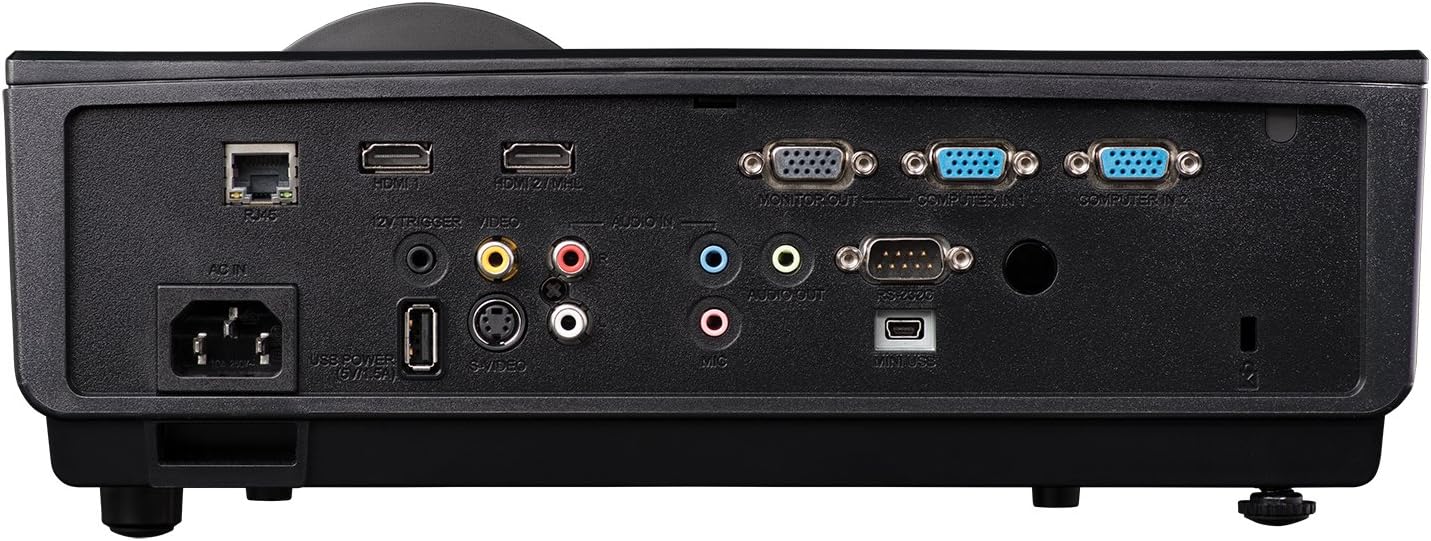
3-сүрөт: Жеткиликтүү туташуу портторун көрсөткөн арткы панель.
- HDMI (x2): For digital video and audio input from computers, Blu-ray players, and other HDMI-enabled devices.
- VGA (x2): Компьютерлерден аналогдук видео киргизүү үчүн.
- USB: Кызмат же микропрограммалык камсыздоону жаңыртуу үчүн.
- Тармак (RJ45): Тармакты көзөмөлдөө жана көзөмөлдөө үчүн.
- Аудио кириш/чыгыш: 3.5mm jacks for external audio sources or output to external speakers.
- Видео (RCA): Композиттик видео киргизүү үчүн.
5. Операция
5.1 Күйгүзүү/өчүрүү
- Күйгүзүү: Connect the power cord and press the power button on the projector or remote control. The power indicator light will turn blue.
- Өчүрүү: Кубат баскычын эки жолу басыңыз. Проектор толугу менен өчөөрдөн мурун муздатуу циклине кирет.
5.2 Сүрөттү тууралоо
- Фокус: Объективдеги фокус шакекти сүрөт курч болгонго чейин айлантыңыз.
- Чоңойтуу: Сүрөттүн өлчөмүн өзгөртүү үчүн линзанын масштабдуу шакегин тууралаңыз.
- Негизги ташты оңдоо: Use the keystone correction function in the OSD (On-Screen Display) menu to correct trapezoidal image distortion.
6. 3D функциясы
The InFocus IN3148HD projector supports 3D content from compatible sources, such as Blu-ray players. To experience 3D, you will need active 3D glasses (sold separately) and a 3D-enabled source device.
Figure 4: Visual representation of 3D content viewing.
7. Техникалык тейлөө
Үзгүлтүксүз тейлөө оптималдуу иштешин камсыз кылат жана проекторуңуздун иштөө мөөнөтүн узартат.
- Lamp Алмаштыруу: лamp has a limited lifespan. Refer to the OSD menu for lamp hour information. Replace the lamp when its brightness significantly decreases or when the lamp indicator light illuminates. Always use genuine InFocus replacement lamps.
- Фильтрди тазалоо: Clean the air filter regularly to prevent dust buildup, which can affect cooling and image quality. Refer to the full user manual for specific instructions on accessing and cleaning the filter.
- Линзаны тазалоо: Use a soft, lint-free cloth and a specialized lens cleaning solution to gently clean the projector lens. Avoid abrasive materials.
8. Кыйынчылыктарды
If you encounter issues with your projector, consult the table below for common problems and solutions.
| Көйгөй | Мүмкүн себеп | Чечим |
|---|---|---|
| Сүрөт көрсөтүлгөн жок | Power cable disconnected, input source not selected, lamp ийгиликсиздик. | Check power connection, select correct input source, replace lamp зарыл болсо. |
| Сүрөт бүдөмүк | Линза фокустан чыгып кеткен, туура эмес аралыктан ыргытылган. | Фокус шакекчесин тууралап, проектордун ордун өзгөртүңүз. |
| Аудио жок | Volume too low, audio cable disconnected, incorrect audio source. | Increase volume, check audio cable connections, select correct audio input. |
| Проектор ысып кетти | Бөгөттөлгөн желдетүү, кир аба чыпкасы. | Ensure clear ventilation, clean air filter. |
9. Техникалык шарттар
Detailed technical specifications for the InFocus IN3148HD projector.
| Өзгөчөлүк | Спецификация |
|---|---|
| Бренд | InFocus |
| Модель аты | IN3148HD |
| Display Resolution | 1920 x 1080 (1080p) |
| Жарыктык | 5000 Lumens (ANSI) |
| Контраст катышы | 1000:1 |
| Дисплей түрү | DLP |
| Байланыш технологиясы | HDMI, USB, VGA |
| Өзгөчө өзгөчөлүк | 3D агымы |
| Lamp Ватtage | 310 Ватт |
| Жарык булагы иштөө мөөнөтү | 4500 саат |
| Элемент Салмагы | 4.47 килограмм |
10. Кепилдик жана колдоо
For warranty information, technical support, or service inquiries, please refer to the warranty card included with your product or visit the official InFocus webсайт. Сатып алуу квитанциясын кепилдик дооматтары үчүн сатып алуунун далили катары сактаңыз.