
1. Киришүү
This manual provides detailed instructions for the installation, operation, maintenance, and troubleshooting of your FSP 400W Micro ATX Power Supply (Model FSP400-60GHS(85)-R1). This power supply unit is designed for compact small form factor PC systems, offering 400 watts of power output with 80 Plus Bronze certification for high efficiency. It is compatible with Intel and AMD CPU systems and standard PC configurations.
Please read this manual thoroughly before installation and operation to ensure proper usage and to prevent damage to the unit or other components.
2. Коопсуздук маалыматы
ЭСКЕРТҮҮ: Power supplies contain high voltage компоненттери. Электр менен камсыздоо булагын ачпаңызasing. Ичинде колдонуучу тейлей турган тетиктер жок.asing will void the warranty and poses a risk of electric shock.
- Орнотуудан же тейлөөдөн мурун кубат булагы AC розеткадан ажыратылганын текшериңиз.
- Электр менен камсыздоону жакшы желдетилген жерге орнотуңуз.
- Do not operate the power supply in high humidity or extreme temperature environments.
- Кубат менен камсыздалган кабелдерди гана колдонуңуз.
- Тутумду күйгүзүүдөн мурун бардык кабелдер ишенимдүү туташтырылганын текшериңиз.
- Бул продукт жеке компьютерлерде колдонуу үчүн иштелип чыккан. Аны башка эч кандай максатта колдонбоңуз.
3. Пакеттин мазмуну
Төмөндө тизмеленген нерселердин баары пакетиңизде бар экенин текшериңиз:
- FSP 400W Micro ATX Power Supply (FSP400-60GHS(85)-R1)
- AC Power Cord
- SFX to PS2 Bracket
- User Manual
- Mounting Screws (typically included with PC cases, but sometimes with PSUs)

Figure 3.1: Package Contents. Shows the power supply unit, user manual, various power cables, an AC power cord, and an SFX to PS2 adapter bracket.
4. Продукт бүтүп калдыview
The FSP400-60GHS(85)-R1 is a compact power supply designed for small form factor systems. Key features include an 80mm cooling fan with thermal sensing technology and an energy-saving 1-watt standby mode.
4.1 Физикалык жайгашуу

4.1-сүрөт: Бурчтуу view of the FSP 400W Micro ATX Power Supply, highlighting the fan grille, power switch, and AC power input.

4.2-сүрөт: Арткы view of the power supply, detailing the main power switch and the AC power input socket.

4.3-сүрөт: Жогорку view of the power supply, showing the protective grille over the 80mm cooling fan.
4.2 Output Connectors
The power supply includes various connectors to power your system components:
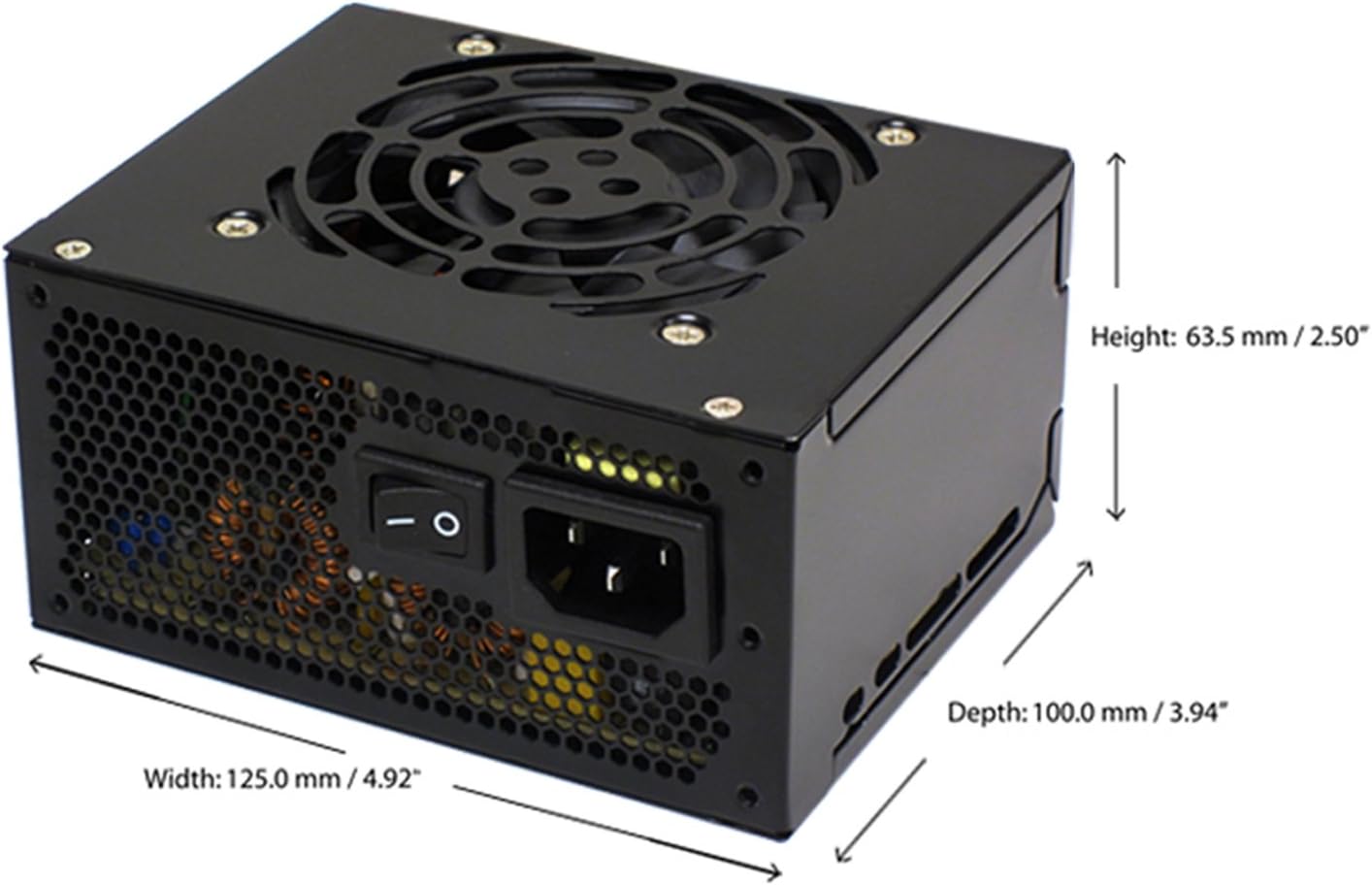
Figure 4.4: Diagram illustrating the types and quantities of output connectors available on the FSP400-60GHS(85)-R1 power supply.
- Main 24 Pin (1): Энелик плата үчүн кубаттуулук.
- P4 | EPS 4+4 Pin (1): CPU кубаттуулугу үчүн.
- PCI-E 8 Pin (6+2) (1): Графикалык карталар үчүн.
- Molex 4 Pin (3): For older peripherals and fans.
- Serial ATA 15 Pin (3): For SATA hard drives and SSDs.
- FDD 4 Pin (1): For floppy disk drives or other legacy devices.
5. Орнотуу жана орнотуу
Before beginning installation, ensure your computer system is powered off and disconnected from the AC power outlet. It is recommended to wear an anti-static wrist strap to prevent electrostatic discharge (ESD) damage to components.
5.1 Installing the Power Supply
- Ишти даярдоо: Open your computer case. Identify the power supply mounting area.
- PSU орнотуу:
- For SFX cases: Insert the FSP400-60GHS(85)-R1 directly into the SFX power supply bay and secure it with screws.
- For standard ATX cases: Attach the included SFX to PS2 bracket to the power supply. Then, mount the power supply with the bracket into the ATX power supply bay and secure it with screws.

Figure 5.1: The FSP 400W Micro ATX Power Supply shown with the SFX to PS2 adapter bracket installed, ready for mounting in a standard ATX case.

Figure 5.2: Illustration demonstrating how the SFX power supply fits into a PS2 (ATX) case using the provided adapter bracket.
5.2 Туташтыруучу кабельдер
Connect the appropriate cables to your motherboard and components. Refer to your motherboard and component manuals for specific connection points.
- Энелик платанын кубаттуулугу: Connect the 24-pin ATX connector to the corresponding socket on your motherboard.
- CPU кубаттуулугу: Connect the 4+4-pin EPS/ATX 12V connector to the CPU power socket on your motherboard.
- Графикалык картанын кубаттуулугу: If your graphics card requires external power, connect the 6+2-pin PCI-E connector(s) to the graphics card.
- Сактагыч түзмөктөр: Connect SATA power connectors to your SATA hard drives, SSDs, and optical drives.
- Перифериялык түзүлүштөр: Use Molex 4-pin connectors for case fans or other legacy peripherals as needed.
- Кабелдик башкаруу: Корпустун ичинде абанын туура айланышын камсыз кылуу үчүн кабелдерди тыкан өткөрүңүз.
Once all internal connections are made, close your computer case.
5.3 Тышкы туташуу
- Connect the AC power cord to the power supply's AC inlet.
- Plug the other end of the AC power cord into a grounded wall outlet or surge protector.
- Ensure the power switch on the back of the power supply is in the "OFF" (O) position before plugging it in.
6. Иштөө нускамалары
6.1 Системаңызды күйгүзүү
- After all connections are secure, flip the power switch on the back of the power supply to the "ON" (I) position.
- Системаны баштоо үчүн компьютериңиздин корпусундагы кубат баскычын басыңыз.
6.2 Thermal Control System
The FSP400-60GHS(85)-R1 features an 80mm cooling fan with thermal sensing technology. This system automatically adjusts the fan speed based on the internal temperature of the power supply, optimizing cooling performance while minimizing noise.
6.3 Energy Saver Standby Mode
This power supply is designed with an energy-saving 1-watt standby mode, reducing power consumption when the system is in a low-power state or turned off but still connected to AC power.
7. Техникалык тейлөө
Туура тейлөө электр менен камсыздооңуздун узак мөөнөттүү жана оптималдуу иштешин камсыз кылат.
- Тазалоо: Periodically clean the exterior of the power supply and its fan grille to prevent dust buildup. Use a soft, dry cloth or compressed air. Ensure the power supply is disconnected from AC power before cleaning.
- Вентиляция: Ensure that the power supply's fan and ventilation openings are not obstructed. Good airflow is crucial for cooling.
- Кабелдин бүтүндүгү: Бардык электр зымдарын эскирүүнүн, сүрүлүүнүн же бузулуунун белгилерин үзгүлтүксүз текшерип туруңуз. Бузулган зымдарды дароо алмаштырыңыз.
Do not attempt to open the power supply unit for internal cleaning or repair. This will void the warranty and can be dangerous.
8. Кыйынчылыктарды
Эгерде сиз электр менен камсыздоодо көйгөйлөргө туш болсоңуз, төмөнкү кеңири таралган көйгөйлөрдү жана чечимдерди караңыз:
8.1 Системага кубат жок
- Check AC Power: Ensure the AC power cord is securely plugged into both the power supply and a working wall outlet.
- Кубат которгучу: Verify that the power switch on the back of the power supply is in the "ON" (I) position.
- Ички байланыштар: Confirm that the 24-pin ATX and 4+4-pin EPS/ATX 12V connectors are firmly seated in the motherboard.
- Кыска туташуу: Disconnect all peripheral power cables (SATA, Molex, PCI-E) and attempt to power on. If the system powers on, a short circuit may exist in one of the connected components or cables. Reconnect them one by one to identify the faulty component.
8.2 Системанын туруксуздугу же туш келди өчүрүүлөр
- Ашыкча жүктөө: Ensure your system's power requirements do not exceed the 400W capacity of the power supply.
- Вентиляция: Check for proper airflow within the case and ensure the power supply's fan is not obstructed. Overheating can cause instability.
- Кабелдик байланыштар: Re-check all power connections to ensure they are secure. Loose connections can lead to intermittent power delivery.
8.3 Ашыкча желдеткичтин ызы-чуусу
- Чаңдын пайда болушу: Clean the fan grille and fan blades with compressed air.
- Тоскоолдук: Ensure no cables or foreign objects are interfering with the fan's rotation.
- Иштөө чөйрөсү: High ambient temperatures can cause the thermal control system to increase fan speed. Ensure adequate room ventilation.
If troubleshooting steps do not resolve the issue, contact FSP customer support or your retailer for assistance.
9. Техникалык шарттар
Detailed technical specifications for the FSP400-60GHS(85)-R1 power supply:
| Модель аты | FSP 400W Micro ATX Power Supply |
| Модель номери | FSP400-60GHS(85)-R1 |
| Бренд | FSP |
| Чыгуу Wattage | 400 Ватт |
| 80+ сертификаты | 80 Plus Бронза |
| Форма фактору | Micro ATX (SFX with PS2 bracket) |
| Муздатуу ыкмасы | Air (80mm fan with thermal control) |
| Энергия менен жабдуунун дизайны | Модулдук эмес |
| Киргизүү көлөмүtage | 100 - 265 Вольт (өзгөрмө ток) |
| Өлчөмдөрү (L x W x Y) | 4.9 x 3.9 x 2.5 дюйм (125.0 x 100.0 x 63.5 мм) |
| Элемент Салмагы | 2.31 фунт |
| Шайкеш түзмөктөр | Personal Computer (AMD/Intel CPU systems) |
| Туташтыргычтар | Main 24 Pin (1), P4 | EPS 4+4 Pin (1), PCI-E 8 Pin (6+2) (1), Molex 4 Pin (3), Serial ATA 15 Pin (3), FDD 4 Pin (1) |
| Экологиялык шайкештик | RoHS, коргошунсуз, экологиялык таза продукт (GP) |

Figure 9.1: Physical dimensions of the FSP 400W Micro ATX Power Supply.

Figure 9.2: Illustrative diagram showing typical cable lengths for the power supply connectors.
10. Кепилдик маалыматы
The FSP 400W Micro ATX Power Supply (FSP400-60GHS(85)-R1) is covered by a 3 жылдык өндүрүүчүнүн кепилдиги. This warranty guarantees the quality and performance of the product for the specified period from the date of purchase.
The warranty covers defects in materials and workmanship under normal use. It does not cover damage resulting from improper installation, accidents, misuse, abuse, natural disasters, or unauthorized modifications or repairs. Opening the power supply casing кепилдикти жокко чыгарат.
For warranty claims or service, please retain your proof of purchase and contact FSP customer support.
11. Кардарларды колдоо кызматы
If you require further assistance, have questions, or need to report an issue that cannot be resolved using the troubleshooting guide, please contact FSP customer support.
- FSP Webсайт: Visit the official FSP webпродукт маалыматы, көп берилүүчү суроолор жана колдоо булактары үчүн сайт.
- Байланыш маалыматы: Refer to the FSP website or your product packaging for the most current customer service contact details (phone, email, or support portal).
When contacting support, please have your product model number (FSP400-60GHS(85)-R1) and proof of purchase readily available.