
1. Киришүү
This manual provides detailed instructions for the installation, operation, and maintenance of the Aiphone IX-MV IP Video Master Station. The IX-MV is an IP addressable video and audio master station designed for use with Aiphone IX Systems, offering both handset and hands-free communication capabilities.
Please read this manual thoroughly before attempting to install or operate the unit to ensure correct usage and to prevent damage.
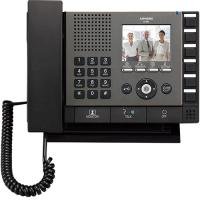
Сүрөт 1: Алдыңкы view of the Aiphone IX-MV IP Video Master Station, showing the display, buttons, and handset.
2. Коопсуздук маалыматы
Observe the following safety precautions to prevent injury, damage to the product, or property damage.
- Электр коопсуздугу: Ensure all power connections are made according to local electrical codes. Disconnect power before servicing.
- Курчап турган чөйрө: Do not expose the unit to water, high humidity, extreme temperatures, or direct sunlight. Install in a well-ventilated area.
- Колдонуу: Агрегатты кылдаттык менен колдонуңуз. Аны түшүрүүдөн же катуу таасирлерге дуушар кылуудан алыс болуңуз.
- Өзгөртүүлөр: Do not attempt to modify or disassemble the unit. Refer all servicing to qualified personnel.
- Тазалоо: Тазалоо үчүн жумшак, кургак чүпүрөктү колдонуңуз. Абразивдүү тазалагычтардан же эриткичтерден качыңыз.
3. Пакеттин мазмуну
Орнотууну улантуудан мурун пакетте бардык элементтер бар экенин текшериңиз.
- Aiphone IX-MV IP Video Master Station
- Монтаждоо кронштейндери жана бурамалар
- Орнотуу боюнча колдонмо (бул документ)
- Network cable (may be sold separately)
4. Орнотуу
4.1 Физикалык орнотуу
- Жайгашкан жерди тандоо: Select a suitable indoor location, away from direct heat sources, moisture, and strong electromagnetic fields. Ensure adequate space for wiring and operation.
- Монтаждоо:
- Secure the mounting bracket to a wall using appropriate screws and anchors.
- Кронштейндин тегиз жана бекем бекитилгенин текшериңиз.
- Attach the IX-MV unit to the mounting bracket.
- Зымдар:
- Connect a standard Ethernet cable (Cat5e or higher) from your network switch/router to the LAN port on the back of the IX-MV unit.
- If using Power over Ethernet (PoE), no separate power adapter is needed. Otherwise, connect the appropriate DC power adapter (sold separately) to the power input.
4.2 Баштапкы конфигурация
After physical installation and power-up, the unit will attempt to obtain an IP address via DHCP. For detailed network configuration and system integration, refer to the Aiphone IX System programming manual or consult a qualified installer.
- Кирүү Web Интерфейс: колдонуу a web browser to access the unit's IP address for advanced settings. The default IP address or method to discover it can be found in the Aiphone IX System documentation.
- Системалык интеграция: The IX-MV must be registered with an Aiphone IX System server for full functionality. Follow the server's configuration guide.
5. Иштөө нускамалары
5.1 Чакыруунун негизги функциялары
- Чалууга жооп берүү: When an incoming call is received, the unit will ring and display the caller's information on the screen.
- To answer hands-free, press the СҮЙЛӨШҮҮ баскычы.
- To answer using the handset, lift the handset.
- Чакыруу:
- Use the keypad or directory function to select the desired station or contact.
- басыңыз ЧАЛ чалууну баштоо үчүн баскычты басыңыз.
- Чалууну аяктоо:
- If using hands-free, press the END баскычы.
- If using the handset, replace the handset in its cradle.
5.2 Видео дисплей
During a video call, the caller's video feed will be displayed on the IX-MV screen. The video quality depends on network conditions and the camera capabilities of the calling station.
5.3 Door Release (if configured)
If connected to a door station with door release functionality, a dedicated ЭШИКТИ ЧЫГАРУУ button may be available on the screen or physical panel. Press this button during a call with a door station to activate the door release mechanism.
6. Техникалык тейлөө
6.1 Тазалоо
To clean the unit, gently wipe the surfaces with a soft, dry cloth. For stubborn marks, slightly dampen the cloth with water. Do not use harsh chemicals, abrasive cleaners, or solvents, as these can damage the finish and electronic components.
6.2 Программалык камсыздоо жаңыртуулары
Periodically check the Aiphone website or consult your system administrator for available firmware updates. Keeping the software updated ensures optimal performance, security, and access to new features. Firmware updates are typically performed via the system server or the unit's web интерфейс.
7. Кыйынчылыктарды
| Көйгөй | Мүмкүн себеп | Чечим |
|---|---|---|
| Эч кандай кубат/Бирдик күйбөйт. | No power supply; faulty power adapter; PoE issue. | Check power cable connection. Verify PoE switch is active. Test power adapter if not using PoE. |
| Тармакка туташпай жатат. | Network cable disconnected; incorrect IP settings; network switch issue. | Ensure Ethernet cable is securely connected. Verify network settings (DHCP/Static IP). Check network switch status. |
| Чалуу учурунда аудио жок. | Microphone/speaker issue; volume too low; network latency. | Adjust volume settings. Check for physical obstructions. Verify network connection stability. |
| Видео көрсөтүү жок. | Camera issue at calling station; network bandwidth; display settings. | Ensure calling station's camera is operational. Check network bandwidth. Adjust display settings on IX-MV. |
| Түзмөк жооп бербей жатат. | Программалык камсыздоонун иштебей калышы; кубат көйгөйү. | Perform a power cycle (disconnect and reconnect power). If issue persists, contact technical support. |
If the problem persists after attempting these solutions, please contact Aiphone technical support or your system integrator.
8. Техникалык шарттар
| Өзгөчөлүк | Деталь |
|---|---|
| Бренд | Aiphone |
| Модель номери | IX-MV.M |
| Элементтин өлчөмдөрү (L x W x Y) | 9.81 x 7.44 x 2.31 дюйм |
| Элемент Салмагы | 3.3 фунт |
| Байланыш | IP (Ethernet) |
| Электр камсыздоо | PoE (Power over Ethernet) or external DC power supply (not included) |
| Байланыш түрү | Video and Audio, Handset / Hands-free |
9. Кепилдик жана колдоо
9.1 Кепилдик маалыматы
Aiphone products are typically covered by a limited warranty against defects in materials and workmanship. The specific warranty period and terms may vary by region and product. Please refer to the official Aiphone warranty statement available on their website or contact your local distributor for details.
This warranty does not cover damage caused by improper installation, misuse, unauthorized modification, or acts of nature.
9.2 Техникалык колдоо
For technical assistance, troubleshooting beyond this manual, or warranty claims, please contact Aiphone technical support. You can find contact information, including phone numbers and online support resources, on the official Aiphone webсайт:
https://www.aiphone.com/support
When contacting support, please have your product model number (IX-MV.M) and a detailed description of the issue ready.