
Introduction
Сатып алганыңыз үчүн рахматasing the DigiTech Digital Rain Gauge with Temperature, Model XC0430. This advanced weather instrument provides accurate measurements of rainfall and temperature, along with historical data logging and various display modes. Designed for ease of use, it features a wireless self-emptying rain collector and a large backlit LCD display unit for convenient monitoring of your local weather conditions. Please read this manual thoroughly before setup and operation to ensure optimal performance and longevity of your device.

Image: The DigiTech Digital Rain Gauge system, showing the main display unit on the left and the wireless rain collector on the right.
кутучанын мазмуну
Please check the contents of your package to ensure all items are present and undamaged.
- 1 x LCD Screen (Main Display Unit)
- 1 x Rain Collector Gauge (Wireless Sensor)
- 1 x LCD Stand
- 1 x Gauge Mount
- 1 x Mounting Hardware Pack (screws, anchors)
- 1 х Колдонуучунун колдонмосу (бул документ)

Image: A visual representation of the box contents, including the main display unit, rain collector, stand, mount, and hardware.
Жайгашуу
1. Батареяны орнотуу
The main display unit and the rain collector require batteries (not included).
- Негизги дисплей блогу: Locate the battery compartment on the back of the unit. Insert 2 x AA size 1.5V batteries, ensuring correct polarity (+/-).
- Rain Collector Gauge: Locate the battery compartment on the base of the collector. Insert the required batteries (refer to the collector's specific instructions, typically 2 x AA or AAA), ensuring correct polarity.
Маанилүү: Always insert batteries into the rain collector first, then into the main display unit to ensure proper synchronization.
2. Rain Collector Placement
For accurate rainfall measurement, the rain collector should be placed in an open area, away from obstructions like trees, buildings, or fences that could block rain or cause splash-back.
- Ensure the collector is level to prevent inaccurate readings. Use a spirit level if necessary.
- Mount the collector securely using the provided gauge mount and hardware. It can be mounted on a post or flat surface.
- The maximum transmission range between the collector and the display unit is 150 meters (line of sight). Obstacles like walls or dense foliage will reduce this range.

Сүрөт: деталдуу view of the wireless rain collector, showing its self-emptying mechanism and base.
3. Main Display Unit Placement
The main display unit is designed for indoor use.
- Place the unit on a flat surface using the provided LCD stand, or mount it on a wall using the wall mounting hole.
- Ensure it is within the 150m transmission range of the rain collector.
- Avoid placing it near heat sources or direct sunlight, which could affect indoor temperature readings.

Сүрөт: алдыңкы жана арткы views of the display unit, highlighting various buttons and features for setup and operation.
Key Parts of Main Display Unit:
1. Тындырма / Жарык баскычы
2. LCD Display with Backlight
3. Alert LED Indicator
4. Тарых баскычы
5. Since Button
6. Rain Button
7. Эстутум баскычы
8. Саат дисплейи
9. Ойготкуч баскычы
10. Эскертүү баскычы
11. Wall Mounting Hole
12. Down / Up Buttons
13. Калыбына келтирүү баскычы
14. Батарея отсеги
15. °C or °F Select Button
16. MM / In Select Button
17. Скандоо баскычы
Иштөө нускамалары
Баштапкы синхрондоштуруу
After battery installation, the main display unit will automatically attempt to connect with the rain collector. This may take a few minutes. A signal icon on the display will indicate successful connection.
Display Modes and Functions
- Rainfall Display: The large LCD shows current rainfall data. Use the ЖАМГЫР button (6) to cycle through different rainfall views: Hourly, Daily, Weekly, Monthly, and Yearly totals.
- Graphical Histogram: The display includes a graphical histogram to visualize rainfall patterns over time.
- SINCE Function: басыңыз БЕРИ баскычын (5) чейин view the total rainfall accumulated from a customized date. This function allows you to track rainfall for specific periods.
- Температура дисплейи: The unit displays indoor temperature. Use the °C or °F Select button (15) to switch between Celsius and Fahrenheit.
- Саат дисплей: The real-time clock displays HH:MM and Weekday. It features an Atomic Radio Controlled function for accurate timekeeping.
- Эстутум функциясы: басыңыз ЭСКЕРТҮҮ button (7) to access stored data. The unit logs and stores data for the past 24 hours, including current, minimum, and maximum values with timestamps.
- High/Low Alert: Set high and low alerts for temperature or rainfall. When a set threshold is met, the Alert LED Indicator (3) will flash, and an alarm may sound. Press the ALERT button (10) to configure these settings.
- Ойготкуч функциясы: The unit includes an alarm with an ice-alert function. Press the АЛАРМ button (9) to set or disable the alarm.
- Арткы жарык: басыңыз СОЮЗ / ЖАРЫК button (1) to activate the display backlight for better visibility in low light conditions.
- Тарых: басыңыз ТАРЫХ button (4) to review historical rainfall data.
- MM / In: колдонуу MM / In button (16) to switch between millimeters and inches for rainfall measurement.
Убакыт жана дата орнотуу
Refer to the detailed instructions in the full manual for setting the time, date, and atomic clock synchronization. Typically, you will use the ТӨМЕН/ЖОГОРУ buttons (12) to adjust values and other function buttons to confirm.
Техникалык тейлөө
- Тазалоо: Periodically clean the rain collector to ensure no debris (leaves, dirt) obstructs the funnel or the tipping bucket mechanism. Use a soft, damp cloth for the display unit. Do not use abrasive cleaners.
- Батареяны алмаштыруу: Replace batteries in both units when the low battery indicator appears on the display. The unit features data retention during battery changes, but it's recommended to replace them promptly.
- Rain Collector Check: Ensure the rain collector is free from spiderwebs or insect nests, which can interfere with accurate readings.
- Деңгээлди текшерүү: Periodically verify that the rain collector remains level in its mounted position.
Проблемаларды чечүү
| Көйгөй | Мүмкүн себеп | Чечим |
|---|---|---|
| Негизги блокто дисплей жок. | Батареялар өлүп калган же туура эмес салынган. | Батареянын полярдуулугун текшерип, жаңы батарейкаларга алмаштырыңыз. |
| Rainfall data not updating or showing "---". | No connection between main unit and rain collector; collector batteries low; collector obstructed. |
|
| Жаан-чачындын көрсөткүчтөрү так эмес. | Rain collector is not level; funnel or tipping bucket is dirty/obstructed. |
|
| Убакыт/дата туура эмес. | Atomic clock signal weak or not received; manual setting required. |
|
Техникалык шарттар
| Негизги бирдиктин өлчөмдөрү | 155 (H) x 95 (W) x 23 (D) mm |
| Негизги бирдиктин салмагы | 212г (батареяларды эсепке албаганда) |
| Батареяга талаптар | 2 x AA size 1.5V batteries (Main Unit), Batteries for Rain Collector (refer to collector's manual) |
| Зымсыз берүү диапазону | 150 м чейин (көрүү сызыгы) |
| Жабык температура диапазону | -40°Cден 70°Cге чейин (-40°Fтен 158°Fге чейин) |
| Имараттын температурасынын чечилиши | 0.1°C же 0.1°F |
| Үй ичиндеги температуранын тактыгы | ±1°C or 2°F typical @ 25°C |
| Үй ичиндеги нымдуулук диапазону | 20% - 90% RH |
| Үй ичиндеги нымдуулуктун тактыгы | ±5% typical @ 25°C |
| Дисплей режимдери | Current, min/max, historical data for past 24 hours (rainfall, temperature) |
| Саат дисплей | HH:MM / Weekday (12hr AM/PM or 24hr format) |
| Календарь дисплейи | DD/MM/YR же MM/DD/YR |
| Weekday Languages | English, French, German, Spanish, Italian, Dutch, Russian |
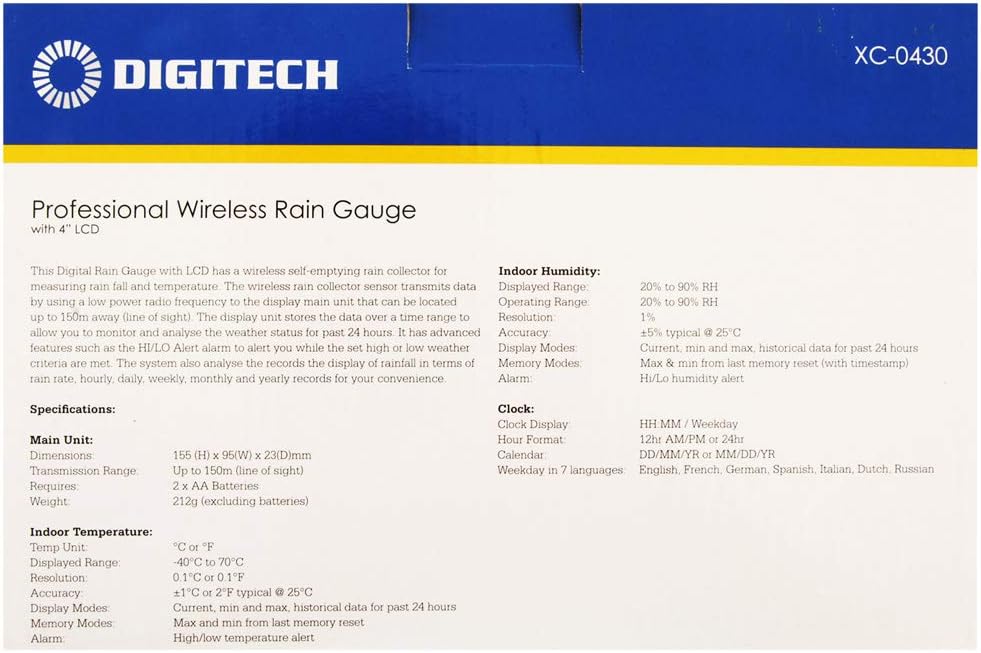
Image: A close-up of the product box detailing the technical specifications of the rain gauge system.
Кепилдик жана колдоо
This product is covered by a standard manufacturer's warranty. For specific warranty terms and conditions, please refer to the documentation included with your purchase or contact DigiTech customer support.
For technical assistance, troubleshooting, or replacement parts, please contact your retailer or the manufacturer directly. Keep your purchase receipt as proof of purchase for warranty claims.