
Introduction
This manual provides comprehensive instructions for the setup, operation, maintenance, and troubleshooting of your Sharp EL-6490 32 KB Electronic Organizer. Please read this manual thoroughly before using your device to ensure proper function and longevity.
Жайгашуу
Пакеттен чыгаруу
Carefully remove all components from the packaging. Ensure that the electronic organizer and any included accessories are present and undamaged. Retain the packaging for future storage or transport.
Батарея орнотуу
- Аппараттын артындагы батарея бөлүкчөсүнүн капкагын табыңыз.
- Бөлүмдү ачуу үчүн капкакты жылдырыңыз же көтөрүңүз.
- Insert the required batteries (e.g., two AAA batteries, not included) according to the polarity indicators (+ and -) inside the compartment.
- Батарея уясынын капкагын ордуна коюңуз, анын ордуна бекем чыкылдатыңыз.
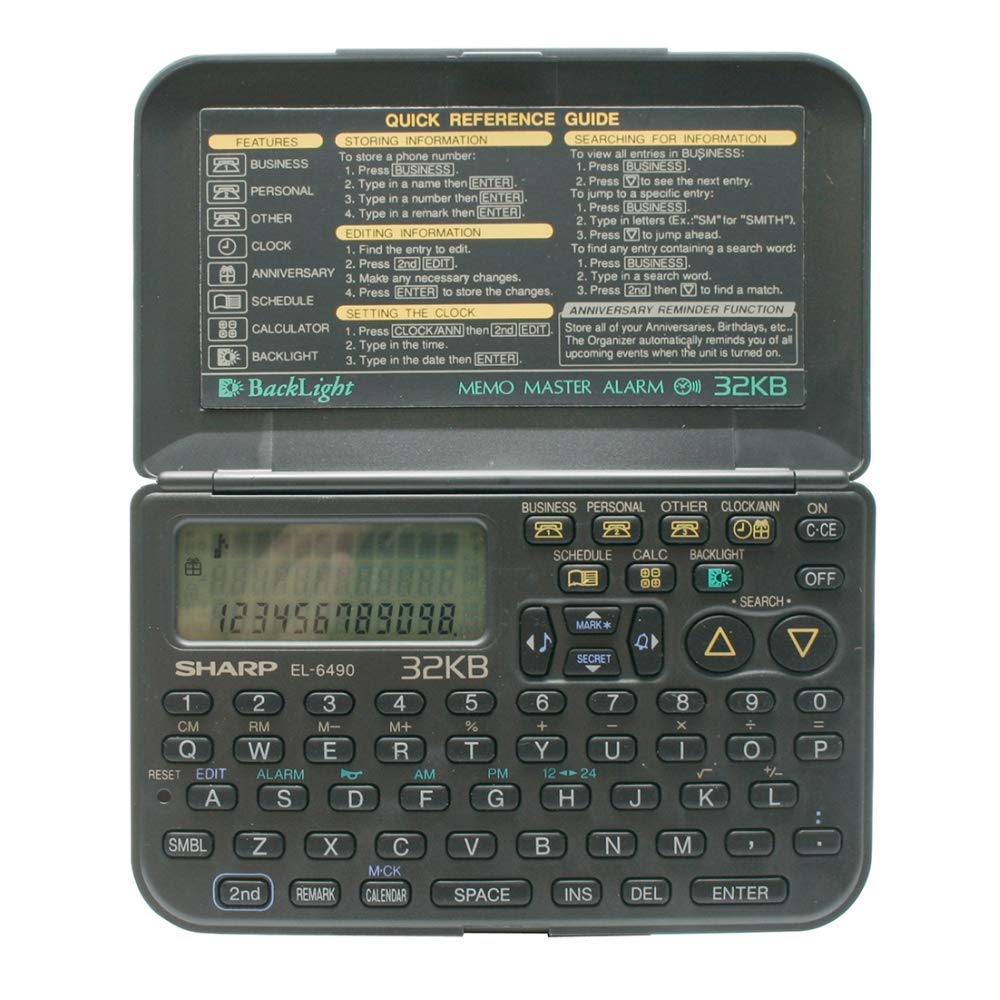
Image: The Sharp EL-6490 Electronic Organizer, showing the rear panel where the battery compartment is typically located.
Баштапкы күйгүзүү
басыңыз КҮЙГҮЗҮҮ/ӨЧҮРҮҮ button to power on the device. The display should illuminate, and you may be prompted to set the date and time.
Дата менен убакытты орнотуу
- дегенге өтүңүз ЖӨНДӨӨЛӨР menu using the arrow keys.
- Тандоо DATE & TIME.
- Use the numeric keypad and arrow keys to enter the current date (MM/DD/YYYY) and time (HH:MM).
- Confirm your settings by pressing the ENTER or SET баскычы.
Иштөө нускамалары
Негизги навигация
The EL-6490 features a directional keypad for navigating menus and a QWERTY keyboard for data entry. Use the МЕНЮ button to access main functions and the ESC мурунку экранга кайтуу үчүн баскычты басыңыз.
Маалыматтарды киргизүү
To enter text or numbers, select the desired field and type using the QWERTY keyboard. Press SHIFT for uppercase letters and SYM for symbols. Press ENTER киргизүүнү ырастоо үчүн.
Using the Calendar/Scheduler
- Негизги менюдан тандаңыз КАЛЕНДАРИ or ГРАФИК.
- Use the arrow keys to navigate through days, weeks, or months.
- To add an event, select a date and press КОШУУ or ЖАНЫ. Enter the event details, time, and any notes.
- Save the event by pressing САКТОО.
Телефон китебин колдонуу
- Тандоо ТЕЛЕФОН КИТЕП негизги менюдан.
- To add a new entry, press КОШУУ. Enter the name, phone number, and any additional contact information.
- To search for an entry, use the search function or scroll through the list.
Using the Memo Function
- Мүмкүнчүлүк эсине негизги менюдан.
- Create a new memo by selecting NEW MEMO.
- Type your notes using the keyboard.
- Save the memo for future reference.
Calculator Function
The EL-6490 includes a basic calculator. Select КАЛКулятор from the main menu. Use the numeric keys and operation symbols (+, -, *, /) to perform calculations. Press = натыйжа үчүн.
Техникалык тейлөө
Тазалоо
To clean the device, use a soft, dry cloth. For stubborn marks, slightly dampen the cloth with water. Do not use harsh chemicals, abrasive cleaners, or solvents, as these can damage the display or casing.
Батареяны алмаштыруу
When the battery indicator appears on the display, replace the batteries promptly to avoid data loss. Follow the battery installation steps outlined in the Жайгашуу section. It is recommended to replace all batteries at the same time.
Сактагыч
If storing the device for an extended period, remove the batteries to prevent leakage and potential damage. Store in a cool, dry place away from direct sunlight and extreme temperatures.
Проблемаларды чечүү
| Көйгөй | Мүмкүн себеп | Чечим |
|---|---|---|
| Түзмөк күйбөйт. | Өлүк же туура эмес орнотулган батарейкалар. | Батареянын полярдуулугун текшериңиз. Жаңы батареялар менен алмаштырыңыз. |
| Дисплей бош же күңүрт. | Low battery power; contrast setting. | Replace batteries. Adjust display contrast in the settings menu. |
| Data is lost or corrupted. | Batteries removed for too long; critical battery level. | Ensure batteries are always present. Replace batteries promptly when low. |
| Ачкычтар жооп бербейт. | Dust or debris under keys; device malfunction. | Clean the keyboard area. Try removing and reinserting batteries to reset. If problem persists, contact support. |
Техникалык шарттар
| Өзгөчөлүк | Деталь |
|---|---|
| Өндүрүүчү | Sharp |
| Модел | ЭЛ-6490 |
| Эс | 32 KB |
| Продукциянын өлчөмдөрү | 0.02 x 0.14 x 0.19 см (0.008 x 0.055 x 0.075 дюйм) |
| Продукт Салмагы | 200 г (болжол менен 7.05 унция) |
| ASIN | B077YK7M3H |
| Power Source | Batteries (e.g., AAA, not included) |
Кепилдик жана колдоо
For warranty information and technical support, please refer to the warranty card included with your product or visit the official Sharp webсайт. Сатып алуу квитанциясын кепилдик дооматтары үчүн сатып алуунун далили катары сактаңыз.
Расмий Sharp Webсайт: global.sharp/products/calculator/support/