
Introduction
Thank you for choosing the Teufel One M All-in-One WiFi Bluetooth Streaming Speaker. This device integrates Wi-Fi and Bluetooth streaming capabilities with an internal subwoofer, delivering powerful and immersive audio. This manual provides essential information for the proper setup, operation, and maintenance of your speaker. Please read it thoroughly before use.
Маанилүү коопсуздук нускамалары
- Электр камсыздоо: Only use the provided power cable. Ensure the voltage matches your local power supply. Disconnect the power cable during lightning storms or when unused for extended periods.
- Жайгашкан жери: Place the speaker on a stable, flat surface. Avoid direct sunlight, heat sources, or areas with high humidity. Ensure adequate ventilation around the unit.
- Суу жана ным: Do not expose the speaker to dripping or splashing water. Do not place objects filled with liquids, such as vases, on or near the speaker. The speaker is not waterproof.
- Тазалоо: Unplug the speaker before cleaning. Use a soft, dry cloth. Do not use liquid cleaners or aerosol sprays.
- Тейлөө: Do not attempt to repair the speaker yourself. Refer all servicing to qualified service personnel. Opening the unit voids the warranty.
- Балдар: Муунтуп калуу коркунучун алдын алуу үчүн таңгактоочу материалдарды жана майда бөлүктөрүн балдардан алыс кармаңыз.
Эмне камтылган
- 1 x Teufel One M Speaker
- 1 x Кубат кабели
Продукт бүттүview
Алдыңкы панелдин башкаруу элементтери

Figure 1: Front Panel Controls (Black Model)
The front panel features integrated touch controls for convenient operation:
- Үн баскычы: Rotate to adjust the audio volume. Press to mute/unmute.
- Ойнотуу/тындыруу баскычы: Учурдагы аудио тректи ойнотуу же тындыруу үчүн басыңыз.
- Көздү өткөрүп жиберүү баскычтары: Use to skip to the next or previous track.
- Булакты тандоо баскычтары: Quickly switch between different audio sources (e.g., Wi-Fi, Bluetooth, Line-In).
Арткы панелдик байланыштар

Figure 2: Rear Panel Connections (Black Model)
The rear panel provides the following connection options:
- AUX киргизүү: 3.5mm jack for connecting external audio devices (e.g., turntables, CD players).
- LAN порту: Ethernet port for a wired network connection.
- USB порт: For connecting USB storage devices to play music.
- Калыбына келтирүү баскычы: Аппаратты заводдук жөндөөлөргө кайтаруу үчүн колдонулат.
- Орнотуу баскычы: Initiates the Wi-Fi setup process.
- BT баскычы: Bluetooth жупташтыруу режимин иштетет.
- Кубат киргизүү: Берилген электр кабелин бул жерге туташтырыңыз.
Жайгашуу
1. Power Connection
- Берилген электр кабелин туташтырыңыз Power Input on the rear panel of the Teufel One M.
- Электр кабелинин экинчи учуна ылайыктуу розеткага сайыңыз.
- The speaker will power on automatically or can be turned on using the power button (if available, or via app).
2. Network Connection (Wi-Fi or LAN)
For Wi-Fi streaming and multiroom functionality, connect your speaker to your home network.
Wi-Fi орнотуу:
- жүктөп алып, орнотуңуз Raumfeld App смартфонуңузда же планшетиңизде.
- Follow the in-app instructions to connect your Teufel One M to your Wi-Fi network. This typically involves pressing the Орнотуу баскычы арткы панелде.
LAN туташуу:
Alternatively, you can connect the speaker directly to your router using an Ethernet cable via the LAN порт арткы панелде.
3. Bluetooth Жупташтыруу
To stream audio via Bluetooth from your mobile device:
- басыңыз BT баскычы on the rear panel or select Bluetooth as the source via the front panel controls. The Bluetooth indicator will flash.
- On your smartphone or tablet, go to Bluetooth settings and select "Teufel One M" from the list of available devices.
- Once paired, the Bluetooth indicator will glow steadily, and you can begin streaming audio.
4. Raumfeld App Installation
The Raumfeld app is essential for managing multiroom audio, Wi-Fi streaming services (Spotify, internet radio), and accessing music from USB or NAS drives. Download it from your device's app store.
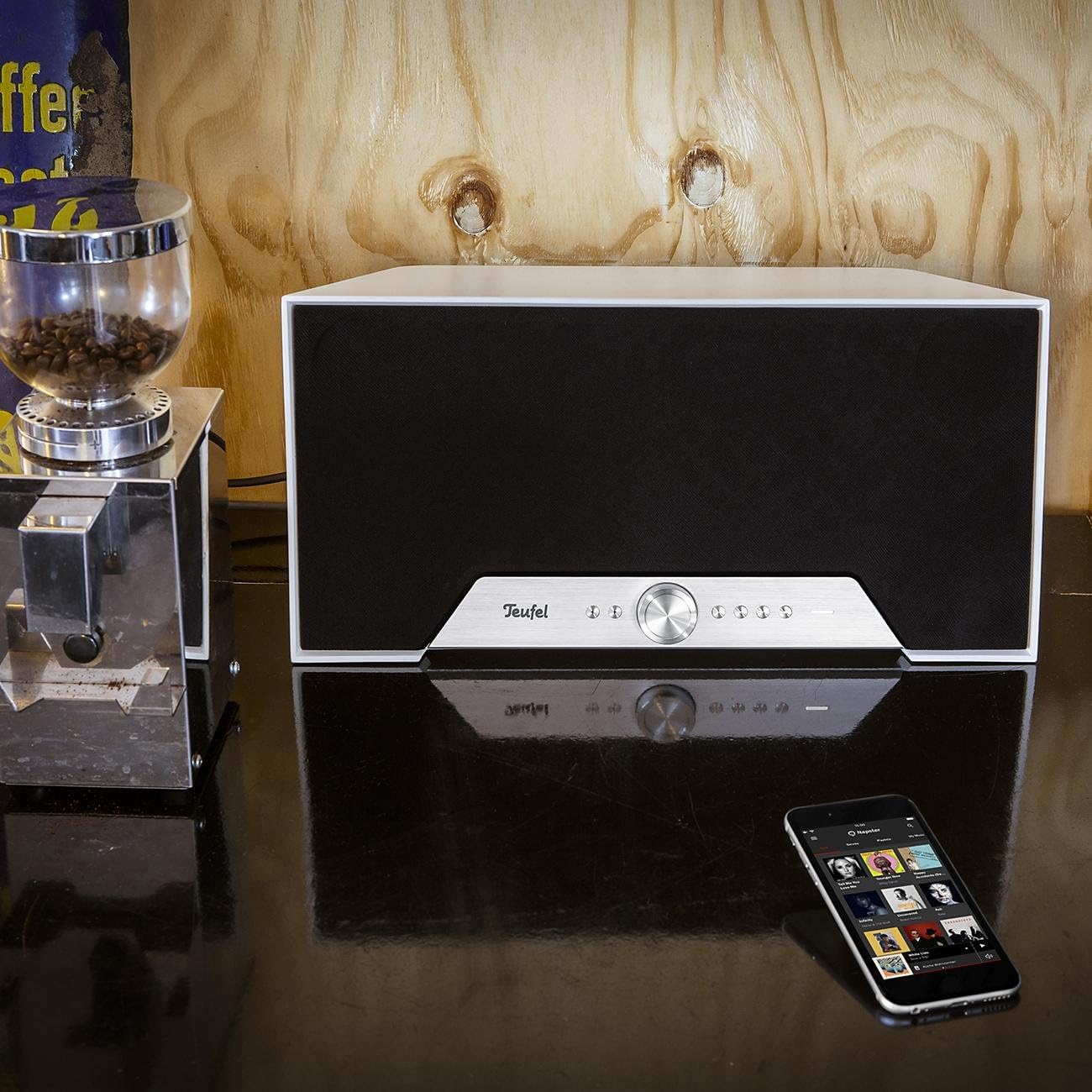
Figure 3: Teufel One M in a home environment (White Model)
Operating Your Teufel One M
Негизги ойнотуу
Use the front panel controls for basic functions:
- басыңыз Ойнотуу/Тыныгуу ойнотууну баштоо же токтотуу үчүн баскыч.
- айлантыңыз Көлөм баскычы үн деңгээлин тууралоо үчүн.
- колдонуу Track Skip ойнотмо тизмеңизди багыттоо үчүн баскычтар.
Wi-Fi агымы
Utilize the Raumfeld app to access various Wi-Fi streaming options:
- Музыкалык кызматтар: Stream directly from integrated services like Spotify.
- Интернет радиосу: Access a wide range of internet radio stations.
- Жергиликтүү сактагыч: Музыка ойнотуу files from USB drives connected to the USB port or from Network Attached Storage (NAS) devices on your network.
Bluetooth ойнотуу
After successful pairing, select Bluetooth as the source and play audio from your paired device. The speaker will reproduce the sound wirelessly.
Line-In Source
Connect an external audio source (e.g., a turntable or CD player) to the AUX киргизүү using a 3.5mm audio cable. Select the Line-In source via the front panel controls or the Raumfeld app to listen to audio from this device.
Smart Standby Mode
The Teufel One M features a smart standby mode for low power consumption. The speaker will automatically enter standby after a period of inactivity and can be woken up by playing audio via Wi-Fi or Bluetooth, or by interacting with the controls.
Техникалык тейлөө
Кам көрүү жана тазалоо
To maintain the appearance and performance of your Teufel One M speaker:
- Тазалоодон мурун динамикти ар дайым розеткадан сууруп алыңыз.
- Use a soft, dry, lint-free cloth to wipe the surfaces.
- Абразивдүү тазалагычтарды, момдорду же эриткичтерди колдонбоңуз, анткени алар финишке зыян келтириши мүмкүн.
- Суюктуктарды динамикке түздөн-түз чачуудан алыс болуңуз.
Проблемаларды чечүү
If you encounter issues with your Teufel One M, refer to the following table for common problems and solutions.
| Көйгөй | Мүмкүн себеп | Чечим |
|---|---|---|
| Күч жок | Электр кабели туташкан эмес же розетка иштебейт. | Кубат кабели динамикке жана иштеген электр розеткасына бекем туташтырылганын текшериңиз. |
| Үн жок | Volume is too low or muted; incorrect source selected; audio cable issues. | Increase volume, check mute status. Verify the correct input source is selected. For Line-In, check cable connections. |
| Wi-Fi'га туташпай жатат | Incorrect Wi-Fi password; speaker out of range; router issues. | Double-check Wi-Fi password. Move speaker closer to router. Restart router and speaker. Use the Raumfeld app for troubleshooting. |
| Bluetooth жупташтыруу ишке ашпай калды | Динамик жупташтыруу режиминде эмес; түзмөк мурунтан эле жупташтырылган; тоскоолдук бар. | Press the BT button to enter pairing mode. Ensure no other device is connected. Try pairing again. |
| Multiroom not working | Network issues; Raumfeld app not configured correctly. | Ensure all speakers are on the same network. Check Raumfeld app settings and update if necessary. Note: Teufel One M is not compatible with Teufel Home series products or the Teufel Home app. |
Техникалык мүнөздөмөлөр
| Өзгөчөлүк | Нарк |
|---|---|
| Модель аты | ONE M |
| Элемент моделинин номери | 105404002 |
| Бренд | Teufel |
| Түс | Ак |
| Продукциянын өлчөмдөрү (L x W x Y) | 19 x 42 x 20.5 см |
| Материалдын түрү | Plastic or lacquered material |
| Динамик түрү | All-in-one streaming speaker |
| Аудио чыгаруу режими | Стерео |
| Көлөмдүү үн каналынын конфигурациясы | 2.1 |
| Динамиктердин максималдуу чыгаруу күчү | 120 Ватт |
| Баяндамачылардын саны | 1 |
| Байланыш технологиясы | Bluetooth, WiFi |
| Зымсыз байланыш технологиясы | Bluetooth, WiFi |
| Башкаруу ыкмасы | тийүү |
| Power Source | Электр кабели |
| Шайкеш түзмөктөр | Smartphones, tablets, computers |
| Өзгөчөлүктөр | Multi-room audio, High-res audio, Wi-Fi and Bluetooth streaming |
| Продукт үчүн сунушталган колдонуу | For music player |
| Монтаж түрү | Үстөлдүн үстүнө орнотуу |
| Суу өткөрбөйт | False |
| Камтылган компоненттер | 1 электр кабели |
| Элементтердин саны | 1 |
| Дата биринчи жеткиликтүү | 7-декабрь, 2017-жыл |
Кепилдик жана Кардарларды колдоо
Your Teufel One M speaker comes with a limited warranty. For specific details regarding the warranty period and coverage, please refer to the warranty card included with your product or visit the official Teufel webсайт.
For technical support, troubleshooting assistance, or inquiries about spare parts, please contact Lautsprecher Teufel GmbH directly. Contact information can typically be found on their official webсайтында же продукт документациясында.