1. Киришүү
This manual provides comprehensive instructions for the safe and efficient operation of the Generic DANIU FY3224S Dual-channel Arbitrary Waveform DDS Function Signal Generator. This device is designed to generate various waveforms, including sine, square, triangle, pulse, and arbitrary waveforms, with a maximum frequency of 24MHz. It also features frequency sweep and counter functions, making it suitable for a wide range of electronic testing and experimental applications.
2. Коопсуздук маалыматы
Please read and understand all safety precautions before operating the device. Failure to follow these instructions may result in electric shock, fire, or damage to the product.
- Кубат булагы: Use only the specified power adapter and voltage. Ensure the power outlet is properly grounded.
- Курчап турган чөйрө: Operate the device in a dry, well-ventilated area, away from direct sunlight, high temperatures, humidity, and corrosive gases.
- Вентиляция: Желдетүүчү тешиктерди жаппаңыз.
- Суюктук менен байланыш: Avoid contact with liquids. Do not operate the device if it has been exposed to moisture.
- Тейлөө: Аппаратты өзүңүз ачууга же оңдоого аракет кылбаңыз. Бардык тейлөөлөрдү квалификациялуу кызматкерлерге тапшырыңыз.
- Кабелдер: Inspect all cables for damage before use. Do not use damaged cables.
3. Пакеттин мазмуну
Төмөндө тизмеленген нерселердин баары пакетиңизде бар экенин текшериңиз:
- DANIU FY3224S Function Signal Generator Unit
- Кубат адаптери/кабели
- BNC to Alligator Clip Cables (2 pcs)
- USB маалымат кабели
- CD with Software/Drivers (if applicable)
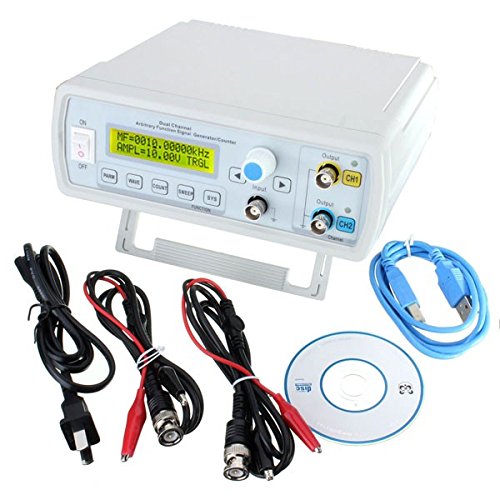
Figure 3.1: DANIU FY3224S Function Signal Generator and its accessories.
4. Продукт бүтүп калдыview
Familiarize yourself with the main components and controls of the signal generator.
4.1 алдыңкы панели
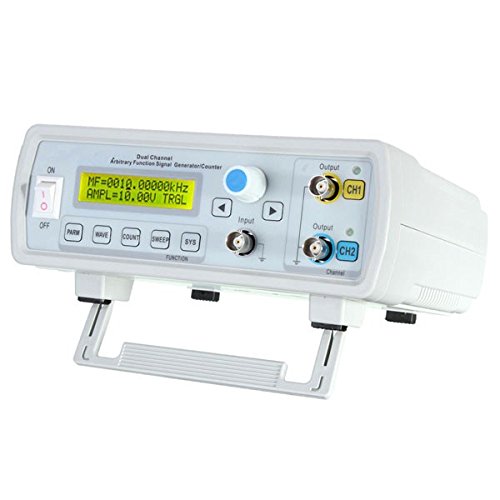
Figure 4.1: Front Panel of the FY3224S.
- Кубат өчүргүч (КҮЙГҮЗҮҮ/ӨЧҮРҮҮ): Түзмөктүн кубатын которушат.
- LCD дисплей: Shows current settings, waveform parameters, and menu options.
- Башкаруу баскычы: Used for navigating menus and adjusting parameter values. Press to confirm selection.
- Directional Buttons (Left/Right): Used for cursor movement or fine-tuning values.
- Функция баскычтары:
- PARM: Parameter settings.
- ТОЛКУН: Waveform selection.
- COUNT: Counter function.
- шыпыруу: Frequency sweep settings.
- SYS: Система тууралоолору.
- ФУНКЦИЯ: Additional function menu.
- Киргизүү порту: For external signal input, typically for the counter function.
- Output Ports (CH1, CH2): BNC connectors for waveform output.
4.2 Арткы панель
The rear panel typically houses the power input jack and potentially a USB communication port for PC connectivity.
5. Орнотуу
- Кубат туташуу: Connect the provided power adapter to the power input jack on the rear panel of the signal generator. Plug the adapter into a suitable AC power outlet.
- Баштапкы күйгүзүү: Flip the ON/OFF switch on the front panel to the 'ON' position. The LCD display should illuminate, showing the startup screen and then the default waveform settings.
- Чыгуу туташуу: Connect the BNC output cables (CH1 or CH2) to your desired test equipment (e.g., oscilloscope, frequency counter, circuit under test).
- USB туташуу (кошумча): If using PC software for control, connect the USB data cable from the signal generator's USB port to your computer. Install the necessary drivers and software from the provided CD or manufacturer's webсайт.
6. Иштөө нускамалары
6.1 Негизги операция
- Навигация: Use the control knob to scroll through menu options or adjust values. Press the knob to select an option or confirm a value.
- Параметрди тууралоо: When a parameter is highlighted, turn the knob to change its value. Use the left/right directional buttons for fine adjustments or to move the cursor within a number.
- Канал тандоо: The device operates with two independent channels (CH1 and CH2). Ensure you are adjusting parameters for the correct channel.
6.2 Waveform Generation
- басыңыз WAVE button to enter the waveform selection menu.
- Turn the control knob to select the desired waveform type (e.g., Sine, Square, Triangle, Pulse, Arbitrary). Press the knob to confirm.
- басыңыз PARM button to access waveform parameters.
- Мындай параметрлерди тууралаңыз:
- Жыштык (FREQ): Set the output frequency.
- Ampлитуда (AMPL): Set the peak-to-peak voltage.
- Offset (OFFSET): Set the DC offset voltage.
- Duty Cycle (DUTY): For square/pulse waves.
- Phase (PHASE): For dual-channel synchronization.
- Ensure the output channel (CH1 or CH2) is enabled if there's a dedicated button or menu option for it.
6.3 Frequency Sweep Function
- басыңыз шыпыруу баскычы.
- коюңуз Баштоо жыштыгы жана Аяктоо жыштыгы using the control knob and directional buttons.
- коюңуз Sweep Time (duration of the sweep).
- тандаңыз Sweep Mode (e.g., Linear, Logarithmic).
- Activate the sweep function.
6.4 Counter Function
- Connect the external signal to be measured to the Киргизүү порту.
- басыңыз COUNT баскычы.
- The display will show the frequency or period of the input signal.
- Adjust settings like gate time or coupling if available in the counter menu.
7. Техникалык тейлөө
- Тазалоо: Disconnect power before cleaning. Use a soft, dry cloth to wipe the exterior of the device. Do not use abrasive cleaners or solvents.
- Сактагыч: Store the device in a cool, dry place, away from dust and extreme temperatures, when not in use for extended periods.
- Калибрлөө: Periodic calibration by qualified technicians may be required to maintain accuracy. Refer to the manufacturer's recommendations.
8. Кыйынчылыктарды
| Көйгөй | Мүмкүн себеп | Чечим |
|---|---|---|
| Түзмөк күйбөйт. | Электр кабели туташкан эмес; розетка бузулган; кубат өчүк. | Check power cable connection; try a different outlet; ensure power switch is ON. |
| No output signal. | Output channel disabled; incorrect parameters; faulty cable. | Ensure channel is enabled; verify frequency/amplitude settings; test with a different BNC cable. |
| Туура эмес жыштык/amplitude readings on external device. | Improper impedance matching; external device calibration issue. | Ensure 50Ω termination if required; check external device settings and calibration. |
| Counter function not working. | Input signal too weak/strong; incorrect input connection. | Adjust input signal level; ensure signal is connected to the correct input port. |
9. Техникалык шарттар
- Модел: FY3224S (FFC-BG-1157268)
- Каналдар: Кош канал
- Макс жыштыгы: 24MHz (Sine Wave)
- Толкун формасынын түрлөрү: Sine, Square, Triangle, Pulse, Arbitrary, etc.
- Технология: DDS (Direct Digital Synthesis)
- Функциялары: Waveform Generation, Frequency Sweep, Counter
- Бренд: Generic (DANIU)
- ASIN: B0784RZ28Q
- Биринчи жеткиликтүү датасы: 20-жылдын 2017-ноябры
10. Кепилдик жана колдоо
This product is covered by a standard manufacturer's warranty. For specific warranty terms, please refer to the documentation included with your purchase or contact the seller directly. For technical support, troubleshooting assistance beyond this manual, or inquiries regarding repairs, please contact the retailer or manufacturer's customer service department.


