
bluebyte BP-S210bl
Clip Style Bluetooth V5.4 Receiver
User Manual
Brand: bluebyte
1. Продукт бүтүп калдыview
The bluebyte Clip Style Bluetooth V5.4 Receiver is a versatile audio adapter designed to convert wired headphones, earbuds, or home audio systems into wireless ones. Featuring Bluetooth 5.0 technology, it provides stable connectivity and premium-quality sound for music streaming and hands-free calling.
Негизги өзгөчөлүктөр төмөнкүлөрдү камтыйт:
- Converts wired audio devices to wireless.
- Stable Bluetooth 5.0 connectivity with a reliable wireless range of approximately 33 ft (10m).
- Advanced Bluetooth chip for premium-quality sound during music playback and hands-free calls.
- Automatic reconnection feature for seamless pairing.
- Large, easy-to-use buttons for common device controls, ideal for active use.
2. Пакеттин мазмуну
Please check the product packaging for a complete list of included items. Typically, the package contains:
- bluebyte Clip Style Bluetooth Receiver
- Заряддоо кабели (Type-C)
- User Manual
3. Продукциянын схемасы жана компоненттери

Сүрөт 3.1: Алдыңкы view of the bluebyte Bluetooth receiver with its control buttons.
This image displays the circular control panel of the bluebyte Bluetooth receiver. It features a central play/pause button, surrounded by four directional buttons for volume up (+), volume down (-), previous track (<<), and next track (>>).

3.2-сүрөт: Каптал view of the bluebyte Bluetooth receiver highlighting its compact dimensions and Type-C charging port.
Бул сүрөт каптал профессионалды көрсөтөтfile of the receiver, indicating its compact size (approximately 2.6 x 1.3 x 2.2 inches) and the location of the Type-C charging port. The device also features a 3.5mm audio jack for connecting headphones or other audio devices.
The device features a clip for easy attachment to clothing or bags, a 3.5mm audio output jack, a Type-C charging port, and a built-in microphone for hands-free calling.
4. Орнотуу
4.1 Аппаратты заряддоо
Before first use, fully charge the Bluetooth receiver. Connect the provided Type-C charging cable to the receiver's charging port and the other end to a USB power source (e.g., computer USB port, wall adapter). A full charge takes approximately 2 hours and provides up to 9 hours of continuous audio playback.
4.2 Bluetooth жупташтыруу
- Ensure the Bluetooth receiver is sufficiently charged.
- Turn on the Bluetooth function on your smartphone or other audio source device.
- Power on the bluebyte Bluetooth receiver. It will automatically enter pairing mode (indicated by a flashing LED light, if applicable).
- On your audio source device, search for available Bluetooth devices. Select "bluebyte Receiver" (or similar name) from the list.
- Once connected, the LED indicator will change (e.g., solid blue) and a voice prompt may confirm successful pairing.
The receiver supports automatic reconnection. After initial pairing, simply turn on your cell phone's Bluetooth first, then power on the receiver, and it will automatically re-pair with the last connected device.
4.3 Аудио түзмөктөргө туташуу
Plug your wired headphones, earbuds, or the AUX-in cable of your home audio system or car stereo into the 3.5mm audio jack of the bluebyte Bluetooth receiver.

Figure 4.1: Multi-application diagram of the bluebyte Bluetooth receiver.
This diagram illustrates how the bluebyte receiver can be used with various devices, including cell phones, headphones, car stereos, and home speakers, to enable wireless audio streaming.
5. Иштөө нускамалары
5.1 Музыканы ойнотууну башкаруу
- Ойнотуу/тындыруу: Музыканы ойнотуу же тындыруу үчүн борбордук баскычты бир жолу басыңыз.
- Көлөмү: Press the "+" button to increase volume.
- Үнүн азайтуу: Press the "-" button to decrease volume.
- Кийинки трек: Press the ">>" button to skip to the next song.
- Мурунку трек: Press the "<<" button to go back to the previous song.
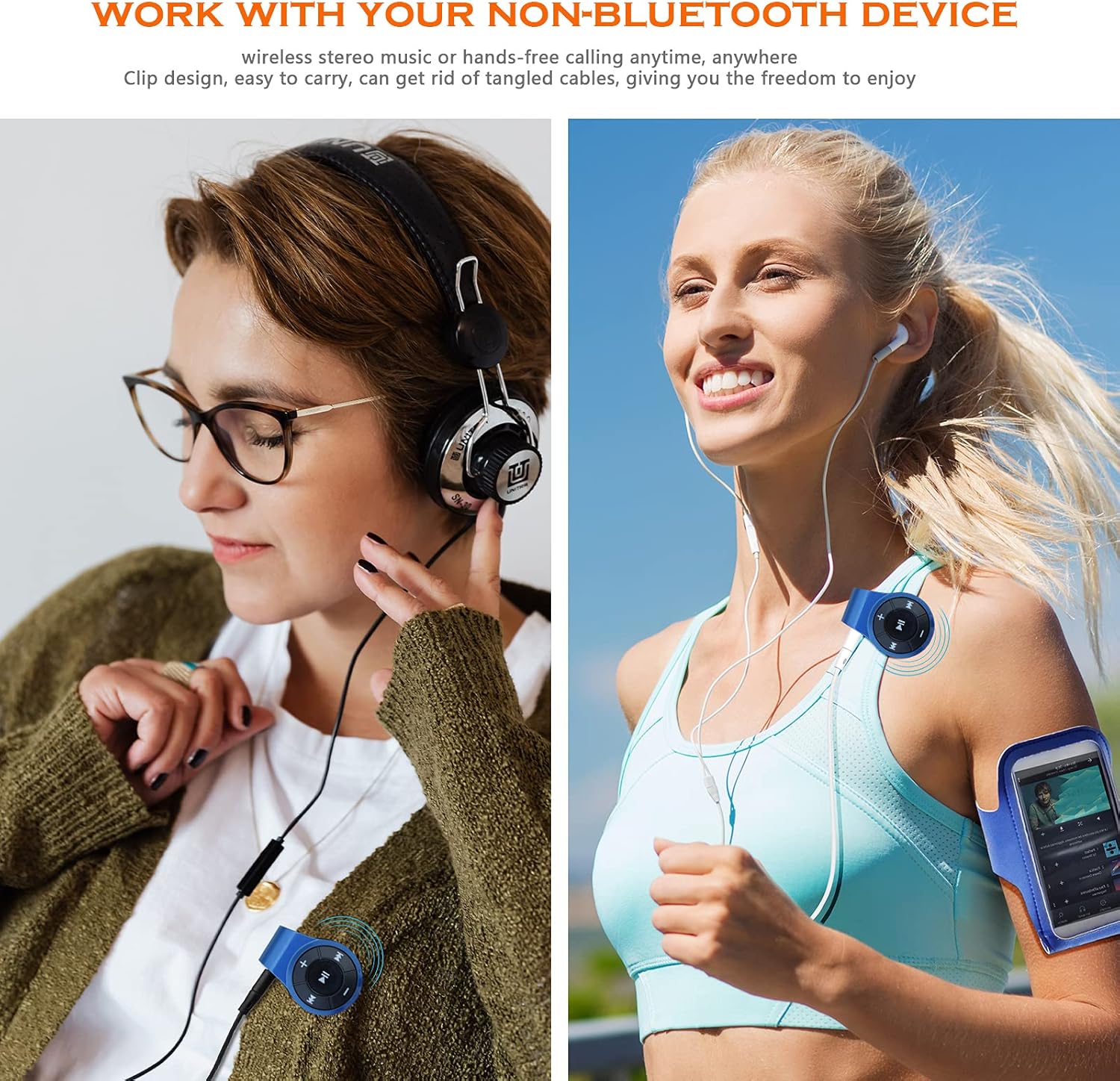
Figure 5.1: Users enjoying wireless audio with the bluebyte receiver.
This image shows two different scenarios: one person listening to music indoors with over-ear headphones, and another person jogging outdoors with in-ear headphones, both utilizing the clip-on Bluetooth receiver for wireless convenience.
5.2 Hands-Free чалуу
The bluebyte receiver is equipped with a built-in microphone for hands-free calling. When a call comes in while connected:
- Чакырууга жооп берүү: Press the central button once.
- Чакырууну аяктоо: Press the central button once during a call.
- Чакырууну четке кагуу: Борбордук баскычты 2 секунд басып, кармап туруңуз.

Figure 5.2: Connecting to car AUX port for music and calls.
This image demonstrates the use of the bluebyte receiver in a car, connected to the AUX port, enabling wireless music streaming and hands-free calling through the car's audio system. The device utilizes DSP (Digital Signal Processing) for clear voice signal processing.
6. Техникалык тейлөө
- Аппаратты кургак кармаңыз. Нымдуулуктун, жамгырдын же суюктуктун таасиринен алыс болуңуз.
- Аппаратты жумшак, кургак чүпүрөк менен тазалаңыз. Катуу химиялык заттарды же абразивдүү тазалагычтарды колдонбоңуз.
- Аппаратты колдонбогондо салкын, кургак жерде сактаңыз.
- Avoid extreme temperatures, as this can shorten the lifespan of electronic components and batteries.
7. Кыйынчылыктарды
| Көйгөй | Мүмкүн себеп | Чечим |
|---|---|---|
| Түзмөк күйбөйт. | Батарея аз. | Берилген Type-C кабелин колдонуп, аппаратты толугу менен заряддаңыз. |
| Bluetooth түзмөгү менен жупташтыруу мүмкүн эмес. | Bluetooth is off on source device; device not in pairing mode; too far from source. | Ensure Bluetooth is enabled. Power cycle the receiver to enter pairing mode. Move devices closer (within 33 ft/10m). Clear previous pairings on source device. |
| No sound after connecting. | Volume too low; incorrect audio input selected on connected device; cable not fully inserted. | Increase volume on both the receiver and the connected audio source. Ensure the 3.5mm cable is fully inserted. Verify correct audio input on your home stereo/car system. |
| Аудио сапаты начар же ажыратылган. | Interference; device too far from source; low battery. | Reduce interference by moving away from other wireless devices. Move closer to the audio source. Recharge the receiver. |
8. Техникалык шарттар
| Өзгөчөлүк | Деталь |
|---|---|
| Продукциянын өлчөмдөрү | 2.6 x 1.3 x 2.2 дюйм |
| Элемент Салмагы | 0.38 унция |
| Элемент моделинин номери | BP-S210bl |
| Батареялар | 1 Литий Полимердик батарейка (кошулган) |
| Байланыш технологиясы | Bluetooth |
| Bluetooth версиясы | V5.0 |
| Зымсыз диапазон | Approx. 33 ft / 10m |
| Power Source | Батарея менен иштейт |
| Өзгөчө өзгөчөлүк | Камтылган микрофон |
| Өндүрүүчү | Bluepioneer Technology Co.,Ltd |
| Дата биринчи жеткиликтүү | 26-декабрь, 2017-жыл |
9. Коопсуздук маалыматы
Please read and adhere to the following safety guidelines to ensure safe operation and prolong the life of your device:
- Use the device only in dry environments. Avoid exposure to water, rain, or any liquids.
- Аппаратты өтө жогорку температурага (ысык же муздак) тийгизбеңиз.
- Dispose of the battery properly according to local regulations. Do not incinerate or mutilate batteries.
- Балдар жетпеген жерде сактаңыз.
- Do not attempt to disassemble, repair, or modify the device yourself. This will void the warranty and may cause harm.
10. Кепилдик жана колдоо
Specific warranty details and direct support contact information are not provided in this manual. For warranty claims or technical assistance, please refer to the product packaging or contact the retailer where the product was purchased. You may also visit the official bluebyte webкошумча маалымат алуу үчүн сайт.
Өндүрүүчү: Bluepioneer Technology Co.,Ltd
Ask a question about this manual
Ask about setup, troubleshooting, compatibility, parts, safety, or missing instructions. Manuals+ will review the question and use this page’s manual context to help answer it.