
Walfront HA-4012
Walfront Islamic Azan Alarm Clock User Manual
Модел: HA-4012
Introduction
The Walfront Islamic Azan Alarm Clock is a digital prayer clock designed to assist Muslims with daily prayer times. It features automatic Azan time calculation for various cities, multiple alarm functions including a special Fajr alarm, temperature display, and a full-screen light for visibility in the dark. This manual provides instructions for setting up, operating, and maintaining your clock.

Сүрөт: алдыңкы view of the Walfront Islamic Azan Alarm Clock, displaying time, date, and prayer times.
Негизги өзгөчөлүктөрү
- Automatic Azan Times: Pre-programmed Azan times for over 1500 cities worldwide, with five daily prayer times.
- Special Fajr Alarm: A unique alarm that adjusts daily relative to the Fajr Azan time, ensuring you wake up consistently after Fajr.
- 5 мүнөттүк тындыруу функциясы: Allows for a brief delay before the alarm sounds again.
- Full Screen Light: Provides illumination for easy viewжарык аз шарттарда.
- Multi-Display: Shows current time, date, week, and daylight saving time status.
- Температура дисплейи: Температураны Цельсий же Фаренгейтте көрсөтөт.
- Жөнгө салынуучу Көлөмү: Azan volume can be controlled via a dial switch or set to a beep sound.
- Makkah Music: Includes Makkah music for prayer.
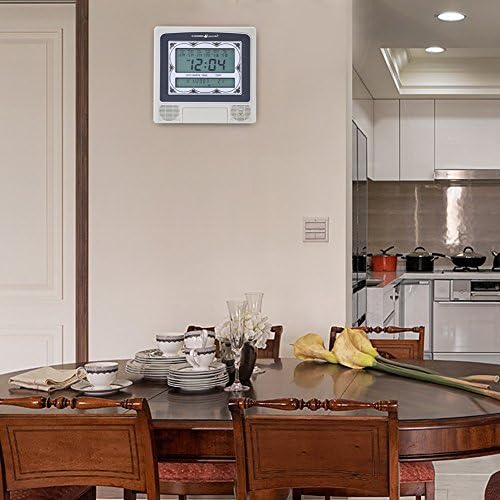
Image: The Walfront Islamic Azan Alarm Clock mounted on a wall, highlighting its function as a Muslim prayer clock.
Жайгашуу
Before using your clock, ensure it is powered correctly. The clock operates on battery power (batteries not included) or via a DC 6V 300mA power adapter (if applicable, check product packaging for power adapter inclusion).
1. Баштапкы күйгүзүү жана негизги орнотуулар
- Insert batteries into the designated compartment or connect the power adapter.
- The clock display should illuminate.
- табыңыз SET button, typically on the back or side of the unit.
- Басыңыз SET орнотуу режимине кирүү үчүн.
- колдонуу UP (▲) жана ылдый (▼) buttons to adjust values (e.g., hour, minute, year, month, day).
- Басыңыз SET again to confirm each setting and move to the next parameter.
2. Setting Your City for Azan Times
The clock has pre-programmed Azan times for 1500 cities. You need to select your current city for accurate prayer times.
- In setting mode, navigate to the city selection option (this may be indicated by a city code or name on the display).
- колдонуу UP жана ылдый buttons to scroll through the available city codes or names until you find your location. Refer to the included city code list if provided with your product.
- Once your city is selected, press SET to confirm. The clock will automatically calculate the Azan times for your chosen city.
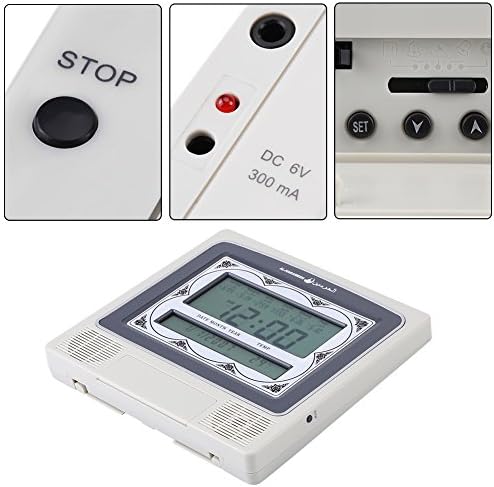
Сүрөт: деталдуу view of the clock's control buttons (STOP, SET, Y, A) and the DC 6V 300mA power input port.
Иштөө нускамалары
1. Daily Alarm and Fajr Alarm
- The clock provides five daily Azan times automatically based on your selected city.
- To set a specific daily alarm (non-Azan related), navigate to the alarm setting mode using the SET button. Adjust the desired alarm time using the UP жана ылдый баскычтар.
- The special Fajr alarm function allows you to set an alarm relative to the Fajr Azan. For example, if you set it for "5 minutes after Fajr," the alarm time will automatically adjust each day to maintain this interval.
2. Тындырма функциясы
Ойготкуч чыкканда, басыңыз ТОКТОТ button (or a designated snooze button if available) to activate the 5-minute snooze function. The alarm will sound again after 5 minutes.
3. Үндү башкаруу
The Azan volume can be adjusted using the dial switch, typically located on the side or back of the clock. You can also set the clock to beep 3 times instead of playing the full Azan by adjusting this setting in the menu or via the dial.
4. Температураны чагылдыруу
The clock displays the current room temperature. You can switch between Celsius and Fahrenheit units through the settings menu (refer to the setup section for navigating settings).
5. Full Screen Light
The full screen light activates to improve visibility of the display in dark environments. This feature is typically automatic or can be toggled via a dedicated button.
Техникалык тейлөө
- Тазалоо: Саатты жумшак, кургак чүпүрөк менен сүртүңүз. Абразивдүү тазалоочу каражаттарды же эриткичтерди колдонбоңуз, анткени алар дисплейге же клапанга зыян келтириши мүмкүн.asing.
- Батареяны алмаштыруу: If the display dims or functions become erratic, replace the batteries. Ensure correct polarity when inserting new batteries.
- Жайгашкан жери: Place the clock on a stable surface or mount it securely on a wall. Avoid direct sunlight, extreme temperatures, or high humidity.
Проблемаларды чечүү
| Көйгөй | Мүмкүн себеп | Чечим |
|---|---|---|
| Дисплей бош же күңүрт. | Батареялар аз же түгөндү; кубат адаптери туташтырылган эмес же бузук. | Replace batteries or ensure power adapter is securely connected and functional. |
| Азан убактысы туура эмес. | Incorrect city selected; incorrect date/time set. | Verify and re-select your city. Ensure the current date and time are set accurately. |
| Ойготкуч угулбайт. | Alarm is turned off; volume is too low or muted. | Check alarm settings to ensure it is enabled. Adjust the volume dial. |
| Баскычтар жооп бербейт. | Убактылуу программалык камсыздоодогу мүчүлүштүк; батареянын заряды аз. | Remove and re-insert batteries (power cycle). Replace batteries if low. |
Техникалык шарттар
| Бренд | Walfront |
| Модел | HA-4012 |
| Дисплей түрү | Санарип |
| Түс | Боз, Ак |
| Продукциянын өлчөмдөрү | 8.8"W x 8.4"H |
| Элемент Салмагы | 1.25 фунт (0.57 килограмм) |
| Power Source | Батарея менен иштейт (Батареялар камтылган эмес) |
| Материал | Пластик |
| Монтаж түрү | Дубалга орнотуу |
| Өзгөчөлүктөр | Alarm, Daylight Saving, Temperature Display |
| UPC | 663862629408 |
Кепилдик жана колдоо
This Walfront product is protected by a Өмүр бою кепилдик. Walfront is committed to customer satisfaction. If you encounter any issues with the product quality or functionality, please contact Walfront customer support for assistance.
For support, please refer to the contact information provided with your product packaging or visit the official Walfront webсайт.
Ask a question about this manual
Ask about setup, troubleshooting, compatibility, parts, safety, or missing instructions. Manuals+ will review the question and use this page’s manual context to help answer it.