
Introduction
This user manual provides comprehensive instructions for the Walfront HA-4012 Digital Muslim Islamic Prayer Alarm Clock. This device is designed to assist users with accurate prayer times, Azan alerts, and general timekeeping functions. Please read this manual carefully to ensure proper setup and operation of your new clock.
Продукт бүттүview
Familiarize yourself with the main components and features of your Walfront HA-4012 clock.

1-сүрөт: Алдыңкы жана арткы View of the Clock. This image displays the digital screen, control buttons (not explicitly visible but implied by the front view), and the rear panel with mounting points and battery compartment.

2-сүрөт: Clock Dimensions. The image shows the clock with measurements: approximately 22.5 cm (8.8 inches) wide, 21.5 cm (8.4 inches) high, and 3 cm (1.1 inches) deep.

3-сүрөт: Power Input and Speaker. A close-up view of the side of the clock, indicating the DC 6V 300mA power input port and a speaker icon, suggesting audio output capabilities.
Орнотуу колдонмосу
1. Күйгүзүү
The Walfront HA-4012 clock can be powered by batteries or an external DC 6V 300mA power adapter (not included). Ensure you use the correct power source.
- Батарея орнотуу: Locate the battery compartment on the back of the clock. Open the cover and insert the required batteries, ensuring correct polarity (+/-).
- Кубат адаптерин туташтыруу: If using a power adapter, connect it to the DC 6V 300mA input port on the side of the clock and plug it into a suitable power outlet.

4-сүрөт: Rear Panel with Battery Compartment. This image shows the back of the clock, highlighting the battery compartment cover and the integrated stand for tabletop use or wall mounting points.
2. Баштапкы конфигурация
Upon first power-on or after battery replacement, you may need to set the basic parameters.
- Учурдагы убакытты жана датаны коюңуз: Use the control buttons (usually located on the side or front panel) to navigate to the time/date setting menu. Adjust the hour, minute, day, month, and year.
- Шаарды/жайгашкан жерди тандаңыз: The clock requires your current city or a nearby major city to calculate accurate prayer times. Access the city selection menu and choose your location from the pre-programmed list.
- Choose Prayer Calculation Method: Different regions may use different prayer time calculation methods. Select the method appropriate for your location (e.g., Umm Al-Qura, Muslim World League, etc.).
- Adjust Azan Volume: If applicable, set the desired volume level for the Azan (call to prayer) alerts.
Иштөө нускамалары
Маалыматты көрсөтүү
The large digital display provides various pieces of information at a glance:
- Учурдагы убакыт: Displays the current time in 12-hour (AM/PM) or 24-hour format.
- Дата: Shows the current Gregorian date (Day/Month/Year).
- Prayer Times: Displays the times for Fajr, Shuruq, Dhuhr, Asr, Maghrib, and Isha prayers.
- Температура: Indicates the ambient temperature.
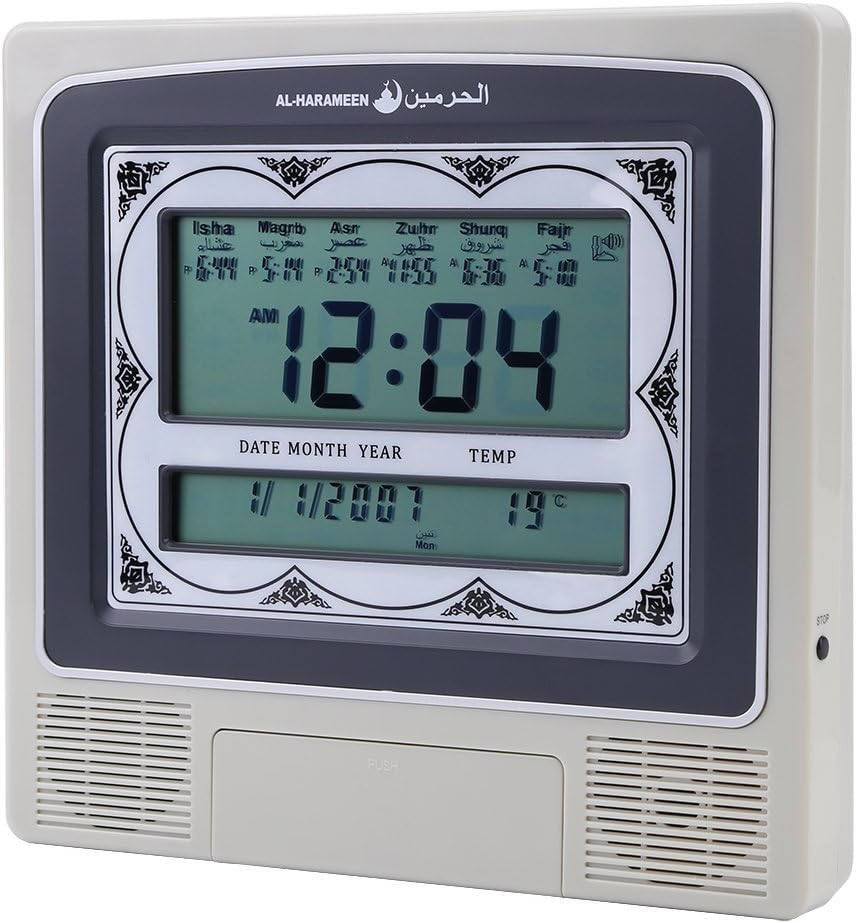
5-сүрөт: Active Display. This image shows the clock's screen displaying the current time (e.g., 12:04 AM), date (e.g., 1/1/2007), temperature (e.g., 19°C), and the calculated prayer times for Isha, Maghrib, Asr, Zuhr, Shuruq, and Fajr.
Орнотуулар
Use the navigation buttons (e.g., UP, DOWN, SET, MODE) to access and modify various settings:
- Ойготкуч орнотуулары: Set daily alarms for non-prayer purposes.
- Жайкы убакыт (DST): Manually enable or disable DST if your region observes it.
- Кыбыла багыты: Some models may offer a Qibla direction feature. Consult the on-screen prompts.
Prayer Time Features
The clock automatically calculates and displays prayer times based on your configured city and calculation method. At each prayer time, the clock will sound the Azan to alert you.
- Автоматтык Азан: The full Azan will play at the exact prayer times.
- Daily Update: Prayer times are automatically updated daily based on the set location and calculation method.
Техникалык тейлөө
- Тазалоо: Use a soft, dry cloth to clean the clock's surface. Do not use abrasive cleaners or solvents, as they may damage the finish or screen.
- Батареяны алмаштыруу: If the display dims or the clock functions become erratic, it may be time to replace the batteries. Follow the battery installation steps in the "Setup Guide" section. Dispose of old batteries responsibly.
- Сактагыч: If storing the clock for an extended period, remove the batteries to prevent leakage and potential damage.
Проблемаларды чечүү
| Көйгөй | Мүмкүн себеп | Чечим |
|---|---|---|
| Саат күйбөйт. | No power, dead batteries, or incorrect power adapter. | Check battery installation and polarity. Ensure power adapter is correctly connected and functional. |
| Incorrect prayer times. | Wrong city/location set, incorrect calculation method, or incorrect date/time. | Verify the set city, calculation method, and current date/time in the settings menu. |
| Azan sound is too low or absent. | Volume set too low, or Azan feature disabled. | Adjust the Azan volume in the settings. Ensure the Azan alert feature is enabled. |
| Дисплей күңүрт же бүлбүлдөп турат. | Батареянын кубаттуулугу төмөн. | Батареяларды алмаштырыңыз. |
Техникалык шарттар
| Бренд | Walfront |
| Модел | HA-4012 |
| Материал | Пластик |
| Продукт Салмагы | 572 г |
| Power Input | DC 6V 300mA (Adapter not included) |
| Өлчөмдөрү (болжол менен) | 22.5 см (W) x 21.5 см (H) x 3 см (D) |
Кепилдик жана колдоо
Walfront products are manufactured to high-quality standards. For information regarding warranty coverage, please refer to the warranty card included with your purchase or visit the official Walfront website. For technical support or assistance with your HA-4012 clock, please contact Walfront customer service through their official channels.
Эскертүү: Кепилдиктин конкреттүү шарттары жана колдоо кызматынын байланыш маалыматтары аймакка жараша өзгөрүшү мүмкүн.