
Кран EE-5622
Crane EE-5622 Digital LED Display Tower Fan User Manual
Модель: EE-5622
Introduction
This manual provides detailed instructions for the safe and efficient use of your Crane EE-5622 Digital LED Display Tower Fan. Please read all instructions carefully before operation and retain this manual for future reference.

Image: Crane EE-5622 Tower Fan with its packaging, highlighting key features like digital LED display, 12-hour timer, 70-degree oscillation, and 3 adjustable speed settings.
Маанилүү коопсуздук нускамалары
- Always place the fan on a firm, level surface.
- Желдеткичти шнур же сайгыч бузулган менен иштетпеңиз.
- Вентиляторду суудан же башка суюктуктардан алыс кармаңыз.
- Ensure the fan is unplugged before cleaning or maintenance.
- Манжаларды же бөтөн нерселерди эч кандай тешиктерге киргизбеңиз.
- Бул желдеткич имараттын ичинде колдонуу үчүн гана.
- Желдеткич колдонулуп жатканда балдарды көзөмөлдөңүз.
Пакеттин мазмуну
Пакетте бардык буюмдар бар экенин текшериңиз:
- 1 x Crane EE-5622 Tower Fan
- 1 x Wireless Remote Control (batteries included)
- 1 х Колдонуучунун колдонмосу (бул документ)
Жайгашуу
- Пакеттен чыгаруу: Желдеткичти жана бардык аксессуарларды таңгактан кылдаттык менен чыгарып алыңыз.
- Жайгашкан жери: Place the fan on a stable, flat surface, ensuring there is adequate space around it for air circulation. Avoid placing it near curtains or objects that could obstruct airflow.
- Кубат туташуу: Электр шнурын стандарттуу электр розеткасына сайыңыз.

Сүрөт: Толук view of the Crane EE-5622 Tower Fan, showing its base and power cord connection point.
Иштөө нускамалары
The Crane EE-5622 Tower Fan can be operated using the control panel on top of the unit or the wireless remote control.
Башкаруу панели
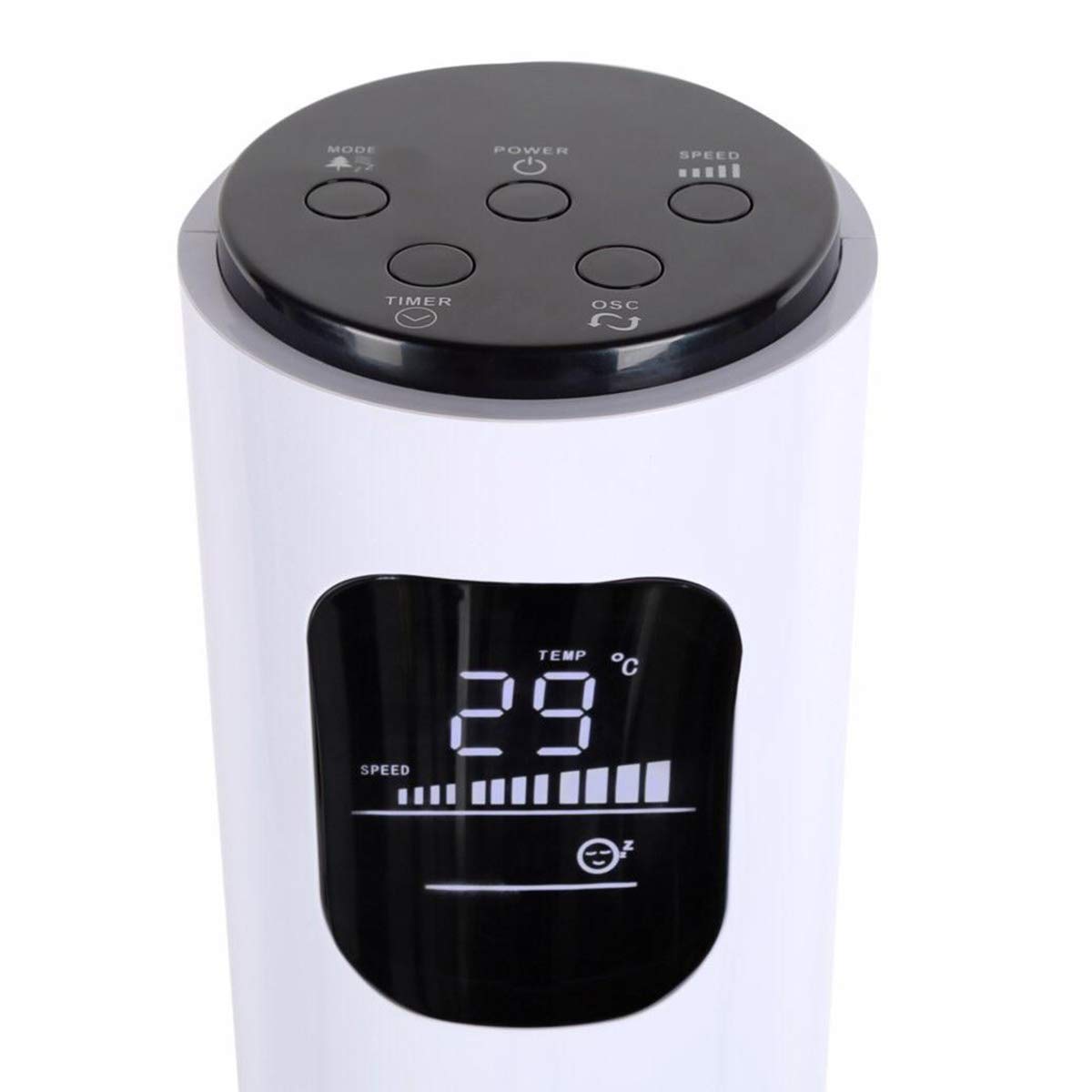
Image: Close-up of the fan's top control panel and digital LED display, showing buttons for Power, Speed, Oscillation, Timer, and Mode.
- Кубат баскычы (⏻): Желдеткичти КҮЙГҮЗҮҮ же ӨЧҮРҮҮ үчүн басыңыз.
- Ылдамдык баскычы (█████): Press to cycle through 3 speed settings (Low, Medium, High). The current speed is indicated on the LED display.
- Термелүү баскычы (↻): 70° термелүү функциясын иштетүү же өчүрүү үчүн басыңыз.
- Таймер баскычы (⏱): Press to set the auto-off timer from 1 to 12 hours. Each press increases the timer by one hour.
- Режим баскычы (☼): Press to cycle through different operating modes:
- Кадимки режим: Тандалган ылдамдыкта туруктуу аба агымы.
- Табигый жел режими: Вентилятордун ылдамдыгын өзгөртүү менен табигый шамалды симуляциялайт.
- Уйку режими: Gradually reduces fan speed over time for quiet operation during sleep.
Зымсыз алыстан башкаруу
The remote control provides convenient operation from a distance. Ensure the remote is pointed towards the fan's receiver.
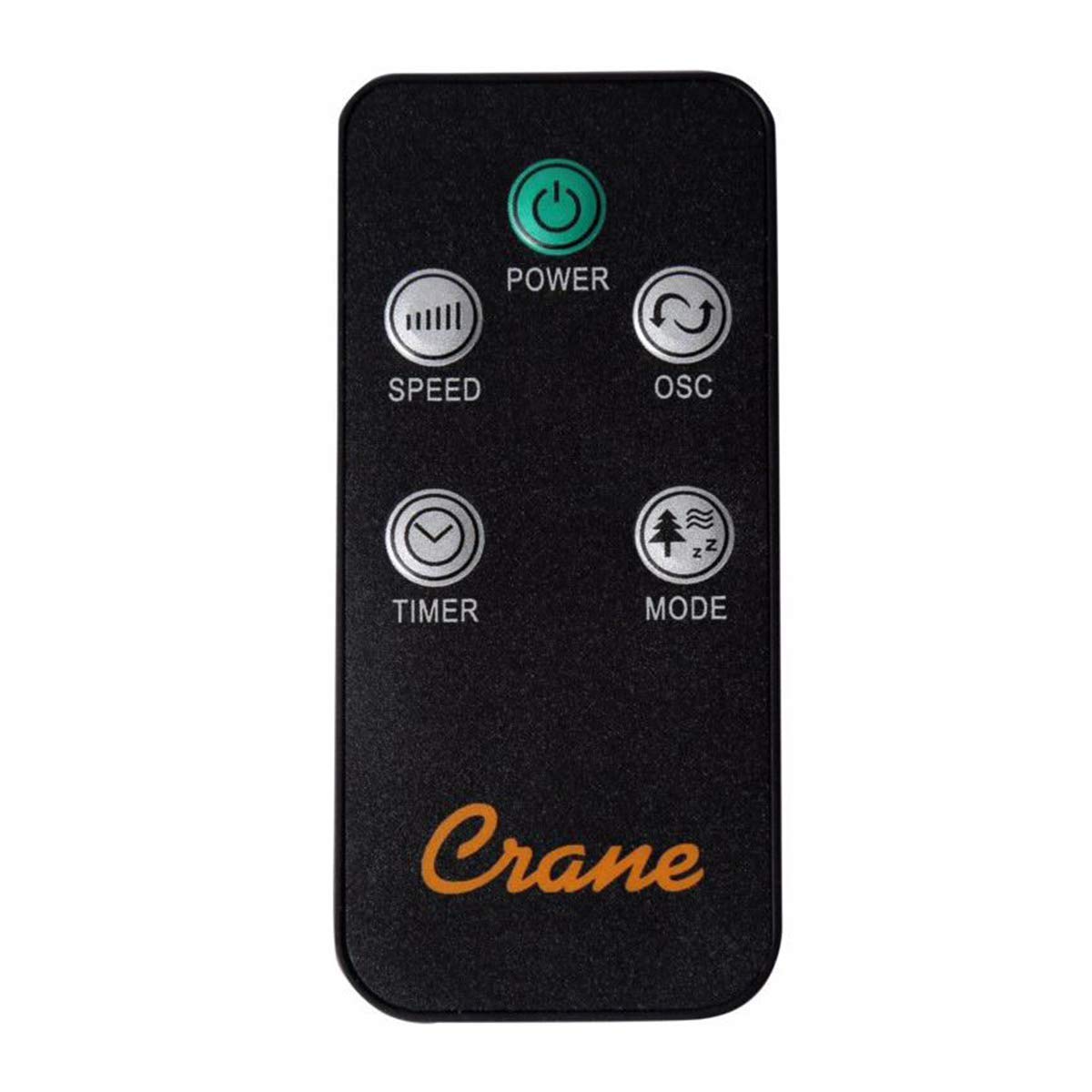
Image: The wireless remote control for the Crane EE-5622 Tower Fan, showing buttons for Power, Speed, Oscillation, Timer, and Mode.
The remote control features the same buttons as the control panel for Power, Speed, Oscillation, Timer, and Mode. It requires batteries (included).

Сүрөт: Жогорку view of the Crane EE-5622 Tower Fan, illustrating the integrated slot for storing the remote control.
Техникалык тейлөө
Үзгүлтүксүз техникалык тейлөө желдеткичиңиздин оптималдуу иштешин жана узак мөөнөттүү иштешин камсыз кылат.
- Тазалоо: Тазалоодон мурун желдеткичти ар дайым сууруп алыңыз. Жумшак,amp cloth to wipe the exterior surfaces. Do not use abrasive cleaners or allow water to drip into the fan's interior.
- Чаңды тазалоо: Аба кирүүчү жана чыгаруучу торчолордон чаңды кетирүү үчүн щетка тиркемеси бар чаң соргучту же кысылган абаны колдонуңуз.
- Сактагыч: If storing the fan for an extended period, clean it thoroughly, place it back in its original packaging, and store it in a cool, dry place.
Проблемаларды чечүү
| Көйгөй | Мүмкүн себеп | Чечим |
|---|---|---|
| Желдеткич күйбөйт. | Электр энергиясы жок; Электр шнурунун розеткасына сайылган эмес; Кубат баскычы басылган жок. | электр розеткасын текшерүү; Электр шнурунун бекем сайылганын текшериңиз; Кубат баскычын басыңыз. |
| Алсыз аба агымы. | Fan speed set too low; Air intake/exhaust blocked; Dust accumulation. | Increase fan speed; Clear any obstructions; Clean the fan grilles. |
| Желдетүүчү ызы-чуу. | Fan not on a level surface; Foreign object inside; Dust accumulation. | Place fan on a flat, stable surface; Unplug and check for obstructions; Clean the fan. |
| Пульт иштебей жатат. | Batteries depleted; Obstruction between remote and fan; Remote not pointed correctly. | Replace remote control batteries; Remove obstructions; Point remote directly at the fan's receiver. |
Техникалык шарттар
| Бренд | Кран |
| Модель номери | EE-5622 |
| Power Source | AC Powered (Remote Control: Battery Powered) |
| Ватtage | 45 Ватт |
| Ылдамдыктын саны | 3 |
| Термелүү бурч | 70° |
| Таймер | 1ден 12 саатка чейин |
| Бийиктик | Болжол менен 115 см (44 дюйм) |
| Элемент Салмагы | 5.1 фунт |
| Башкаруу ыкмасы | Алыстан башкаруу пульту, түзмөктүн баскычтары |
| Өзгөчөлүктөр | Digital LED Display, Room Temperature Display, Natural Breeze Mode, Sleep Mode, Auto Shut-off |
| Материал | Acrylonitrile Butadiene Styrene (ABS), Plastic Blades |
| Ички/тышкы колдонуу | Ичинде гана колдонуу |
Кепилдик жана колдоо
For warranty information or technical support, please refer to the warranty card included with your product or contact Crane customer service directly. Contact details are typically available on the manufacturer's official webсайт же продукт таңгак.
Эскертүү: Кардарлардын кайрылуусуviews indicate potential challenges with service support. It is recommended to retain your purchase receipt for warranty claims.
Ask a question about this manual
Ask about setup, troubleshooting, compatibility, parts, safety, or missing instructions. Manuals+ will review the question and use this page’s manual context to help answer it.