
1. Киришүү
The AC Infinity AIRTAP T4 is a register booster fan designed to enhance and improve existing airflow from HVAC register holes in your home. It features smart programming with 10-level speeds, heating and cooling triggers, timers, and cycles. This manual provides essential information for the safe and efficient operation of your AIRTAP T4.
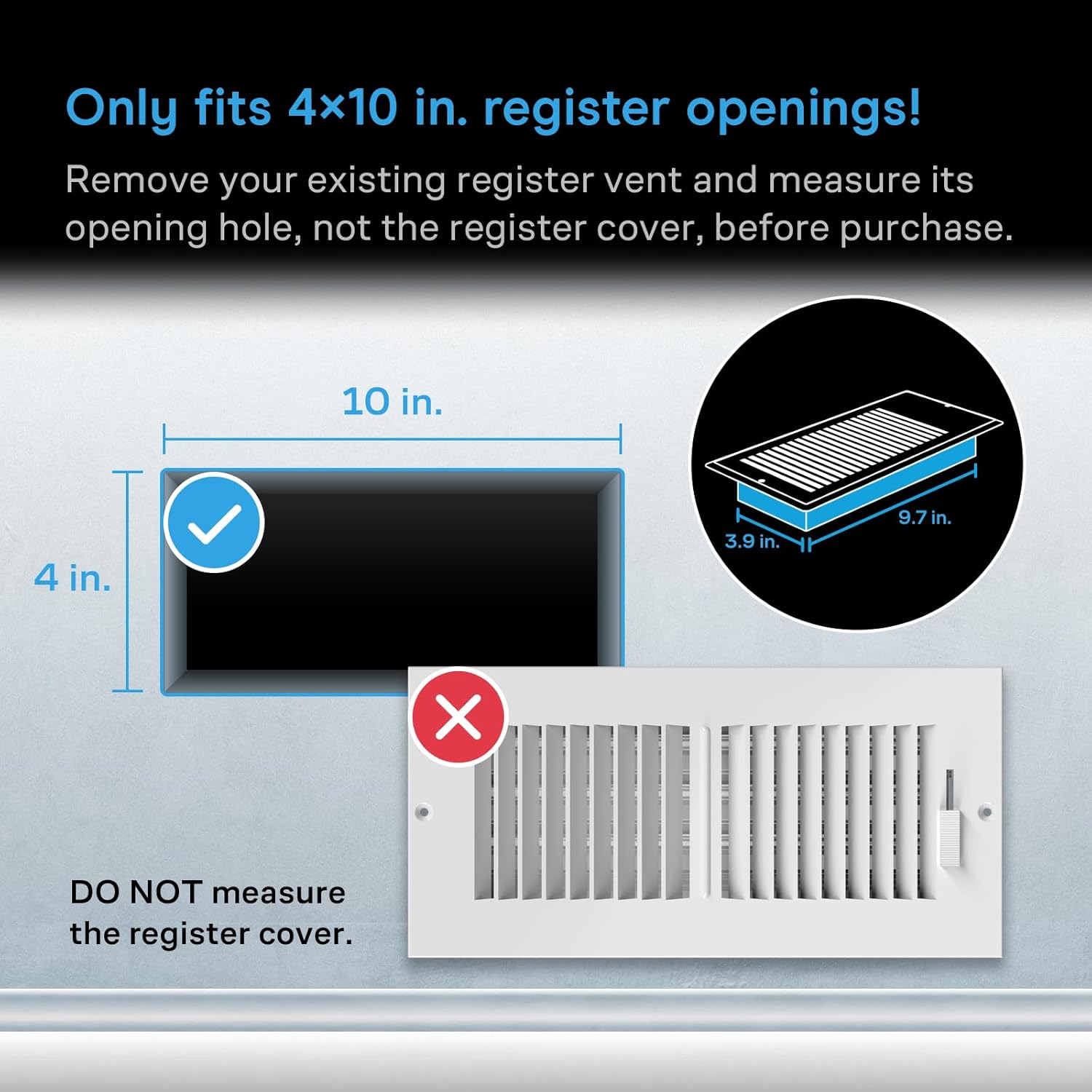
Figure 1: AC Infinity AIRTAP T4 Register Booster Fan (Bronze)
2. Коопсуздук маалыматы
Please read this manual thoroughly before installation and operation. Failure to follow these instructions may result in electric shock, fire, or serious injury.
- электр менен жабдууну камсыз кылуу voltage күйөрмандын талаптарына жооп берет.
- Желдеткичти шнур же сайгыч бузулган менен иштетпеңиз.
- Иштеп жаткан учурда манжаларды жана бөтөн объекттерди желдеткичтин пляждарынан алыс кармаңыз.
- Желдеткичти сууга батырбаңыз же ашыкча нымдуулукка дуушар кылбаңыз.
- Тазалоодон же тейлөөдөн мурун желдеткичти розеткадан сууруп алыңыз.
- Бул продукт ички колдонуу үчүн гана арналган.
3. Орнотуу
3.1 Measure Before Purchase
It is crucial to measure your existing duct opening before purchasing and installing the AIRTAP T4. This model is designed to fit 4 x 10 inch duct openings only. Remove your existing register vent and measure its opening hole, not the register cover.

Figure 2: Ensure your duct opening measures 4 x 10 inches.
3.2 Орнотуу
- Remove your existing floor or wall register.
- Carefully place the AC Infinity AIRTAP T4 into the duct opening. Ensure it sits flush with the floor or wall surface.
- Connect the power adapter to the fan and then plug it into a standard electrical outlet.

Figure 3: AIRTAP T4 installed in a floor vent, ready for operation.
4. Операция
The AIRTAP T4 offers versatile control options including an on-device display, a remote controller, and a Bluetooth app.
4.1 Intelligent Programming
Utilize the smart programming features to optimize your home's heating and cooling. The system includes 10-level speeds, heating and cooling triggers, timers, and cycles.
- Temperature Controlled Airflow: Set desired temperature thresholds for automatic fan activation.
- 10-Level Speeds: Adjust fan speed from 1 to 10 to control airflow intensity.
- Timers and Cycles: Program the fan to operate during specific periods or in repeating cycles.

Figure 4: On-device display and remote controller for intelligent programming.
4.2 Bluetooth колдонмосун башкаруу
Download the AC Infinity app to unlock advanced programs, monitor climate data, set alarms, receive notifications, and remotely control your register fan via Bluetooth.
- Өркүндөтүлгөн программалар: Access additional customization options for fan operation.
- Climate Data: View real-time and historical temperature data.
- Эскертмелер: Receive alerts for temperature changes or operational status.

Figure 5: Control your AIRTAP T4 and monitor data using the AC Infinity mobile app.
4.3 Тынч иштөө
The AIRTAP T4 features dual-ball bearing fans with a PWM motor, engineered to minimize noise while delivering high airflow. This ensures quiet operation even at higher speeds.

Figure 6: Dual-ball bearing fans designed for ultra-quiet performance.
5. Техникалык тейлөө
Regular maintenance ensures optimal performance and longevity of your AIRTAP T4.
- Тазалоо: Periodically wipe the surface of the fan with a soft, dry cloth. For deeper cleaning, unplug the unit and gently clean the fan blades with a soft brush or compressed air.
- Текшерүү: Regularly check the power cord and plug for any signs of damage. Do not use the unit if any damage is found.
6. Кыйынчылыктарды
| Көйгөй | Мүмкүн себеп | Чечим |
|---|---|---|
| Желдеткич күйбөй жатат | No power; Incorrect settings | Check power connection; Verify temperature triggers and fan speed settings. |
| Төмөн аба агымы | Fan speed too low; Obstruction | Increase fan speed; Clear any obstructions from the vent or fan blades. |
| Желдетүүчү ызы-чуу | Obstruction; Loose installation | Check for and remove any obstructions; Ensure the fan is securely seated in the vent. |
| Колдонмо туташпай жатат | Bluetooth off; App issue | Ensure Bluetooth is enabled on your device; Restart the app or reinstall if necessary. |
7. Техникалык шарттар
| Өзгөчөлүк | Деталь |
|---|---|
| Модель аты | AC-RBF4-B |
| Бренд | AC Infinity |
| Түс | Бронза |
| Duct Opening Size | 4 x 10 дюйм |
| Арткы Casinг өлчөмдөрү | 3.93 x 9.76 дюйм |
| Продукциянын өлчөмдөрү (D x W x Y) | 1.96"D x 11.54"W x 5.51"H |
| Мотор | Dual 92 mm Fans |
| Аба агымы | 130 CFM |
| Ызы-чуу деңгээли | 17 dBA (as per feature bullets) / 18 Decibels (as per specifications) |
| Ылдамдыктын саны | 10 |
| Power Source | Электр зымдары |
| Ватtage | 6 ватт |
| Тtage | 12 вольт |
| Башкаруу ыкмасы | App, Button Control, Remote Control |
| Материал | Алюминий, Пластик |
| Элемент Салмагы | 0.01 унция |
| UPC | 819137020238 |
8. Кепилдик жана колдоо
AC Infinity products are designed with quality and durability in mind. For specific warranty details and to register your product, please visit the official AC Infinity website. For technical support, troubleshooting assistance, or any inquiries, please contact AC Infinity customer service through their webсайт же продукт таңгагында көрсөтүлгөн байланыш маалыматы.
You can visit the AC Infinity Store for more information: AC Infinity дүкөнү